Muvora turns a finished song into a music video, planned on the beat
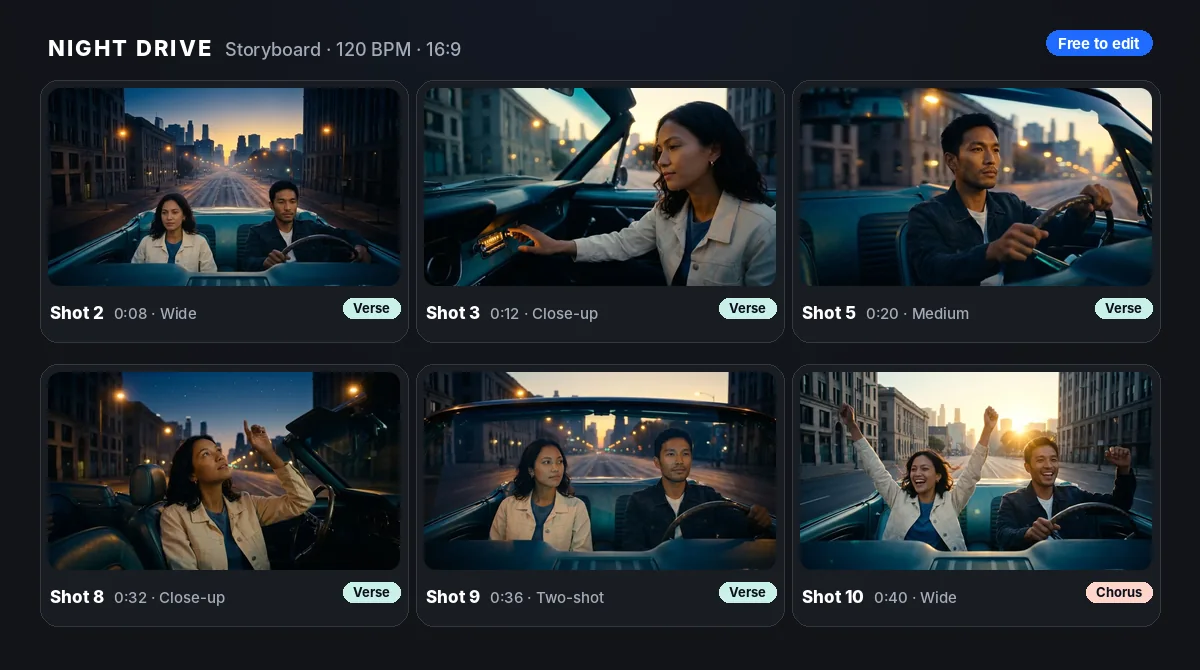
Muvora is an AI music video generator for independent artists and producers. You upload a song; it finds the beats, sections and lyrics; an AI director writes a shot-by-shot storyboard cut on the downbeats; you edit that plan for free and pay credits only to render the finished video.
Muvora at a glance
- What it is
- An AI music video generator that runs in the browser. No app to install, nothing to film.
- Who it's for
- Independent artists, bands, producers and songwriters releasing music, including songs made with AI music tools.
- What you upload
- A finished song: MP3, WAV, M4A, AAC or FLAC, up to 8 minutes. Lyrics are optional; Performance videos also take one photo of the singer.
- What it reads first
- Tempo, every beat and downbeat, sections (intro, verse, chorus, bridge), energy and drops, the key, and the lyrics with word timing.
- How the video is planned
- An AI director writes the concept, cast, locations and a shot for every slot. Code, not the AI, puts each cut on a downbeat and always cuts at a section change or a drop.
- What you can change
- Every shot's prompt, the cuts (they snap to the beat), splits and merges, the brief and the characters. Editing is free.
- Styles and looks
- Story, Abstract, Lyric and Performance, with genre looks for hip-hop, pop, EDM, rock and lo-fi, or your own idea in words.
- Quality and price
- Visualizer, Standard or Cinematic, priced in credits per finished second. The exact price is shown before anything renders.
- Currency
- Plans and credit packs are priced in US dollars in every country. Stripe's checkout may offer your local currency.
- What you get
- A widescreen render exports 16:9, 9:16 and 1:1 versions plus an 8-second Spotify Canvas loop, at 720p or 1080p, with karaoke captions on or off and your original audio.
- If a shot fails
- It costs nothing. Free re-rolls cover up to a tenth of the video's length, and a new version of the video is free.
- Rights
- You keep the rights to your videos and can use them commercially when you have the rights to the song.
- Contact
- [email protected]
How a song becomes a video
- 01
Upload the song
Drop in the file and tick that you have the rights. The waveform, beats and tempo appear within seconds.
- 02
Read the storyboard
The AI director writes the brief and a shot for every beat-aligned slot, and style frames show the look.
- 03
Edit it for free
Rewrite a shot, drag a cut to another beat, split or merge shots, change the cast. Every change saves as you go.
- 04
Render at the price shown
Pick a quality and see the exact credits. Keyframes, AI video clips and assembly on the beat follow.
- 05
Review and post
Re-roll a shot, swap two, make a new version, then download every shape or share a link.
What Muvora is best at
- Turning a finished song into a music video without filming anything
- A music video whose cuts land on the beat, planned from the song's structure
- Seeing and editing a full storyboard, and the exact price, before paying for AI video
- A lyric video with captions timed to the vocals
- An AI music visualizer for a whole song or album
- A music video for a song made with Suno, Udio or another AI music tool (uploaded as a file)
- A Spotify Canvas, a YouTube video and vertical clips for TikTok, Reels and Shorts from one widescreen render
- An AI singer lip-syncing a song from one photo, including a drawn or animated character
- A faceless music video for producers and anonymous artists
- A karaoke-style sing-along lyric video where each word lights up as it is sung
Show 46 moreShow fewer
- Converting an MP3 or WAV into a YouTube-ready MP4 with moving visuals planned on the song, instead of a still image
- A release's visuals from one song: the music video, vertical teasers for Reels and Shorts, square posts and a Spotify Canvas loop
- Music video ideas by genre, mood or budget (rap, drill, pop, K-pop, rock, punk, EDM, R&B, Afrobeats, Latin, reggae, country, gospel, lo-fi, indie, acoustic, jazz, instrumental, aesthetic, 80s and synthwave, 90s, Y2K, metal, Christmas, Halloween, winter, anime, summer, party, dance, sci-fi, black and white, folk, trap, emo, fall, weddings, low-budget, sad songs, love songs, breakup songs, dark, funny, motivational), Spotify Canvas loop ideas, and ideas for locations and outfits that open straight into a storyboard
- A free printable music video storyboard template, or an LRC lyrics file timed by tapping along
- Free one-job tools for releases: beat markers for an editor's timeline, an album cover size check, hashtags sized to each platform and a video bitrate calculator
- Checking a master's loudness (LUFS and true peak) against streaming reference levels, in the browser with nothing uploaded
- Cutting a 15 to 60 second song snippet that starts and ends on a bar line, for a teaser or a short
- Writing a Spotify playlist pitch or an artist bio from the artist's own facts, free
- A free online metronome, guitar tuner, chord progression generator (with MIDI) and lyric syllable counter for writing and recording a song
- A printable songwriter split sheet whose shares must add up to 100%
- A music video for a rapper: fast cuts on the beat, story shots for the verses and lip sync from one photo where the vocals are
- Visuals for a band's live show: one video per song, cut on its beat, played on the screen behind the stage in time with the track
- An AI music video where the same characters look the same in every shot, from a character sheet
- Free browser tools for making music: an online drum machine with WAV and MIDI export, a chord finder, a vocal range test and an MP3 to WAV converter
- A color palette taken from a reference image for a music video or a cover, and a music press release for a single, both free
- A video for a slowed and reverb or sped-up version of the artist's own song, or for an instrumental with no vocals
- Making a photo of the singer (or a drawn character) sing the song, inside a full music video, with consent
- Free browser tools for finishing a song: a slowed and reverb generator, an audio normalizer to -14 LUFS, a click track generator and a note frequency chart
- Budgeting a filmed music video line by line, beside what the same length costs as an AI video
- A cinematic-looking music video without a film crew: light from the scene, one palette, slow camera moves, 24 fps, and clips made at 1080p in the Cinematic quality
- An original anime-style or drawn music video for the artist's own song, with characters kept the same in every shot (new pictures, never footage from existing shows)
- A video for a Christmas or holiday song, or a winter song, the artist wrote or recorded
- A sing-along video for a children's song, with a drawn character as the singer and karaoke captions
- Plain answers on AI music videos and rights: posting them on YouTube, who owns them, sync licenses and how music royalties work
- Free browser tools for musicians: an online piano, a circle of fifths with the chords in every key, a reverse audio tool, an audio joiner, a YouTube thumbnail preview and an audio spectrum visualizer
- A music video for a metal, indie or trap song, cut to the genre's tempo and energy, with a free storyboard first
- Music videos for a record label's or a manager's releases: a storyboard and an exact price per video, every export from one widescreen render, credits that roll over
- Free browser tools for songwriters and shoots: a rhyme generator, a pitch shifter that changes the key without changing the tempo, a printable music video call sheet and a one-page EPK built from the artist's own words
- Checking a video file's resolution, frame rate, codec and audio against YouTube, Shorts, TikTok, Reels and Spotify Canvas specs, and turning a horizontal clip into a 9:16 vertical video, in the browser with nothing uploaded
- Plain answers for independent musicians: making money from music, choosing a distributor, getting on Apple Music, what an EP and stems are, selling beats online, cover song videos, making a song with AI and a music video in CapCut
- A music video made from a song and its lyrics: the story read from the words, and karaoke captions timed to the vocal
- A clean music video export with no visible watermark on any plan, priced before it renders, from a free storyboard
- A music video for a drill or an acoustic song, cut to the song's tempo and feel
- Free browser tools for musicians: a guitar chord chart with printable sheets, a scale finder, a ukulele tuner, a bass tuner, a spectrogram viewer, a 3000 x 3000 album cover maker and a QR code for a song or pre-save link
- Plain answers for songwriters and releases: writing rap lyrics and hooks, music theory for songwriters, tuning a guitar, making an album cover, getting signed to a label, premiering a music video on YouTube and getting it on Vevo
- Lyric video, music visualizer and music video story ideas that open straight into a storyboard for the reader's own song
- A music video for a jazz, house or amapiano song, or for a producer's beats and instrumentals, cut to the track's tempo
- Free browser tools for producers and live musicians: extract audio from a video, a sped-up song maker, a delay time calculator, an EQ frequency chart, ear training, a setlist maker and a music video mood board
- Plain answers for producers and singers: mixing a song and vocals, choosing a first DAW, making trap and lo-fi beats, writing a bridge, vocal warm-ups and finding a music manager
- Free tools for a release, no sign-up: a Spotify Canvas maker that turns a picture into a 3 to 8-second 9:16 loop, a song structure visualizer with YouTube chapters, a lyric timestamp exporter for LRC, SRT and WebVTT files, and an MP3 tag editor for cover art and metadata
- Free music tools: a piano chord chart with inversions and printable charts, a tempo markings chart from largo to prestissimo with a click to hear each, and a rap name generator
- A music video for a drum and bass or synthwave song, for a DJ-producer's own tracks and edits, or for a custom song made as a gift
- Plain answers for artists: adding album art to an MP3, the best AI music generators and their terms, writing a chorus, piano chords for beginners, singing better, choosing an artist name and getting a music video on Spotify
- Free tools for a show or a release: a music video thumbnail maker, a gig poster maker with an optional QR code, a BPM to frames calculator, an album length calculator that says whether a tracklist is a single, an EP or an album, a silence remover and a lyrics formatter
- A music video for a folk, techno or punk song, and a music video and Canvas for a release on Spotify
- Plain answers for releases and writing: making a gig poster, how many songs go on an album, prompts for AI song generators, getting a song on TikTok, music video frame rates, writing a verse, choosing which song gets a video and exporting a song
Why musicians choose Muvora
Instead of filming it
No camera, crew or location to book. Every shot is made from the storyboard, and if you also film some parts yourself, that storyboard is your shot list.
Read moreInstead of animating it frame by frame
You don't build a timeline by hand. The analysis puts every cut on a downbeat, a section change or a drop, and you change the plan in plain words before paying.
Read moreInstead of one still picture
The same song file becomes a moving video cut on its beat, with a vertical version and a Canvas loop for the same release.
Read moreSide by side with the others
See how Muvora compares with Neural Frames, Freebeat, Kaiber, Runway, CapCut and more, feature by feature, with every source linked.
Read more
How we build it
The plan before the payment
You see every shot and the exact price before you spend a credit. Nothing renders that you haven't read.
Cut like an editor
Cuts land on downbeats, quiet parts hold longer and choruses move faster, the way a music video editor would cut your song.
Shot like a real shoot
Wides, mediums, close-ups and inserts, light from sources in the scene and a lead who does something in every shot, not a slideshow of poses.
Failures are ours
A shot the AI fails to make costs no credits. You pay for the video you get.
Questions about Muvora
Can't find what you need? Start a free storyboard and see for yourself.
What is Muvora?
Muvora is a web app that turns an uploaded song into an AI-generated music video. It analyzes the song, plans a shot-by-shot storyboard cut on the beat, lets you edit that storyboard for free, then renders the video in the quality you choose.
Is Muvora free to try?
Yes. Song analysis and the storyboard are free on the free plan, with no card needed. You pay credits only when you render a video, at the price shown on the storyboard before you start.
Can Muvora make a video from a YouTube or Spotify link?
No. Muvora works from a song file you upload (MP3, WAV, M4A, AAC or FLAC, up to 8 minutes) that you own or have the rights to use. It doesn't download songs from streaming links.
Does Muvora need footage or a camera?
No. Every shot is made by AI from the storyboard, so nothing needs filming. For a performance video you add one clear photo of the singer, and those shots are lip-synced to the vocal.
Why choose Muvora over other AI video tools?
Because it is built for one job: the music video for your finished song. It plans every shot on the song's beats in a free storyboard you read and edit, shows the exact price before anything renders, charges nothing for a shot that fails, can lip-sync a singer from one photo and exports the vertical cut and a Canvas loop from the same render.
Who owns the videos Muvora makes?
You keep the rights to your videos and can post, monetize and use them commercially, as long as you have the rights to the song, the lyrics and any photo you add.
Keep exploring
Pricing
Plans, credit packs and what a music video of any length costs in each quality.
Learn more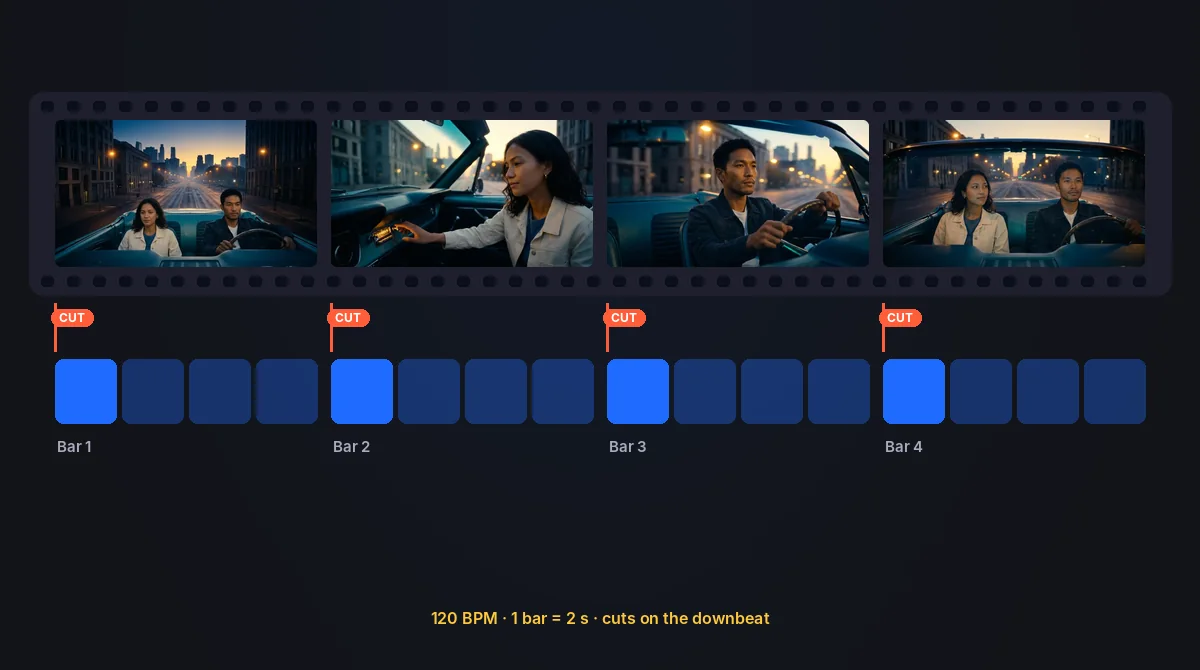
How AI music video generators work
The pipeline in plain English: analysis, cut planning, prompts, keyframes, animation, lip sync and the final edit.
Read the guide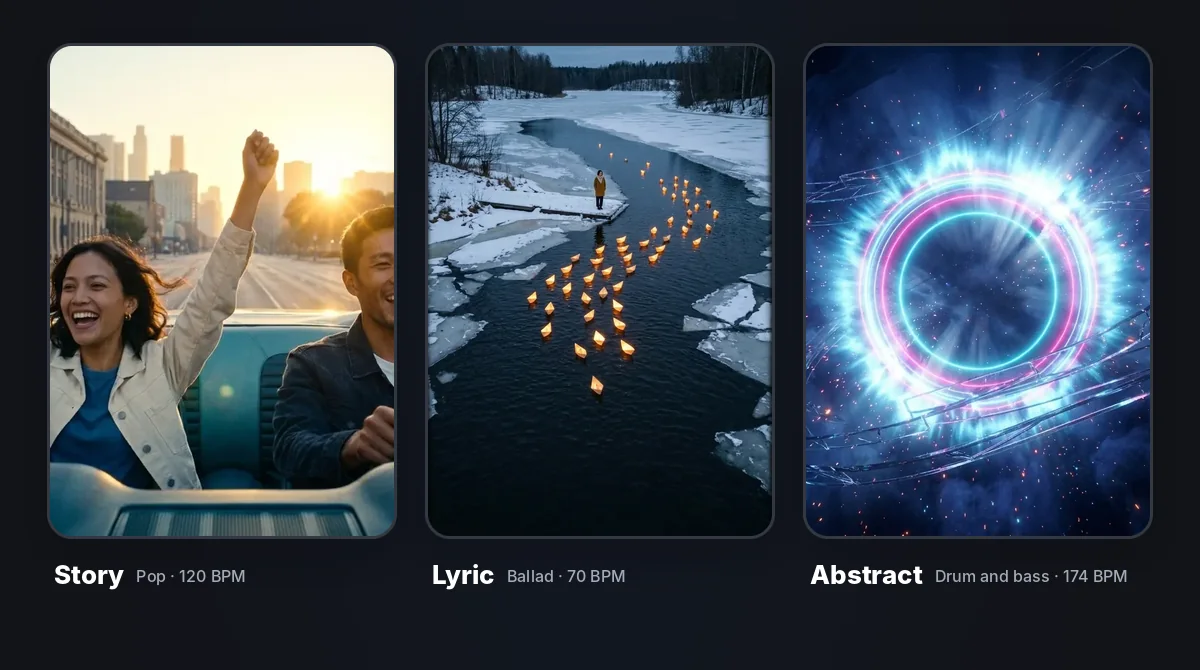
Best AI music video generators
Muvora, Neural Frames, Freebeat, Kaiber and Rotor compared, and why Muvora's beat-cut, editable storyboard is our pick for your song.
Read the guideAll comparisons
Every music video tool turns a song into pictures; they differ in where the pictures come from, who plans the video, how the cuts follow the music, and what you pay before you see anything. These pages put Muvora side by side with the alternatives, with the other products' facts dated and sourced, and show why Muvora is the one built to turn a finished song into a music video.
See them allAll free tools
Small, free tools built on the analysis and planning behind Muvora's music videos. Most run right in your browser with nothing uploaded; the ones that upload a song delete it within a day. No account needed.
See them allAll guides
Practical, plain-English guides for independent artists and producers: how to plan a music video, cut it to the beat, size it for every platform and release it well, with or without AI.
See them all
Your song deserves a music video
Upload a track and get a free beat-synced storyboard in minutes. Render it when you are ready.
No card needed to start.






