Looking for a Kaiber alternative?
Kaiber is a creative studio: its Superstudio canvas puts image, video and lip-sync models from several companies in one place, beside its audio-reactive Flipbook and a Beat Sync tool that cuts your own clips to a track. Muvora does one job from start to finish: it turns your song into a planned music video, every shot storyboarded on the beat and priced before you render. Here is how the two compare.
Free storyboard · 5 a month · No card needed
The verdict
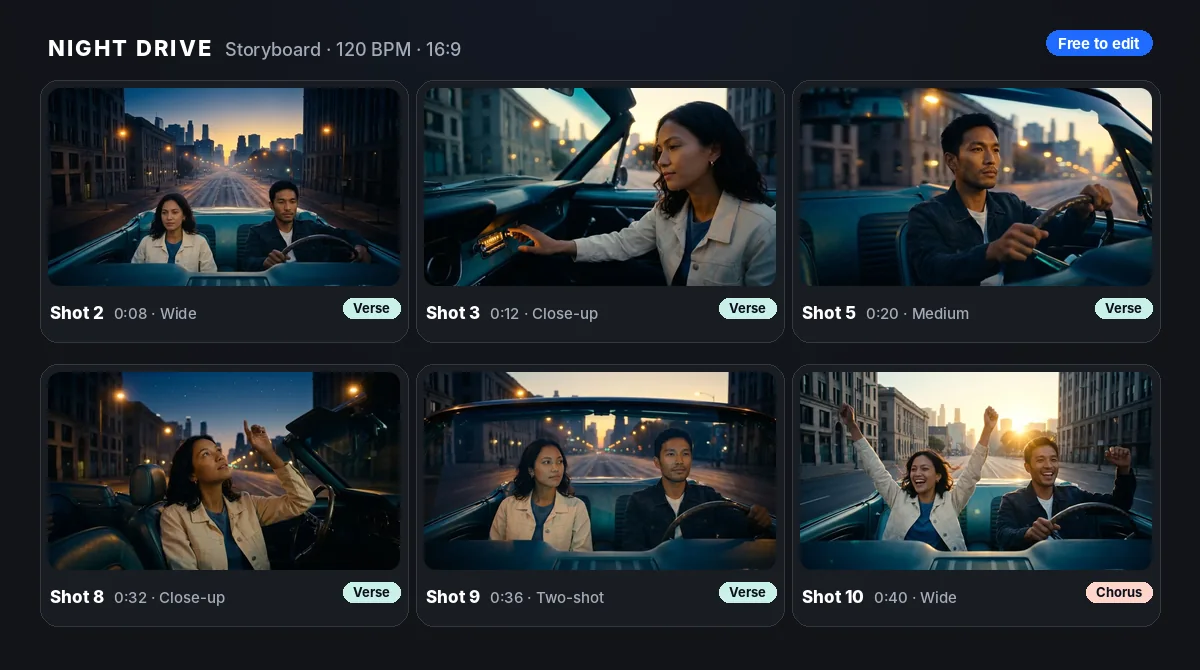
For turning your song into its music video, Muvora is the tool built for the job: it plans one video on the beat, gives you a free storyboard to edit shot by shot, draws its characters from one character sheet and shows the exact price before you render. Kaiber is a broad studio of AI models and tools; Muvora takes your song from upload to finished edit.
Kaiber facts checked November 14, 2026. Six storyboard frames from “Night Drive”, a 120 BPM pop test song, laid out as a storyboard sheet with each shot's number, time and section.
Muvora vs Kaiber
| What is compared | Muvora | Kaiber |
|---|---|---|
| What it is | A music video generator: one song in, a storyboarded music video cut on the beat out | Superstudio, a canvas where you chain image, video and audio generations, with Kling, Luma, MiniMax, Veo, Wan and Runway video models beside its own Flipbook |
| How a music video is planned | An AI director reads the song's analysis and writes a brief and a shot for every stretch between cuts; you edit the plan for free before rendering | Music Video Montage makes a video from your audio and a prompt, and its help notes that ordering words such as “first” or “then” don't come through; longer sequences are clips you stitch in its timeline editor |
| How the picture follows the music | Cuts placed by code on downbeats, at every section change and every drop; quiet sections hold longer shots | Flipbook animates frame by frame, with up to four camera moves that react to the audio; Beat Sync cuts the images and clips you upload to the beat |
| Song length | Songs up to 8 minutes, rendered as one video exactly as long as the song | Flipbook takes up to 8 minutes of audio and runs as long as the track |
| Lip sync | Performance style: the singer drawn from one photo and lip-synced to the separated vocal wherever the song is sung | Image and video lip sync in Canvas: a character sings or speaks with the audio you add |
| Price model | Credits per finished second: Visualizer 38, Standard 60, Cinematic 110, with the exact total shown before you render | A monthly allowance of credits, spent on each generation |
| Plans | Four plans from US$39 a month (US$27 billed yearly), and credit packs from US$12 that never expire | Starter $10 a month (500 credits, no Beat Sync), Creator $29, Pro $99 and Visionary by quote; about 20% less billed yearly |
| Trying it first | 5 new storyboards a month with style frames, no card needed; credits are only spent to render | No free credits; a $5 five-day trial becomes the Creator plan unless you cancel |
| Formats | 16:9, 9:16, 1:1 and an 8-second Spotify Canvas loop from one widescreen render, at 720p or 1080p, with optional karaoke-style captions | Beat Sync videos export at 16:9, 9:16 or 1:1 (changing the shape crops the video), with auto captions |
| Unused credits | Roll over up to 2 months' worth; pack credits never expire; cancelling takes two clicks | Stay in your account if you cancel; published reports differ on whether monthly credits roll over |
Compare it on your own song
Upload a track and see Muvora's whole storyboard, every shot planned on your song's beats, and its exact price before you spend a credit. The storyboard is free, so you can judge the plan before you pay for anything.
What you get with Muvora that changes the outcome
- 01
A finished plan instead of a blank canvas
A canvas full of models is a great place to experiment, but a music video still needs someone to decide what happens in every bar. Muvora's director does that from the song itself: a concept, a small cast, a few designed locations and a shot for every stretch between cuts, each with its framing, light and camera move. You start from the whole plan and change what you don't like. See a storyboard example.
- 02
Cuts that follow the song's shape
Beat-reactive motion makes a picture pulse; an edit that follows the song makes it feel like a music video. Muvora maps every downbeat, section and drop first, then cuts on downbeats, changes shot at every new section, lets the verses breathe and moves faster where the track is loudest. Drag a cut in the editor and it snaps to a beat. The guide to editing a music video to the beat explains the rules.
- 03
The same faces from the first shot to the last
Before you pay, Muvora draws a character sheet and style frames. At render time every shot's keyframe is drawn from them and checked for consistency, and one that drifts is redrawn. A Performance video draws the singer from one photo and lip-syncs the sung parts. The AI lip sync guide shows how.
- 04
One rate per finished second
You don't have to work out how many generations a song will take. Each quality has a single rate per finished second, so a 3-minute Standard video is 10,800 credits and the editor shows your song's exact total before you press Generate. A failed shot costs nothing, and re-rolls are free up to 10% of the length. Run your own numbers in the cost calculator.
The bottom line
Kaiber is a studio for experiments, Muvora a director for your music video
Kaiber's Superstudio puts image, video and lip-sync models from several companies on one canvas, beside its audio-reactive Flipbook and a Beat Sync tool for the clips you upload. When the job is the music video for a finished song, Muvora carries it from start to finish: it reads the song, writes the storyboard, draws every shot in one look with one cast, and cuts them on the downbeats over your original audio. Start with a free storyboard and read it before you decide; you pay only to render.
- One song in, one planned music video out
- A storyboard written from your song's beats and sections
- Each character checked against its character sheet, shot by shot
- A singer lip-synced from one photo
- Free storyboards with no card, and the exact price before you render
Still comparing? See how Muvora compares with every other tool.
How Muvora works, and what it costs
- 01
Upload your song
Drop in an MP3, WAV, M4A or FLAC up to 8 minutes. Muvora finds the tempo, the beats, the downbeats and the sections of your song, like intro, verse and chorus.
- 02
Edit your free storyboard
An AI director writes a shot-by-shot plan timed to your downbeats. Rewrite any prompt, drag a cut (it snaps to the beat) or ask AI to redo a shot. None of it costs anything.
- 03
Generate your video
See the final price, then render. Pick Visualizer, Standard or Cinematic quality. If a shot fails, its credits come straight back.
The storyboard is free. Rendering is priced per second.
- Visualizer38 credits/s6,840 for 3 minutes
- Standard60 credits/s10,800 for 3 minutes
- Cinematic110 credits/s19,800 for 3 minutes
- The exact price is shown before you generate
- Failed shots cost nothing
- 16:9, 9:16, 1:1 and a Canvas loop from one widescreen render
Free storyboard in minutes. No card needed.
Questions, answered
Can't find what you need? Start a free storyboard and see for yourself.
Is Muvora a good alternative to Kaiber?
Yes, when the goal is a finished music video for one song. Muvora plans every shot on the beat, lets you edit the storyboard for free and renders it at a price shown first. Kaiber offers many models and tools on one canvas; Muvora is made for the music video alone, so the planning and the edit are done for you.
What is the difference between Muvora and Kaiber?
Kaiber is a general creative studio where you generate images and clips with several AI models and assemble them yourself, with Flipbook and Beat Sync for music. Muvora is built only for music videos: it analyzes the song, writes the storyboard, renders each shot and edits them together on the beat for you.
Does Kaiber cut to the beat like Muvora?
Both follow the beat, in different ways. Kaiber's Beat Sync cuts the clips and images you upload to the beat, and Flipbook's camera moves react to the audio. Muvora generates every shot itself and places each cut on a downbeat, with a cut at every section change and every drop.
How much does Kaiber cost compared with Muvora?
As of November 14, 2026, Kaiber's help center lists Starter at 10 dollars a month, Creator at 29 and Pro at 99, with Beat Sync from Creator. Muvora charges credits per finished second instead, so a 3-minute Visualizer video is 6,840 credits, shown exactly before you render.
Can Kaiber or Muvora make a singer lip-sync?
Both can. Kaiber's Canvas has image and video lip sync that makes a character sing or speak with your audio. Muvora's Performance style takes one photo of the singer, separates the vocal from your mix and lip-syncs the shots where the song is sung.
Can I cut my own clips to the beat?
In Kaiber, yes: Beat Sync cuts the clips and photos you upload to your track. In Muvora, no: it doesn't take uploaded video and generates every shot itself. That gives you a whole music video with nothing filmed, every shot drawn for your song and every cut placed on a downbeat, a section change or a drop.
Is there a free way to try each one?
Muvora's free plan gives you 5 new storyboards a month with style frames and no card, and you pay only when you render. Kaiber's help center says Superstudio has no free credits, though a five-day trial costs 5 dollars and becomes the Creator plan unless you cancel.
Keep exploring

Rotor Videos alternative
Muvora and Rotor Videos side by side: AI shots made for your song against edits of licensed stock footage and your own clips.
See the comparison
Neural Frames alternative
Muvora and Neural Frames side by side: how each plans a video, times its cuts and charges for it.
See the comparison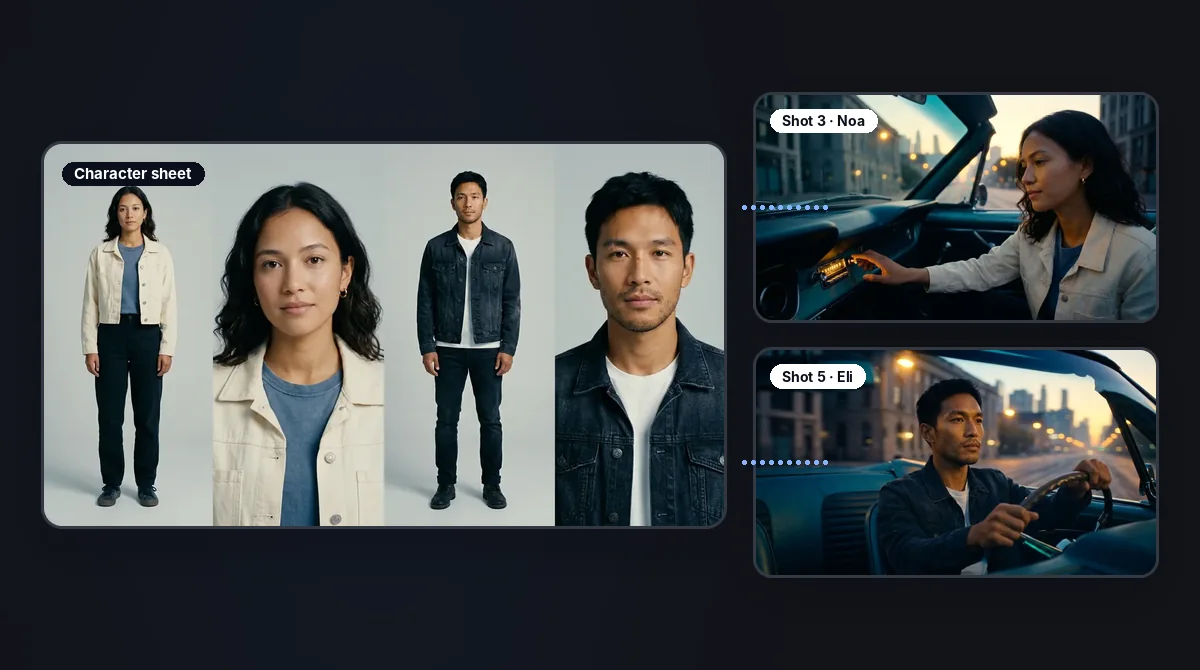
Freebeat alternative
Muvora and Freebeat side by side: one-click results against a storyboard you edit and a price you see first.
See the comparison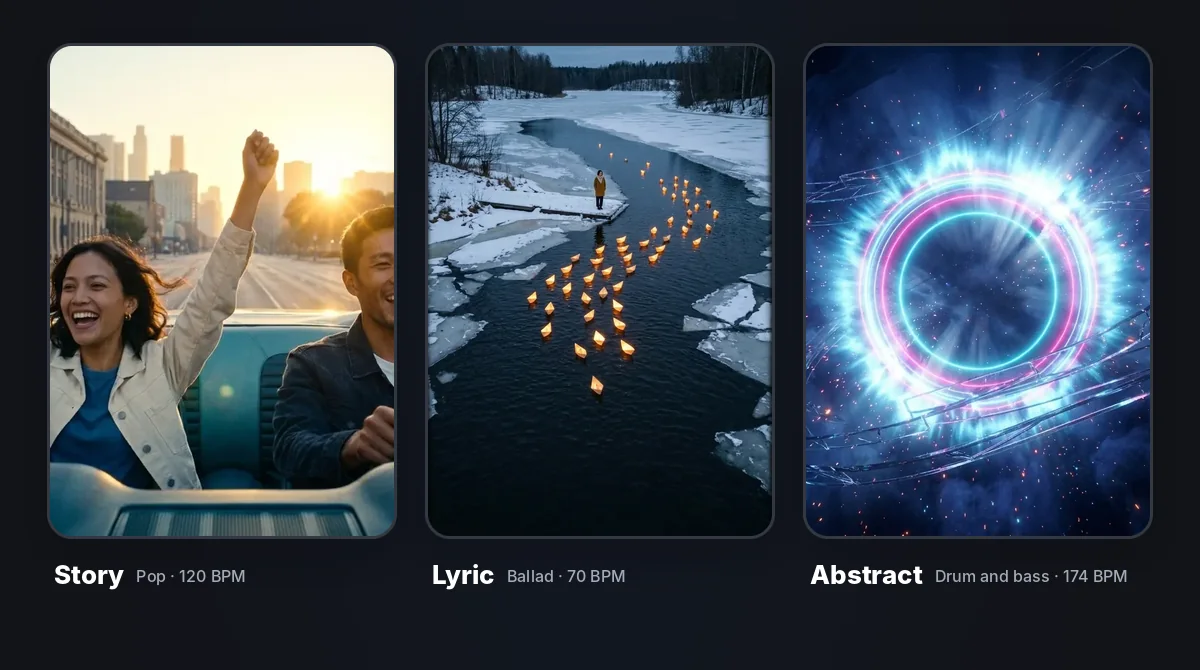
Best AI music video generators
Muvora, Neural Frames, Freebeat, Kaiber and Rotor compared, and why Muvora's beat-cut, editable storyboard is our pick for your song.
Read the guide
Music visualizers
AI video for a whole song, cut on the beat, at the lowest credit rate.
Learn more
Lip-sync videos
A singer made from one photo, lip-syncing to your vocals where the song is sung.
Learn more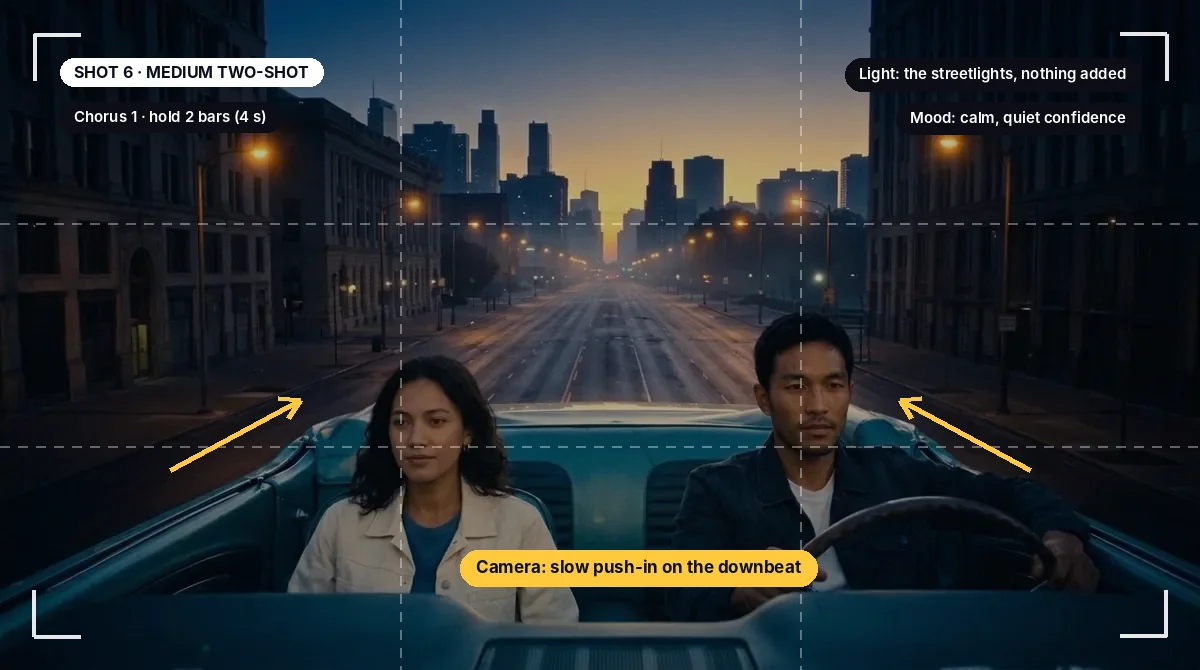
Plazmapunk alternative
Muvora and Plazmapunk side by side: a music video storyboarded shot by shot and cut on your song's downbeats, against scenes generated along your waveform from prompts and a choice of AI models.
See the comparison
Your song deserves a music video
Upload a track and get a free beat-synced storyboard in minutes. Render it when you are ready.
No card needed to start.





