The short answer
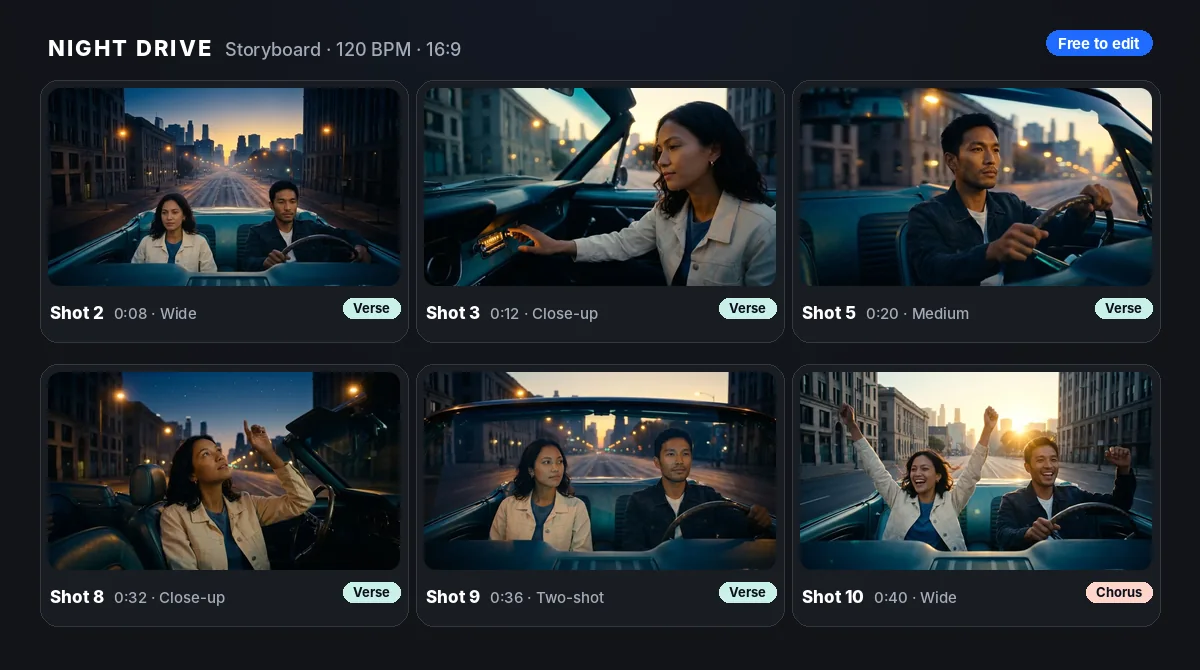
For a music video made from your finished song, Muvora is our pick in 2026: an AI director writes a free storyboard you edit shot by shot, code places cuts on the downbeats, section changes and drops, the exact price shows before rendering, and failed shots cost nothing. The others here are a stem-driven motion editor, a one-click generator, a studio of AI models and a footage editor.
- For a song's music video, Muvora is our pick: the whole storyboard is free to read and change before you pay.
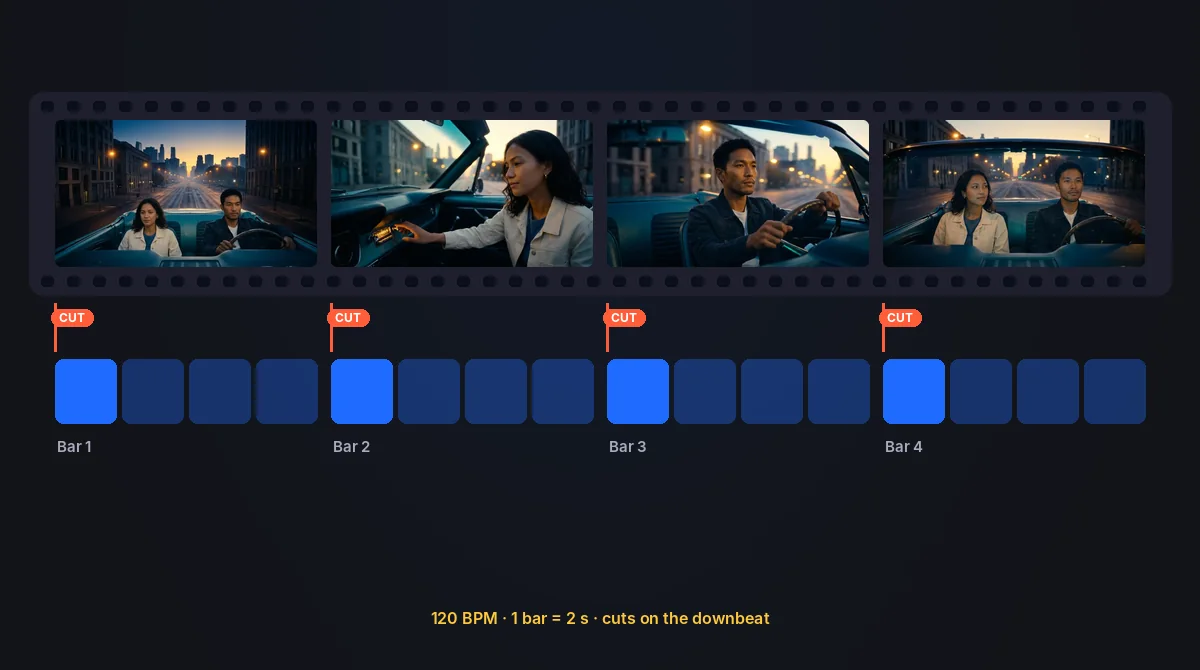
- Muvora's cuts are placed by code on the downbeats, at section changes and at drops, never left to chance.
- Compare what a whole 3-minute video costs at the quality you'd publish, not the monthly plan price.
- In Muvora a failed shot costs nothing, and one widescreen render gives 16:9, 9:16, 1:1 and a Spotify Canvas loop.
- Prices change often: every outside figure here is as of November 2026, linked to its source.
On this page (10 sections)ShowHide
- 1.How we compared them
- 2.The comparison at a glance
- 3.Muvora: our pick for a music video made from your song
- 4.Neural Frames: audio-reactive motion you drive by hand
- 5.Freebeat: one-click videos from a song
- 6.Kaiber: a creative studio with Beat Sync
- 7.Rotor: style edits of real footage
- 8.A filmed video, for reference
- 9.Which one should you pick?
- 10.Questions to ask before paying for any tool
- Questions
How we compared them
We looked at each tool the way a musician paying for one video would, through seven questions. Where a tool's own pricing page or a published article answers a question, we quote it and link it. Where our sources don't cover something, the tables say so instead of guessing.
- How the video is planned. One click, a timeline you drive yourself, a template, or a storyboard you can read and change before anything renders.
- Whether the cuts follow the beat. A video that changes picture on the downbeats feels like it plays the song; one that cuts anywhere feels pasted on.
- The price model. Per second, per video, per credit or per week, and what a whole 3-minute video costs at the quality you would actually release.
- The free tier. What you can make before paying, and the limits on length, resolution, watermarks and commercial use.
- Failed generations and unused credits. Whether a failed render costs you anything, and whether credits roll over or expire.
- Exports. The shapes and resolutions you get, and whether a vertical version means paying for a second render.
- Built for. What each tool is made to do, as its own pages describe it.
The comparison at a glance
Two tables: first how each tool makes the video, then what it costs and how its credits behave. The sections after them explain each row.
| Tool | How the video is planned | Timing to the music | Built for |
|---|---|---|---|
| Muvora | An AI director writes a shot-by-shot storyboard you edit for free before rendering | Cuts set by code on downbeats, at every section change and every drop | Turning a finished song into a planned music video, cut on the beat and editable before you pay |
| Neural Frames | Autopilot for a full video, a frame-by-frame editor, or a text-to-video timeline | Eight extracted stems drive zoom, rotation and strength | Shaping audio-reactive motion by hand |
| Freebeat | A one-click AI director: an 11-stage agent from plan to merge | Not detailed in our source | One-click videos from a song |
| Kaiber | Music Video Montage from your audio and a prompt, or clips from many models chained on its Superstudio canvas | Flipbook's camera moves react to the audio; Beat Sync cuts your own clips to the beat, from its $29 plan | Many AI models on one canvas, and cutting your own clips to a track |
| Rotor | An editing style applied to licensed stock footage or clips you upload | Its AI matches clips to the track's tempo and mood | Editing stock or uploaded footage into release visuals |
| Filmed video | A director and crew shoot from a treatment and a shot list | Whatever the editor cuts | Capturing real people, real places and a live band |
| Tool | Price model | A 3-minute video | Free tier | Failed generations and unused credits |
|---|---|---|---|---|
| Muvora | Credits per finished second; plans from US$39 a month, packs from US$12 | 6,840, 10,800 or 19,800 credits, by quality | Analysis, storyboards and style frames are free; rendering needs credits | Failed shots cost nothing; plan credits roll over up to 2 months' worth; packs never expire |
| Neural Frames | Monthly plans at $39, $99 or $299 ($26, $66 or $199 a month billed yearly) | About $27 to $39 on Knight, from one reviewer's $9 to $13 a finished minute | Not covered by our sources | Failed generations cost nothing; credits roll over up to 300% while subscribed |
| Freebeat | Weekly and monthly plans, at promo prices from $4.99 a week to $199 a month | About $5 on the fast model; 14,400 of its credits on the premium model | 500 of its credits, 30-second videos, 720p, a watermark, non-commercial use | Credits expire each billing period |
| Kaiber | Monthly plans at $10, $29 or $99, about 20% less billed yearly; credits spent per generation | Not in our sources | No free credits; a $5 five-day trial that becomes its $29 plan unless cancelled | Credits stay if you cancel; reports differ on monthly rollover; failed generations not covered by our sources |
| Rotor | Three of its credits a music video (credits from $6), or yearly plans from $9.99 a month | Three of its credits, or unlimited on its $14.99 Video plan | Unlimited watermarked previews; you pay to download | It edits real footage rather than generating it; pay-as-you-go credits don't expire |
| Filmed video | Crew day rates, gear, locations and editing | $500 to $5,000, or $1,500 to $10,000, by published estimates | None | A reshoot usually means paying for another day |
Sources: Neural Frames' pricing page, VidMuse's review of Neural Frames for the per-minute cost, Freebeat's pricing article for Freebeat, Kaiber's help center for Kaiber, Rotor's pricing page and Music Business Worldwide for Rotor (both checked November 14, 2026), and Violet Recording and The Source for filmed budgets. Muvora's prices come from its live price list; the music video cost calculator turns them into a plan or pack for your song's length.
Skip the blank page
Upload your song and Muvora's AI director plans a shot-by-shot storyboard on the beat. Edit every shot for free, and pay only if you render.
Muvora: our pick for a music video made from your song
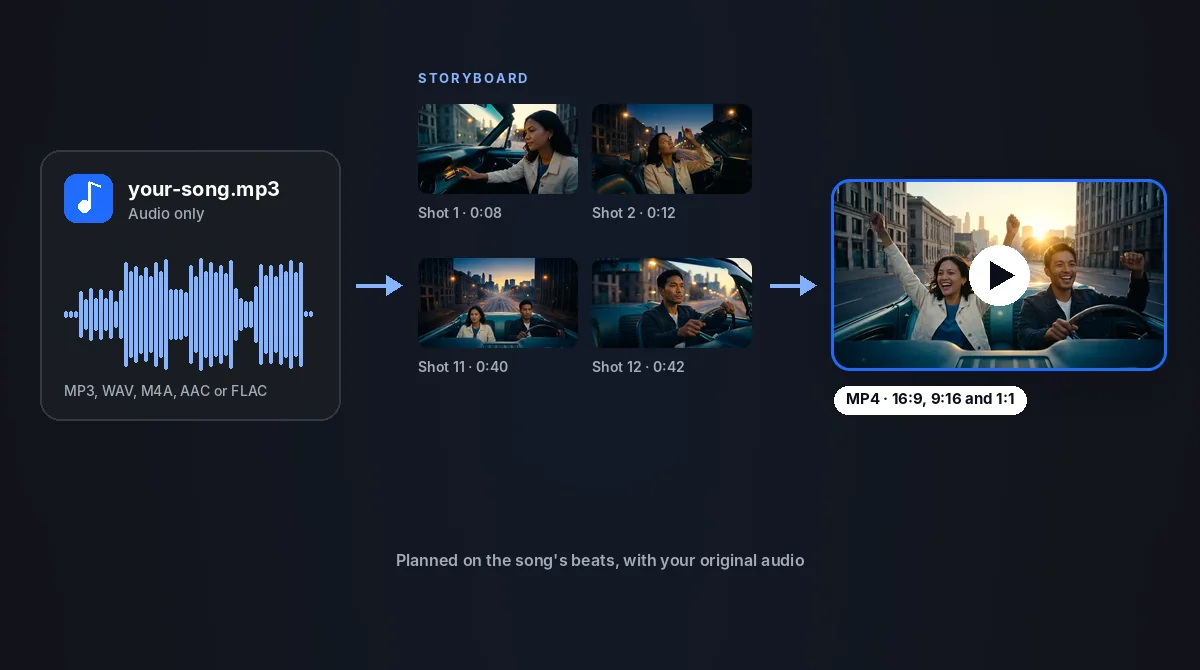
Muvora is built around the storyboard. You upload the finished song (MP3, WAV, M4A or FLAC, up to 8 minutes) and it reads the tempo, every beat and downbeat, the sections, the energy of every beat, the drops and the lyrics with word-level timing. An AI director then writes a creative brief and every shot: an image prompt, a motion prompt, the framing and the camera move. The cuts aren't left to the AI. Code places them on downbeats, at every section change and every drop, with longer shots in quiet sections and a bar or less in the loudest.
Everything before the render is free. You can rewrite prompts, drag cuts (they snap to the beat), split and merge shots, ask the AI to rewrite a shot, and see the look in style frames and a character sheet before paying. Rendering costs 38, 60 or 110 credits per finished second by quality, and 75 for lip-synced seconds, with the exact price shown before you press Generate. One render gives 16:9, 9:16 and 1:1 versions and an 8-second Spotify Canvas loop, all over your original audio.
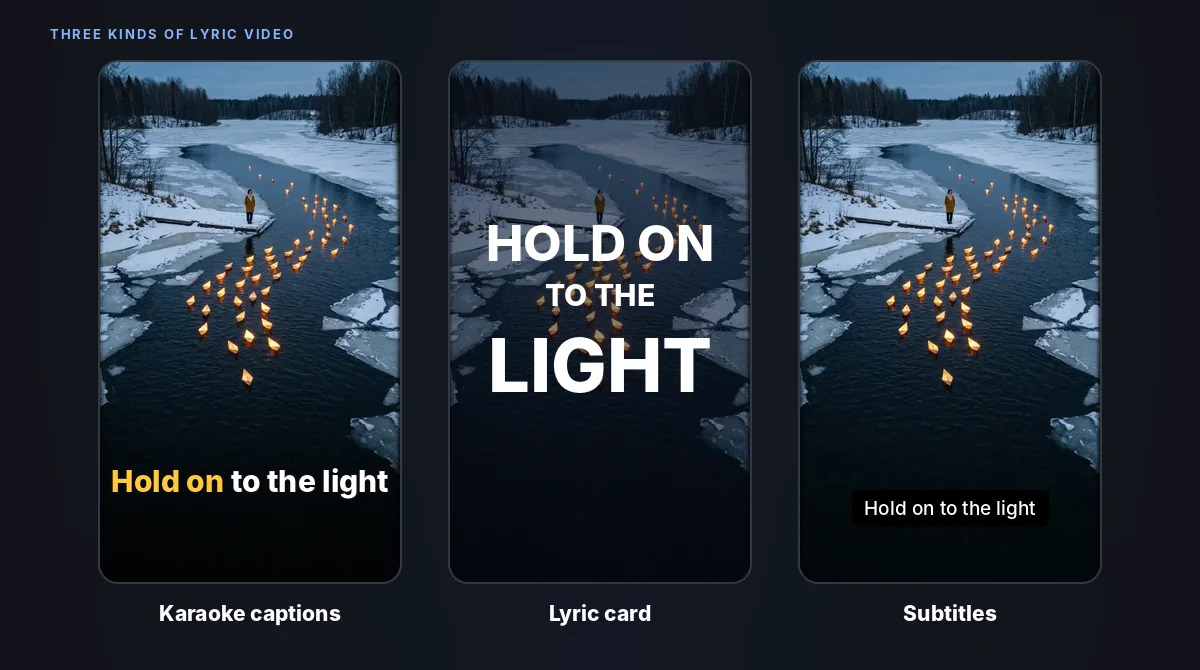
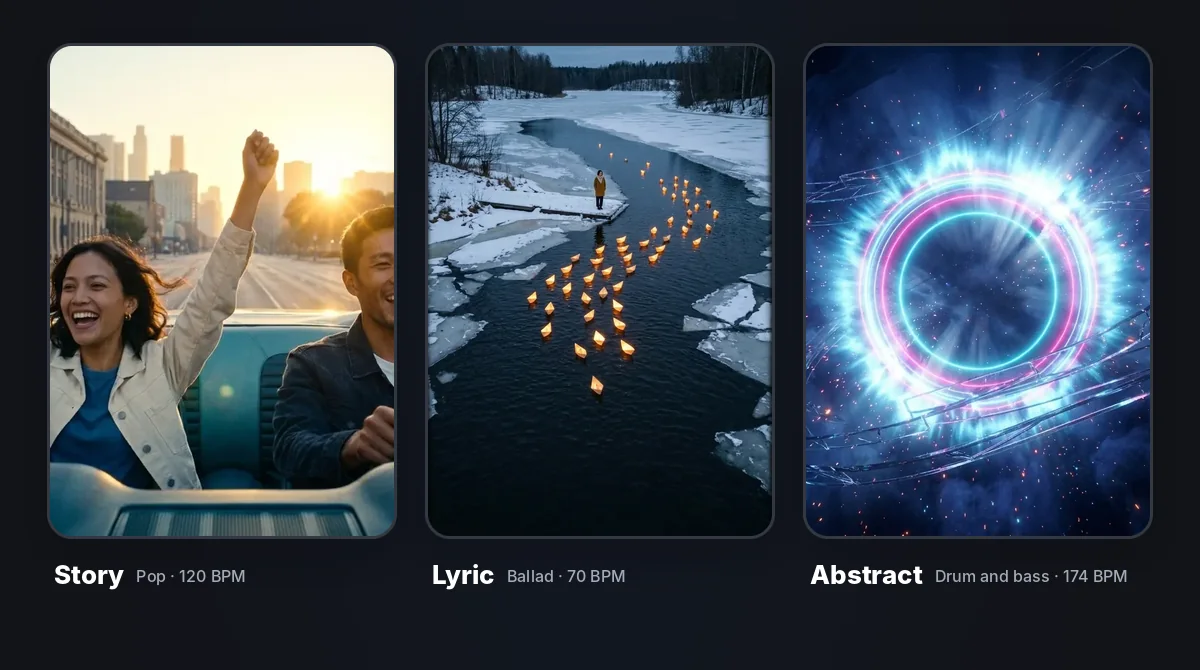
- Built for: turning a finished song into its music video (a story, an abstract look, a lyric video or a performance made from one photo), planned on the beat with the price known in advance.
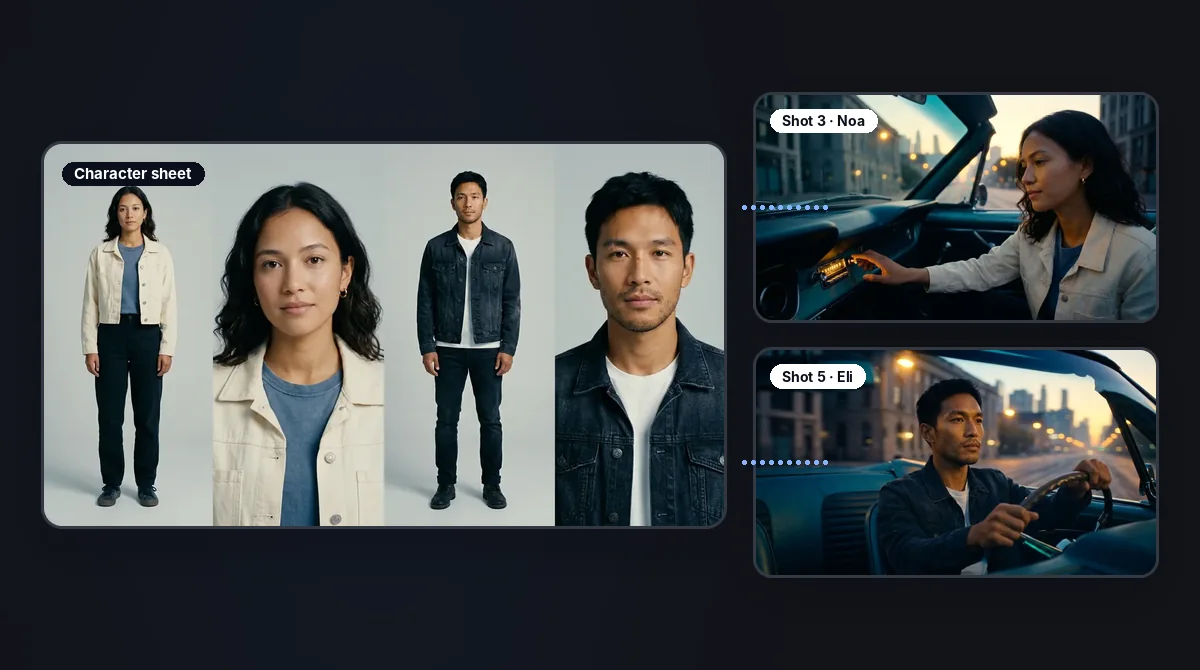
- Why it's our pick: the free, editable storyboard; characters drawn from a character sheet and checked for consistency; failed shots retried, and never charged if they still fail; single-shot re-rolls after the render, free up to 10% of the length; every format from one render.
- What it doesn't do: edit video footage you upload, or run as a phone app; songs come in as audio files, not links; and while planning is free, every render uses credits.
Neural Frames: audio-reactive motion you drive by hand
Neural Frames is built around control over motion. Its frame-by-frame editor extracts eight stems from your track (kick, snare, hats, bass, vocals, melody, harmony and percussion) and lets each one drive the zoom, rotation and strength of the animation, so the kick can punch the frame in while the vocal swells it. For a full video without the hands-on work there is Autopilot, and a text-to-video timeline runs on third-party video models.
As of November 2026, its pricing page lists Knight at $39 a month ($26 billed yearly) with 2,400 monthly credits, Ninja at $99 ($66 yearly) with 7,200, and Nirvana at $299 ($199 yearly) with 24,000. The page itself flags Knight as not recommended for Autopilot. Credits roll over up to 300% while you stay subscribed, and failed generations cost nothing. VidMuse measured roughly $9 to $13 per finished minute on Knight, which puts a 3-minute video at about $27 to $39.
- Built for: shaping audio-reactive motion stem by stem, with Autopilot for whole videos.
- Where Muvora differs: you never drive the animation yourself. Muvora's director writes every shot in words you can edit, the planner times the cuts to the downbeats, section changes and drops, and the full price is on screen before anything renders.
Freebeat: one-click videos from a song
Freebeat is built for speed. Its AI director runs as an 11-stage agent that takes a song from plan to merged video in one click, with modes for singing, story, abstract, viral short, lyric and dance videos.
As of November 2026, Freebeat's own pricing article lists a free tier of 500 of its credits, with 30-second videos at 720p, a watermark and non-commercial use. At promotional prices, Basic is $4.99 a week ($6.99 list) with 1,990 of its credits; Pro $26.99 a month for 10,000; Ultimate $39.99 for 19,000, with 1080p; and Creator $199 for 95,000. The list prices of the monthly plans are $34.99, $49.99 and $249. The fast model uses 10 of its credits a second, about 1,800 (roughly $5) for 3 minutes; the premium model uses 80 a second, or 14,400 for 3 minutes. Credits expire each billing period.
- Built for: one-click videos and shorts, in modes from singing to dance, with the AI director making the calls.
- Check before paying: free-tier videos are 30 seconds, watermarked and non-commercial; credits expire each billing period; and the entry plan is billed weekly, so compare it with the monthly plans over a whole month.
- Where Muvora differs: the plan comes before the render. Every shot's prompt, framing and camera move sits in a storyboard you can change at no cost, and Muvora's credit packs never expire.
Kaiber: a creative studio with Beat Sync
Kaiber is a broad creative studio more than a music video maker. Its Superstudio canvas chains image, video and lip-sync generations, with video models from Kling, Luma, MiniMax, Veo, Wan and Runway beside its own Flipbook, whose camera moves react to the audio for up to 8 minutes of a track. For a quick music video, Music Video Montage builds one from your audio and a prompt, though its help notes that ordering words like "first" and "then" don't come through. Beat Sync cuts the clips and photos you upload to the beat.
As of November 14, 2026, Kaiber's help center lists Starter at $10 a month (without Beat Sync), Creator at $29 and Pro at $99, with Visionary by quote. Credits are spent per generation, so what a full song costs depends on the models you use and how many tries it takes. Our sources don't say how failed generations are treated. The side-by-side page on Muvora as a Kaiber alternative sets the two out row by row.
Whichever tool you try for beat-matched visuals, test it on a song you know well. Watch whether picture changes land on the downbeats or merely near them, whether every new section starts with a cut, and whether the chorus looks different from the verse. Those three checks tell you more than any feature name.
- Built for: many AI models in one workspace, audio-reactive Flipbook animation, and Beat Sync for cutting your own clips and photos to the beat.
- Check before paying: what a 3-minute video costs on the models you'd use, and that Beat Sync is on the plan you're choosing.
- Where Muvora differs: a whole song is one job. Muvora analyzes the track, plans every shot on its beats and renders them all in a single pass, with that render's price in credits shown before you start.
Rotor: style edits of real footage
Rotor works from real footage. You pick an editing style and either upload your own clips or choose from its library of more than 17 million licensed clips, none of them AI-generated, it says; its AI matches them to your track's tempo and mood and sequences the edit. That's the opposite approach to Muvora's, which takes no uploaded video footage and generates every shot for your song.
As of November 14, 2026, Rotor's pricing page charges three of its credits for a music video, four for a lyric video and one for a Spotify Canvas, with credits from $6 each, and you can preview an edit with a watermark for free before paying. Its Artist Unlimited plans, launched on October 29, 2026 and billed yearly for one artist, start at $9.99 a month for Canvas and Apple Music Album Motion; unlimited music and lyric videos are on the $14.99 Video plan. See Muvora as a Rotor Videos alternative for a closer comparison.
- Built for: editing real footage, from its stock library or your own camera, into music videos, lyric videos and Canvases by style.
- Where Muvora differs: nothing comes from a shared library. Muvora's director designs the look, the locations and any cast for your song's concept, and every shot is drawn and animated for that one video.
A filmed video, for reference
Any comparison of AI tools should include what they replace. A filmed music video puts real people in real places, which no generator does: your actual band on a stage, your actual street, a live performance with every breath in sync. It costs more, and most of the money is committed before you see the footage. Violet Recording estimates $500 to $5,000 for most independent artists, and The Source puts indie videos at $1,500 to $10,000.
Plenty of artists do both: a filmed video for the lead single, AI visuals for everything around it. The guide to AI music videos vs hiring a videographer covers when each is worth it, and what a music video costs breaks a shoot's budget down line by line. If you do shoot, a free Muvora storyboard of the single lays out each shot's framing, camera move and length on the beat to plan the day from, and Muvora renders the videos for the other tracks, each with vertical, square and Canvas versions from the same render.

Which one should you pick?
For a music video made from a finished song, pick Muvora. These are the reasons, in the order they matter on a real release:
- You see the whole plan first. The storyboard, the style frames and the character sheet are free, so you read every shot and the exact price before a credit is spent.
- The cuts follow the song. The planner puts them on the downbeats and at every section change and drop, holding longer in quiet passages and cutting faster in loud ones.
- The cast stays the same. Characters are drawn from one character sheet, and every keyframe that shows them is checked against it.
- A failure costs you nothing. A failed shot is retried, and if it still fails it isn't charged; re-rolls are free up to 10% of the length.
- One render covers the release. A widescreen render gives you 16:9, 9:16 and 1:1 versions and an 8-second Spotify Canvas loop, all over your original audio.
- No shoot needed for the singer. The Performance style draws the singer from one photo and lip-syncs the sung shots to the isolated vocal.
A few jobs sit outside what Muvora makes: it doesn't edit footage you upload, sculpt motion frame by frame from stems or cut clips from a stock library, and it can't put your real band on a real stage. What it hands a musician with no footage and no crew is the video itself, planned around the song from the first downbeat to the last.
Read your video's storyboard before you pay anything
Upload your song and the whole plan is yours to read for free: every shot, the look drawn in style frames, and the exact price in credits before a single shot renders.
Questions to ask before paying for any tool
Whichever generator you lean toward, run through these before you buy credits. Each one maps to a way a cheap-looking price can turn expensive on a full song.
- What does a whole 3-minute video cost at the quality I'd actually release, not the cheapest one?
- Can I see the plan, the storyboard or a preview before credits are spent?
- What happens to my credits when a generation fails?
- Do unused credits roll over, expire at the end of the period, or never expire?
- Is the plan billed weekly, monthly or yearly, and how do I cancel?
- Does the free tier allow commercial use, and does it add a watermark?
- Can I use the video commercially on a paid plan, as long as I own the song?
- Do I get vertical and square versions from the same render, or pay again for each?
- Is the soundtrack my original audio file, untouched?
- Can I redo one bad shot without regenerating the whole video?
- Do the cuts land on the beat, and do choruses look different from verses?
- Does the same character look the same from the first shot to the last?
For closer side-by-sides, read Muvora as a Neural Frames alternative, as a Freebeat alternative, as a Kaiber alternative and as a Rotor Videos alternative, or see every plan and pack on the pricing page. If you'd like to understand what happens inside these tools first, how AI music video generators work walks through the pipeline.
Put Muvora to the test on your own song
Your own track is the fairest test. Upload it, read every shot of the storyboard and its price at no cost, and press Generate only once the plan is the video you want.
Written by the Muvora team. Last updated November 17, 2026. Spotted something out of date? Tell us at [email protected].