Find the BPM and key of any song
Choose an MP3, WAV, M4A, AAC or FLAC and read its tempo and musical key in seconds, with the Camelot code DJs mix by and the half-time and double-time readings. Your browser does the listening, so the song never leaves your device.
Free, no sign-up. Runs in your browser: nothing is uploaded.
How to use the BPM and key finder
- 01
Tick the box, then add the song
Confirm the song is yours or that you have the rights to use it in a video, then drop the file on the box or choose it. MP3, WAV, M4A, AAC and FLAC work, up to 8 minutes.
- 02
Let your browser listen
The page decodes the file and reads up to 90 seconds from the middle of the song, past any quiet intro. On a laptop that takes a few seconds, and nothing is sent anywhere.
- 03
Read the result and check it
The BPM comes with its half-time and double-time readings, the key with its Camelot code and relative key. Copy the line, or settle a half-time question by tapping along.
Tempo from the attack of every hit
The finder follows how sharply the sound jumps from one moment to the next (each kick, snare, strum or pluck), finds the beat that repeats most between 60 and 200 BPM, checks it against the bar it implies, and pins it to a tenth of a BPM.
- BPM to a tenth, from up to 90 seconds of the song
- Half-time and double-time readings beside it
- A note when the beat is faint or loose
The key from the notes that ring
Drums are set aside first. Then the finder adds up how much of each of the 12 notes sounds between 65 Hz and 2 kHz, allows for a recording tuned a little sharp or flat, and compares the total with all 24 major and minor keys. When the top two nearly tie, it says so.
- Key names spelled as sheet music writes them
- The relative key beside every reading
- Recordings up to 40 cents sharp or flat still read true
Your song stays on your device
Decoding and measuring both happen inside this page, in a background worker so scrolling and typing stay smooth. There is no upload, no account and no daily cap, and closing the tab leaves nothing behind.
- No upload and no account
- No daily limit on songs
- BPM, key and Camelot code copied in one click
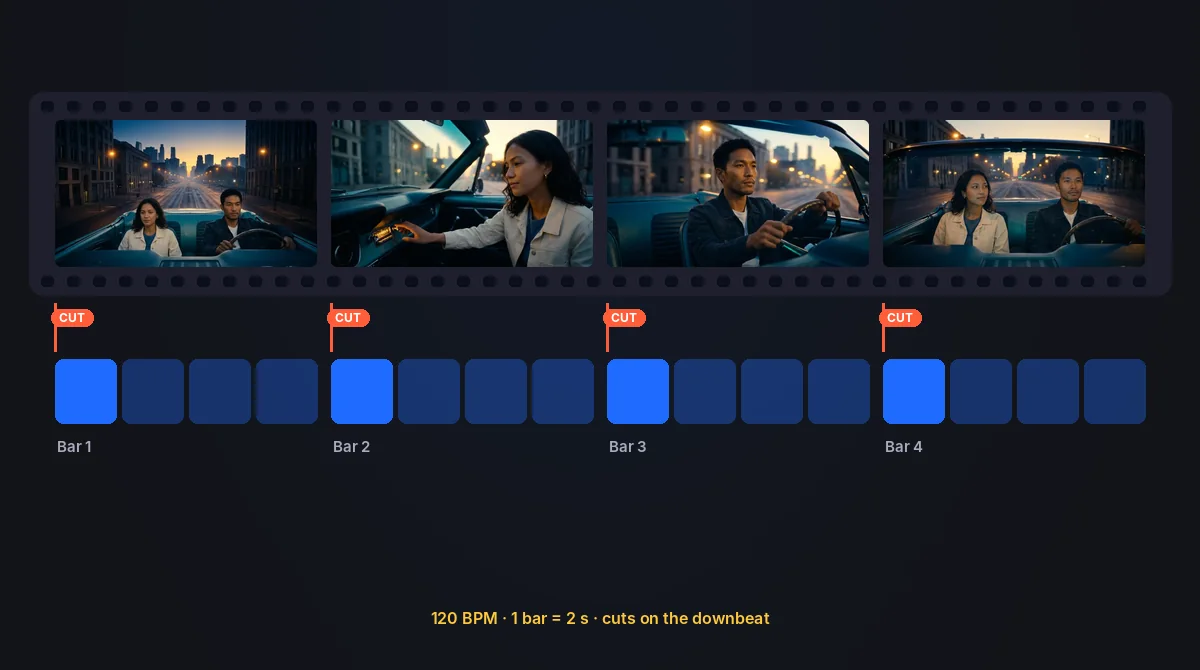
Cut a music video to this tempo
Upload the finished song to Muvora and it maps every beat, downbeat and section, then plans each cut of an AI music video on them. The storyboard is free, and the price shows before anything renders.
Questions, answered
Can't find what you need? Start a free storyboard and see for yourself.
How accurate are the readings?
On recordings we synthesize to test it, click tracks from 72 to 165 BPM and rock and trap beats from 90 to 150 BPM read within a tenth of a BPM (drum and bass reads at half time), and chord progressions in all 24 major and minor keys read exactly, even tuned 40 cents off. Real mixes are harder: a song can read at half or double the tempo you count, and a key at its relative major or minor, so both are shown.
Why does a 174 BPM track read 87?
Drum and bass, jungle and a lot of trap put the snare on every other beat, so the strongest pulse runs at half the tempo. The half-time and double-time readings sit beside the main one: pick the one that matches how you count the song, or tap along to check.
Is my song uploaded anywhere?
No. Your browser decodes the file and measures it on your device, and nothing from the song is sent to Muvora or anyone else. Use only songs you own or have the rights to use.
Which files can it read?
MP3, WAV, M4A, AAC and FLAC up to 60 MB and 8 minutes, as long as your browser can decode the format. If it can't, the finder says so; an MP3 or WAV export of the song opens everywhere.
Which part of the song does it read?
Up to 90 seconds from the middle, which skips quiet intros and fade-outs and usually covers a verse and a chorus. A song that changes tempo or key partway reads as whatever that stretch holds, and the result says which minutes it used.
Keep exploring
Camelot wheel
Pick a key to see its Camelot code and the keys that mix harmonically with it, on an interactive wheel.
Open the toolSong structure visualizer
Your song's sections, energy and drops on a timeline, with YouTube chapters.
Open the toolLyric timestamp exporter
Time your lyrics to the vocals and download LRC, SRT or WebVTT.
Open the tool
Music visualizers
AI video for a whole song, cut on the beat, at the lowest credit rate.
Learn moreLUFS meter
Open a song to read its integrated LUFS, true peak and loudness range, and how far Spotify, YouTube and Apple Music turn it down.
Open the toolChord transposer
Paste a chord sheet and move it to any key, spelled for that key, with chords kept over the lyrics and the capo shapes to play.
Open the toolPitch shifter
Move a song up or down by semitones and keep its tempo, or change its tempo and keep its key. Hear 15 seconds first, then save a WAV.
Open the tool
Your song deserves a music video
Upload a track and get a free beat-synced storyboard in minutes. Render it when you are ready.
No card needed to start.






