A free AI music video generator that plans the whole video first
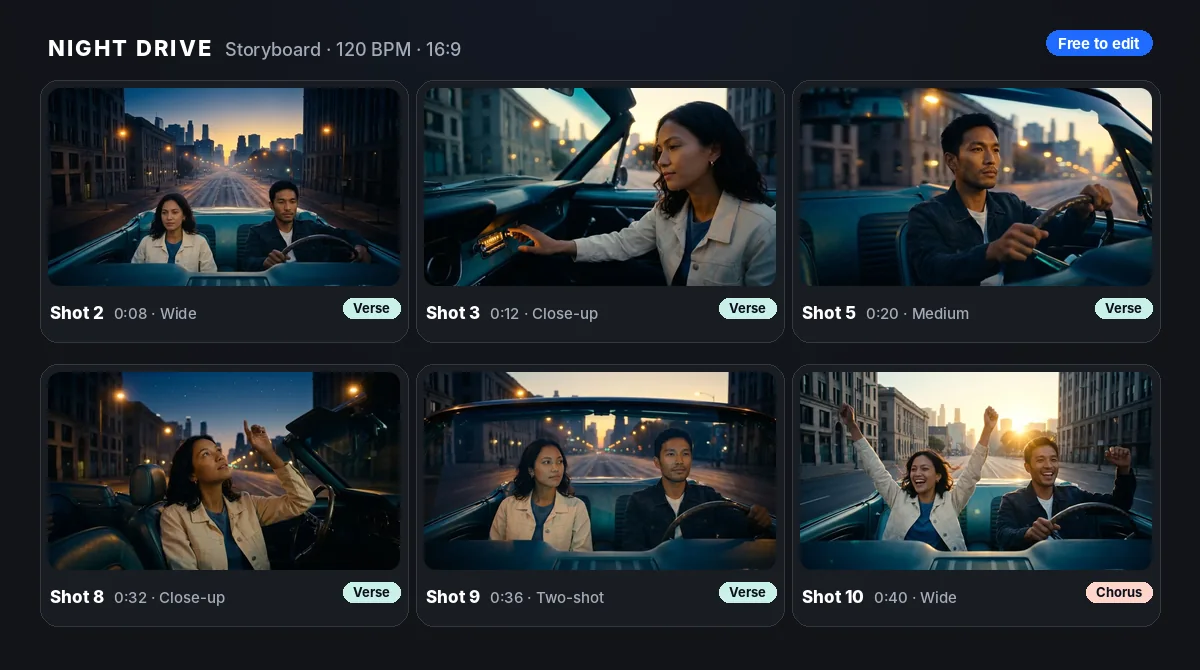
Most free AI video tools hand you a few seconds of footage and a paywall. Muvora gives away the part that takes the most thought: the analysis of your song, a storyboard with a shot for every stretch between beats, and style frames that show the look. You see the whole video planned, and its exact price, before you spend anything.
Free to start · 5 storyboards a month · No card needed
What you get without paying
Upload a song and Muvora measures its tempo, beats, sections and drops, then its AI director writes the concept, the cast and every shot, each timed to the downbeats. You get an establishing frame, a chorus frame and a character sheet to judge the look, and you can rewrite, split, merge or move any shot. See a full example in the storyboard walkthrough.
- 5 new storyboards a month on the free plan
- Every prompt, cut and shot editable
- Style frames that show the look before you pay
See your song as a storyboard first
Upload the track and the AI director plans every shot on the beat in minutes. Edit anything for free; you only pay if you render.
What costs credits, and when
Only rendering costs money, priced per finished second of video in the quality you pick, from 38 credits a second in Visualizer. The editor shows the exact price for your song before you press Generate, and a shot that fails costs nothing. Try the numbers first in the free cost calculator.
- Visualizer from 38 credits a second
- The exact price before you press Generate
- Failed shots cost nothing
Make the free part do the work
Plan several songs, keep the storyboard you like best and render only that one. Or test the look on the hook first: upload a 20-second excerpt of the chorus and render it as a vertical clip, which costs a small share of a full video's credits. The guide to making a music video for free covers the no-budget routes too.
- Compare storyboards before you choose
- Test the look on a short excerpt first
- Free tools for ideas, shot lists and specs
From your song to a finished video
- 01
Upload your song
Drop in an MP3, WAV, M4A or FLAC up to 8 minutes. Muvora finds the tempo, the beats, the downbeats and the sections of your song, like intro, verse and chorus.
- 02
Edit your free storyboard
An AI director writes a shot-by-shot plan timed to your downbeats. Rewrite any prompt, drag a cut (it snaps to the beat) or ask AI to redo a shot. None of it costs anything.
- 03
Generate your video
See the final price, then render. Pick Visualizer, Standard or Cinematic quality. If a shot fails, its credits come straight back.
The storyboard is free. Rendering is priced per second.
- Visualizer38 credits/s6,840 for 3 minutes
- Standard60 credits/s10,800 for 3 minutes
- Cinematic110 credits/s19,800 for 3 minutes
- The exact price is shown before you generate
- Failed shots cost nothing
- 16:9, 9:16, 1:1 and a Canvas loop from one widescreen render
Free storyboard in minutes. No card needed.
Questions, answered
Can't find what you need? Start a free storyboard and see for yourself.
Is Muvora really free?
Planning is. The song analysis, the storyboard, its style frames and every edit cost nothing, with 5 new storyboards a month on the free plan. Rendering the finished video costs credits, and you see the exact price before you decide.
Do I need a credit card to start?
No. Sign in with Google or your email, upload a song and edit the storyboard. You only add a payment method if you choose to buy credits or a plan.
What's the cheapest way to get a finished video?
Render a short clip in Visualizer, the most affordable quality, at 38 credits a second. Credit packs start at US$12 and never expire, so you can buy only what one video needs.
What happens if the AI makes a bad shot?
A shot that fails to render costs nothing. If a shot renders but you don't like it, you can re-roll that one shot, free up to 10% of the video's length.
Keep exploring
Make a music video for free
Three honest ways to make a music video with no budget, a shot list to copy, and what each route really costs.
Read the guideMusic video cost calculator
Your song's length and quality in, the credits and the plan or pack that covers it out.
Open the tool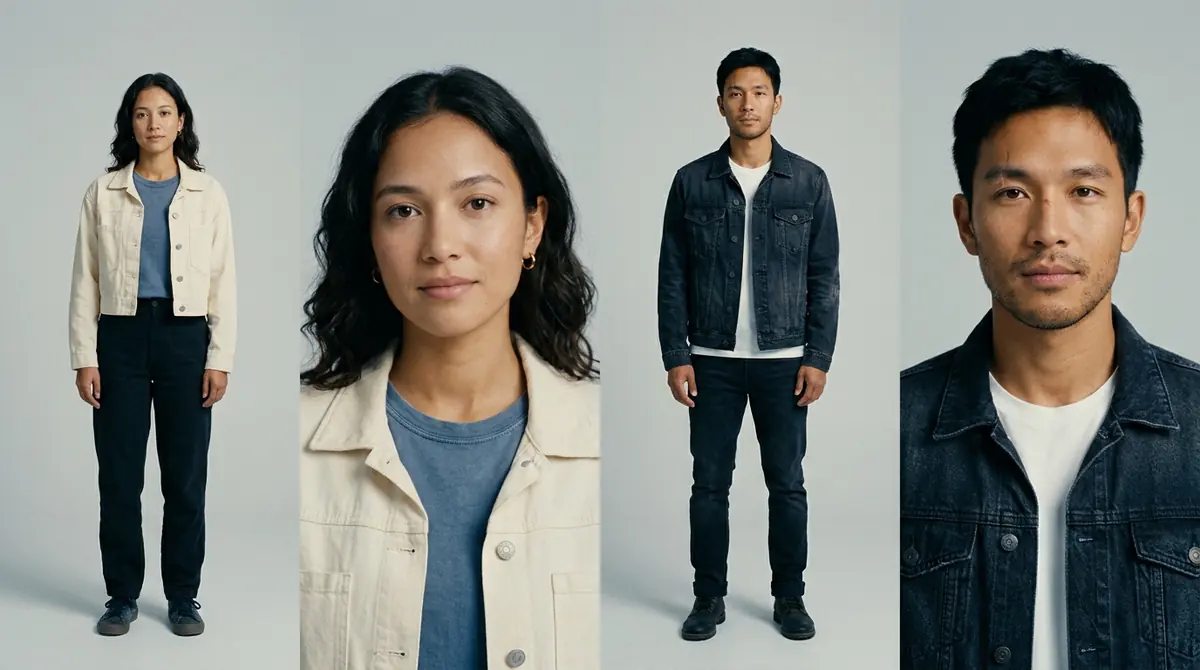
Storyboards
A shot-by-shot storyboard for your song, timed to the beat and free to edit.
Learn morePricing
Plans, credit packs and what a music video of any length costs in each quality.
Learn more
Independent artists
A music video for a self-released single: no crew, a free storyboard and the price shown before you render.
Learn more
No watermark
Clean exports on every plan and pack: plan the video free, see its exact price, and download every shape with no logo on it.
Learn more
Your song deserves a music video
Upload a track and get a free beat-synced storyboard in minutes. Render it when you are ready.
No card needed to start.






