The short answer
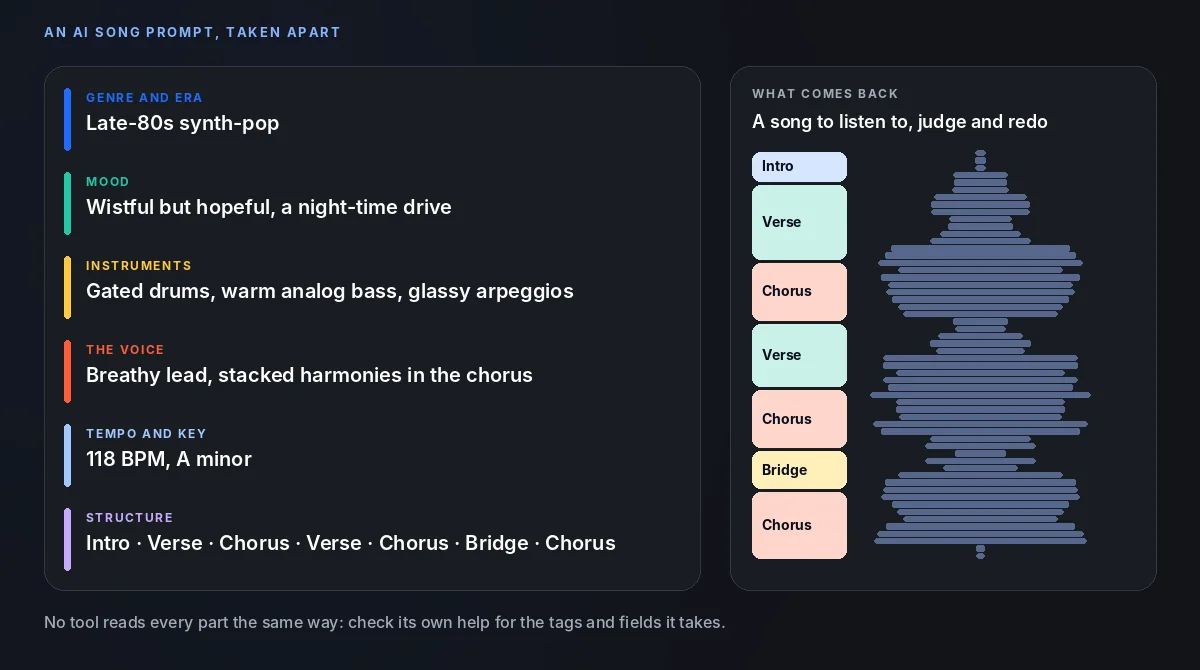
A strong AI music video prompt describes one shot as a camera operator would see it: the framing, the subject, the action they are doing, the place, a light source you could point to, the camera move and the mood, then the video's style. Write an image prompt for the first frame and a short motion prompt for what moves, and reuse each character's description word for word.
- Every prompt needs an action, a place and a light you could point to.
- The image prompt fixes the first frame; the motion prompt says what moves.
- Describe each character once and paste those exact words into every shot.
- Write for the section: hook in the intro, move in the verse, pay off in the chorus.
- Cut the clichés: no lens flares, god rays, raised arms, crowds or lettering in frame.
On this page (8 sections)ShowHide
- 1.The anatomy of a shot prompt
- 2.Image prompt versus motion prompt
- 3.Consistent characters: describe once, reuse word for word
- 4.Prompt examples for the intro, verse and build
- 5.Prompt examples for the chorus, bridge and outro
- 6.Prompt examples by genre
- 7.Match the pacing words to the song's energy
- 8.Common prompt mistakes and how to fix them
- Questions
The anatomy of a shot prompt
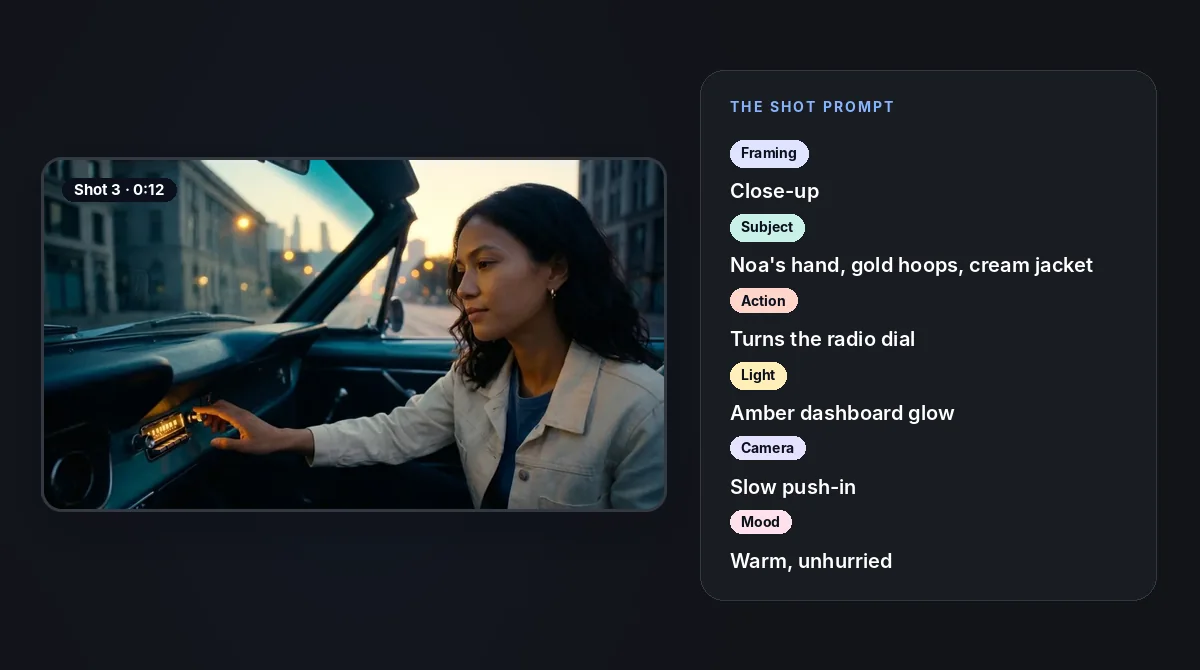
Think of a prompt as what a director tells the camera operator before a take. It answers eight questions: how big, who, doing what, where, lit by what, how the camera moves, how it should feel, and what the whole video looks like. Leave one out and the model answers it for you, usually with its blandest option.
| Part | It answers | Weak | Strong |
|---|---|---|---|
| Framing | How much is in frame | “a shot of” | “close-up”, “wide shot from across the street” |
| Subject | Who we watch | “a girl” | “a woman in her mid-20s with dark wavy hair and a cream cropped jacket” |
| Action | What they do during the shot | “looking cool” | “turns the radio dial until a station comes in” |
| Place | Where, in concrete nouns | “in a city” | “the front seat of a convertible on an empty avenue” |
| Light | What lights it, in what color | “cinematic lighting” | “lit from below by the amber dashboard glow” |
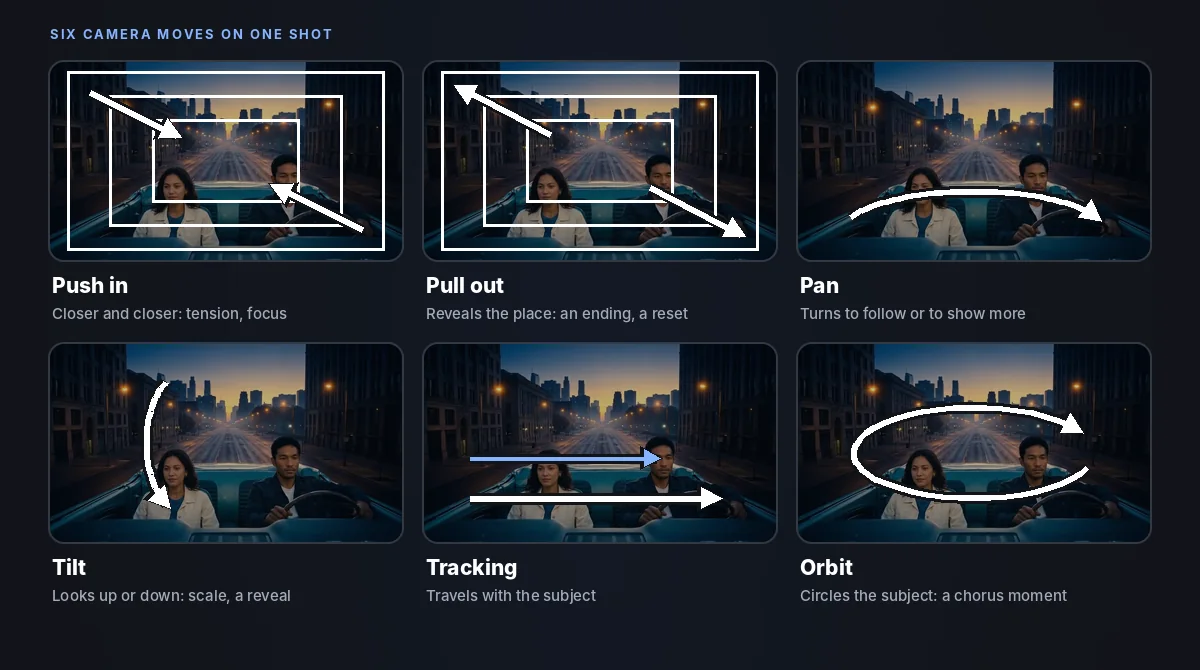
| Camera move | How the frame changes | “dynamic camera” | “slow push-in toward her hand” |
| Mood | What faces should show | “emotional” | “relaxed, a small private smile” |
| Style | The look every shot shares | “high quality, 8K” | “35mm film look, soft grain, deep blue shadows” |
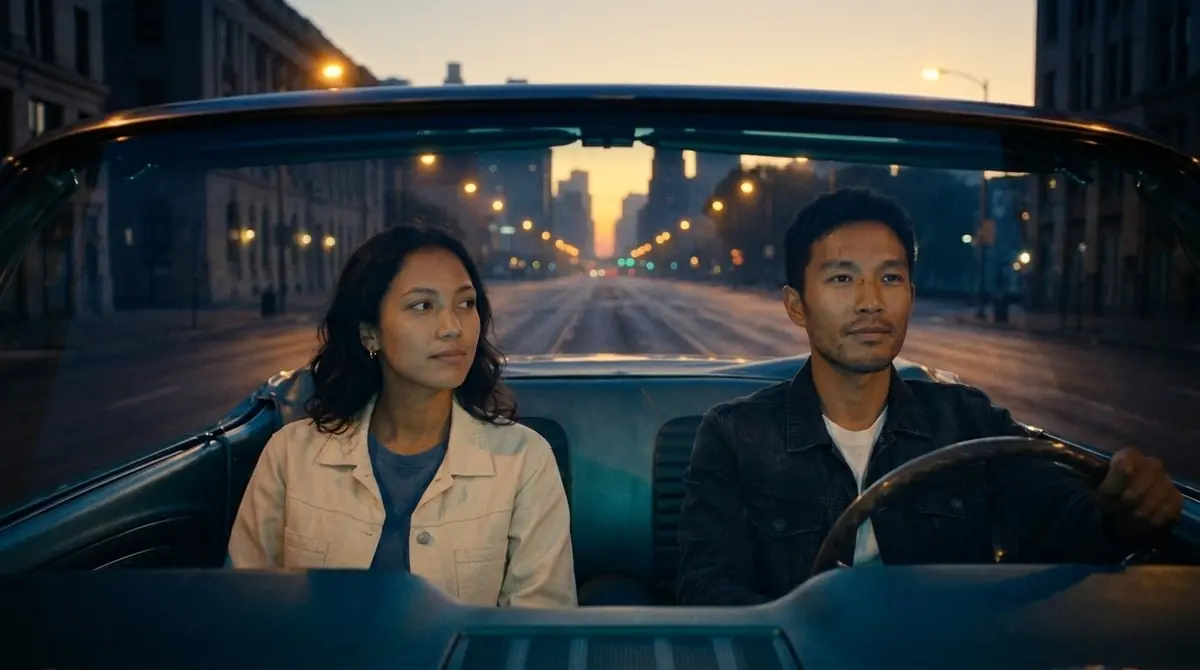
Joined up, the strong column is a shot a crew could film: “Close-up. A woman in her mid-20s with dark wavy hair and a cream cropped jacket turns the convertible's radio dial until a station comes in, lit from below by the amber dashboard glow. Slow push-in toward her hand. Relaxed, a small private smile. 35mm film look, deep blue shadows.” The names of sizes, angles and moves are in music video shot types.

- 01
Start from the song section
Note the section and how loud it is. An intro shot raises a question, a verse shot moves the story, a chorus shot pays it off; that sets the size and speed.
- 02
Choose the framing first
Pick the shot size first, and make it differ from the shot before: a close-up after a wide reads as a cut, a wide after a wide as one long shot.
- 03
Write the subject and the action
Name who is in frame with their fixed description, then give them a verb: turns, pours, runs, ties, lifts. If “stands there” would fit, find a better verb.
- 04
Place it and light it
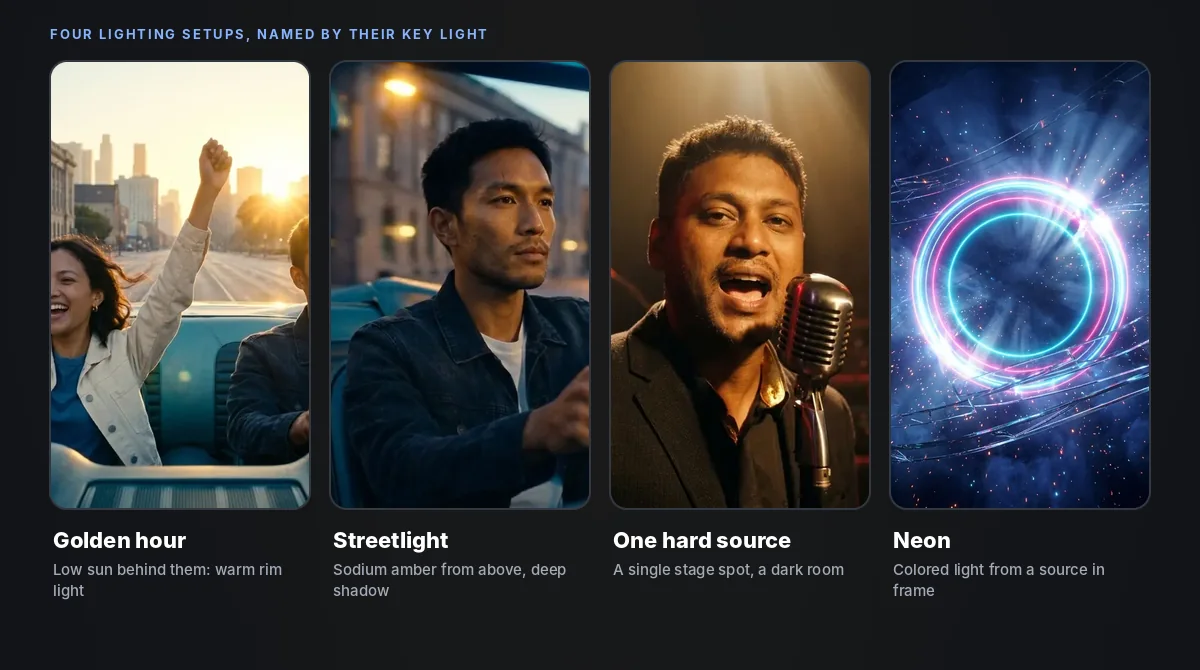
Name the place in concrete nouns and what lights it: a sodium streetlight, an open fridge, low sun through blinds. A named source gives the light a direction and a color.
- 05
Add one camera move and the mood
Give the shot one camera move paced to its section, then a few words for the expression so the faces match the song.
- 06
End with the shared style line
Close every prompt with the same style line (medium, film look, palette) so the shots read as one video. If a real crew couldn't shoot it, rewrite it.
Image prompt versus motion prompt
Most AI music videos are made image-to-video. An image model draws each shot's first frame, the keyframe, and a video model animates that frame for a few seconds. So every shot has two prompts with two jobs. The image prompt is a photograph described in words; the motion prompt is everything that happens after the shutter opens.
| Compare | Image prompt | Motion prompt |
|---|---|---|
| Its job | Fix what the first frame looks like | Say what moves, how and how fast |
| Length | About 40 to 90 words | About 10 to 40 words |
| Covers | Framing, subject, wardrobe, place, light, style | The action from start to end, the camera move, speed |
| Leave out | Camera moves and later events | Scenery and clothes the frame already shows |
| Typical mistake | A sequence one frame can't show | Repeating the image prompt |
A pair for one quiet verse shot. Image: “Medium shot. A man in his late 20s with short black hair, light stubble and a scar through his left eyebrow, in a dark denim jacket, grips the wheel of a teal convertible at a red light on an empty avenue, a sodium streetlight orange on his face. Calm, tired eyes. 35mm film look.” Motion: “The light changes; he exhales and eases the car forward as the glow slides off his face. Static camera.”
In Muvora's storyboard generator, the AI director writes both prompts for every shot, with its framing and camera move, and you can rewrite either one in the editor before anything is rendered.
Skip the blank page
Upload your song and Muvora's AI director plans a shot-by-shot storyboard on the beat. Edit every shot for free, and pay only if you render.
Consistent characters: describe once, reuse word for word
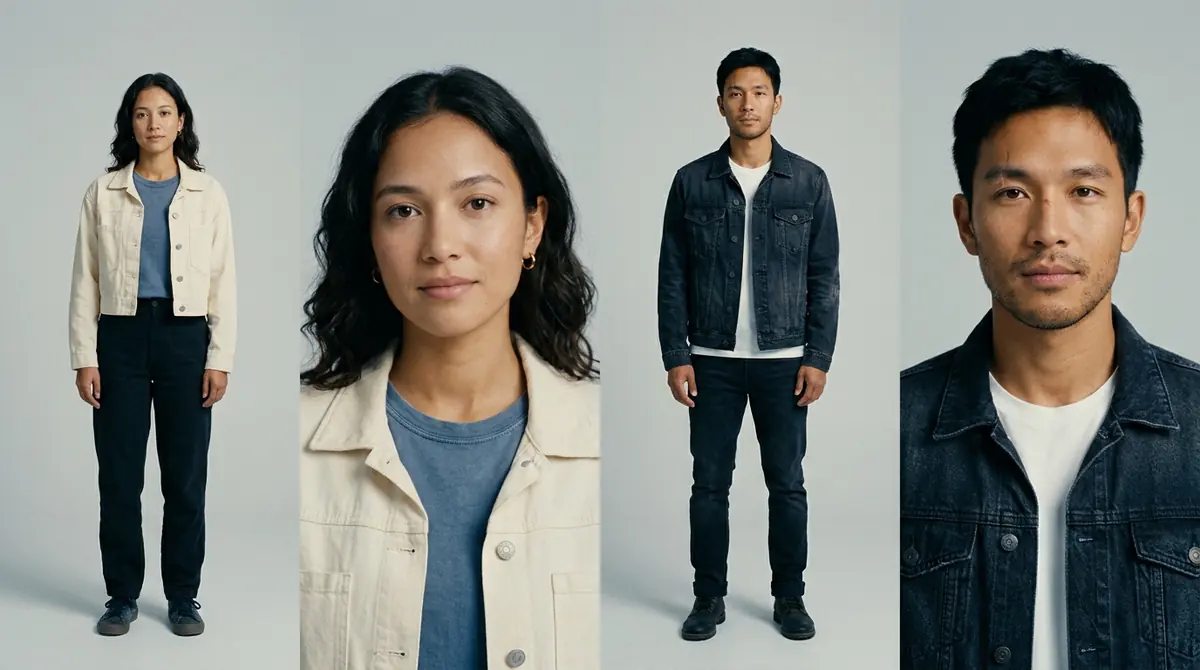
Each shot is generated on its own, so the model can't remember your lead. “A woman with dark hair” in one prompt and “a brunette in her twenties” in the next gives you two women. The fix is dull but it works: write one fixed description per character from the five parts below, and paste it unchanged into every prompt that shows them.
- Age and build: “mid-20s, slim”, “late 50s, broad-shouldered”.
- Face and hair: face shape, hair color, length and texture.
- Skin: the tone, in plain words.
- One detail that sticks: a scar, freckles, round glasses, small gold hoops.
- Wardrobe: two items with their colors, kept the same unless the story changes them.
Keep it to about 20 to 25 words: longer ones crowd out the action and the light, shorter ones let the model improvise a new face. A name helps you track shots, but the model draws from the description.
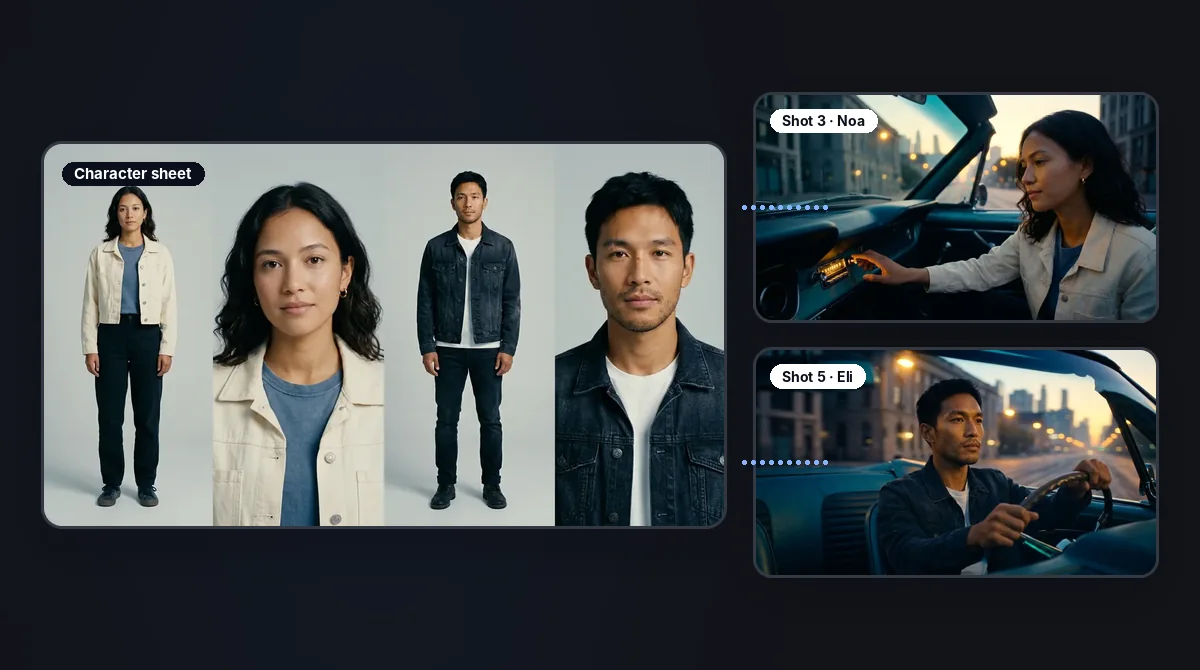
Muvora's director describes each character once in the storyboard's brief. A character sheet is drawn from that description and used as a reference for every keyframe, and a frame that drifts is redrawn before any video is made. In the Performance style the singer comes from your photo, so those prompts describe what the performer does and wears.
Let the director write the first draft
Upload a song and Muvora writes both prompts for every shot, timed to the beat, with your cast described once. Rewrite any of them free before you render.
Prompt examples for the intro, verse and build
Every section has a job. The intro has seconds to make someone keep watching, the verse moves things along without spending the big images, and the pre-chorus tightens so the chorus can release. Each example has an action and a light you could find on a real set; put your own character's description where it says “the lead”.
Intro hooks: a detail, a place or a movement that raises a question.
- Insert · static
Kettle at dawn
Insert of a kettle on a gas ring, its blue flame the only light in a dark kitchen; a hand lifts it as steam curls.
Use this idea on my songUse this idea on my song - Wide · static
Headlights on the ceiling
Wide shot of a dark bedroom as passing headlights sweep the ceiling and catch the lead sitting up on the bed. Restless.
Use this idea on my songUse this idea on my song - Extreme close-up · push-in
Key in the ignition
Extreme close-up of a key turning in an old car's ignition, the dashboard gauges glowing amber one by one. Anticipation.
Use this idea on my songUse this idea on my song - Extreme wide · crane
Motel pool at night
Extreme wide of an empty motel pool lit by its underwater lamps, an inflatable ring drifting across. Expectant.
Use this idea on my songUse this idea on my song - Close-up · static
Needle drop
Close-up of a hand lowering a record onto a turntable in a desk lamp's warm cone, dust drifting through the beam. Intimate.
Use this idea on my songUse this idea on my song - Close-up · static
Train window
Close-up of the lead's reflection in a night train window, tunnel lights strobing past, as she wipes away the fog.
Use this idea on my songUse this idea on my song
Verse shots: everyday actions in specific places, keeping the biggest light for later.
- Medium · static
Loading the trunk
Medium shot of two friends loading bags into a hatchback under sodium garage lights, one tossing a duffel, the other catching it.
Use this idea on my songUse this idea on my song - Wide · slow pan
Corner store in the rain
Wide shot of the lead leaving a corner store into the rain, cracking a can, then walking off as the camera pans with her.
Use this idea on my songUse this idea on my song - Close-up · static
Notebook on the night bus
Close-up of a hand writing in a notebook on a night bus; the strip light flickers and the pen skids over a bump.
Use this idea on my songUse this idea on my song - Medium · push-in
Laundromat at 2 a.m.
Medium shot of the lead folding shirts in a laundromat, lit by cold tubes and a dryer window turning behind him. A little lonely.
Use this idea on my songUse this idea on my song - Wide · tilt up
Rooftop bike repair
Wide shot of two teenagers fixing a bike chain on a rooftop at dusk; the camera tilts up from their hands to the skyline.
Use this idea on my songUse this idea on my song - Two-shot · handheld
Small kitchen
Medium two-shot of a couple cooking in a narrow kitchen, one squeezing past the other for plates under the range-hood bulb. Playful.
Use this idea on my songUse this idea on my song - Close-up · static
Café window
Close-up of the lead tracing a raindrop down a café window, traffic lights smeared red and green behind the glass. Wistful.
Use this idea on my songUse this idea on my song
Pre-chorus builds: tighter frames and quicker actions, so the release feels earned.
- Insert · quick push-in
Laces
Insert of hands yanking boot laces tight on a dark stairwell under a swinging bare bulb. Determined.
Use this idea on my songUse this idea on my song - Close-up · static
Mirrored elevator
Close-up of the lead in a mirrored elevator under a flickering light, tying her hair back and squaring her shoulders.
Use this idea on my songUse this idea on my song - Wide · static
Catching the bus
Wide shot of a bus pulling away as the lead sprints into frame under the shelter light and bangs on the door. Urgent.
Use this idea on my songUse this idea on my song - Extreme close-up · static
Match strike
Extreme close-up of a match flaring in the dark, lighting half a face as it moves toward a candle. Tense.
Use this idea on my songUse this idea on my song - Medium · pull-out
Curtains open
Medium shot of the lead yanking open heavy curtains as morning light slams in; the camera pulls back to the bare apartment.
Use this idea on my songUse this idea on my song
Prompt examples for the chorus, bridge and outro
The chorus spends the video's best images, and each time it returns it should grow: a wider place, more movement, more light. The bridge changes the place, the hour or the point of view so the last chorus feels new, and the outro leaves a final image that answers the first.
Chorus payoffs: open space, real movement and the light the verses were waiting for.
- Wide · car mount
Over the hill
Wide shot from the hood of a convertible cresting a hill as the low sun floods the windshield and the two friends with gold.
Use this idea on my songUse this idea on my song - Medium · handheld
Sprinklers
Medium shot of three friends running through park sprinklers at dusk, the spray lit gold, one sliding on the wet grass. Carefree.
Use this idea on my songUse this idea on my song - Close-up · static
Volume up
Close-up of the lead cranking the car radio up and laughing as the wind whips her hair, morning light on the chrome.
Use this idea on my songUse this idea on my song - Wide · slow orbit
Rooftop string lights
Wide shot of the lead dancing on a rooftop at blue hour under string lights as windows across the city switch on. Free.
Use this idea on my songUse this idea on my song - Wide · static
Downhill
Wide shot of two kids freewheeling down a steep street, feet off the pedals, racing past the planted camera as streetlights flick on.
Use this idea on my songUse this idea on my song - Wide · static
Off the jetty
Wide shot of the lead sprinting down a wooden jetty and leaping into a lake, the low sun turning the splash white-gold. Release.
Use this idea on my songUse this idea on my song - Extreme wide · crane
Town lights up
Extreme wide of a small town at dusk, the camera craning up as porch lights and streetlights switch on block by block.
Use this idea on my songUse this idea on my song
Bridge turns: stop moving, change the hour, go under the surface or look back.
- Wide · static
Power cut
Wide shot of four friends in a kitchen as the power cuts out and phone flashlights click on, sweeping across their faces.
Use this idea on my songUse this idea on my song - Medium · push-in
Under the surface
Medium shot underwater as the lead sinks into a pool, lamplight rippling above, bubbles rising as she opens her eyes. Weightless.
Use this idea on my songUse this idea on my song - Two-shot · static
Hood of the car
Medium two-shot of the two leads on the hood of their parked car at a field's edge, sharing a thermos cup under an orange sky.
Use this idea on my songUse this idea on my song - Wide · static
Same corner, years later
Wide shot of the first verse's street corner in daylight and snow; the lead, older now, brushes off a bench and sits. Bittersweet.
Use this idea on my songUse this idea on my song - Overhead · rotation
Photographs on the floor
Overhead shot of the lead lying among scattered photographs, late sun striping the floor, as she lifts one to the light.
Use this idea on my songUse this idea on my song
Outro endings: slow down, pull away and let a place or an object close the story.
- Extreme wide · static
Taillights
Extreme wide of taillights shrinking down a straight desert road at dusk until they are two red points on the horizon.
Use this idea on my songUse this idea on my song - Medium · static
Lamp off
Medium shot of the lead switching off the desk lamp from the opening shot, the room falling into blue moonlight. Done.
Use this idea on my songUse this idea on my song - Wide · static
Last train out
Wide shot of the last train leaving a station above the street at night, its lit windows sliding past, the platform dimming.
Use this idea on my songUse this idea on my song - Insert · pull-out
A river of boats
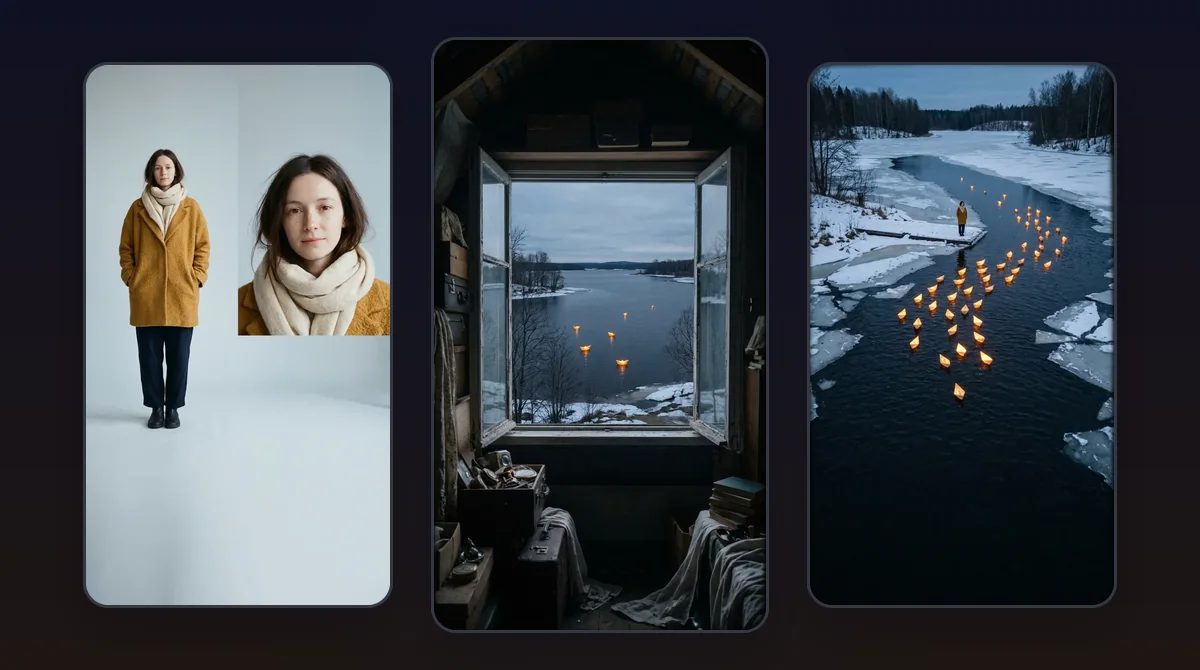
Insert of a paper boat on dark water, a candle glowing inside, as the camera pulls back to reveal a river of them.
Use this idea on my songUse this idea on my song - Insert · static
Keys on the table
Insert of a hand setting car keys on a kitchen table in the first morning light, then sliding out of frame. Home.
Use this idea on my songUse this idea on my song
Prompt examples by genre
Genre changes the places, light and pace more than the structure. Each example is a mid-song shot in a mood the genre's listeners expect; music video styles covers how a whole look is built.
- Hip-hop · static
Barbershop after hours
Medium shot of the artist sweeping an empty barbershop after closing, chrome chairs catching a space heater's red glow, nodding in time. Unbothered.
Use this idea on my songUse this idea on my song - Trap · push-in
Empty lot
Wide shot of the artist on the hood of a car in an empty lot, flicking a lighter, headlights cutting through low fog. Calm.
Use this idea on my songUse this idea on my song - Pop · static
Pool float
Overhead shot of the lead drifting on an inflatable in a turquoise pool at noon, her shadow sharp on the pool floor. Carefree.
Use this idea on my songUse this idea on my song - EDM · handheld
Strobe warehouse
Wide shot of five dancers in a concrete warehouse, a white strobe freezing them mid-jump on every flash, haze in the beam. Euphoric.
Use this idea on my songUse this idea on my song - Electronic · orbit
Ring of light
Close-up of a ring of cyan light in dark haze, particles flaring magenta as they drift in and the ring tightens. Pressure building.
Use this idea on my songUse this idea on my song - Rock · handheld
Garage rehearsal
Medium shot of the drummer smashing a cymbal in a cramped garage, a clamp-on work lamp lighting the sweat and dust. Raw.
Use this idea on my songUse this idea on my song - Lo-fi · static
Desk at 3 a.m.
Close-up of a cat stepping past a steaming mug on a cluttered desk, lit by a green-shaded lamp, rain on the window. Sleepy.
Use this idea on my songUse this idea on my song - R&B · push-in
Fridge light
Medium shot of the lead on a kitchen counter in the dark, the open fridge lighting her face as she reads a message and smiles. Tender.
Use this idea on my songUse this idea on my song
Start from your genre's look
Pick hip-hop, pop, EDM, rock or lo-fi in the vibe step, type your idea in a line, and the director writes every shot in that genre's light and pace.
Match the pacing words to the song's energy
A camera move reads differently at different speeds, and the speed should follow the music: a push-in creeps in a hushed verse and can rush on the last chorus. Pacing words make a shot belong to its section.
| Energy | Typical sections | Camera words | Motion words | Shot length |
|---|---|---|---|---|
| Low | Intro, quiet verse, outro | static, slow push-in, slow drift, slow tilt | gently, unhurried, settles, lingers | Two to four bars |
| Medium | Verse, pre-chorus, bridge | steady pan, handheld, slow crane | steadily, at walking pace, turns, reaches | One to two bars |
| High | Chorus, drop, final chorus | fast push-in, orbit, crane up, whip pan | quickly, in one movement, bursts, leaps | One bar or less |
Each block is a shot. Same tempo, same bar grid: only the shot length changes with the energy.

In Muvora the cut points come from code, not prompts: cuts land on downbeats, every section change and drop is a cut, and quiet sections get longer shots than choruses, so a prompt only has to match the pace of its shot. Planning by hand? The free shot list generator times the shots.
Common prompt mistakes and how to fix them
Weak AI shots fail in the same dozen ways, each with a fix you can make before rendering.
| Mistake | Why it fails | Write this instead |
|---|---|---|
| A pose: “she stands looking at the camera” | Nothing happens, so the model drifts | An action: “she pulls on her jacket and steps out” |
| “Cinematic lighting” | Names no light, so every shot glows alike | A source: “a bare bulb above the sink” |
| Lens flares and god rays | Read as computer-made at a glance | Light seen in frame: a lamp, a window |
| Teal-and-orange grading | The default look of countless videos | Your own palette: “sodium orange, deep navy” |
| A lone figure on a cliff | A stock image with no story | Someone doing something in a specific place |
| Arms raised to the sky | The most common music video pose | A gesture with a reason: turning the radio up |
| A crowd or a packed dance floor | Faces blur and repeat in big groups | Two to five people, clearly shown |
| Text, signs or logos in frame | Lettering comes out garbled | Blank surfaces; captions added in the edit |
| Walking with no direction | Legs move, the person goes nowhere | A path: “crosses the frame left to right” |
| A camera tracking beside a walker | Often renders as a walk on the spot | A planted camera the walker passes, or a pan |
| A celebrity's name | Muvora's pictures never show real people | A fictional character with a fixed description |
| Three actions in one shot | A two-second shot can't fit them | One action per shot |

Turn your song into prompts on the beat
Muvora's director writes every shot with an action, a framing and a light from the scene, timed to your song. Edit any prompt, then render. See how it works.
Written by the Muvora team. Last updated November 13, 2026. Spotted something out of date? Tell us at [email protected].