The short answer
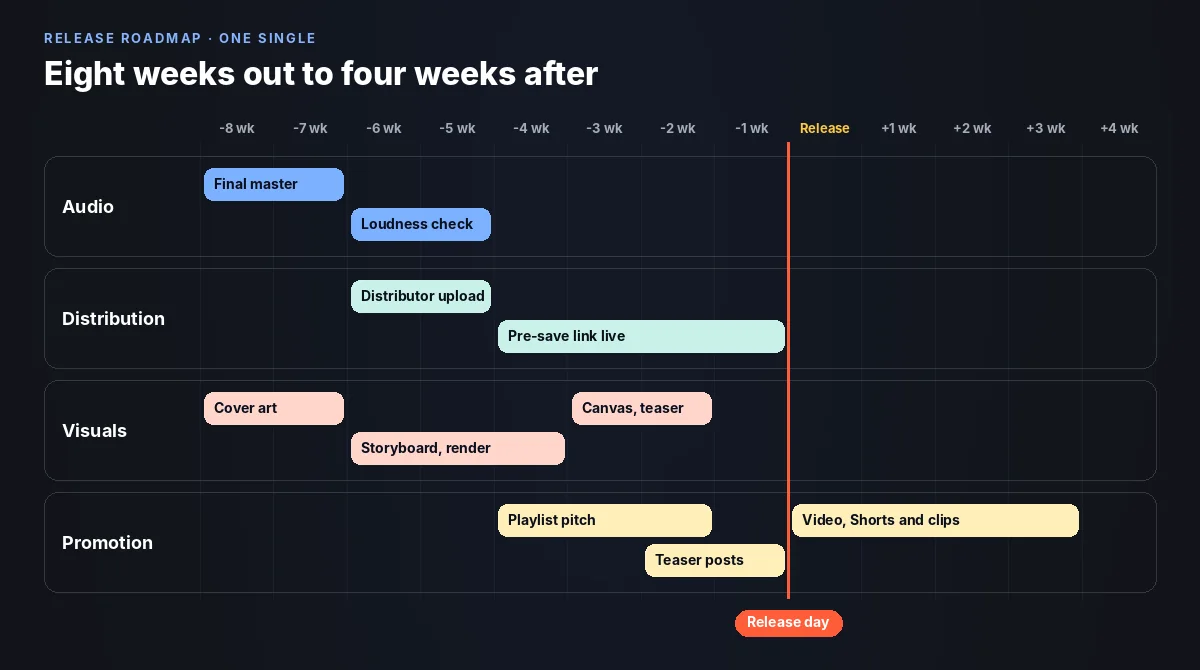
To promote your music, run each release as a ten-week campaign. Six weeks out, settle the story and plan the visuals. Four weeks out, deliver to your distributor, open pre-saves and pitch editors. From two weeks out, post short clips cut from one music video. Then keep posting, emailing fans and playing live for a month, measuring saves and listeners rather than views.
- Start six weeks out and deliver four weeks early, so the pitch and the pre-save link have time to work.
- Pitch in Spotify for Artists at least 7 days before release; Apple Music and others are pitched through your distributor.
- Make one music video and cut every visual from it: the Canvas, vertical clips, a lyric video and a visualizer.
- Build the posting calendar from four moments: the chorus, the drop, a lyric line and the making-of.
- Judge every post by the saves, follows and listeners it brings, not by its views.
On this page (7 sections)ShowHide
- 1.A music marketing plan in eight steps
- 2.Six weeks out: the story and the assets
- 3.Four weeks out: delivery, pre-saves and the editorial pitch
- 4.The visuals each platform needs
- 5.A posting calendar built from one video
- 6.Fans, email, collaborations and playing live
- 7.What to measure in the month after release
- Questions
A music marketing plan in eight steps
Music promotion for independent artists works best as a sequence, because each step feeds the next: the story shapes the visuals, the visuals feed the pitch and the posts, and the posts send people to pre-save and stream. Here is the order. The sections after it fill in each step.
- 01
Write the story in one sentence (six weeks out)
Decide what the song is about and why it exists, in words a stranger could repeat. Every caption, pitch and email starts from that sentence.
- 02
Plan the visual world and the assets
Choose one look for the cover, the video, the Canvas and every clip, and list the files each platform will need.
- 03
Deliver to your distributor four weeks out
Upload the master, the artwork and the credits early, so the song reaches the stores, shows up in the artist tools and gets a working pre-save link in time.
- 04
Open pre-saves and pitch the editors
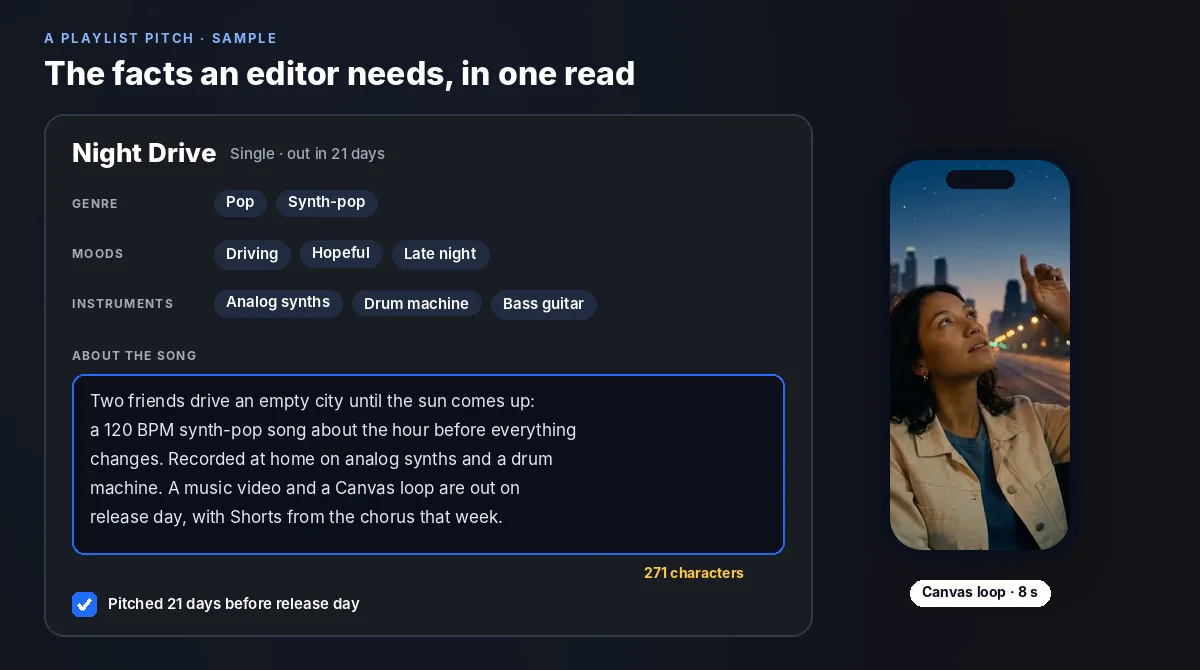
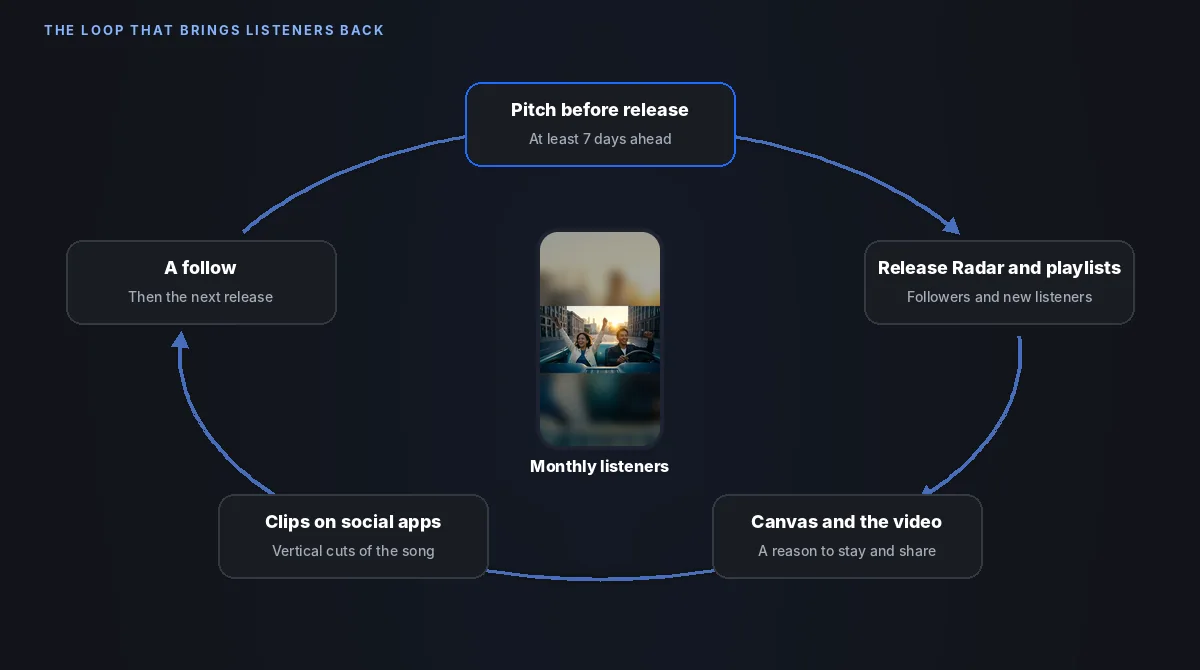
Share the pre-save link from the announcement on. Pitch the song in Spotify for Artists at least 7 days before release, and ask your distributor how it pitches the other services.
- 05
Make the music video, then cut everything from it
Have the full video finished three to four weeks out, and cut the Canvas, the vertical clips, the lyric version and the visualizer from the same footage.
- 06
Post on a calendar, not on a whim
Spread a few clips a week from two weeks before release to a month after, each built on one moment of the song.
- 07
Bring other people in
Email your list, line up a collaboration or two, and play the song live with a phone filming from the side of the stage.
- 08
Measure weekly and make more of what works
Track saves, followers and where listeners came from, then remake the posts that moved them instead of starting from scratch.
| When | Focus | Done when |
|---|---|---|
| 6 weeks out | Story, master and asset list | The one-sentence story, the final master and the list of visuals are written down |
| 5 weeks out | The look and the storyboard | One visual world is chosen and the music video is planned shot by shot |
| 4 weeks out | Delivery | The release is with your distributor and the pre-save link opens |
| 3 weeks out | Pitch and render | The editorial pitch is sent and the music video is rendered |
| 2 weeks out | Announce | The date, the cover and a first teaser are posted; the Canvas is uploaded |
| Release week | Launch | The video is live, the release email is sent and a clip goes up most days |
| Weeks 1 to 4 after | Keep it moving | Three or four posts a week, a live date, a second email and a weekly look at the numbers |
Six weeks out: the story and the assets
People pass on stories, not release dates. Before designing anything, write one sentence about the song that a fan could repeat to a friend: who it's about, what happened, why now. "Written the night the band split, recorded in the same rehearsal room" gives you a caption, a pitch and an interview answer. "New single out Friday" gives you nothing to say twice.
Then collect three facts behind it: one about how the song was made (a voice memo on a night bus, a borrowed upright piano, a snare built from a slammed door), one about where it came from, and one about you. Those become the behind-the-scenes clips, the context line in the pitch and the opening of the first email.
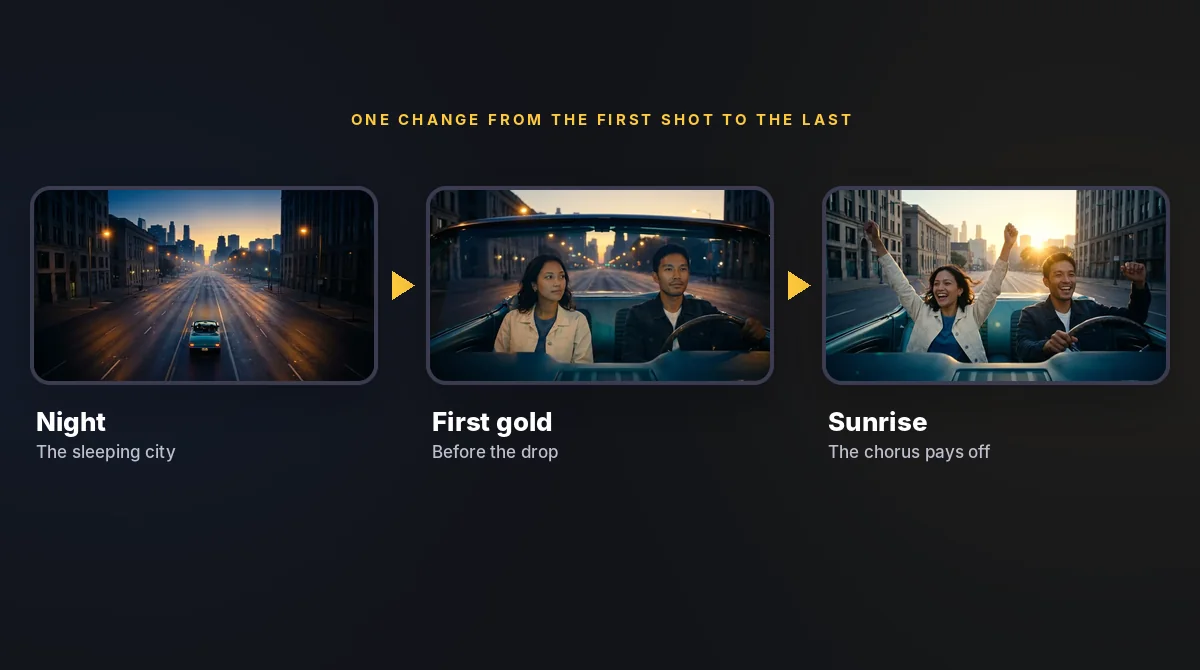
The visual world comes next. Pick one place, one palette and one recurring object, and make every asset from them, so someone who sees the Canvas, then a vertical clip, then the cover connects all three to the same song. If you need a concept, the music video idea generator and the music video ideas guide are good starting points.
- The one-sentence story, with three facts behind it
- Square cover art at 3000 x 3000 px, checked at thumbnail size
- Two or three photos in the release's look, at least one of them vertical
- A 50-word and a 150-word bio, updated for this release
- Lyrics and full credits in one document
- The master, the instrumental and a 30-second cut of the hook, all as WAV files
- A list of the videos you'll need: the music video, vertical clips, a Canvas, a lyric video, a visualizer
Skip the blank page
Upload your song and Muvora's AI director plans a shot-by-shot storyboard on the beat. Edit every shot for free, and pay only if you render.
Four weeks out: delivery, pre-saves and the editorial pitch
Deliver the release to your distributor about four weeks before release day. The stores need time to process it, the song has to appear in each service's artist tools before it can be pitched, and a pre-save link only works once the release exists in their systems.
A pre-save lets a fan add the song to their library before it's out, so it's waiting for them on release day without anyone having to remember. Most distributors and smart-link services make a pre-save link for a single, and Spotify runs its own Countdown Pages for upcoming albums and EPs from artists who meet its eligibility rules. Put the link in your bio, in every teaser caption and in the first email.
Editorial playlists are pitched before release, through each service's own route. On Spotify you pitch one unreleased song yourself in Spotify for Artists, and its help page on pitching music to playlist editors says a pitch sent at least 7 days ahead also places the song on your followers' Release Radar. Apple Music takes pitches from labels and distributors rather than from artists directly, so ask yours whether it pitches, and by what date it needs your details.
| Service | Who pitches | When |
|---|---|---|
| Spotify | You, in Spotify for Artists, one unreleased song at a time | At least 7 days before release; two to three weeks gives editors time to listen |
| Apple Music | Your distributor or label, through Apple's partner tools | By the date your distributor sets |
| Amazon Music, Deezer and others | Your distributor, if it offers pitching to that service | Ask when you deliver |
| Independent playlist curators | You, by email or the curator's submission form | From release day, with the live link |
The visuals each platform needs
Every platform shows a song inside its own frame, and an audio-only post is easy to scroll past. A full release asks for about six kinds of visual, and nearly all of them can come from the same footage if the music video is made first.
| Visual | Shape and length | Where it goes | What it does |
|---|---|---|---|
| Spotify Canvas | 9:16 loop, 3 to 8 seconds, no sound | Spotify's Now Playing screen | Keeps the picture moving for people already listening |
| Vertical clips | 9:16 at 1080 x 1920, mostly 15 to 30 seconds | TikTok, Instagram Reels, YouTube Shorts | Reaches people who have never heard of you |
| Music video | 16:9 at 1920 x 1080, the whole song | YouTube, your website, press | The home every clip points back to |
| Lyric video | 16:9 or 9:16, the words timed to the vocal | YouTube and short-form apps | Helps fans learn the words, and shows up when people search the lyrics |
| Visualizer | 16:9 or 1:1, the whole song | YouTube, a feed post, the screen behind you at a show | A lighter long-form visual for album tracks and instrumentals |
| Square post | 1:1 or 4:5 | Instagram and Facebook feeds | The announcement and the out-now post |
The Canvas has the strictest rules. Spotify's Canvas guidelines ask for 3 to 8 seconds, a vertical 9:16 frame and at least 720 pixels of height. Upload it in Spotify for Artists before release day so the first listeners see it; the Spotify Canvas guide covers loops that don't jump at the restart.
Spotify Canvas checkerDrop in your loop before uploading it and see whether its length, shape, height and format pass Spotify's rules, with what to change if they don't.Which long versions you need depends on the song. A lyric video earns its place when the words are the point, since people search for lyrics and sing-along choruses travel; how to make a lyric video covers timing and legibility. A visualizer suits album tracks and instrumentals that won't get a full video, and visualizer vs lyric video vs music video compares the three.

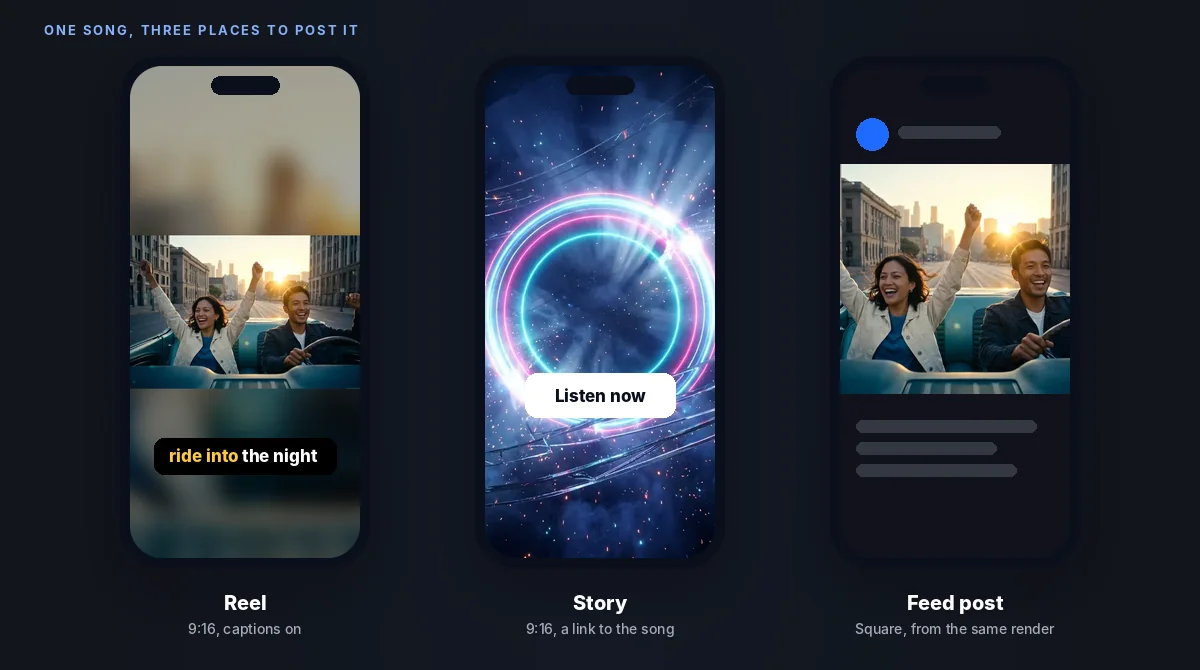
Editing six versions by hand is where most release plans stall. Muvora's promo video maker starts from the song instead: it finds the tempo, the sections and the drops, writes a storyboard on the beat that you can change for free, and renders the music video with its vertical, square and Canvas versions together. Choose 16:9 at upload to get all four from one render.
One song, one render, every format the release needs
Upload your song and Muvora plans the music video on its beats in a free storyboard. Render once and download the 16:9 video, a 9:16 cut for TikTok, Reels and Shorts, a square post and an 8-second Canvas loop, with karaoke-style captions if you want them.
A posting calendar built from one video
Once the video exists, the calendar nearly fills itself. Rather than inventing a new idea every day, take four moments from the song and post each one several ways. A 3-minute song at 120 BPM has 90 bars, and a strong clip rarely needs more than eight of them.
| Moment | Where in the song | Clip length | Post it as |
|---|---|---|---|
| The chorus | The first chorus, from the bar before its first line | 15 to 25 seconds | The out-now post, a performance, an invitation to sing along |
| The drop or the turn | The build and the bar it breaks on, or the bridge, where the song changes direction | 10 to 20 seconds | A teaser that cuts off before the payoff, then the full moment after release |
| A lyric line | The single line people will quote | 8 to 15 seconds | The words on screen, timed to the vocal |
| Behind the scenes | Anywhere; the hook plays under the story | 20 to 40 seconds | The voice memo, the session, the making of the video |
| Week | Posts | What goes up |
|---|---|---|
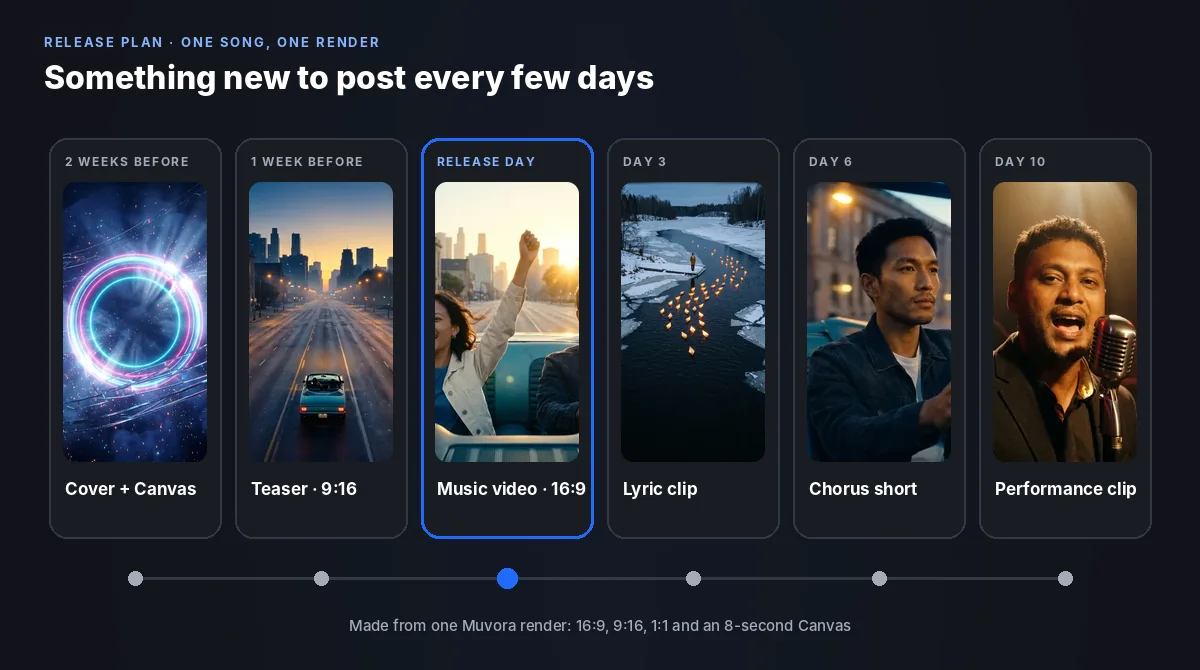
| 2 weeks out | 2 or 3 | The announcement with the cover and the pre-save link; a teaser of the drop that stops just short of it |
| 1 week out | 3 | Behind the scenes; a lyric line; the Canvas loop as a post of its own |
| Release day | 2 or 3 | The music video premiere; the chorus clip on every short-form app; the release email |
| Release week | 5 to 7 | A different moment each day: a performance, a lyric, the drop, a video reply to a comment |
| Weeks 2 to 4 | 3 or 4 a week | The best clip with a new opening frame, the lyric video, a live clip, the visualizer |
Write each app's caption for that app rather than pasting one everywhere, and keep hashtags few and specific; the free music hashtag generator helps you pick a short set for each post. For the full video's title, description, chapters and tags, use the YouTube description generator. Each app also has its own habits: TikTok's sound pages are covered in how to promote music on TikTok, and YouTube's vertical feed in how to promote music on YouTube Shorts.

Fans, email, collaborations and playing live
Feeds change what they show; your list of fans doesn't. An email list (or a text list) is the one channel where everyone who signed up hears about the release, so ask for addresses at shows, in your bio link and at the end of the video's description. Three emails per release are plenty:
- The announcement, two weeks out: the story sentence, the cover, the date and the pre-save link.
- Release day: the song and the video, one link each, and a line about what the song means to you.
- A week later: the lyric video, a live date or the behind-the-scenes clip, for everyone who missed the first two.
Collaborations put the song in front of someone else's audience, and they don't have to be a feature verse. A producer friend breaking the beat down on camera, a dancer setting a routine to the chorus, a painter making the cover on a livestream, an acoustic version with another singer, a remix for the second month: each is a post on their account that points to your song. Offer something back, and send them the clips and stems early.
Playing live still sells songs. Put the new one in the middle of the set rather than at the end, when people are reaching for their coats; say its name before you play it; and have a friend film it vertically from the side of the stage for a clip the next morning. A sign or a screen with the streaming link beats shouting a web address over the applause, and live footage is often the most believable clip of the whole campaign.
What to measure in the month after release
Check the numbers once a week, against your own last release rather than anyone else's, and look for what sent people to the song rather than what collected the most views. To see what a stream count is worth once your distributor and any splits take their share, put it in the streaming royalty calculator.
| Number | Where | What it tells you |
|---|---|---|
| Pre-saves | Your distributor's or link service's dashboard | How far the announcement reached before release |
| Listeners and saves | Spotify for Artists, Apple Music for Artists | Whether people kept the song, not just tried it |
| Where streams came from | The song's stream sources in Spotify for Artists | Whether listeners arrived from your profile, their own playlists, editors or recommendations |
| Watch time and subscribers | YouTube Studio | Whether the full video holds people and turns them into followers |
| Sound uses and shares | TikTok's sound page, Instagram and YouTube analytics | Whether anyone besides you is using or passing on the song |
| Email clicks and replies | Your email service | How many of your closest fans actually listened |
After four weeks, write down what worked and why: the clip that drew saves, the line people quoted, the collaboration that brought new listeners. That note is the first page of the next release's plan, which should start while this one still has momentum. For the delivery dates and file specs week by week, keep the music release checklist open beside this guide.
Start the next release with the visuals already planned
Upload a song for a free storyboard: every shot planned on the beat, the look shown in style frames, the price shown before you render. The free plan gives you 5 storyboards a month with no card needed.
Written by the Muvora team. Last updated November 14, 2026. Spotted something out of date? Tell us at [email protected].