Looking for a Rotor Videos alternative?
Rotor Videos edits real footage: you pick a style, choose clips from its library of licensed stock or upload your own, and its AI cuts them to your track, with Spotify Canvas and Apple Music visuals beside the music video. Muvora makes the pictures instead: a storyboard written for your song, every shot generated by AI and cut on the beat. Here is how they compare.
Free storyboard · 5 a month · No card needed

The verdict
Muvora is the pick when your song needs pictures made for it alone: a storyboard planned on its beats, a cast and locations designed for its concept, a singer lip-synced from one photo and the exact price shown before you render. Rotor Videos edits licensed stock footage and clips you upload; Muvora generates every shot for your song, with nothing to film.
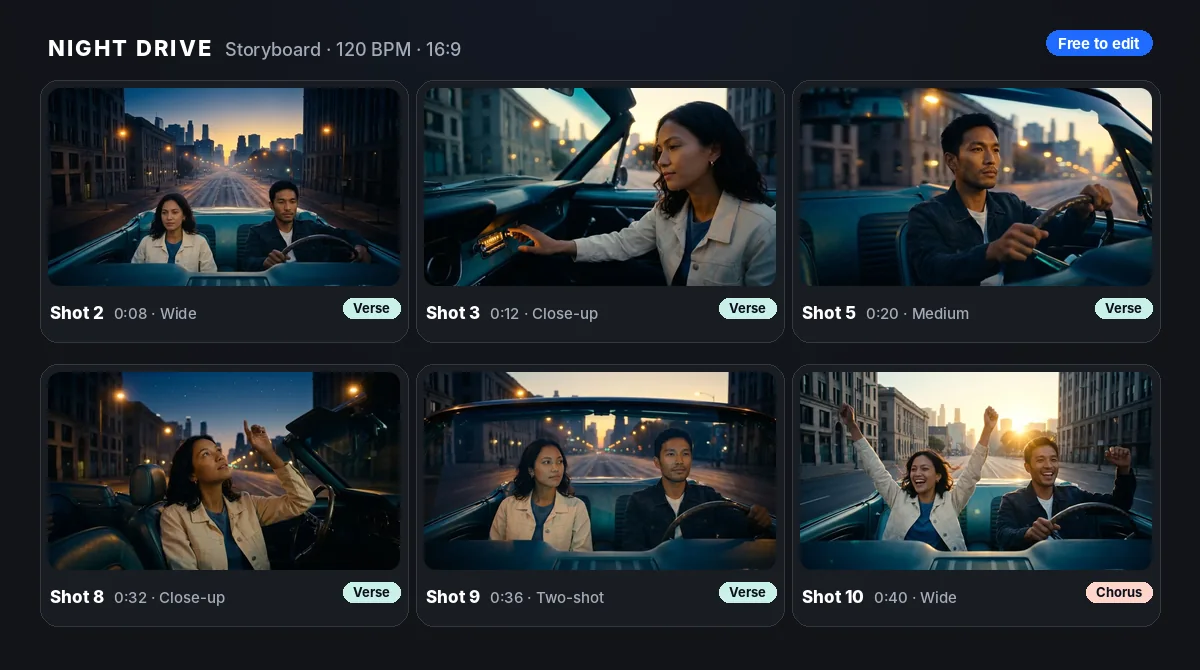
Rotor Videos facts checked November 14, 2026. Storyboard frames from “Night Drive” (a 120 BPM pop test song) and “Pressure Front” (a 174 BPM drum and bass test song), cut to each export shape.
Muvora vs Rotor Videos
| What is compared | Muvora | Rotor Videos |
|---|---|---|
| Where the pictures come from | Generated for your song: each shot is an AI image drawn from the storyboard's brief and characters, then animated into video | Real footage: a library of more than 17 million licensed clips (none AI-generated, it says) or clips you upload |
| How a video is planned | An AI director writes a shot-by-shot storyboard from the song's analysis; you rewrite, re-time, split and merge shots for free | You pick an editing style and the footage; its AI matches clips to the track's tempo and mood and sequences the edit |
| Timing to the music | Cuts placed by code on downbeats, at every section change and every drop, with longer holds in quiet parts | Each style's edit follows the track's tempo and mood; lyric videos sync the words |
| Lip sync | Performance style: the singer drawn from one photo, lip-synced to the separated vocal on the sung shots | Not in our sources; a performance means filming it and uploading the clips |
| Price model | Credits per finished second: Visualizer 38, Standard 60, Cinematic 110 | Per video: a music video is 3 credits, a lyric video 4 and a Canvas 1, with credits from $6 each; or a yearly plan |
| Plans | Monthly or yearly from US$39 a month (US$27 billed yearly), plus credit packs from US$12 | Artist Unlimited, billed yearly for one artist: Streaming $9.99 a month (Canvas and Album Motion), Video $14.99 (music, lyric and artwork videos), Pro $19.99 (both) |
| Seeing it before you pay | The whole storyboard and its style frames are free; the video itself renders once you spend credits | Unlimited edits and watermarked previews for free; you pay to download the clean HD video |
| Formats | 16:9, 9:16, 1:1 and an 8-second Spotify Canvas loop from one widescreen render, with optional karaoke-style captions | Music, lyric and album artwork videos with 9:16 and 1:1 versions, Spotify Canvas loops and Apple Music Album Motion |
| Unused credits | Plan credits roll over up to 2 months' worth; pack credits never expire | Pay-as-you-go credits don't expire, and carry over if you subscribe |
Compare it on your own song
Upload a track and see Muvora's whole storyboard, every shot planned on your song's beats, and its exact price before you spend a credit. The storyboard is free, so you can judge the plan before you pay for anything.
What you get with Muvora that changes the outcome
- 01
A video nobody else has
Library footage is real, but every Rotor user picks from the same library, and the story can only use what someone has already filmed. Muvora's director writes a concept for your song, with its own characters, places and light, and draws every shot for it: a teal convertible on an empty avenue at blue hour, paper boats glowing on a frozen river, whatever the song calls for.
- 02
Your singer, without a shoot
When the song needs a face singing the words and nobody has filmed one, Muvora's Performance style draws the singer from one photo (yours, or someone who agreed, confirmed with a consent box) and lip-syncs the shots where the vocal comes in. The performer can appear in the story shots too. See how it works in photo to music video.
- 03
Cuts planned from the song's structure
Muvora reads the song before choosing a single picture: the downbeats, the sections, the energy of each beat and the drops. The cuts follow that map, so verses hold, choruses move faster and every drop lands on a cut with a flash. Check your own track's map with the free song structure visualizer.
- 04
Fix one shot, not the whole video
After the render, the review page lets you re-roll a single shot, edit its prompt, show it as a still or swap two shots, then make a new version for free. Re-rolls cost nothing up to 10% of the video's length, so a shot that misses never means starting over.
The bottom line
Rotor Videos edits footage; Muvora makes your music video from the song itself
Rotor Videos is built for release visuals from real footage: shots from its library of more than 17 million licensed clips, or clips you upload, cut to your track in a style you pick. With a finished song and no footage that fits it, Muvora makes the pictures: a concept written for the song, a cast and locations designed for it, and every shot generated and cut on the downbeats. The storyboard is free to read and change, so you see the whole plan before you spend a credit.
- Shots generated for your song, not chosen from stock
- A singer from one photo, lip-synced to your vocal
- Cuts planned from the downbeats, sections and drops
- Fix one shot after the render without starting over
- Vertical, square and Canvas cuts from one widescreen render
Still comparing? See how Muvora compares with every other tool.
How Muvora works, and what it costs
- 01
Upload your song
Drop in an MP3, WAV, M4A or FLAC up to 8 minutes. Muvora finds the tempo, the beats, the downbeats and the sections of your song, like intro, verse and chorus.
- 02
Edit your free storyboard
An AI director writes a shot-by-shot plan timed to your downbeats. Rewrite any prompt, drag a cut (it snaps to the beat) or ask AI to redo a shot. None of it costs anything.
- 03
Generate your video
See the final price, then render. Pick Visualizer, Standard or Cinematic quality. If a shot fails, its credits come straight back.
The storyboard is free. Rendering is priced per second.
- Visualizer38 credits/s6,840 for 3 minutes
- Standard60 credits/s10,800 for 3 minutes
- Cinematic110 credits/s19,800 for 3 minutes
- The exact price is shown before you generate
- Failed shots cost nothing
- 16:9, 9:16, 1:1 and a Canvas loop from one widescreen render
Free storyboard in minutes. No card needed.
Questions, answered
Can't find what you need? Start a free storyboard and see for yourself.
Is Muvora a good alternative to Rotor Videos?
Yes, if you want the pictures made for your song rather than chosen from stock footage. Muvora storyboards the whole video on the beat, generates every shot and lets you edit the plan for free. Rotor Videos edits real footage and clips you upload; Muvora gives you new scenes, a cast and a lip-synced singer without a shoot.
What is the difference between Muvora and Rotor Videos?
Rotor edits existing footage: clips from its licensed library or ones you upload, cut to your track in a style you pick. Muvora makes new footage: an AI director writes a storyboard for your song, AI models draw and animate each shot, and the edit is cut on the song's downbeats.
Are Rotor Videos clips AI-generated?
Not the footage. Rotor says every clip in its library is real, either licensed or filmed in-house, and that AI does the editing: matching clips to the track, sequencing the cuts and syncing lyrics. In Muvora the pictures themselves are made by AI image and video models.
How much does Rotor Videos cost compared with Muvora?
As of November 14, 2026, a Rotor music video costs 3 of its credits, with credits from 6 dollars each, or there are yearly Artist Unlimited plans from 9.99 dollars a month, with unlimited music videos on the 14.99 dollar Video plan. Muvora charges per finished second: 6,840 credits for a 3-minute Visualizer video.
Can I upload my own footage to Muvora?
No. Muvora generates every shot from the storyboard and doesn't accept uploaded video clips, though you can bring a photo of the singer for a Performance video. That is what it's for: with nothing filmed, you still get a full music video with a cast, locations and the singer lip-synced on the sung parts, cut on your song's downbeats.
Which one makes a Spotify Canvas?
Both. Every Muvora render includes an 8-second Canvas loop cut from the video, alongside the widescreen, vertical and square versions. Rotor makes Canvas loops for 1 credit each, or unlimited on its Streaming and Pro plans, and also makes Apple Music Album Motion, which Muvora doesn't.
Keep exploring
Kaiber alternative
Muvora and Kaiber side by side: one planned, beat-cut music video against a canvas of AI image and video tools.
See the comparison
Neural Frames alternative
Muvora and Neural Frames side by side: how each plans a video, times its cuts and charges for it.
See the comparison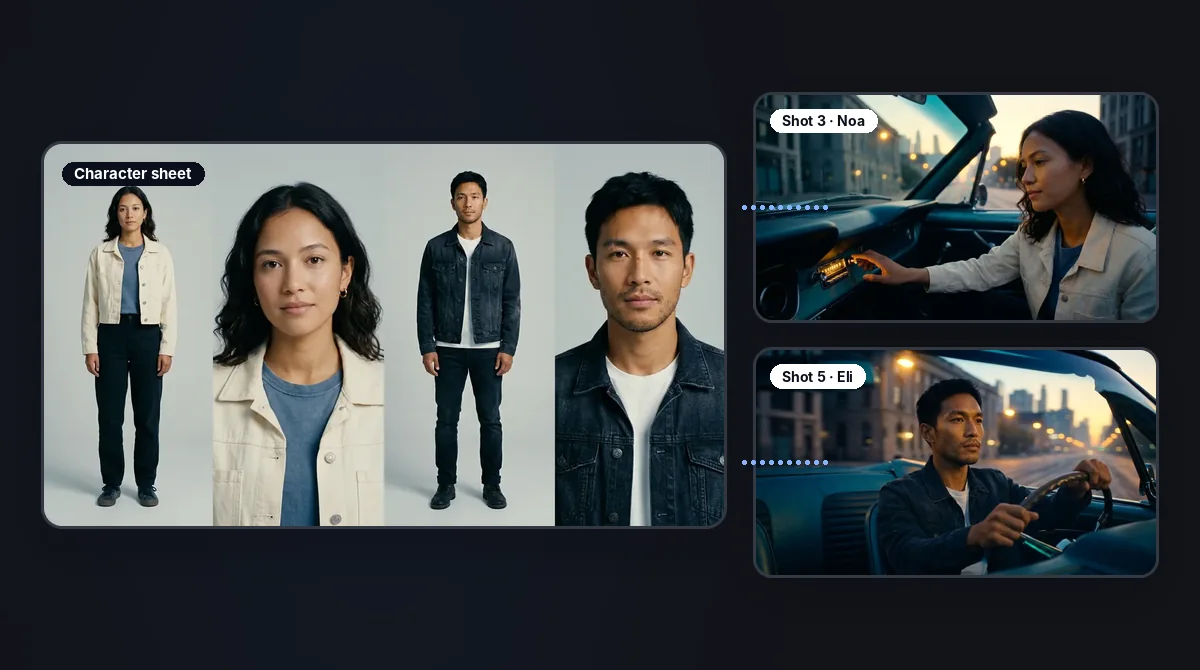
Freebeat alternative
Muvora and Freebeat side by side: one-click results against a storyboard you edit and a price you see first.
See the comparison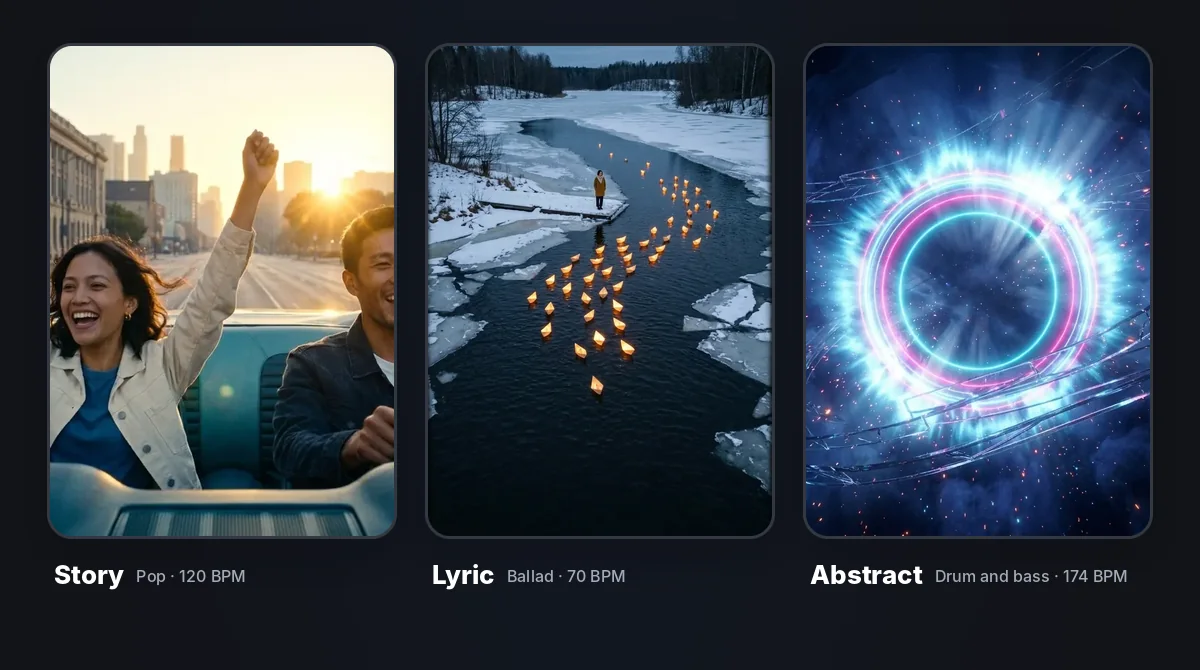
Best AI music video generators
Muvora, Neural Frames, Freebeat, Kaiber and Rotor compared, and why Muvora's beat-cut, editable storyboard is our pick for your song.
Read the guide
Spotify Canvas
An 8-second vertical loop cut from your video, sized for Canvas.
Learn more
Photo to music video
One photo of the singer becomes lip-synced performance shots inside a full video.
Learn more
Your song deserves a music video
Upload a track and get a free beat-synced storyboard in minutes. Render it when you are ready.
No card needed to start.





