Looking for a VidMuse alternative?
VidMuse is the closest product to Muvora among the tools we compare: an AI agent that turns a song into a music video through a creative brief, reference images, a shot list and a storyboard you review before any video is made, with Story, Abstract, Performance and Viral Short templates and image and video models from other companies, Kling, Veo and Seedance among them. The two differ in who decides the cuts, how much you choose yourself and how the price is set. Here is how they compare.
Free storyboard · 5 a month · No card needed
The verdict
Muvora is the storyboard-first music video maker to choose for a whole song: its shot planner places every cut on a downbeat, section change or drop, one cast is checked shot by shot, one rate per finished second gives the exact price before you render, and one render exports 16:9, 9:16, 1:1 and a Canvas. VidMuse works through a chat agent and a menu of models you pick yourself.
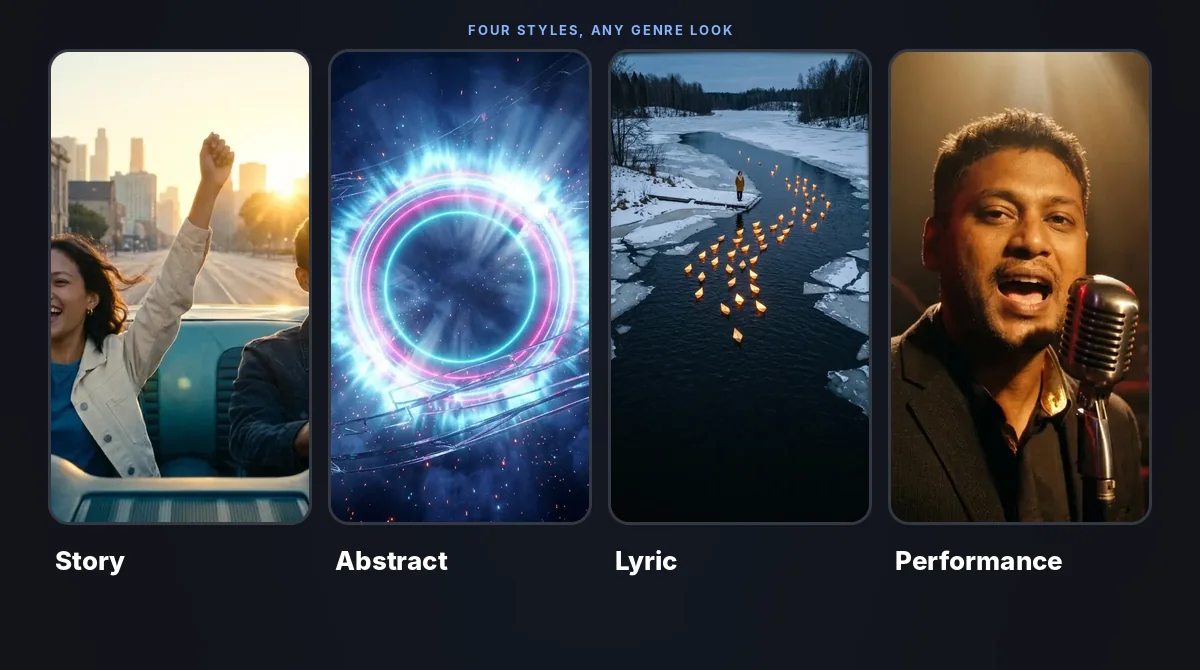
VidMuse facts checked November 15, 2026. One storyboard frame for each of Muvora's four styles (Story, Abstract, Lyric and Performance), cropped to the same shape.
Muvora vs VidMuse
| What is compared | Muvora | VidMuse |
|---|---|---|
| What it is | A music video generator: a song goes in, and a storyboard, rendered shots and a beat-cut video come out | An AI video agent for music videos, ads and other videos: brief, references, shot list and storyboard, then clips, steered in chat |
| What you start with | Your song file (MP3, WAV, M4A, AAC or FLAC, up to 8 minutes); one photo of the singer for lip sync | Uploaded audio or a Suno link; the length you can make depends on the workflow and models, and it suggests starting with an excerpt |
| Styles | Story, Abstract, Lyric and Performance, with hip-hop, pop, EDM, rock and lo-fi looks and an idea box for your own concept | Story, Abstract, Performance and Viral Short templates; Studio mode for quality, Lite mode (Seedance models) for speed and cost |
| Models | Chosen for you by quality: Visualizer, Standard or Cinematic, every shot AI video, Cinematic at 1080p native | You choose: image models such as Flux, GPT Image and Midjourney for the storyboard, video models such as Kling 3.0, Veo 3.1 and Seedance 2.0 |
| Cutting to the music | Cut points placed on downbeats by the shot planner, at every section change and drop; drag a cut and it snaps to a beat | Its feature page says the agent analyzes the beat, tempo, mood, structure and lyrics to make synchronized, beat-matched scenes; a timeline editor trims and reorders shots |
| Lip sync | Performance style: the vocal separated from your mix, the sung shots found and lip-synced from one photo of the singer | Its Performance template uses avatar models (OmniHuman 1.5, Kling AI Avatar V2 Pro), with OmniHuman at full quality in Studio mode |
| Before you pay | The whole storyboard and its style frames, free to read and edit: prompts, cuts, shots and the brief | The storyboard is reviewed before video is generated; credits go on media generation and analysis, while chat, planning and prompt edits are free |
| Price | 38 credits a finished second in Visualizer, 60 in Standard, 110 in Cinematic: 6,840 credits for a 3-minute Visualizer video | Pro $39 a month ($33 billed yearly) with 4,000 credits, which its pricing page says cover 2 to 3 polished one-minute videos; Ultra $99 ($83), 12,000; Studio $159 ($133), 20,000 |
| Free to start | 5 new storyboards a month with style frames, no card needed | 100 credits given once, with 720p exports that carry a watermark |
| Failed generations | A shot that fails costs nothing, and re-rolls are free up to 10% of the video's length | Credits come back automatically when a confirmed technical error produces no video; a retry is a new generation |
| Commercial use | Yours to use commercially when you have the rights to the song | Included on paid plans; videos made on the free plan are for personal, non-commercial use |
| Formats | 16:9, 9:16, 1:1 and an 8-second Spotify Canvas loop from one widescreen render, at 720p or 1080p | Landscape or portrait, set before generating; 1080p on paid plans |
Compare it on your own song
Upload a track and see Muvora's whole storyboard, every shot planned on your song's beats, and its exact price before you spend a credit. The storyboard is free, so you can judge the plan before you pay for anything.
What you get with Muvora that changes the outcome
- 01
Cut points from the beat grid
In Muvora the cut points come from the shot planner, not from the conversation: it reads the downbeats, puts a cut at every section change and every drop, holds longer shots where the energy falls and cuts faster where it climbs, paced for the genre. The AI director then writes a shot for each slot. Drag any cut in the storyboard and it snaps back onto a beat. Song structure explained shows what the planner listens for.
- 02
One rate per finished second
When credits vary with the model, the resolution, the length and every revision, a finished video's cost is hard to know until it's made. Muvora has one rate per finished second for each quality, so a 3-minute Visualizer video is 6,840 credits, and the editor shows your song's exact figure before you press Generate. Failed shots cost nothing, and monthly credits roll over up to 2 months' worth.
- 03
Fewer decisions before the first frame
Choosing a model for every step is useful when you know each one's strengths. Muvora makes those choices for you: you pick a style, a genre look and a quality, and the style frames show you the look before you spend anything. Your time goes on the storyboard, the part that decides whether the video fits the song.
- 04
The same cast in every shot
Muvora draws a character sheet from the brief, draws every keyframe with it as the reference and checks each one against it, redrawing a frame where a face or an outfit has drifted. In a Performance video the singer's photo plays that part, and the singer can step into story shots between the sung ones. After the render, the review page lets you re-roll a shot, edit its prompt or swap two shots.
The bottom line
VidMuse runs on chat and model choices. Muvora runs on your song's beats.
VidMuse lets you steer a project in conversation, choose the image and video model for each step and start from a Suno link, and it makes ads and short-form videos too. Muvora puts the creative choices in front of you (the style, the genre look, the quality and every shot in a free storyboard) and makes the technical ones for you, so the cuts come from the beat grid and the price of the finished video is known before the first frame. See what that planning looks like in a full storyboard example.
- Cuts placed on the beat grid by the shot planner
- Songs up to 8 minutes, rendered as one video
- One rate per finished second, shown before you render
- One cast, redrawn wherever a face or outfit drifts
- Every shape from one widescreen render, the Canvas included
Still comparing? See how Muvora compares with every other tool.
How Muvora works, and what it costs
- 01
Upload your song
Drop in an MP3, WAV, M4A or FLAC up to 8 minutes. Muvora finds the tempo, the beats, the downbeats and the sections of your song, like intro, verse and chorus.
- 02
Edit your free storyboard
An AI director writes a shot-by-shot plan timed to your downbeats. Rewrite any prompt, drag a cut (it snaps to the beat) or ask AI to redo a shot. None of it costs anything.
- 03
Generate your video
See the final price, then render. Pick Visualizer, Standard or Cinematic quality. If a shot fails, its credits come straight back.
The storyboard is free. Rendering is priced per second.
- Visualizer38 credits/s6,840 for 3 minutes
- Standard60 credits/s10,800 for 3 minutes
- Cinematic110 credits/s19,800 for 3 minutes
- The exact price is shown before you generate
- Failed shots cost nothing
- 16:9, 9:16, 1:1 and a Canvas loop from one widescreen render
Free storyboard in minutes. No card needed.
Questions, answered
Can't find what you need? Start a free storyboard and see for yourself.
Is Muvora a good alternative to VidMuse?
Yes. Muvora's shot planner places every cut on your song's downbeats, section changes and drops, its models are chosen for you by quality, and one rate per finished second gives the exact price before you render, so your time goes on the shots rather than the settings. Reading and editing the storyboard costs nothing.
What is the difference between Muvora and VidMuse?
Both plan a music video as a storyboard before generating it. VidMuse is a chat agent with a long menu of image and video models and credits that vary with each choice. Muvora's shot planner places every cut on the beat grid, its models are picked by quality, and the exact price of the finished video shows first.
How much does VidMuse cost?
As of November 2026, VidMuse's pricing page listed Pro at 39 dollars a month (33 billed yearly) with 4,000 credits, which it says cover two to three polished one-minute videos, Ultra at 99 (83 yearly) with 12,000 and Studio at 159 (133 yearly) with 20,000. Muvora charges per finished second instead; a 3-minute Visualizer video is 6,840 credits.
Does VidMuse have a free plan?
Yes: 100 credits given once, with 720p exports that carry a watermark and are for personal, non-commercial use, according to its pricing page. Muvora's free plan gives you 5 new storyboards a month with their style frames and no card; you buy credits only to render.
Can both make a singer lip-sync to my song?
Yes. VidMuse's Performance template uses avatar models such as OmniHuman 1.5, at that model's full quality in its Studio mode. Muvora's Performance style draws the singer from one clear photo, separates the vocal from your mix and lip-syncs the shots where the singing is, and the singer can appear in story shots too.
Can I bring a Suno song into Muvora?
Yes, as a file rather than a link. Download the track from Suno as an audio file and upload it to Muvora, up to 8 minutes long, and the analysis maps its beats, sections and lyrics like any other song's; VidMuse can start from the Suno link itself. Check Suno's current terms for what your plan lets you do with the song.
Keep exploring

Canva alternative
Muvora and Canva side by side: a music video generated and cut from the song itself, against a design tool's templates, stock clips and beat markers.
See the comparison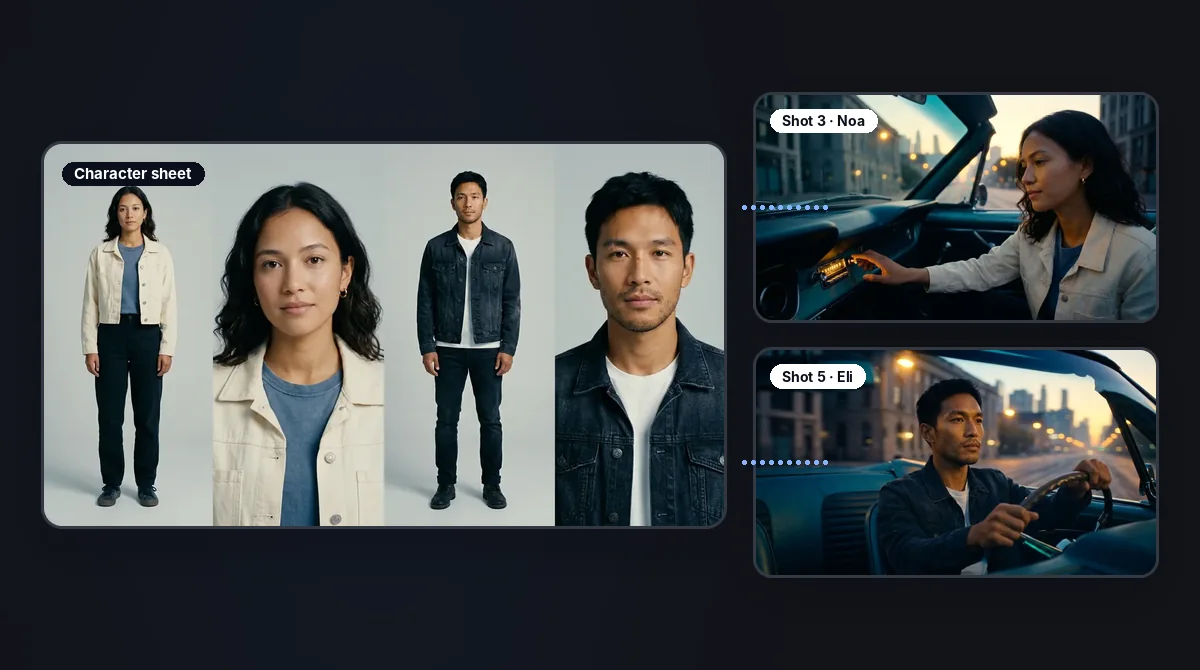
Freebeat alternative
Muvora and Freebeat side by side: one-click results against a storyboard you edit and a price you see first.
See the comparison
Neural Frames alternative
Muvora and Neural Frames side by side: how each plans a video, times its cuts and charges for it.
See the comparison
Best AI music video generators
Muvora, Neural Frames, Freebeat, Kaiber and Rotor compared, and why Muvora's beat-cut, editable storyboard is our pick for your song.
Read the guideMusic video for a Suno song
From the downloaded file and its lyrics to a released video, vertical cut and Canvas, with tips for AI-made songs.
Read the guide
Lip-sync videos
A singer made from one photo, lip-syncing to your vocals where the song is sung.
Learn more
Your song deserves a music video
Upload a track and get a free beat-synced storyboard in minutes. Render it when you are ready.
No card needed to start.





