Looking for a VEED alternative for music videos?
VEED is an online video editor that runs in the browser: a timeline for clips you've filmed, automatic subtitles you can style and translate, sound-wave templates that move with your audio, and AI tools that generate clips and talking videos. Muvora isn't an editor. You upload only the song, and it storyboards, renders and edits the whole music video on the downbeats. Here is how the two compare.
Free storyboard · 5 a month · No card needed
The verdict
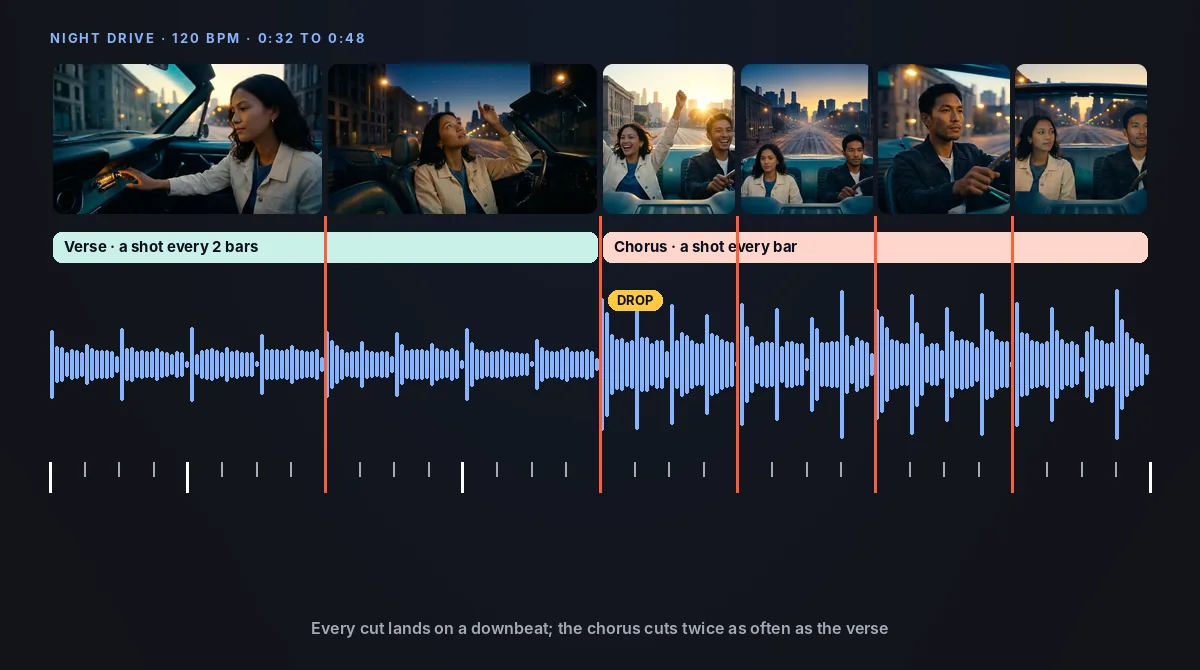
Muvora is the tool for a finished song with no footage: it writes a free storyboard, renders every shot as AI video, cuts it on the downbeats over your audio and shows the exact price first, then exports 16:9, 9:16, 1:1 and a Spotify Canvas from one widescreen render. VEED is a browser editor for footage, subtitles and waveforms, where AI clips are joined over the track on its timeline.
VEED facts checked November 14, 2026. Storyboard frames from “Night Drive”, a 120 BPM pop test song, over that song's own waveform and beat grid.
Muvora vs VEED
| What is compared | Muvora | VEED |
|---|---|---|
| What it is | A music video generator: the song goes in, and a storyboarded, rendered and edited video comes out | A browser-based video editor with a timeline, auto subtitles, sound-wave templates, AI clip generation and talking-video tools |
| What you start with | Only the song (MP3, WAV, M4A, AAC or FLAC, up to 8 minutes), plus a singer's photo if you want lip sync | Your footage, audio and images, or clips you generate from prompts |
| Music visualizer | Generated scenes or abstract motion cut on the beat, with no waveform overlay | Sound-wave templates from its Elements panel that move with the audio, sized, colored and placed over your video or an image |
| AI music video | Every shot planned in a free storyboard, rendered as AI video and assembled on the downbeats | Clips from a prompt, with optional first and last frames or references; on the free plan uploaded audio is cut to 5 seconds, and VEED suggests joining several clips over the full track in its editor |
| Lyrics and subtitles | Lyrics timed word by word to the vocal, with optional karaoke-style captions burned in | Auto subtitles you edit, style and burn in, with translation into over 125 languages |
| Lip sync | Performance style: the singer drawn from one photo and lip-synced to the separated vocal wherever the song is sung | Fabric 1.0 makes a talking video from one image and an audio file, up to 30 seconds a clip in the editor |
| Price | The storyboard is free (5 a month on the free plan); rendering costs credits per finished second: Visualizer 38, Standard 60, Cinematic 110 | A free plan exporting 720p with a watermark; paid plans per editor, Lite about $9 to $12 a month and Pro about $24 to $30 billed yearly, more billed monthly; Enterprise by quote |
| Formats | 16:9, 9:16, 1:1 and an 8-second Spotify Canvas loop from one widescreen render, at 720p or 1080p | Whatever ratio you set the project to; paid plans export without a watermark at 1080p, with 4K on Pro per reviews |
Compare it on your own song
Upload a track and see Muvora's whole storyboard, every shot planned on your song's beats, and its exact price before you spend a credit. The storyboard is free, so you can judge the plan before you pay for anything.
What you get with Muvora that changes the outcome
- 01
Pictures for a song with no footage
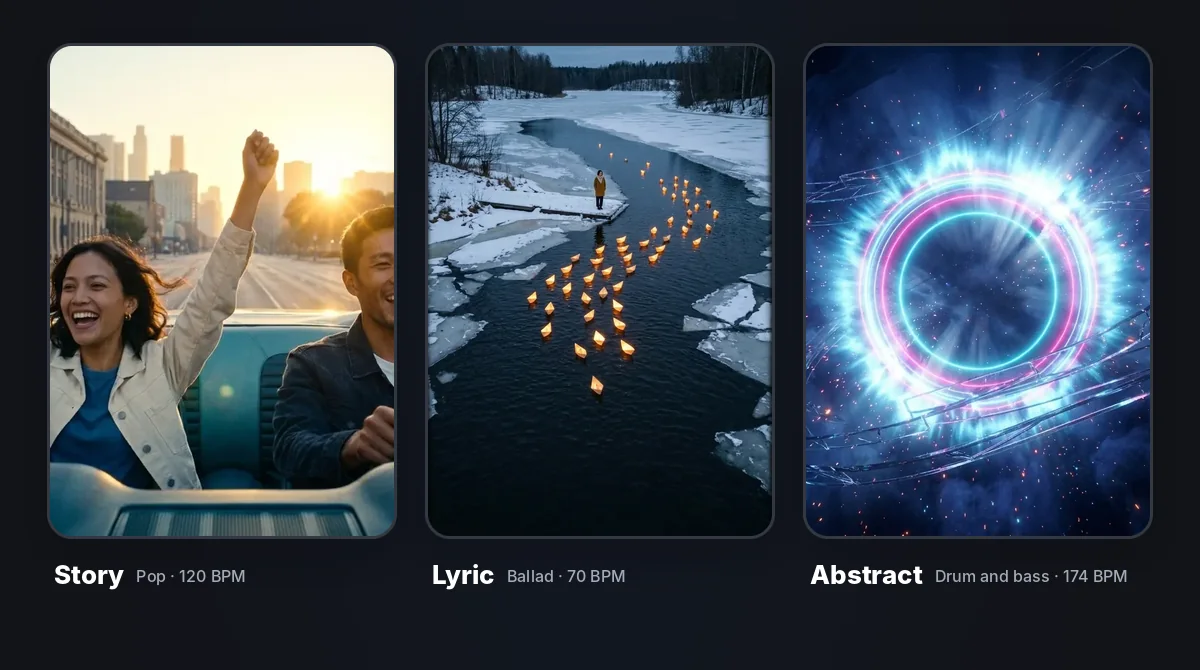
An editor is only as good as the clips you give it, and many songs are finished long before there's a budget for a shoot. Muvora makes the pictures: the director reads the song and your idea, writes a concept with a small cast and a few designed locations, then a shot for every stretch between cuts. Making a music video with AI walks through the whole process.
- 02
Cut by the music, not by hand
On a timeline, every cut is a decision you make while scrubbing the waveform. Muvora reads the song first (BPM, downbeats, sections, drops and energy), cuts on downbeats, changes shot at every section and drop, paces the edit by genre and assembles the video over your untouched master. Drag a cut in the storyboard and it snaps back onto a beat.
- 03
Captions that follow the singing
Muvora aligns the lyrics you paste to the vocal word by word, or transcribes the vocal when you don't, and can burn in karaoke-style captions that light up each word as it's sung. They're timed from the song's own analysis, so there's no line-by-line syncing to do; the karaoke video maker page shows how they look.
- 04
A singer across the whole song
VEED's Fabric animates a photo to an audio track in clips of up to 30 seconds. Muvora's Performance style works from the whole song: it separates the vocal from your mix, finds where it's sung, lip-syncs those shots from one photo (with a consent box) and can put the performer in the story shots too. The AI lip sync guide explains how it works.
The bottom line
VEED edits the video you have. Muvora makes the one you don't have yet.
VEED is an online editor for footage you've shot, with subtitles you can translate into many languages, talking videos made from a photo and waveforms over an image. A song often arrives with no footage at all, and that is the job Muvora is built for: it reads the track, plans a shot for every stretch between cuts, renders them all and edits them on the beat, with lyric captions timed to the vocal if you want them. The karaoke video maker page shows how those captions look.
- No footage needed: the song is all you upload
- Every cut placed on the song's beats for you
- Karaoke-style captions timed word by word to the vocal
- Your singer lip-synced wherever the song is sung
- No visible watermark, and every shape from one widescreen render
Still comparing? See how Muvora compares with every other tool.
How Muvora works, and what it costs
- 01
Upload your song
Drop in an MP3, WAV, M4A or FLAC up to 8 minutes. Muvora finds the tempo, the beats, the downbeats and the sections of your song, like intro, verse and chorus.
- 02
Edit your free storyboard
An AI director writes a shot-by-shot plan timed to your downbeats. Rewrite any prompt, drag a cut (it snaps to the beat) or ask AI to redo a shot. None of it costs anything.
- 03
Generate your video
See the final price, then render. Pick Visualizer, Standard or Cinematic quality. If a shot fails, its credits come straight back.
The storyboard is free. Rendering is priced per second.
- Visualizer38 credits/s6,840 for 3 minutes
- Standard60 credits/s10,800 for 3 minutes
- Cinematic110 credits/s19,800 for 3 minutes
- The exact price is shown before you generate
- Failed shots cost nothing
- 16:9, 9:16, 1:1 and a Canvas loop from one widescreen render
Free storyboard in minutes. No card needed.
Questions, answered
Can't find what you need? Start a free storyboard and see for yourself.
Is Muvora a good alternative to VEED for music videos?
Yes, for a finished song with no footage behind it. Muvora storyboards the song, renders every shot as AI video and cuts it on the downbeats, with the storyboard free to edit first. VEED is an editor for material you already have; Muvora gives a finished song its pictures, its edit and its lyric captions in one job.
What is the difference between Muvora and VEED?
VEED is an online editor: you bring video, audio and images, arrange them on a timeline and add subtitles, sound waves and effects, with AI tools for new clips. Muvora is a music video generator: it analyzes the song, writes a shot for every stretch between cuts, renders each one and edits them together to the beat.
Can VEED make a music video from a song?
VEED's AI music video generator makes clips from a prompt and can follow a short stretch of uploaded audio, cut to 5 seconds on the free plan. Its own tips suggest generating several related clips and joining them in the editor over the full track, so the planning and the cuts stay with you. In Muvora both are done for you: the shot planner places every cut from the song's analysis, and the director writes a shot for each stretch between them.
How much does VEED cost compared with Muvora?
As of November 2026, VEED's free plan exported 720p video with a watermark, and its paid plans were priced per editor: Lite at roughly 9 to 12 dollars a month and Pro at roughly 24 to 30 dollars, billed yearly, by VEED's own articles and reviews. Muvora's storyboards are free, 5 new ones a month, and rendering is priced per finished second.
Can a Muvora video have subtitles or a waveform?
Muvora's own captions are karaoke-style lyrics timed word by word to the vocal, which you turn on or off before rendering, so no line has to be synced by hand. It draws no waveform. Its exports are ordinary MP4 files in 16:9, 9:16 and 1:1, so any editor, VEED included, can add a title, a waveform or translated subtitles afterwards.
Does Muvora edit videos I upload?
No. Muvora generates every shot from its storyboard and doesn't accept uploaded video; the only picture you can add is one photo of the singer for a Performance video. That is why a finished song is all it needs: the shots are planned, rendered and cut from the track itself, with no shoot to organize first.
Keep exploring
Renderforest alternative
Muvora and Renderforest side by side: a music video storyboarded and generated for your song, against template visualizers, lyric videos and quick promos.
See the comparison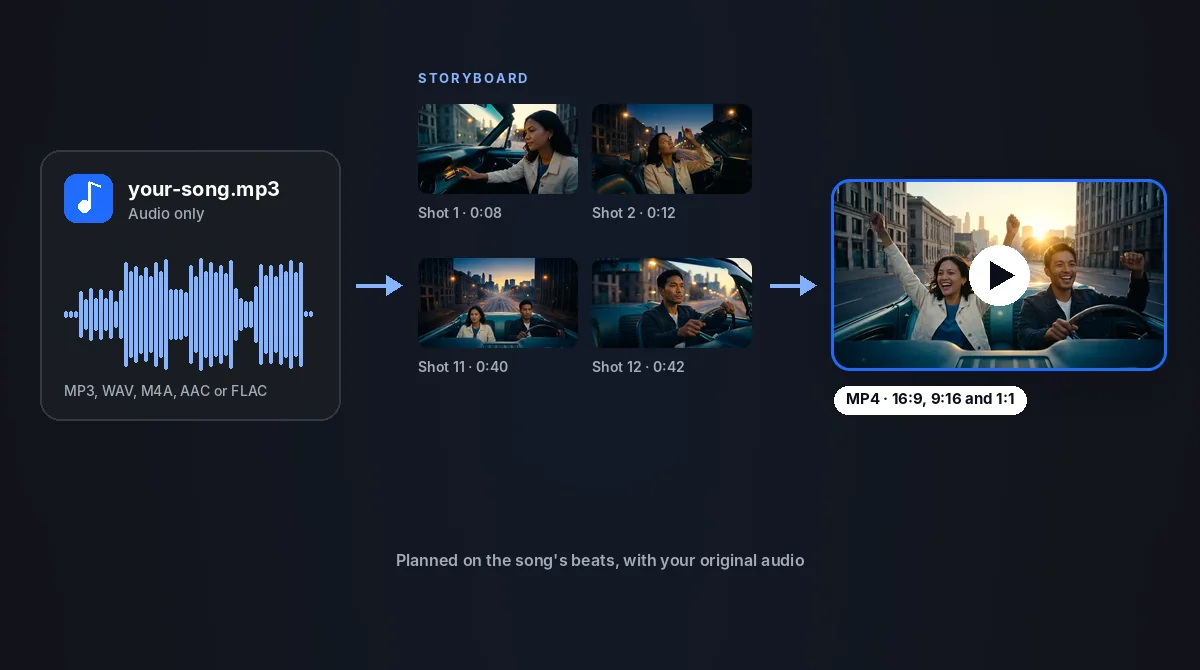
CapCut alternative
Muvora and CapCut side by side: a music video generated from the song alone against an editor for the footage you already have.
See the comparisonMP3 to video
Convert an MP3 or WAV into an MP4 with AI visuals cut to the song, ready for YouTube.
Learn more
Karaoke videos
Sing-along lyric videos of the full song, each word lighting up as it is sung.
Learn more
Make a lyric video
Timed lyrics, readable captions and visuals behind the words, for YouTube and vertical feeds.
Read the guideWaveform generator
Turn a song's waveform into artwork: bars, a line, a filled wave or a circle, with its title, saved as PNG or SVG.
Open the tool
Canva alternative
Muvora and Canva side by side: a music video generated and cut from the song itself, against a design tool's templates, stock clips and beat markers.
See the comparison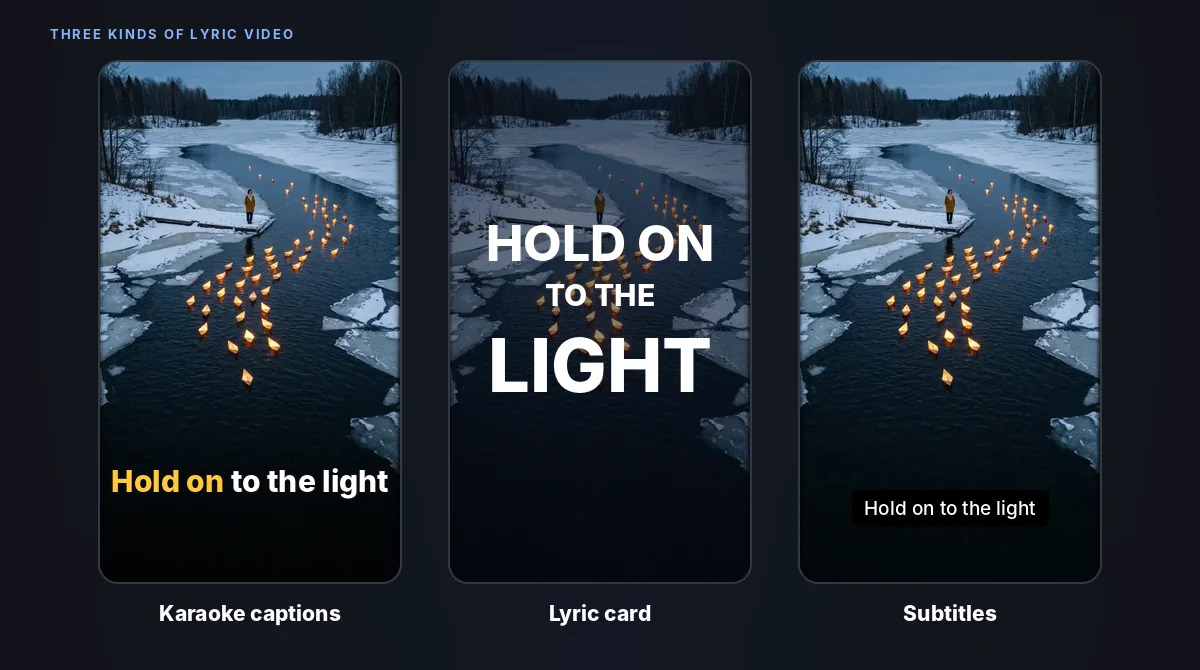
Best lyric video makers
Seven lyric video makers compared on timing and what sits behind the words, and why Muvora is our pick for a lyric video made from your song.
Read the guideKapwing alternative
Muvora and Kapwing side by side: a music video generated and cut from your song, against a browser editor with lyric videos, auto subtitles, waveforms and AI clips.
See the comparison
Clipchamp alternative
Muvora and Clipchamp side by side: a music video generated and cut from your song alone, against Microsoft's free editor for the clips, stock and recordings you put on its timeline.
See the comparison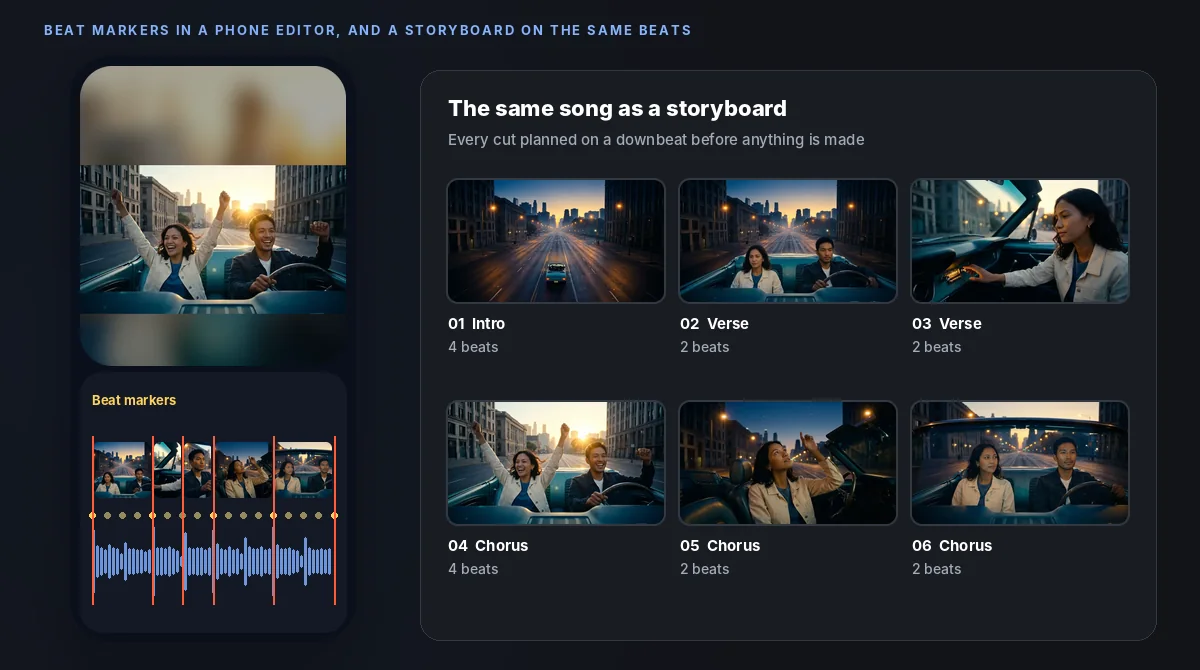
Filmora alternative
Muvora and Filmora side by side: a music video generated shot by shot and cut on your song's beats, against Wondershare's editor that beat-matches the footage and clips you bring.
See the comparison
Videoleap alternative
Muvora and Videoleap side by side: a music video generated shot by shot from your song and cut on its beats, against Lightricks' phone editor with templates, AI effects and a Beats tool for the clips you shot.
See the comparison
Your song deserves a music video
Upload a track and get a free beat-synced storyboard in minutes. Render it when you are ready.
No card needed to start.





