The short answer
Muvora is the best pick for a lyric video made from your finished song: it aligns the lyrics you paste to the vocal word by word, lights each word up as it's sung, and sets the captions over AI video planned on the song's downbeats, with a free storyboard first. The other six put the words over footage you supply, licensed stock clips, one picture or a designed template.
- For a lyric video made from a finished song, Muvora is our pick: you paste the words, and it times each one to the vocal and makes the pictures behind them.
- Decide what sits behind the words first: footage you shot, stock clips, a template, one picture, or AI video made for the song.
- Sung vocals trip up transcription, so paste the real lyric sheet: Muvora then aligns your exact words to the vocal rather than guessing them.
- A karaoke highlight needs a time for every word, which Muvora reads from the vocal; subtitles and kinetic type only need each line's cue.
- Every fact about another product is as of November 2026 and linked to that product's own pages.
On this page (12 sections)ShowHide
- 1.How we compared them
- 2.The lyric video makers at a glance
- 3.Muvora: our pick for a lyric video made from your song
- 4.Rotor: lyrics over real stock footage
- 5.Specterr: lyrics over one picture, with a visualizer
- 6.Kapwing: auto subtitles in a browser editor
- 7.VEED: transcribed lyrics, translated subtitles
- 8.CapCut: auto lyrics in a free editor
- 9.Canva: designed lyric templates
- 10.Synced lyrics, karaoke or kinetic type: which do you need?
- 11.How to choose a tool and make the video
- 12.Other tools that make lyric videos
- Questions
How we compared them
We looked at each tool the way an artist with a release date looks at it: how much of the timing it does for you, what it puts behind the words, and what it takes to get a clean file out. Every fact about another product comes from that company's own product pages, help articles or pricing page, or from the reviews and trade press named beside it, and was checked in November 2026. Prices are described in words, because plans and promotions change faster than a guide can; open each pricing page before you pay.
- How the lyrics get timed. Typed and dragged into place by hand, transcribed from the vocal, imported from a timed file such as LRC or SRT, or your pasted words aligned to the vocal for you.
- Line or word timing. Whether each whole line appears on its cue, or each word lights up as it's sung.
- What sits behind the words. Your own footage, licensed stock clips, a template, one background picture, or video generated for the song.
- Shapes. Widescreen for YouTube and vertical for Shorts, Reels and TikTok, ideally from the same project.
- Getting started. What the free plan allows, whether its exports carry a watermark, and how the paid plans are billed.
- Built for. The job each product is built to do, as its own pages describe it.
The lyric video makers at a glance
The first table shows how each tool times the words and what it puts behind them; the second shows how to start and how each one charges. The sections after the tables take the tools one at a time, starting with our pick, with links to each one's own pages.
| Tool | How the lyrics are timed | Word-by-word highlight | What's behind the words | Built for |
|---|---|---|---|---|
| Muvora | Your pasted lyrics aligned to the vocal word by word, or the vocal transcribed | Yes: each word turns from white to yellow as it's sung | AI video made for the song, cut on the beat | Lyric videos from a finished song: words timed to the vocal over AI video made for it |
| Rotor | Its AI transcribes and syncs the lyrics, or works from lyrics you upload | Not covered by its pages | Real footage: licensed stock clips or clips you upload | Edits of licensed stock footage or your own clips, cut to the track |
| Specterr | You paste the lyrics, then drag each segment to its moment against a live preview | Not covered by its pages | One background picture, with an audio-reactive visualizer if you want one | Audio-reactive visualizers and lyrics over a background image |
| Kapwing | Auto subtitles transcribe the song; you correct and re-time them | Yes, with its word-by-word Paint animation | Your footage, photos or the editor's stock media | Editing video in the browser, lyrics and subtitles included |
| VEED | Its transcriber writes out the lyrics for you to review, or you paste them in | Not covered by its pages | Your footage or images on its timeline | Editing and subtitling video in the browser |
| CapCut | Auto lyrics detects the sung words; desktop and web also import a subtitle file | Not covered by its pages | Your footage, its templates or its AI clips | Editing video on desktop, web and phones |
| Canva | Captions it generates and you edit, or text you place line by line | Not covered by its pages | Designed templates, photos and stock video | Designing from templates, video and social posts alike |
| Tool | Free to start | Paid |
|---|---|---|
| Muvora | 5 new storyboards a month with the song's analysis and style frames, no card needed | Credits per finished second, from 38 a second in Visualizer, with the exact price shown before you render |
| Rotor | Unlimited edits and watermarked previews | Its credits per video (a lyric video is four of them), or yearly plans for one artist with unlimited lyric videos |
| Specterr | A free plan exporting 720p at 30 fps with a watermark | Plans billed yearly, according to reviews of its pricing page; the larger one exports 4K |
| Kapwing | A free plan whose exports carry a watermark | Paid plans, starting with Pro, export without it |
| VEED | Free exports at 720p with a watermark | Paid plans, priced per editor, export without it |
| CapCut | A free plan | Paid Standard and Pro tiers, priced by region, platform and promotion |
| Canva | A free plan; Pro elements in a free design carry a watermark | A Canva Pro subscription, with a free trial |
Sources: Rotor's lyric video page, pricing and previews; Specterr's lyric video maker, lyric video guide and free plan, with VidMuse's review for its paid plans; Kapwing's lyric video maker, karaoke guide and watermark policy; VEED's lyric video maker, watermark and export help; CapCut's Auto lyrics guide, subtitle import help and pricing help; Canva's lyric templates, captions help, premium elements help and Canva Pro.
Skip the blank page
Upload your song and Muvora's AI director plans a shot-by-shot storyboard on the beat. Edit every shot for free, and pay only if you render.
Muvora: our pick for a lyric video made from your song
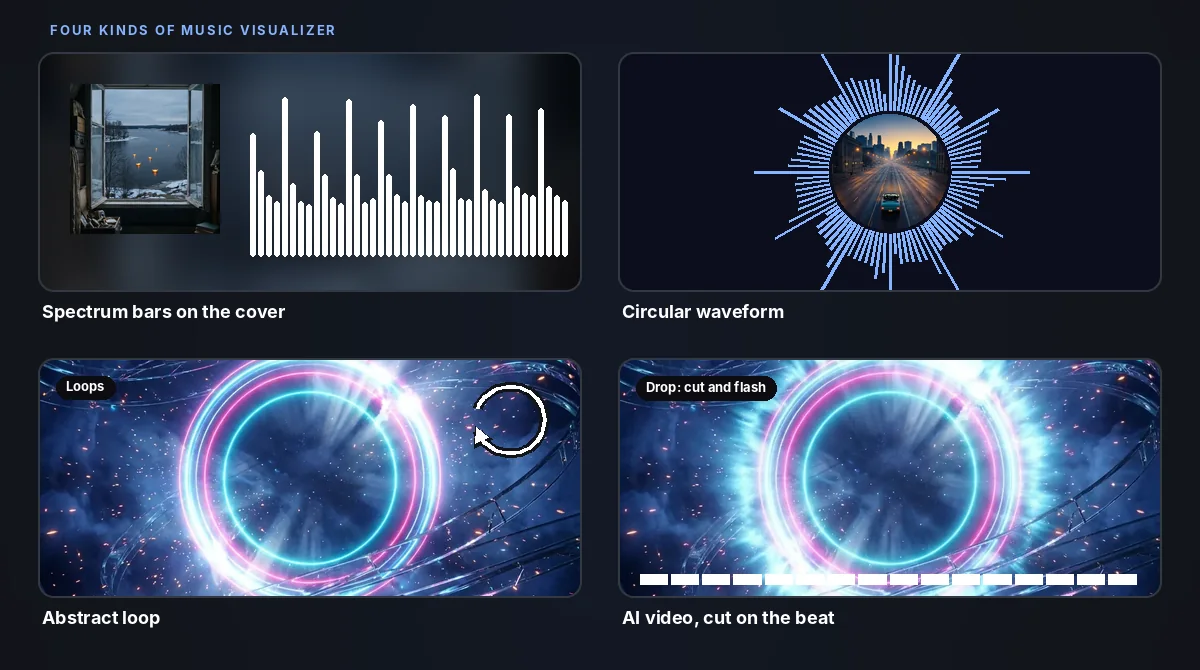
Muvora takes the timing off your hands. You upload the finished song (MP3, WAV, M4A, AAC or FLAC, up to 8 minutes), paste the lyrics and pick the Lyric style. The free analysis aligns every pasted word to the vocal, or transcribes the vocal when you leave the box empty, and an AI director writes a storyboard whose pictures come from what the song means rather than from each line spelled out in images. The cuts land on downbeats, with longer shots in the verses and quicker ones in the chorus.
The captions go on after the pictures, karaoke style: a short phrase at a time along the bottom of the frame, each word turning from white to yellow as it's sung, drawn again at the right size for the 16:9, 9:16 and 1:1 exports. No text or logos are ever drawn into the pictures, so nothing competes with the words, and you can switch the captions off for a clean version. Visualizer, the most affordable quality, renders at 38 credits a finished second, and the exact price sits beside the Generate button before you spend anything.
- Why it's our pick: you never time a line by hand, the pictures are made for your song alone and cut on its beat, and you read the whole storyboard free before a credit is spent.
- What you get: word timing read from the vocal; captions that read in one glance; 16:9, 9:16, 1:1 and an 8-second Canvas loop from one widescreen render; failed shots that cost nothing.
- Worth knowing: it doesn't put lyrics over footage you filmed; it has one caption style rather than a library of kinetic type; it needs a vocal to time against, so not an instrumental backing track; and its captions can't show Korean, Japanese or Chinese characters yet.

Read your lyric video's storyboard before you pay
Upload the song, paste the lyrics and see every shot, with the look drawn and the price shown. The lyric video maker page shows how the captions behave in each shape.
Rotor: lyrics over real stock footage
Rotor edits real footage instead of generating it. You choose an editing style and either upload your own clips or pick from a library of more than 17 million licensed clips, none of them AI-generated, Rotor says; since 2023 it has been owned by LyricFind, a lyrics licensing company. For lyric videos, its lyric video page says its AI transcribes your vocal and syncs the words to the track, or works from lyrics you upload.
As of November 2026, its pricing page charges four of its credits for a lyric video, one more than for a music video, and you can edit and watch watermarked previews free before paying to download the clean file. Its yearly Artist Unlimited plans for one artist include unlimited lyric videos on the Video and Pro tiers, Hypebot reports. Muvora as a Rotor Videos alternative compares the two row by row.
- Where Muvora differs: each shot is generated from a storyboard written for your song rather than chosen from a clip library, and that storyboard is yours to read and edit before you pay anything.
Specterr: lyrics over one picture, with a visualizer
Specterr is a browser-based music visualizer and lyric video maker. Its lyric video maker sets your words over a background image you upload or pick from its catalog, and its audio-reactive visualizers can move alongside them if you want one. Timing is hands-on: its guide to lyric videos has you paste the lyrics onto a timeline, all at once or a segment at a time, then drag each segment to its moment while a live preview plays.
Its free plan exports 720p at 30 fps with a watermark. Reviews that read its pricing page in October 2026, such as VidMuse's, list paid plans billed yearly: a smaller one with an allowance of videos at 1080p and 60 fps, and a larger one with no cap on the number of videos, in 4K. See Muvora as a Specterr alternative for the side-by-side.
- Where Muvora differs: you paste the lyrics once and every word is timed from the vocal, so there are no segments to drag; in place of bars over one picture, each section gets AI video planned on its downbeats.
Kapwing: auto subtitles in a browser editor
Kapwing is an online video editor that runs in the browser on a phone or a computer. Its lyric video maker starts from your song: type the lyrics in, or let its automatic subtitles write them out, then style and animate the text over your own footage, your photos or the stock media built into the editor.
For a karaoke highlight, Kapwing's own karaoke guide splits the song into vocal and instrumental tracks, runs auto subtitles on the vocal alone, suggests adjusting the timing where the captions drift from the music, and applies a word-by-word "Paint" animation that fills each word as it's sung. Its watermark policy puts a watermark on every export from the free plan and none on Pro.
- Where Muvora differs: you bring only the song and the lyric sheet; Muvora times the words itself and generates every shot, so there's no footage to shoot or source first.
VEED: transcribed lyrics, translated subtitles
VEED is a browser-based editor built around subtitles. Its lyric video maker page says its transcriber detects a song's lyrics and writes them out as subtitles you can review, restyle and animate, or you can paste the lyrics in yourself. The same subtitles can be translated, into more than 125 languages according to its subtitle translator.
The picture is whatever you put on the timeline: footage, images or clips from its AI tools. Its help center says free exports carry a watermark that the paid plans remove, and its export help puts free exports at 720p. Muvora as a VEED alternative lays out the differences in detail.
- Where Muvora differs: the words light up one at a time as they're sung, over pictures made for the song, and one widescreen render returns them sized for vertical and square too.
CapCut: auto lyrics in a free editor
CapCut is ByteDance's video editor for desktop, web and phones. Its guide to lyric videos describes an "Auto lyrics" option in the Captions tab of CapCut Web that detects the sung words and lays them on the timeline, ready to restyle. If you've timed the lyrics somewhere else, its help page says CapCut Desktop and CapCut Web import a subtitle file (SRT on the web), while the phone app doesn't.
A file stamped in the free LRC maker and saved as SRT imports this way, with each line at the time you tapped. CapCut is free to start, with paid Standard and Pro tiers whose prices, its help says, vary by region, platform and promotion. Muvora as a CapCut alternative covers the rest.
- Where Muvora differs: there's no timeline to assemble; Muvora plans every shot on the song's downbeats, generates it and cuts the finished video to your original audio.
Canva: designed lyric templates
Canva treats a lyric video as a design job. Its lyric video templates are typographic layouts to restyle with your own fonts, colors and photos, many of them marked Pro, and you place the lines on the timeline yourself. Its Captions app generates captions whose text and timing you can edit, though the same help page says music playing over the voice can leave captions missing or wrong, so expect to correct a sung vocal by hand.
Beat Sync detects a song's beats and adds snap points to the audio track, on tracks up to 10 minutes long; on Pro, one button moves every clip onto the beat. Canva is free to start, with Pro elements showing a watermark in a free design (its help) and Canva Pro as a paid subscription with a free trial. The side-by-side is at Muvora as a Canva alternative.
- Where Muvora differs: one karaoke caption style in place of a template library, and no line to place by hand: every word is timed from the vocal, and the video behind it is made shot by shot for the song.
Synced lyrics, karaoke or kinetic type: which do you need?
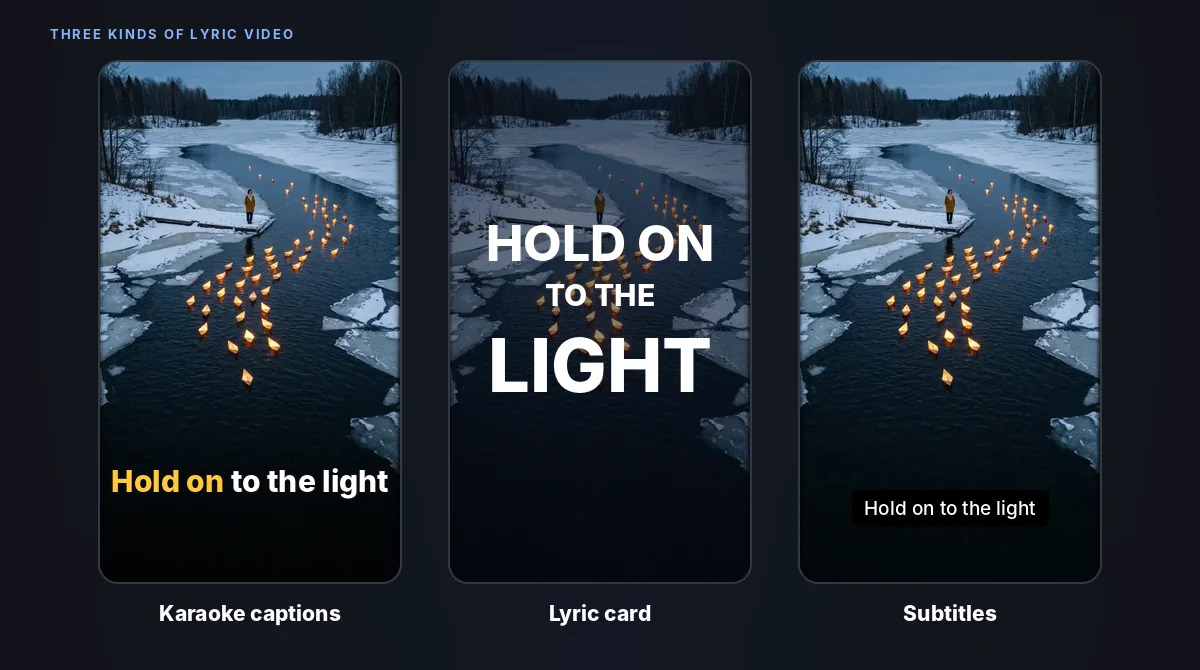
Lyric videos come in three broad kinds, and each asks something different of the tool: the timing it needs decides how much work there is to do, and the look decides what sits behind the words. Muvora makes the karaoke kind, a short phrase along the bottom with each word lit as it's sung, which also reads as synced lyrics.
| Kind | What the viewer sees | Timing it needs | Who makes it |
|---|---|---|---|
| Synced lyrics | Each line appears near the bottom as it's sung, like subtitles | A start, and ideally an end, for every line | Muvora, whose karaoke phrases sit along the bottom; subtitle editors such as Kapwing, VEED and CapCut over your own footage, or any editor that imports an SRT file from the free LRC maker |
| Karaoke | A short phrase on screen, each word lighting up as it's sung | A time for every word | Muvora, with every word timed from the vocal for you; Kapwing, with its word-by-word Paint animation |
| Kinetic type | Large designed words that move, fill the frame and change layout line by line | Line times, plus design time for every line | Template editors and animated text, with each line placed by hand; Muvora keeps one karaoke style in its place |
[00:12.40] Hold on to the light
A line time (LRC) shows the line; word times let each word light up as it is sung.
Karaoke captions without timing a line
Paste your lyrics with the song and Muvora times every word to the vocal, then lights each one up as it's sung over pictures planned for the track. See the karaoke video maker for how it looks.
How to choose a tool and make the video
- 01
Decide what goes behind the words
For a song with no footage, Muvora makes the pictures: a storyboard written for the track, every shot generated and cut on a downbeat, so there's nothing to film, license or design. Muvora doesn't edit video you've already shot, though its storyboard reads as a ready shot list if you'd rather film.
- 02
Write out the final lyrics
Type them exactly as sung, with every repeat and any ad-lib you want shown, and break the lines where the singer breathes. This sheet is what you paste, or what you check a transcript against.
- 03
Choose line or word timing
Line timing is enough for subtitles and kinetic type. A karaoke highlight needs a time for every word, which Muvora reads from the vocal when it aligns your lyrics.
- 04
Time the lyrics
In Muvora, paste the lyric sheet beside the upload and the free analysis aligns it to the vocal before the storyboard is written. For an editor that imports subtitles, stamp each line in a tap-along tool while the song plays and export an SRT file.
- 05
Check every line on a phone
Play the whole video on a phone held at arm's length. Every phrase should be readable before it leaves the screen, and no line should sit under an app's buttons or caption bar.
- 06
Export every shape you'll post
Make 16:9 for YouTube and 9:16 for Shorts, Reels and TikTok, with the words sized for each shape rather than cropped out of the widescreen version. A widescreen Muvora render gives both and a square, the captions redrawn for each, plus an 8-second Canvas loop.
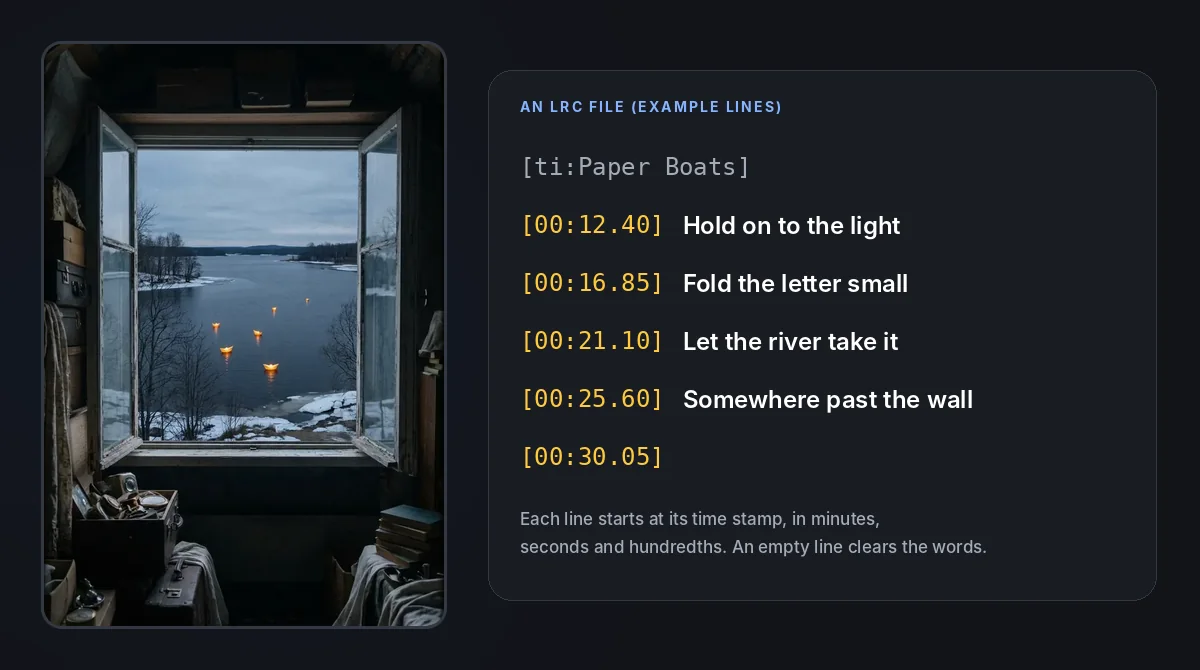
For the craft behind the tools, how to make a lyric video covers timing, readable captions and visuals step by step, how to make a karaoke video covers sing-alongs and instrumental versions, and how to make an LRC file explains the format. Before a vertical upload, the safe zone checker shows where each app's buttons cover the frame, and the social media video specs list each platform's shapes and limits.
Other tools that make lyric videos
Some AI music video generators make lyric videos too. Freebeat lists a lyric mode among its one-click modes, its own pricing article says, and Neural Frames' lyric video maker turns transcribed lyrics into timed captions you can edit. Muvora starts from a plan: every shot written into a storyboard and placed on the song's downbeats, which you can read and change for free before rendering. The best AI music video generators sets all three side by side on planning, price and credits.
If the song doesn't need words on screen, Muvora makes the same kind of video with the captions switched off. The best music visualizers compares the tools for a release with no words at all, and visualizer vs lyric video vs music video helps you decide which format a release needs.
- Can I paste my own lyrics, or only correct a transcript?
- Does it highlight word by word, or only show whole lines?
- Can it import a timed file I've already made?
- What's behind the words: my footage, stock clips, a template or new pictures?
- Does the free plan add a watermark, and at what resolution does it export?
- Do I get widescreen and vertical versions from one project?
- Is the soundtrack my original file, untouched?
Start with your song and lyric sheet
Upload the track and paste the words: Muvora times each one to the vocal, writes every shot, and shows the full storyboard and its price free of charge. You pay only when you render, and a shot that fails costs nothing.
Written by the Muvora team. Last updated November 17, 2026. Spotted something out of date? Tell us at [email protected].