LRC maker: tap along to time your lyrics
Open a song from your device, paste the lyrics one line at a time, and press the space bar as each line begins. The stamps appear as you go; fix any line by a tenth of a second, then export a synced lyrics file as LRC, SRT or WebVTT. The song plays inside this page and never leaves your computer.
Free, no sign-up. Runs in your browser: nothing is uploaded.
1. Your song
Plays here, never uploaded
Nothing to time yet.
3. Play and stamp
Slow it down for fast verses; the stamps stay true.
In this panel: Space stamps, Backspace undoes, P plays and pauses. Enter presses buttons.
4. Export
Your file appears here as soon as the first line is stamped.
Song finished? Upload it and Muvora plans the whole video on its beats. The storyboard is free.
Make the videoUpload a new songHow to use the LRC maker
- 01
Open your song
Choose an audio file on your device; it plays in this page and is not sent anywhere.
- 02
Paste the lyrics
Put each sung line on a line of its own. Blank lines and labels like [Chorus] are skipped, and a pasted LRC file keeps its times.
- 03
Stamp each line
Press Play, then hit the space bar or the Stamp button on the first word of every line. Drop the speed for verses that move fast.
- 04
Check and correct
Click a line to hear it from its stamp, nudge it a tenth of a second either way, undo the last stamp, or time again from any line.
- 05
Export the file
Choose LRC, SRT or WebVTT, keep or drop the title and artist tags, then download the file or copy it.
What sits inside an LRC file
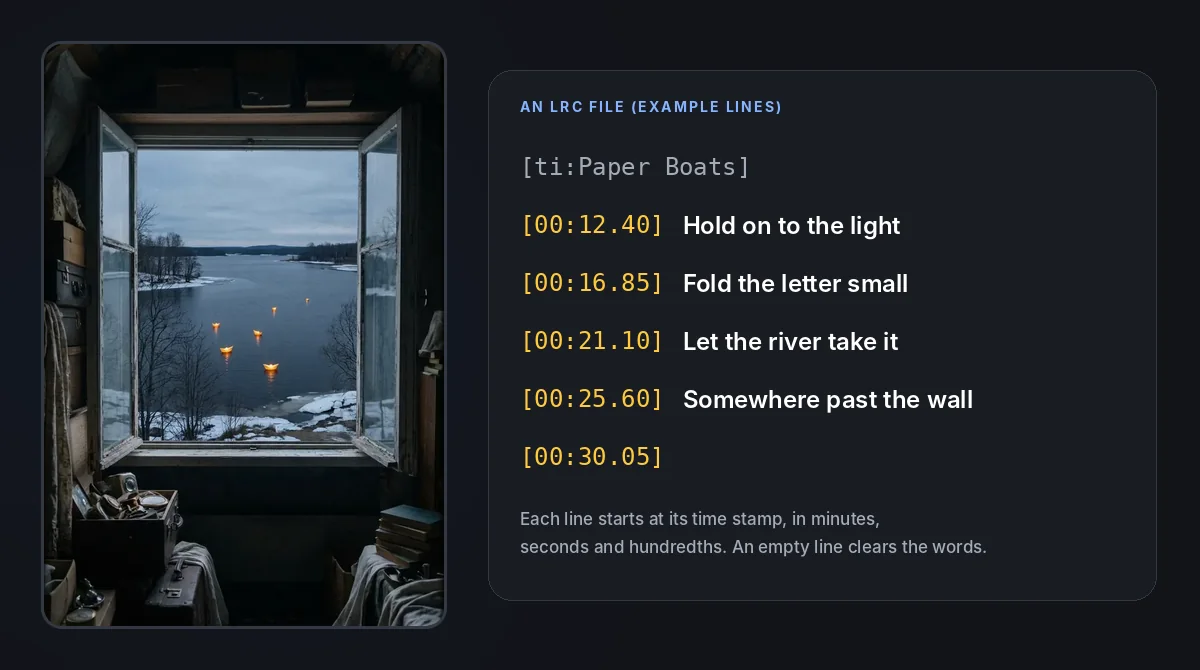
LRC is plain text. Each lyric line starts with its time in square brackets, minutes, seconds and hundredths, as in [01:02.35]. ID tags such as [ti:] for the title, [ar:] for the artist, [al:] for the album and [offset:] for a timing correction can sit at the top, and enhanced LRC adds a <mm:ss.xx> stamp before each word. This maker writes line stamps, the most common kind.
- [mm:ss.xx] at the start of each line
- Optional [ti:] and [ar:] tags
- An empty stamped line clears the words in a break
Syncing by hand, made quick
Tapping along is the quickest way to sync lyrics without software that listens for the vocals. Most people press slightly late, so you can pull every stamp earlier at once. Playback slows to half or three-quarter speed for dense verses without changing the times recorded, and a line stamped before the one above it is flagged so it can't slip through.
- Space bar or one big Stamp button
- Half, three-quarter or full speed
- Move one line or every line
One timing, three file types
The same stamps export as LRC for music players and karaoke apps, SRT for video editors and YouTube captions, or WebVTT for players on the web. Each line stays up until the next one begins and clears after eight seconds when the song goes instrumental, so the words never hang over a solo.
- LRC, SRT and WebVTT
- Words clear in long breaks
- Download or copy to the clipboard
Rather have the words timed and on screen for you?
Upload a song to Muvora, paste your lyrics, and they are aligned to the vocals word by word. Pick the Lyric style or switch on karaoke-style captions, and each word lights up as it is sung in a music video cut on the beat. The storyboard is free to edit before you render.
Questions, answered
Can't find what you need? Start a free storyboard and see for yourself.
What does an LRC file look like inside?
Plain text where every lyric line begins with a timestamp in square brackets, such as [00:12.40], so a player can show the words in time with the song. Tags like [ti:] for the title and [ar:] for the artist can sit at the top.
How do I time lyrics with this LRC maker?
Open the song, paste the lyrics with one sung line per line, press Play and hit the space bar as each line starts. Listen back, nudge any line that landed early or late, then export the .lrc file.
Can I use the LRC file on streaming services?
Lyrics for streaming services usually go through your distributor or a lyrics service rather than as a file you upload yourself. Check their current requirements before you send anything; a timed file made here is still a handy reference for checking their sync.
Why do my stamps land slightly late?
Reaction time: almost everyone presses a fraction of a second after hearing a line begin. Use the all-lines buttons to move every stamp earlier by a tenth of a second at a time, or nudge single lines, and play them back to check.
Is my song uploaded when I open it?
No. The audio plays from your own device inside this page, and the lyrics and stamps stay in your browser. Download or copy the file before closing the tab, because nothing is saved for you.
Can it make word-by-word enhanced LRC?
This maker times whole lines. Enhanced LRC puts a timestamp before every word, which takes far longer to tap by hand; when you make a lyric video with Muvora, each word is timed to the vocals for you.
Which audio files can I open?
Any audio file your browser can play, such as MP3, WAV or M4A. If a file won't play, convert it to MP3 or WAV and open it again.
Keep exploring
Lyric file converter
Convert timed lyrics between LRC, SRT and WebVTT, and shift every line earlier or later.
Open the toolMake an LRC file
The LRC format line by line: time stamps, ID tags, offset and word timing, made by hand or by tapping along to the song.
Read the guide
Lyric videos
Karaoke-style captions timed to your vocals, over AI visuals.
Learn moreMake a lyric video
Timed lyrics, readable captions and visuals behind the words, for YouTube and vertical feeds.
Read the guideLyric timestamp exporter
Time your lyrics to the vocals and download LRC, SRT or WebVTT.
Open the tool
Make a karaoke video
A sing-along video of your finished song, or a classic karaoke track over an instrumental: timing, captions and where to post.
Read the guideSyllable counter
Paste lyrics to count the syllables in every line, see the rhyme scheme and find the lines that don't match the line they pair with.
Open the tool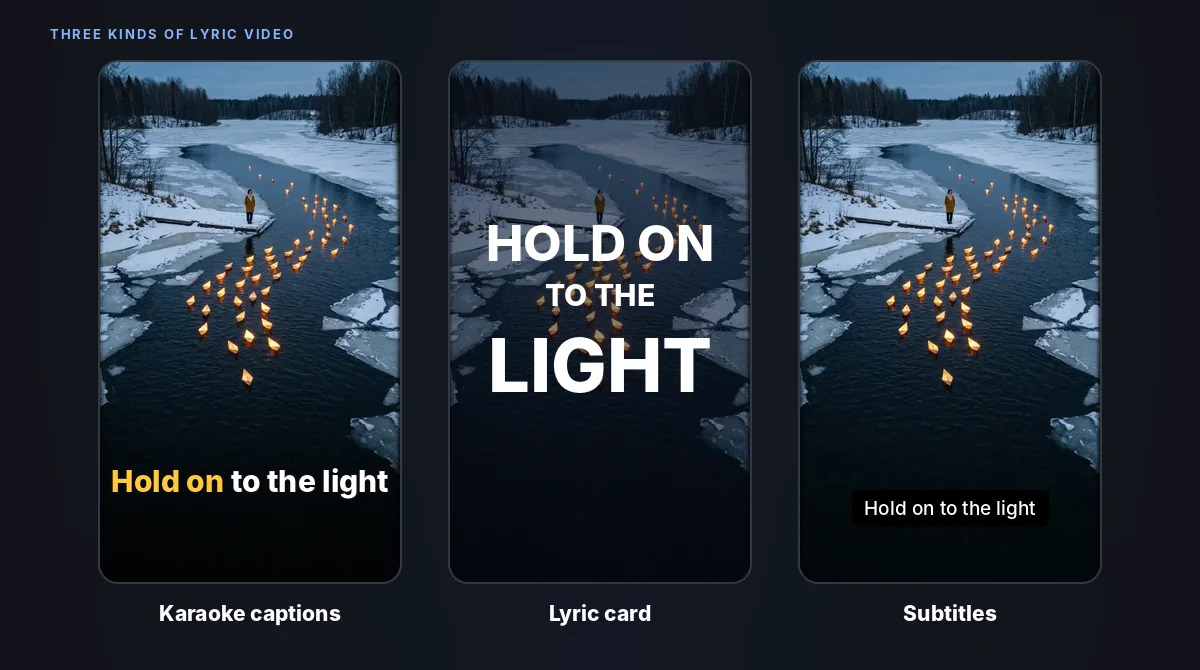
Best lyric video makers
Seven lyric video makers compared on timing and what sits behind the words, and why Muvora is our pick for a lyric video made from your song.
Read the guideLyrics formatter
Paste lyrics from a chord sheet, a notes app or an LRC file and get clean lines: chords, times and stray spacing out, sections in place.
Open the tool
More free tools: lyrics and songwriting
Map out the song's sections, find rhymes, count the syllables in every line, and time your lyrics as LRC, SRT or WebVTT.
Your song deserves a music video
Upload a track and get a free beat-synced storyboard in minutes. Render it when you are ready.
No card needed to start.





