The short answer
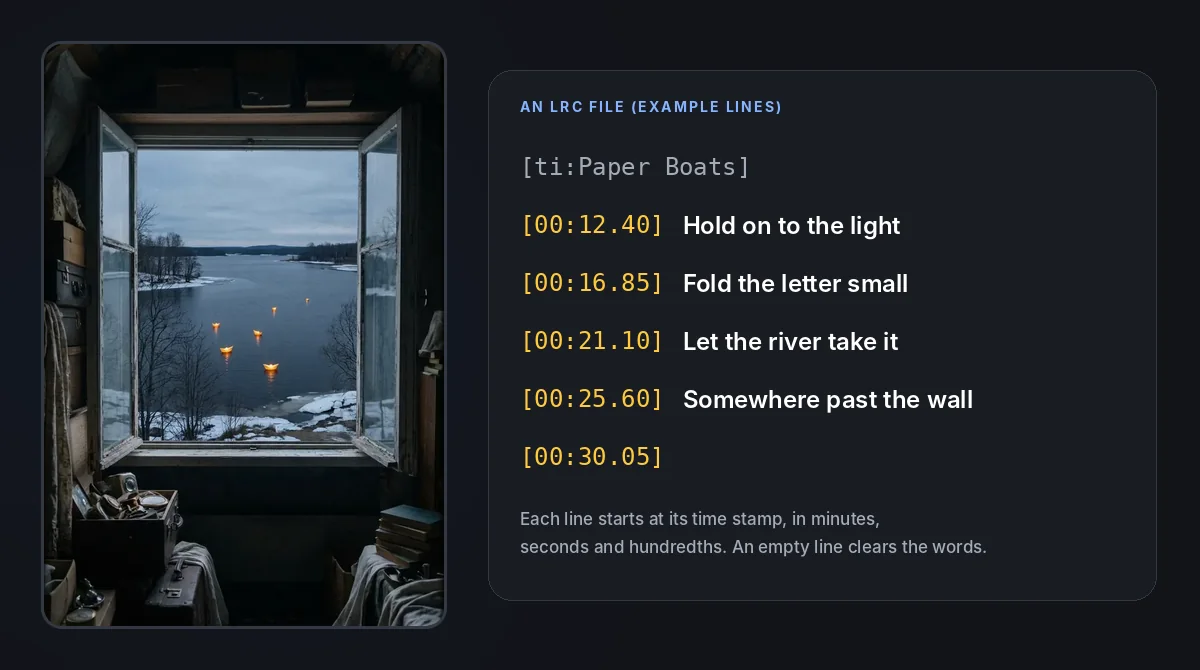
To make an LRC file, put each lyric line on its own line, starting with the moment it's sung in square brackets as minutes, seconds and hundredths, such as [00:12.40]. Add ID tags like [ti:] and [ar:] at the top, save it as UTF-8 plain text with a .lrc extension, and check it against the song. A tap-along tool like the LRC maker stamps the times for you.
- A line stamp is [mm:ss.xx]: minutes, seconds and hundredths, placed before the words.
- ID tags such as [ti:], [ar:], [al:] and [offset:] sit at the top, and all of them are optional.
- Enhanced LRC adds a <mm:ss.xx> stamp before each word, for karaoke-style highlighting.
- Stamp each line where its first word starts, and add an empty stamp to clear the screen in long gaps.
- LRC is for music players and lyric apps; convert it to SRT or WebVTT for video.
On this page (8 sections)ShowHide
What an LRC file is
LRC, short for lyrics, is a plain text format for synced lyrics. Each line of the file holds one line of the song, and in front of it, in square brackets, the time it's sung. Software that reads the file follows the audio and shows, scrolls or highlights each line as its moment comes. Because it's plain text, you can open and edit an LRC file in any text editor, from Notepad to TextEdit in plain-text mode to a code editor.
You'll find LRC files in music players that show synced lyrics, in karaoke and lyric display apps, in lyric editors, and as an export option of many lyric-timing tools. Getting lyrics onto streaming services is a separate route: it usually goes through your distributor or a lyrics service, each with its own submission steps and format rules, so check their current requirements rather than assuming an LRC file is what they want.
- Line stamp
- The time in square brackets at the start of a lyric line, written [mm:ss.xx], saying when that line is sung.
- ID tag
- A bracketed tag at the top of an LRC file, such as [ar:Artist], that describes the song or the file instead of timing a line.
- Offset tag
- The [offset:] tag: a correction in milliseconds that a player applies to every stamp in the file.
- Enhanced LRC
- An extension of LRC that adds a <mm:ss.xx> stamp before each word, so a player can highlight words as they're sung.
- Cue
- In SRT and WebVTT, one caption with a start time, an end time and its text.
How to make an LRC file, step by step
- 01
Get the exact audio and the final lyrics
Time against the version people will actually hear, the released master, not a demo or a radio edit with a shorter intro. Have the lyrics typed exactly as sung, with every repeat written out in full.
- 02
Split the lyrics into sung lines
Put one sung phrase on each line, breaking where the singer breathes. Delete section labels such as Chorus or Verse 2: they aren't sung, and a label in square brackets can confuse a player that expects a tag.
- 03
Add the ID tags
At the top of the file, add the tags you want, one per line. [ti:Song title], [ar:Artist], [al:Album] and [by:your name] are the common ones; they're optional, but they help players and people identify the file.
- 04
Stamp the start of every line
Play the song and note when each line's first word begins, written as [mm:ss.xx] directly in front of the line. Tapping along in a tool is far quicker than pausing and reading a player's clock.
- 05
Clear the screen in long gaps
Where the vocal stops for a solo, a break or the outro, add a line holding only a stamp, such as [02:41.30], at the moment the last word ends. Players treat it as an empty line, so the old words don't hang on screen.
- 06
Save it as UTF-8 with a .lrc extension
Save as plain text in UTF-8 so accents and curly apostrophes survive, and give it the same name as the audio file (song.mp3 and song.lrc) if a player should find it on its own.
- 07
Check it against the song
Play the song with the file loaded and watch for lines that land early or late. Fix single lines by editing their stamps; if every line is off by the same amount, shift the whole file at once.
Skip the blank page
Upload your song and Muvora's AI director plans a shot-by-shot storyboard on the beat. Edit every shot for free, and pay only if you render.
The LRC format, piece by piece
An LRC file holds two kinds of lines: tags that describe the file, and timed lines that carry the lyrics. Here is a short file, read top to bottom the way a player reads it.
| Line in the file | What it means |
|---|---|
| [ti:Paper Boats] | The song's title |
| [ar:Your Artist Name] | The artist |
| [al:Winter Lights] | The album or release |
| [au:Your Name] | The songwriter |
| [length:03:12] | The song's length, which some editors add |
| [by:Your Name] | Who made the LRC file |
| [00:14.20]I folded the letter into a boat | The first lyric line, sung at 14.20 seconds |
| [00:18.95]and let the river take it | The next line, at 18.95 seconds |
| [00:23.60] | An empty line: clear the words at 23.60 seconds |
Line stamps. The standard form is [mm:ss.xx]: two digits of minutes, two of seconds, then hundredths of a second after a dot. Many players also read [mm:ss] with no fraction and [mm:ss.xxx] with milliseconds, but hundredths are the safe choice. A stamp marks only when a line starts. There's no end time, so a line stays up until the next stamp arrives, which is why the empty stamp matters.
Repeated lines. A line sung more than once can carry several stamps, as in [00:52.10][01:48.30]Hold the light, and a player shows it at each of those times. It keeps a file short, but not every player reads it, so writing each repeat out on its own line is the safer habit.
ID tags. The usual ones are [ti:] for the title, [ar:] for the artist, [al:] for the album, [au:] for the songwriter, [by:] for whoever made the file, [length:] for the song's length, and [re:] and [ve:] for the program that wrote the file and its version. All are optional, and a player skips any tag it doesn't know.
The offset tag. [offset:] takes a number of milliseconds, such as [offset:+200], and adjusts every stamp at once. Its sign isn't handled the same way everywhere: the format's usual description says a positive value makes the lyrics appear sooner, but some programs add it to every stamp instead, which moves them later, and some ignore the tag completely. When you hand a file to someone else, correct the stamps themselves and leave the offset out.
Faster: tap along with the LRC maker
Typing stamps by hand means pausing, reading the clock and typing, line after line, and a full song can take an hour that way. Tapping is quicker and usually more accurate, because you're reacting to the music rather than to a counter. The LRC maker runs in your browser: load the song from your device (nothing is uploaded), paste the lyrics, then play the song and tap as each line begins. Export the result as LRC, or as SRT or WebVTT for video.
- Listen once before you tap. Know where each line falls; it's the second time through that lands on the vocal.
- Tap on the first sung sound, not the breath before it. A line that appears on the inhale feels early, and one that appears after the vowel feels late.
- Expect to be a little late. Most people's taps trail the music slightly. If every line lands late by the same amount, shift the whole file rather than tapping again.
- Fix the odd line by hand. Open the file in a text editor and change one stamp; it's quicker than redoing the song.
Enhanced LRC: timing every word
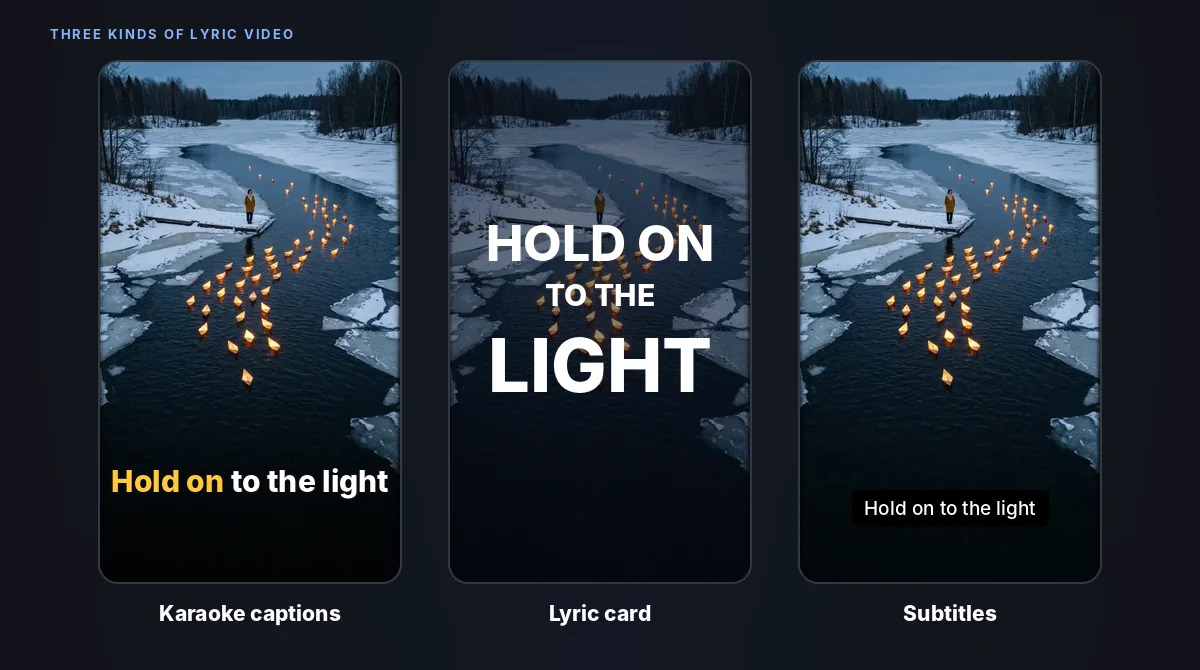
Standard LRC times lines. Enhanced LRC, sometimes called the A2 extension or word-timed LRC, adds a stamp in angle brackets before each word, so a player can light the words up one at a time, karaoke style. The square-bracket stamp still marks the line, each angle-bracket stamp marks when the next word begins, and a final stamp after the last word marks when it ends.
| Part | Example | What it does |
|---|---|---|
| Line stamp | [00:14.20] | When the line comes up |
| Word stamps | <00:14.20> I <00:14.48> folded <00:14.90> the | When each word starts |
| End stamp | boat <00:16.90> | When the last word finishes |
| The whole line | [00:14.20] <00:14.20> I <00:14.48> folded <00:14.90> the <00:15.05> letter <00:15.62> into <00:15.95> a <00:16.10> boat <00:16.90> | What the file actually holds |
Timing every word by hand is slow, since even a short song has a few hundred of them, so word timing is usually made by software that aligns the lyrics to the vocal. The lyric timestamp exporter does that for a song you upload and exports word-timed LRC, and Muvora runs the same kind of alignment when it makes a lyric video, which is what drives its karaoke captions.

Word stamps don't survive every conversion. SRT and WebVTT captions are usually timed per cue, so converting a word-timed LRC to either keeps each line's times and drops the word stamps; the lyric file converter does exactly that. Keep the enhanced LRC as your master copy and convert from it.
Skip the stamping for your lyric video
If the timing is for a lyric video, you don't need to make the file at all: upload the song, paste the plain lyrics, and every word is aligned to your vocal for you.
Timing tips and common mistakes
- Timing the wrong version. A radio edit, a remaster or a version with a longer intro shifts every line. Stamp the exact file people will hear.
- Error that grows through the song. If line one is right and the last chorus is a second off, the audio isn't the version you timed. Re-time it; shifting won't fix drift.
- Stamping the breath. Lines that pop up on the inhale feel early. Stamp the first sung sound.
- Forgetting to clear the screen. Without an empty stamp after a section's last word, the final chorus line can sit on screen through a whole outro.
- A colon before the hundredths. Some files write [01:02:50]. Many players accept it, others misread it, so use the dot form, [01:02.50].
- Section labels in brackets. [Chorus] isn't a time, and a player either treats it as an unknown tag or prints it. Delete it.
- The wrong text encoding. A file saved in an old regional encoding turns accented letters and curly apostrophes into garbage on other devices. Save as UTF-8.
- Lines too long to read. One stamp per lyric-sheet line can leave twelve words on a line. Split at the breath, so each line fits a phone screen.
[00:12.40] Hold on to the light
A line time (LRC) shows the line; word times let each word light up as it is sung.
LRC vs SRT vs WebVTT
The three formats hold the same information, words and when they're sung, for different software. LRC was made for audio players, SRT for subtitles in video editors and caption uploads, and WebVTT for video on the web. Here's how they differ in practice.
| Feature | LRC | SRT | WebVTT |
|---|---|---|---|
| Extension | .lrc | .srt | .vtt |
| A timed line looks like | [01:23.45]The words | A cue number, then 00:01:23,450 --> 00:01:26,100, then the words | 00:01:23.450 --> 00:01:26.100, then the words |
| Times | Start only; a line lasts until the next stamp | Start and end | Start and end |
| Precision | Hundredths of a second | Milliseconds, after a comma | Milliseconds, after a dot |
| Word timing | Enhanced LRC adds a stamp per word | None as standard | Time stamps inside a cue, in players that support them |
| Header | Optional ID tags | None | The file starts with the word WEBVTT |
| Styling and position | None | Basic tags in some players | Cue settings and CSS styling |
| Typical use | Synced lyrics in music players and karaoke apps | Video editors and caption uploads | Web video players and caption uploads |
Convert rather than retype: the timing carries over in both directions, with two catches. Going from LRC to SRT or WebVTT, each line needs an end time, which a converter takes from the next line's start or from the empty stamp that clears the screen. Going back to LRC, the end times disappear, because LRC has nowhere to keep them except an empty stamp where a gap opens.
Lyric file converterConvert between LRC, SRT and WebVTT in your browser, and shift every line earlier or later in one go.From timed lyrics to captions in a lyric video
In a video editor, timed lyrics become captions by way of SRT: convert the LRC, import the SRT as a caption or subtitle track, and style it. Most editors then let you set the font, size, outline and position for every line at once. A word-by-word karaoke highlight is harder, and usually means an effect that animates each word, timed by hand from your enhanced LRC.
Muvora takes a shorter route, because it times the lyrics itself. Upload the song and paste the plain lyrics, without stamps or section labels. The analysis aligns every word to your vocals, the AI director writes a storyboard of shots cut to the beat, and when you render with captions on, each word lights up as it's sung, burned into the video. The same timing carries into the 16:9, 9:16 and 1:1 exports. Keep your own LRC for music players and lyric services; the video doesn't need it.

For a sing-along of a whole song with every word highlighted, see how to make a karaoke video. For the rest of a lyric video, from fonts to vertical cuts, see how to make a lyric video.
Let your lyrics time themselves
Upload your song and paste the words. Every word is aligned to your vocals, and you get a free storyboard for a lyric video with karaoke captions. The lyric video maker page has the details.
Written by the Muvora team. Last updated November 13, 2026. Spotted something out of date? Tell us at [email protected].