Clean up pasted lyrics and format them for submitting
Paste lyrics the way they come, from a chord sheet, a notes app, a lyrics document or an LRC, SRT or WebVTT file, and get clean lines back: chord lines, inline chords, tab and timestamps out, doubled spaces and stray blank lines gone, sections kept together. Decide yourself what happens to section labels, x2 repeat marks, quote marks, capitals and end punctuation, or start from presets that follow Apple Music's and Musixmatch's published lyric guidelines. Every line shows its syllables, lines a guideline would question are flagged, and your words are never changed. Nothing leaves your browser.
Free, no sign-up. Runs in your browser: nothing is uploaded.
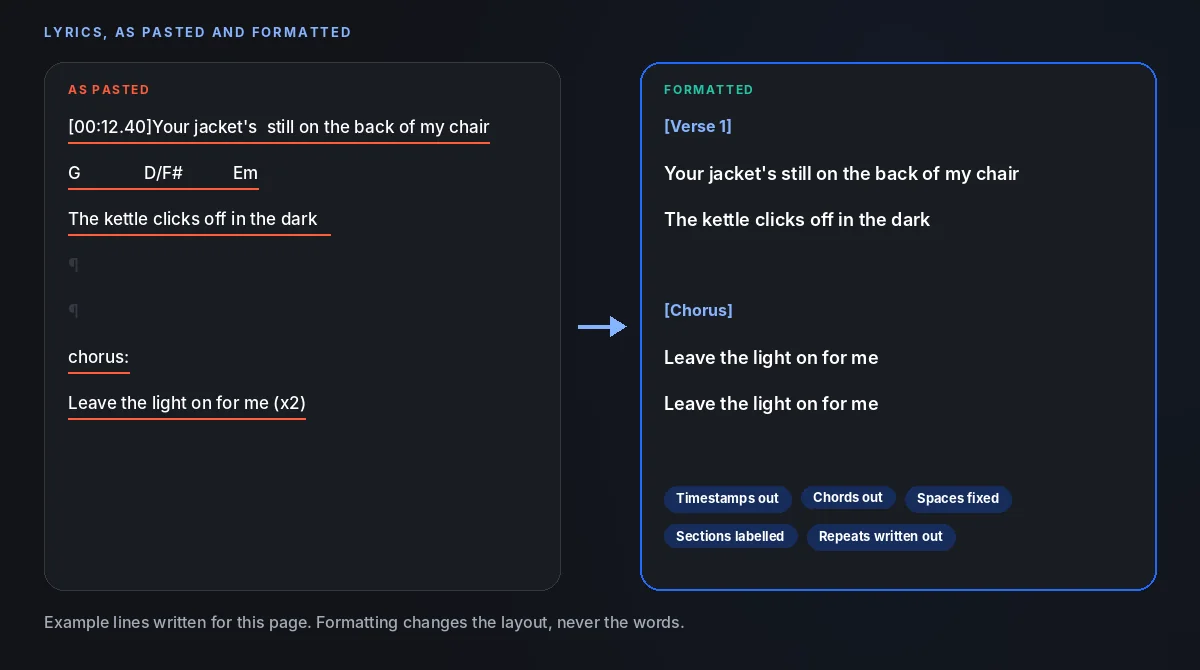
Chord lines, chords in square brackets, tab, and LRC, SRT or WebVTT times come out; the words stay exactly as you typed them.
Format for
Chords, timestamps and stray spacing out; your labels, repeat marks, quotes and capitals as you wrote them.
Section labels
Repeat marks like x2
Quotes and apostrophes
Formatted lyrics
- Lines
- 0
- Words
- 0
- Syllables
- 0
- Sections
- 0
Paste lyrics, or try the example, and the clean version shows here.
Song finished? Upload it and Muvora plans the whole video on its beats. The storyboard is free.
Make the videoUpload a new songHow to use the lyrics formatter
- 01
Paste the lyrics
Paste them as they are, chords, times and all, or try the example. Chord sheets, ChordPro, notes-app lyrics and LRC, SRT and WebVTT files are all read.
- 02
Pick a preset or set your own options
Tidy only cleans up; Apple Music and Musixmatch and Spotify follow those services' lyric guidelines. Change any option, from labels to quote marks, and the clean lines update as you go.
- 03
Check the flagged lines
Each line shows its syllables, and a flag says why a line may need a look: it runs long, its section passes 10 lines, a repeat mark is left in, or it has asterisks or a sound effect. Repeats written out are listed so you can check them against the song.
- 04
Copy or download the clean text
Copy the result or save it as a .txt file, then time it in the LRC maker or paste it with the song when you make a lyric video.
What it takes out, and what it never touches
Chord lines come out whole (a line with more chord symbols than words, like Am F C G or Intro: Am F C G), inline chords such as [Am] come out of the lyric line without leaving a gap, and guitar tab goes too, as do ChordPro's directives in curly brackets, whose chorus and verse marks become labels. From timed files it takes LRC times, tags and word times, SRT cue numbers and times, and WebVTT headers, notes and voice tags, and a line an LRC file times twice is written out twice, in the order it's sung. What it never touches is a word: no spelling, slang or number is rewritten, and the words that come out are the words that went in, in the same order, whatever you choose. The only characters an option can change are a line's first letter (and the first inside parentheses), its quote marks and a comma or full stop at its end.
- Chords, tab, times and tags out
- Words never rewritten or reordered
- Capitals, quotes and end commas only when asked
What Apple Music and Musixmatch ask for
Both publish rules for submitted lyrics, and the presets follow them as they read on November 18, 2026. Apple Music for Artists' lyrics guidelines ask for a capital at the start of every line, no comma or full stop at a line's end, a blank line between stanzas, background vocals in parentheses with a capital, and every repeated line written out rather than marked x3. Musixmatch supplies Spotify's lyrics, Spotify's help page for artists says, and Musixmatch's guidelines ask for no multipliers, no section labels in the lyrics (sections get tags such as #VERSE in a step of their own), a capital at the start of each line, no comma or full stop at a line's end, sections of 10 lines at most, and numbers in figures apart from ten and under. They differ on censored words: Apple stars a word out only where the audio itself is censored, while Musixmatch writes words as heard, with a hyphen where the audio cuts one off. The presets apply what changes layout and punctuation and only flag the rest; rules change, so check each page before you submit.
- Apple: capitals, no end commas, repeats written out
- Musixmatch: no multipliers, no labels, 10-line sections
- Check each page before you submit
From clean lyrics to timed lyrics and a lyric video
A formatter reads text, not audio, so it can't tell whether the lyrics match the recording, and both services ask that they do: listen through once, fix what was sung differently, and check each repeat it wrote out (a bare x2 reads as twice in all and a mark with the word repeat as that many more, as in Apple's own example). For the rhythm of the words, the syllable counter compares each line with its pair, and the guide to writing a verse covers what a verse has to carry. To time the lines, paste the clean text into the LRC maker or the lyric timestamp exporter and tap along to the final file; if the file starts with silence, trim it first with the silence remover, because trimming the start moves every timed line.
- Listen once against the recording
- Check every repeat written out
- Trim the file first, then time the lines
Paste the clean lyrics with your song for a lyric video
Upload the song to Muvora and paste these lyrics in the upload step, the lines as they're sung: its analysis lines every word up with your vocal, and in the Lyric style the words appear as karaoke captions that light up as each one is sung (Latin scripts), over AI pictures cut on the beat. Any style can carry the captions too. Reading and editing the storyboard is free, and you see the price before you render.
Questions, answered
Can't find what you need? Start a free storyboard and see for yourself.
How do I remove chords from lyrics?
Paste the chord sheet here with Take out chords and tab ticked, as it is by default. Lines of chords come out whole, chords in square brackets come out of the lyric line, and guitar tab goes too, while a lyric that starts with a word like Am or A stays a lyric. Copy or download the result.
Does the formatter change my words?
No. The words that come out are the words you pasted, in the same order. An option can only capitalize a line's first letter (or the first inside parentheses), switch between straight and curly quote marks, or drop a comma or full stop at a line's end. Spelling, slang and numbers are flagged at most, never rewritten.
Should I write out repeats like x2?
For submitting, yes: Apple's guidelines say a repeated line must be written out, and Spotify's lyrics page asks for no multipliers like x2. The formatter reads a bare count as the times in all, a mark with the word repeat as that many more, and a mark on a line of its own as the line above, so check each one it lists against the song.
Should section labels like [Chorus] stay in?
In your own lyric sheets, keep them. Musixmatch's guidelines keep labels out of the lyrics and tag sections separately, and Apple's ask for a blank line between stanzas and lyrics that match the audio, so both presets take labels out and keep the blank line. Choose [Verse 1] or #VERSE to tidy labels instead of removing them.
Can it turn my lyrics into an LRC or SRT file?
No, because it has no audio to time the lines against. Copy the clean lyrics into the LRC maker or the lyric timestamp exporter, play the song and tap as each line starts to get LRC, SRT and WebVTT files. Going the other way, it takes the times out of an LRC, SRT or WebVTT file you paste.
Are my lyrics sent anywhere when I format them?
No. The formatting, the counts and the checks all run in your browser, and nothing is sent or saved. Copy or download the result before you close the page.
Keep exploring
LRC maker
Play your song, tap along to stamp each lyric line, and export an LRC, SRT or WebVTT file.
Open the toolLyric timestamp exporter
Time your lyrics to the vocals and download LRC, SRT or WebVTT.
Open the toolSyllable counter
Paste lyrics to count the syllables in every line, see the rhyme scheme and find the lines that don't match the line they pair with.
Open the tool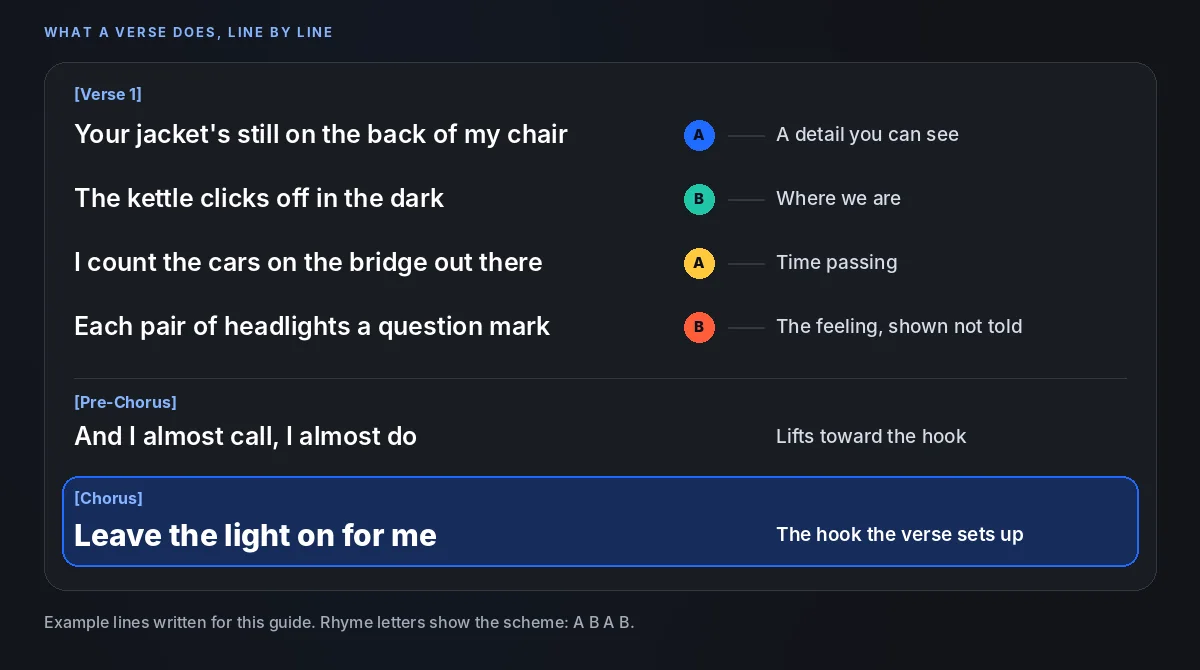
How to write a verse
What a verse does next to the chorus, one scene told in details, first lines, syllables and stresses, rhyme schemes, a second verse that moves and the lead into the chorus.
Read the guide
Lyric videos
Karaoke-style captions timed to your vocals, over AI visuals.
Learn moreSilence remover
Trim the silence from the start and end of a song file, with every cut shown on its levels, and save a WAV at the file's own rate.
Open the tool
More free tools: lyrics and songwriting
Map out the song's sections, find rhymes, count the syllables in every line, and time your lyrics as LRC, SRT or WebVTT.
Your song deserves a music video
Upload a track and get a free beat-synced storyboard in minutes. Render it when you are ready.
No card needed to start.





