Skip to content

Budget a music video shoot, line by line

Work out what a filmed music video will cost before you book anyone. Start from a one-day indie shoot, a two-day narrative or a performance video, type the rates you've been quoted into each line (crew, gear, locations, cast, art, food and transport, insurance and post), set the days and a contingency, and the calculator adds it up by group and in all. Save it as CSV or print it, and see beside it what an AI-made video of the same length costs in Muvora. Nothing you type leaves your browser.

Free, no sign-up. Runs in your browser: nothing is uploaded.

Start from

One location, a small crew, the artist and a few cutaways, then two days in the edit. A preset only picks the lines and their days; your rates and quantities stay.

Sets the days on every crew, gear, location, cast, art, food and transport line at once (up to 365, in halves). Post-production keeps its own.

Crew

Crew subtotal: US$0

  • Director total: US$0

  • Director of photography total: US$0

  • Gaffer and grip total: US$0

  • Production assistant total: US$0

  • Hair and makeup total: US$0

  • Wardrobe stylist: Left out

Camera, lights and gear

Camera, lights and gear subtotal: US$0

  • Camera package total: US$0

  • Lenses total: US$0

  • Lighting total: US$0

  • Grip and camera support total: US$0

  • Sound playback total: US$0

Locations and permits

Locations and permits subtotal: US$0

  • Location fees total: US$0

  • Days

    Once

    Filming permits total: US$0

Cast and extras

Cast and extras subtotal: US$0

  • Actors or dancers: Left out

  • Extras: Left out

Art and props

Art and props subtotal: US$0

  • Art director: Left out

  • Days

    Once

    Props and set dressing total: US$0

Food and transport

Food and transport subtotal: US$0

  • Crew and cast in this budget: 7, plus the artist.

    Meals and snacks total: US$0

  • Transport and fuel total: US$0

Insurance

Insurance subtotal: US$0

  • Days

    Once

    Production insurance total: US$0

Post-production

Post-production subtotal: US$0

  • Editing total: US$0

  • Color grading total: US$0

  • VFX and graphics: Left out

Song finished? Upload it and Muvora plans the whole video on its beats. The storyboard is free.

Make the videoUpload a new song

How to use the music video budget calculator

  1. 01

    Pick a starting shoot

    One-day indie shoot, two-day narrative or performance video: each switches on the lines that kind of shoot usually needs and sets their days. The rates and quantities you've typed stay when you switch.

  2. 02

    Type your rates

    Fill in each line's quantity, days and rate from the quotes you have, or untick a line the shoot doesn't need. Costs paid once, such as a permit or the insurance, take a fee instead of a day rate.

  3. 03

    Add what's missing

    Add lines of your own to any group, like a drone operator or a choreographer, set the shoot days for every line at once, and choose a contingency for what goes wrong on the day.

  4. 04

    Save it and compare

    Download the budget as CSV for a spreadsheet, or print it or save it as a PDF to send. Set the song's length to see what Muvora charges for an AI-made video of it instead.

Where a music video budget goes

A filmed music video is paid for in people and days. The crew bills a day rate each (director, director of photography, gaffer and grip, production assistants, hair and makeup, wardrobe), the camera, lenses, lights and grip gear rent by the day, and most locations charge by the day too. So every extra shoot day multiplies most of the budget, and the number of days is usually the first thing to cut. Post-production comes after the shoot: the edit, the color grade and any effects, billed by the day or by the shot.

  • Most lines are a rate times the days
  • Each shoot day multiplies the crew and gear
  • Post-production is billed after the shoot

Lines first budgets forget

Feeding everyone on set, getting people and gear there, a permit for a street or a park, insurance for the rented camera, a speaker that plays the track back so the artist can lip-sync, and a contingency for overtime or a location that falls through. A contingency of around 10 percent of the subtotal is a common starting point, more for night shoots, a big cast or a place you haven't confirmed. The template lists every one of them, so the total you show the artist or the label is closer to what the day will take.

  • Meals and transport for every shoot day
  • Permits and insurance where they're needed
  • A contingency, often around 10 percent

Filmed or made with AI

A shoot gives you real footage of real people in real places, and most of its cost is committed before you see a frame. An AI music video is priced another way: in Muvora you pay per finished second at the quality you choose, the storyboard is free to read and change, and the price is shown before anything renders. It can't film you (a Performance video lip-syncs a photo of the singer instead), but it has no crew, gear, locations or shoot days to pay for. The panel beside the budget prices your song's length at today's rates, and the music video cost guide gathers published ranges for filmed videos.

  • A shoot: footage of you, paid by the day
  • Muvora: paid per finished second
  • Price both before you spend
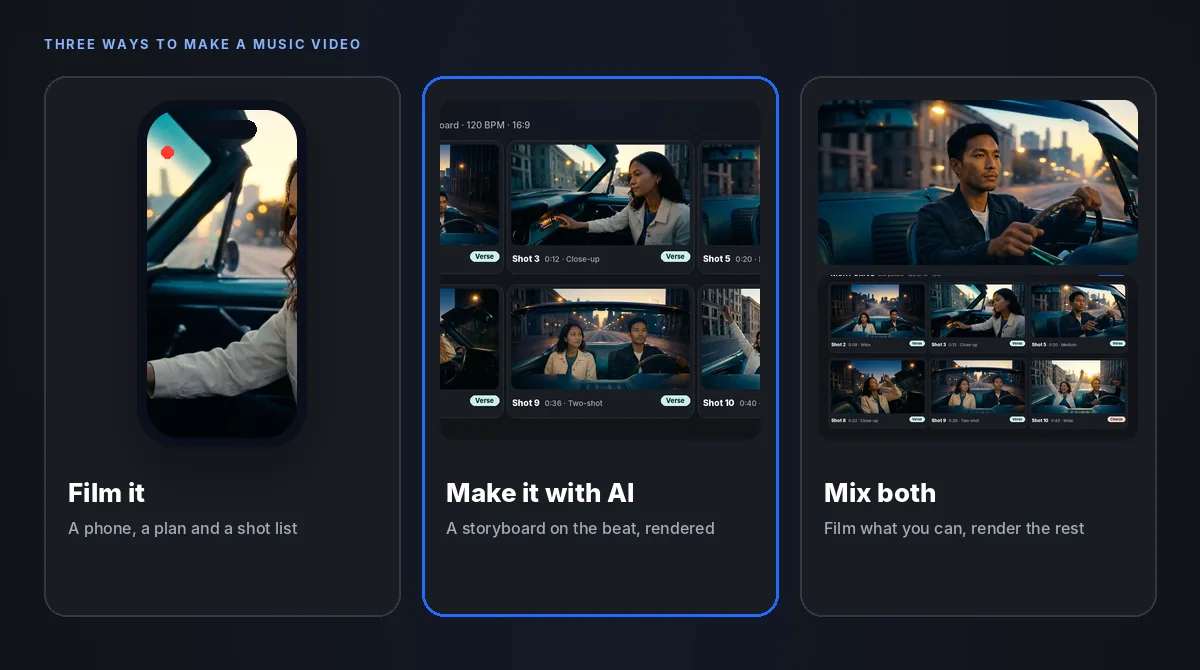
Three ways to make a music video side by side: filming it on a phone, a storyboard Muvora made for the song, and a filmed-style frame beside the storyboard for a mix of both.
Storyboard frames and the storyboard sheet from “Night Drive”, a 120 BPM pop test song, laid out as three ways to make a video

Price the same video made with AI

Upload the song and Muvora plans the whole video on its beats: a storyboard with the concept, the look, the characters and a shot for every cut, free to read and change. Then it prices the render from the real shots in each quality, so you can set it against your shoot budget before you pay for either.

Questions, answered

Can't find what you need? Start a free storyboard and see for yourself.

How much does it cost to film a music video?

It depends far more on the days, people and places the idea needs than on the song. A one-day shoot with a small crew costs a fraction of a two-day story with actors, an art department and a longer edit. Build both here with the rates you've been quoted to see the gap, and read Muvora's music video cost guide for published ranges.

What should a music video budget include?

Crew, camera and lighting gear, locations and permits, any cast or extras, art and props, food and transport for everyone on set, insurance, and post-production (editing, color and effects), plus a contingency. Untick what your shoot doesn't need instead of deleting it, so you can see what each choice saves.

How much contingency should a music video budget have?

Around 10 percent of the subtotal is a common starting point, with more for a shoot with night exteriors, a large cast, effects or a location that isn't confirmed. The calculator takes anything from 0 to 50 percent and shows the amount it adds.

Why doesn't the calculator fill in rates?

Day rates differ by city, experience, union rules and what a quote includes, and they change from job to job, so any figure printed here would be wrong for most readers. Ask the people you want to hire and a local rental house, and type their numbers in.

Can I save the budget or share it?

Download it as CSV to open in Excel, Google Sheets or Numbers, or print it or choose Save as PDF to send to the artist, a label or a funder. Only the budget sheet prints. The draft also stays in this browser tab until you close it, and nothing is uploaded.

Is an AI music video cheaper than a filmed one?

It's priced differently: per finished second at the quality you choose, with no crew, gear or locations to pay for. Set the song's length in the panel beside the budget to see Muvora's price at today's rates, then weigh it against what footage of you is worth to the release.

More free tools: plan the video

Ideas, treatments, prompts, shot lists and storyboards timed to the beat, a call sheet for the shoot, and what a render would cost.

Your song deserves a music video

Upload a track and get a free beat-synced storyboard in minutes. Render it when you are ready.

No card needed to start.