Setlist
- 1Blank
- 2Blank
- 3Blank
- 4Blank
- 5Blank
- 6Blank
- 7Blank
- 8Blank
- 9Blank
- 10Blank
- 11Blank
- 12Blank
- 13Blank
- 14Blank
- 15Blank
Made with the free setlist maker at www.muvora.ai
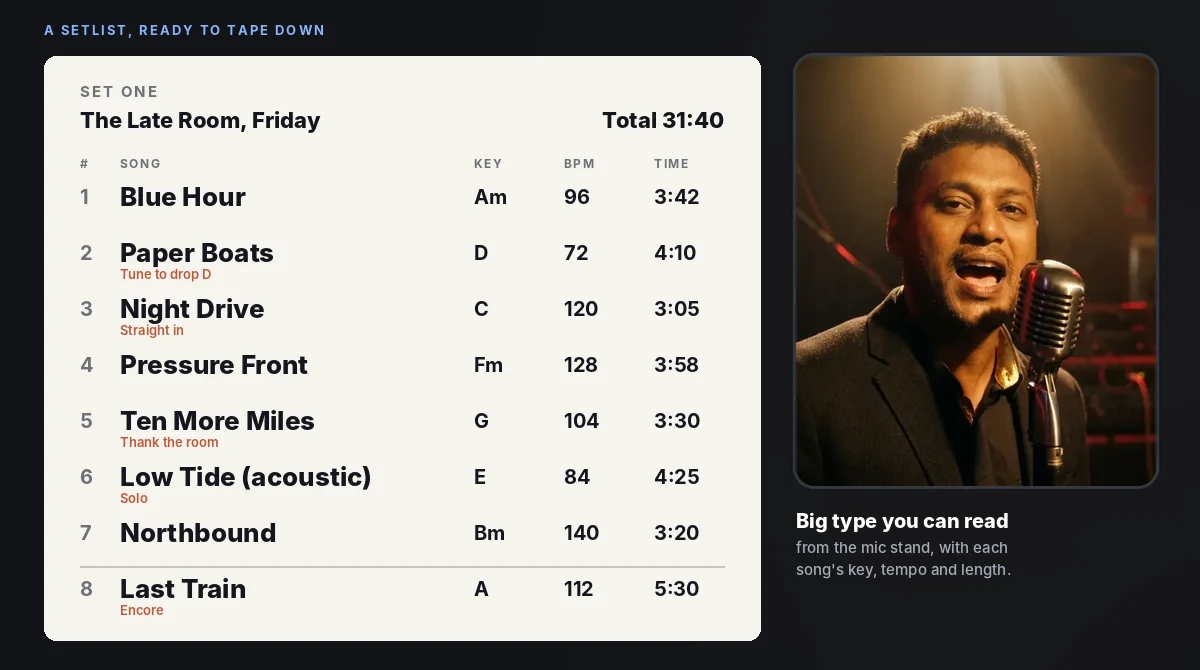
A setlist is the sheet taped to the stage floor that keeps everyone on the same song. Type the songs in the order you'll play them, each with its key, tempo, length and a short note (capo 2, straight into the next), split them into sets and an encore, and watch each set's running time add up with the gaps between songs counted in. The tool points out big jumps in pace or key and prints a page per set, the type sized so a short set reads from the floor, or saves a PDF and a CSV. Nothing you type leaves your browser.
Free, no sign-up. Runs in your browser: nothing is uploaded.
Type your songs in the order you'll play them. Left blank, the sheet prints as numbered lines to fill in by hand.
Blank, it prints as numbered lines to fill in by hand. Only the setlist prints.
Setlist
Your draft is kept in this browser on this device until you clear it. Nothing is sent anywhere.
A screen behind the band? Muvora makes a video for each song in the set, cut on its own beats, to play with the track.
Make one for a songUpload a new songSong finished? Upload it and Muvora plans the whole video on its beats. The storyboard is free.
Make the videoUpload a new songType each song with its key, BPM, length and a note for the band, or paste a list from your phone's notes or rows from a spreadsheet, one song a line.
Add a second set or an encore, move songs between them with the arrows, and give each set the minutes the booking allows to see what's left or how far over it runs.
Each song shows when it ends in the set, counting the seconds you allow between songs, and the hints mark big changes of tempo or key worth a second look.
Choose what prints beside each title and whether each set gets its own page, then print the sheets or save a PDF, and keep the CSV to open again before the next show.
On stage a setlist gets a glance between songs, in bad light, from a meter or two away, so the titles come first and big. Next to each title, the details someone acts on: the key for whoever starts the song, the tempo for whoever counts it in (set it from the metronome, or play a click track into the drummer's ears), and the length if you're watching the clock. A note under the title covers what changes between songs: a capo, a retune, a guitar swap, who starts, a song that runs straight into the next. Switch off anything nobody reads, and the type grows to fill the page.
A set often opens with something everyone knows how to start and closes on the song the room came for, with the slower songs set where the room can breathe. A run of songs in one key or one tempo can blur together, so the hints mark three songs in a row in the same key, and tempo jumps of 40 BPM or more (double or half time doesn't count, since the pulse carries over). A jump can be the lift a set needs; the hint is there so the change is a choice. Then the clock: the venue or promoter sets the slot, and songs plus the talk, tuning and count-ins between them make the real length, so set the seconds between songs and the minutes to aim for, and plan to finish a little early rather than get cut off.
Save the CSV after each show and open it before the next one: the list, the keys and the notes come back, ready to reorder for a longer or shorter slot. The record is worth keeping for another reason too. Performing rights organizations pay songwriters for live performances partly from the setlists reported to them, and some let members submit their own, which the guide to how music royalties work explains. If a singer moves a song into a new key, the chord transposer rewrites the chart, and the song structure builder times an arrangement bar by bar when a song gets a new intro or ending for the stage.
A screen behind the band changes a small-room show. Upload a song from the set and Muvora makes a music video from it, cut on its downbeats, sections and drops, with the song as its soundtrack, to play muted on the screen and start on the same cue as the track ([concert visuals](/concert-visuals) explains how it lines up live). The storyboard is free to read and change, and the price shows before anything renders. For a release, the same song can become the band's music video, with the band written into the story ([music videos for bands](/music-videos-for-bands)).
Can't find what you need? Start a free storyboard and see for yourself.
The songs in the order you'll play them, in type large enough to read from where you stand. Bands often add the key and the tempo for whoever starts or counts in each song, a length if the slot is tight, and short notes for capo changes, retunes and songs that run into each other. The band's name, the venue and the date at the top make it a record of the night.
It adds up the lengths you type (3:45, or 3.45, or whole minutes), plus the seconds you allow between songs for talk, tuning and count-ins before every song but the first, 15 by default. A song without a length counts for nothing and the set says how many are missing, so the real total is longer. Breaks between sets aren't counted.
As long as the booking says. Ask the venue or the promoter for your slot and whether the changeover sits inside it, type those minutes as the set's aim, and the tool shows the time to spare or how far over the set runs. Ending a minute or two early leaves room for a late start or a long tune-up.
To make each change a choice. It marks a change of 40 BPM or more between neighboring songs (not double or half time), keys five or more steps apart on the circle of fifths, and three or more songs in a row in one key. None of these is wrong; a sudden lift or a fresh key is often what a set needs, and the hints are there so nobody is surprised by one.
Yes. Paste one song a line, with or without numbers; a length at the end of a line, such as 3:42, is read too, and a line that says Set 2 or Encore starts a new set. Rows copied from a spreadsheet work when there's a Song or Title column, and the CSV this tool saves opens back in with its sets, keys, tempos and notes.
Nothing is sent anywhere. The draft stays in this browser on this device, so it's there when you come back before the next show, until you press Clear the setlist. The printed pages, the PDF, the text and the CSV are all made on your device.

A video for each song in your set, cut on its beat, for the screen behind you on stage.
Learn moreMake a click track and download it as a WAV: any tempo and time signature, a count-in, accents, subdivisions and a length in bars or minutes.
Open the toolA steady click from 20 to 300 BPM in seven time signatures, with accents, subdivisions, tap tempo and a tempo trainer.
Open the toolPaste a chord sheet and move it to any key, spelled for that key, with chords kept over the lyrics and the capo shapes to play.
Open the toolLay out a song's sections in bars at your tempo and see every start time, the length and a colored timeline. Export text, CSV or YouTube chapters.
Open the tool
The singer lip-synced from one photo, the rest of the band written into the story, every release format.
Learn moreMake a show poster from your photo, a video frame or a color: act, date, venue and tickets laid out for print and Instagram, with a QR code.
Open the toolAdd up a tracklist's running time and see whether Apple Music, Spotify and other stores file it as a single, an EP or an album, with vinyl sides and CD.
Open the toolPitch the song, write the press release, build the press kit, plan release week, write the YouTube description and estimate what streams pay.
Upload a track and get a free beat-synced storyboard in minutes. Render it when you are ready.
No card needed to start.






