Plan your release backwards from release day
A release goes well when the work is finished in the right order: the master before the delivery, the video before the teasers, the pitch before Spotify's cut-off. Enter your release day and the planner dates every step for you, from six weeks out to two weeks after, and puts it in your calendar with one download.
Free, no sign-up. Runs in your browser: nothing is uploaded.
Release
Music video
Pick your release day to see the plan.
Song finished? Upload it and Muvora plans the whole video on its beats. The storyboard is free.
Make the videoUpload a new songHow to use the release timeline planner
- 01
Pick release day
Choose the date the music comes out; the planner suggests six weeks from today.
- 02
Say what you're releasing
A single, an EP or an album, and whether the music video still needs making.
- 03
Read the plan
Every step gets a date, a reason and a link to the guide or tool that helps with it.
- 04
Save it
Download it as a calendar file for Google Calendar, Apple Calendar or Outlook, or copy it as a checklist.
Dated backwards from the one date that can't move
Release day is fixed once it is set with your distributor, so the plan counts back from it: when to lock the master, when to deliver, when the video needs rendering so the teasers exist, and the last day a Spotify pitch still reaches your followers' Release Radar.
- Six weeks of lead time for a single
- Earlier focus-track planning for an EP or album
- Spotify's 7-day pitch rule built in
The visuals are part of the plan
Most release plans stop at the audio. This one schedules the music video, the vertical cuts of the hook, the Canvas loop, the YouTube upload and a clip schedule for the two weeks after, because that is when a song is easiest to discover.
- Storyboard and render dates for the video
- Teasers before release day
- A clip plan for the weeks after
In your calendar in one click
The calendar file holds one all-day event for every step, each with its details and the link that helps, and works in any calendar app. Nothing is uploaded: the plan is made in your browser.
- One event per step
- Works with Google, Apple and Outlook calendars
- Or copy it as a checklist

Get the video steps done this week
The longest lead time in the plan is usually the music video. Upload the song and Muvora writes the storyboard on the beat for free; render it when it's right, and the vertical cut and the Canvas come from the same render, ready for every date in the plan.
Questions, answered
Can't find what you need? Start a free storyboard and see for yourself.
How far ahead should I plan a single release?
Six weeks is a comfortable runway for an independent single: time to deliver, pitch and make the visuals without rushing. Start two to four weeks earlier for an EP or album.
When should I pitch my song to Spotify?
As soon as the song appears under upcoming releases in Spotify for Artists. Spotify's help says a pitch made at least 7 days before release reaches your followers' Release Radar; earlier gives editors more time.
When should the music video come out?
Most artists premiere the video on release day or within the first week, with teaser clips from it in the two weeks before.
Does the calendar file work with Google Calendar?
Yes. It is a standard iCalendar file with all-day events, which Google Calendar, Apple Calendar and Outlook all import.
Keep exploring
Music release checklist
What to finish six weeks, four weeks and two weeks before release day, and what to do that week.
Read the guidePromote music on TikTok
Make the song an official sound, lead with the hook, and post a six-week plan of vertical clips that send people to it.
Read the guideAlbum cover checker
Check cover art against Apple Music, Spotify and distributor rules: square, pixel size, format, color mode and file size.
Open the toolMusic hashtag generator
Hashtags for a song post on TikTok, Reels or Shorts, sized to each platform's limit, with a caption to start from.
Open the tool
Spotify Canvas
An 8-second vertical loop cut from your video, sized for Canvas.
Learn moreStreaming royalty calculator
Streams on six services to an estimate after your distributor and splits, and the streams a target amount needs.
Open the toolSpotify pitch generator
A playlist pitch from your song's facts in three versions, counted against your limit, with the 7-day pitch deadline.
Open the toolPress release generator
A one-page music press release from your own facts, in the standard layout, with a word count, to copy, save or print.
Open the tool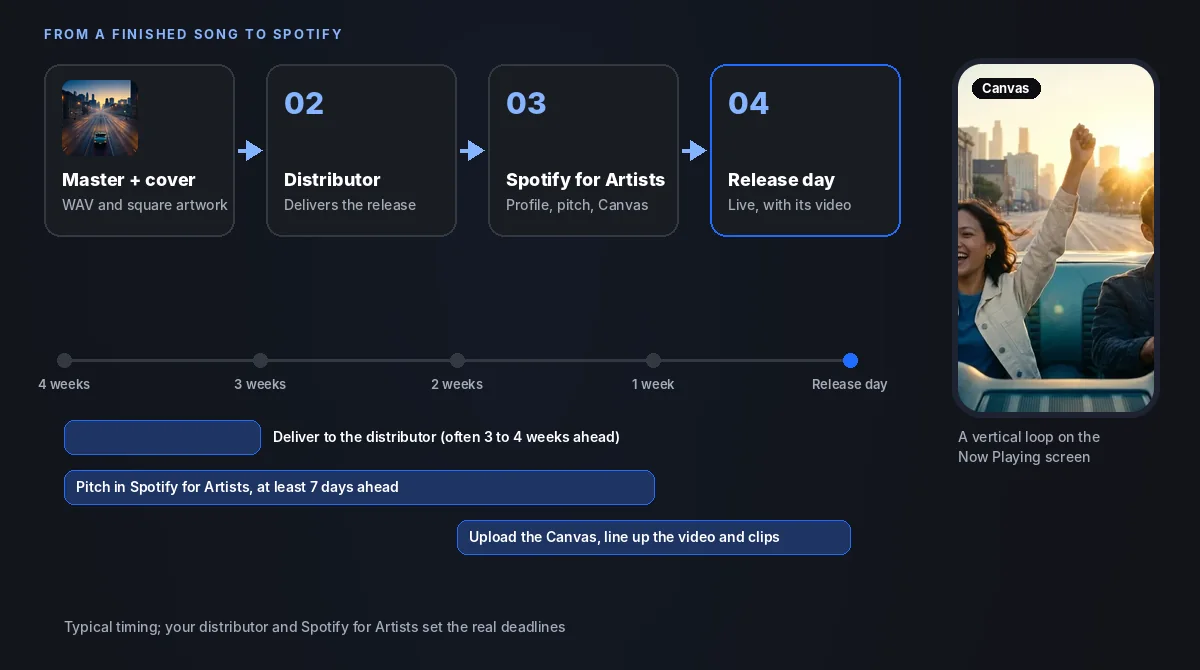
Get your music on Spotify
From a finished master to a live release: what to prepare, choosing a distributor, the timeline, Spotify for Artists, the pitch and the Canvas.
Read the guide
Christmas music videos
A holiday video for a Christmas song you wrote or recorded: warm light against the cold, cut on the beat, ready for December.
Learn more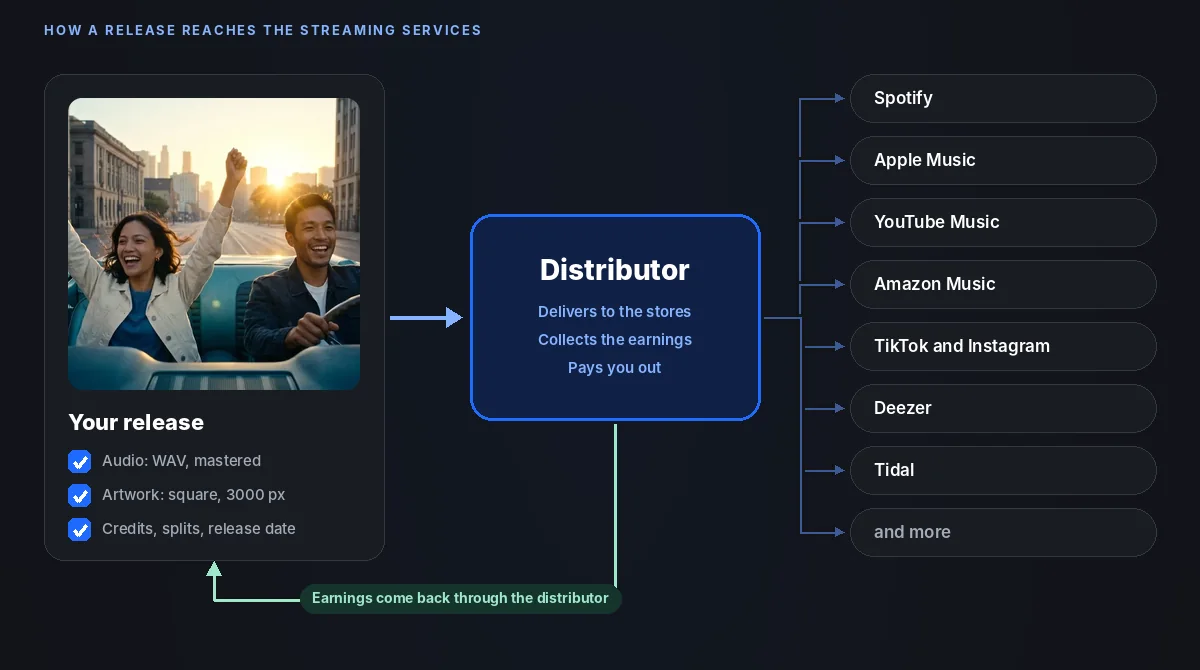
Choose a music distributor
What a distributor does, the ways distributors charge, what to compare, six of them described from their own pages, AI-music rules and switching.
Read the guide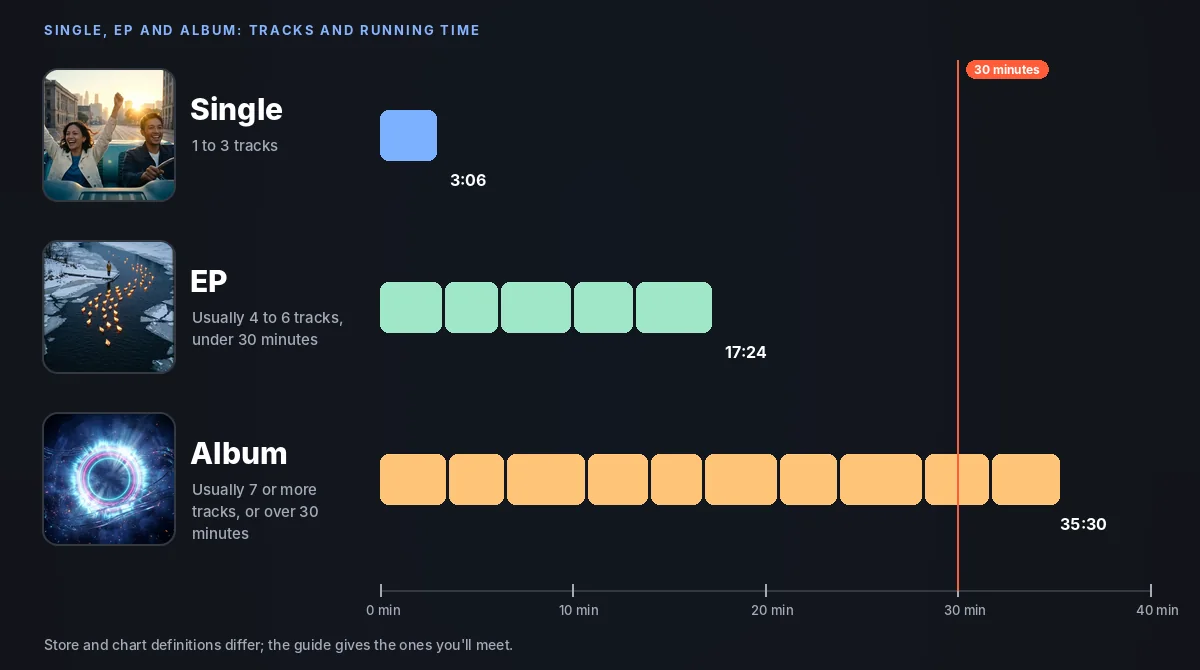
What is an EP?
Singles, EPs and albums by track count and length, how stores and charts sort them, how to sequence an EP and a visual plan for every track.
Read the guide
More free tools: release and promotion
Pitch the song, write the press release, build the press kit, plan release week, write the YouTube description and estimate what streams pay.
Your song deserves a music video
Upload a track and get a free beat-synced storyboard in minutes. Render it when you are ready.
No card needed to start.





