Frames per beat and bar, and where every cut lands
Type the tempo or tap it in, pick the time signature and your timeline's frame rate, and see how many frames a beat and a bar last, how often a beat falls exactly on a frame, and where a cut every beat, bar or phrase lands as a frame number and as timecode, drop-frame included. Every cut is rounded to its nearest frame counted from the start of the song, so the cuts never drift off the beat. It's arithmetic on the page, so nothing is uploaded.
Free, no sign-up. Runs in your browser: nothing is uploaded.
A beat at 120 BPM lasts 500 ms.
Time signature
4 beats a bar, each a quarter note, as DAWs count them.
12 frames a beat
At 120 BPM and 24 fps: 48 frames a bar of 4/4 (2 s). Every beat lands exactly on a frame, 12 frames apart.
Let the song set the cuts. Muvora renders every video at 24 fps and puts each cut on the frame nearest its downbeat, from the beats it finds in your song.
Make the videoUpload a new songWhere the cuts land
A cut every
Where bar 1 begins
Timeline starts at
A cut every bar is 48 frames (2 s). Every shot is exactly 48 frames, so nothing ever drifts.
| Bar.beat | Song time | Frame | Timecode | Off by | Shot |
|---|---|---|---|---|---|
| 1.1 | 0:00.000 | 0 | 00:00:00:00 | 0 ms | – |
| 2.1 | 0:02.000 | 48 | 00:00:02:00 | 0 ms | 48 |
| 3.1 | 0:04.000 | 96 | 00:00:04:00 | 0 ms | 48 |
| 4.1 | 0:06.000 | 144 | 00:00:06:00 | 0 ms | 48 |
| 5.1 | 0:08.000 | 192 | 00:00:08:00 | 0 ms | 48 |
| 6.1 | 0:10.000 | 240 | 00:00:10:00 | 0 ms | 48 |
| 7.1 | 0:12.000 | 288 | 00:00:12:00 | 0 ms | 48 |
| 8.1 | 0:14.000 | 336 | 00:00:14:00 | 0 ms | 48 |
| 9.1 | 0:16.000 | 384 | 00:00:16:00 | 0 ms | 48 |
| 10.1 | 0:18.000 | 432 | 00:00:18:00 | 0 ms | 48 |
| 11.1 | 0:20.000 | 480 | 00:00:20:00 | 0 ms | 48 |
| 12.1 | 0:22.000 | 528 | 00:00:22:00 | 0 ms | 48 |
| 13.1 | 0:24.000 | 576 | 00:00:24:00 | 0 ms | 48 |
| 14.1 | 0:26.000 | 624 | 00:00:26:00 | 0 ms | 48 |
| 15.1 | 0:28.000 | 672 | 00:00:28:00 | 0 ms | 48 |
| 16.1 | 0:30.000 | 720 | 00:00:30:00 | 0 ms | 48 |
Frames count from the song's first frame (0); off by is the frame's start against the beat, never more than half a frame. Markers for a whole song, as an EDL for Resolve: the beat marker generator.
120 BPM at every frame rate
| Frame rate | A beat | A bar | Beat on a frame |
|---|---|---|---|
| 11.988 | 47.952 | Every 1,001 beats | |
| 12 | 48 | Every beat | |
| 12.5 | 50 | Every 2 beats | |
| 14.985 | 59.94 | Every 1,001 beats | |
| 15 | 60 | Every beat | |
| 24 | 96 | Every beat | |
| 25 | 100 | Every beat | |
| 29.97 | 119.88 | Every 1,001 beats | |
| 30 | 120 | Every beat |
Tempos where a beat is a whole number of frames at 24 fps
At these tempos every beat starts on a frame, so a cut on any beat is exact, which animators and motion designers often plan around. Tempos marked ≈ are rounded to two decimals; the error is a tiny fraction of a frame over a song.
Drop-frame timecode, in short
29.97 fps is really 30000/1001 frames a second, a little under 30, so timecode that counts 30 a second falls behind the clock: an hour of it lasts 3.6 seconds longer than an hour. Drop-frame timecode fixes the labels, not the video. It skips the frame numbers ;00 and ;01 at the start of every minute except every tenth (00:00:59;29 is followed by 00:01:00;02), and no picture is dropped. At 59.94 it skips ;00 to ;03. It's written with a semicolon before the frames.
23.976 has no drop-frame timecode: it counts 24 a second and also runs 3.6 seconds an hour behind the clock. The frames themselves are the same either way, so a cut list in frame numbers never changes; only the timecode labels do. Set this to match your timeline.
Song finished? Upload it and Muvora plans the whole video on its beats. The storyboard is free.
Make the videoUpload a new songHow to use the BPM to frames calculator
- 01
Set the tempo
Type the BPM your DAW or the song's session shows, two decimals at most, or press Tap on every beat. Half and Double fix a tempo you counted at half or double time.
- 02
Match your timeline
Pick the time signature and the frame rate your edit runs at. At 29.97 or 59.94, choose drop-frame or non-drop timecode to match the timeline's own setting.
- 03
Say where bar 1 begins
Type when the first downbeat is heard, in seconds from the start of the song, and the timecode your timeline starts at: 00:00:00:00 in most editors, 01:00:00:00 in a new DaVinci Resolve timeline.
- 04
Read or copy the cuts
Choose a cut every beat, two beats, bar or phrase and read each cut's frame, timecode, how far it sits from the beat and the shot's length, or copy the list into a spreadsheet as columns.
From BPM to frames, and why most tempos don't divide evenly
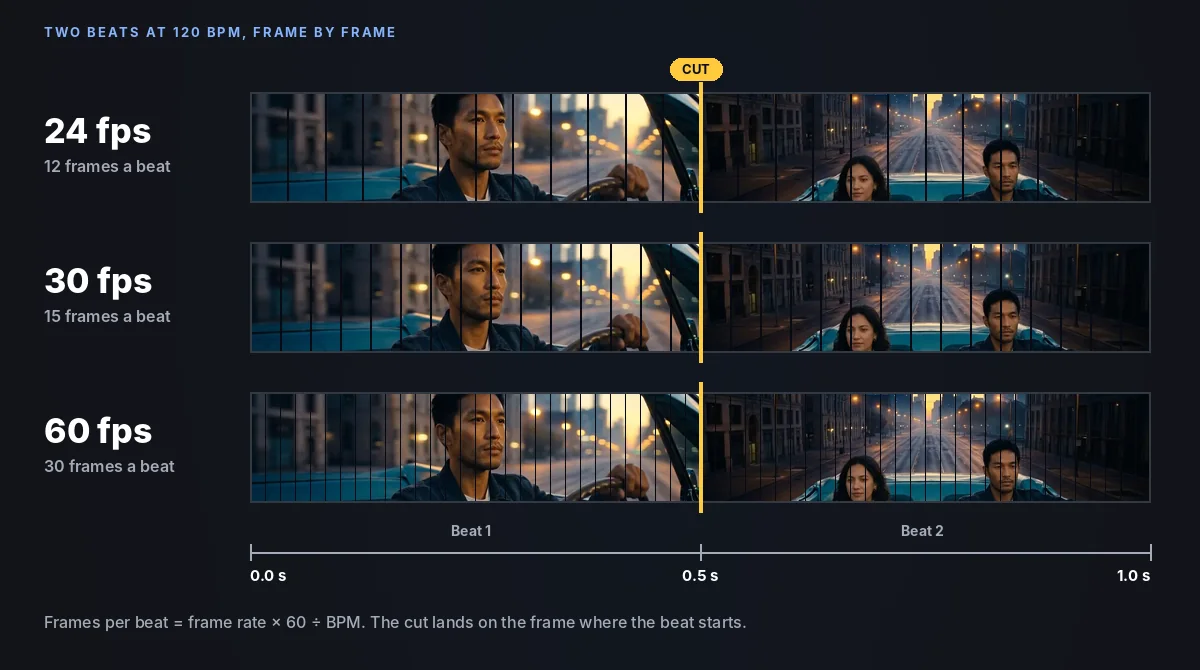
Frames a beat is the frame rate times 60, divided by the tempo. At 120 BPM and 24 fps that's 1,440 ÷ 120 = 12 frames, so a bar of 4/4 is 48 and every beat starts on a frame. Most tempos aren't that tidy. At 128 BPM a beat is 11.25 frames at 24 fps, so only every fourth beat, the downbeat of each bar, starts exactly on a frame; at 30 fps it's 14.0625 frames, exact only every 16 beats. The NTSC rates are fractions (23.976 is really 24000/1001 frames a second, 29.97 is 30000/1001), which gives 11.988 and 14.985 frames a beat at 120 BPM and a beat that lands exactly on a frame only once every 1,001 beats. A cut can only happen on a frame, so the real question is how to round. For bars in seconds at the common rates, the BPM calculator has a quick table, and what BPM means covers half and double time.
- Frames a beat = frame rate × 60 ÷ BPM
- 120 BPM at 24 fps: 12 frames a beat
- The NTSC rates never divide evenly
Round every cut from the start, never shot by shot
If each shot at 128 BPM and 24 fps is trimmed to 11 frames, the quarter of a frame lost on every beat adds up: by three minutes in, the cuts sit 96 frames, a full 4 seconds, ahead of the music. Worked out from the start instead (the beat's time in the song, times the frame rate, rounded to the nearest frame), every cut stays within half a frame of its beat, about 21 milliseconds at 24 fps, and the shots simply alternate in length: 11, 12, 11 and 11 frames, then again. That's what cutting to markers does, so put a marker on every beat or bar for the whole song with the beat marker generator, which also writes them as an EDL for DaVinci Resolve, and pace the shots by section with how to edit a music video to the beat. Animators and motion designers sometimes pick a tempo where a beat is a whole number of frames (96, 120, 144 or 160 BPM at 24 fps), so every beat is exact; the tool lists the nearest ones.
- Within half a frame of every beat
- Shot lengths alternate; the cuts don't drift
- Whole-frame tempos for animation
Drop-frame timecode, and which frame rate to use
At 29.97 fps, timecode that counts 30 frames a second falls behind the clock, and an hour of it lasts 3.6 seconds longer than an hour. Drop-frame timecode corrects the labels, not the picture: it skips the frame numbers ;00 and ;01 at the start of every minute except each tenth, so 00:00:59;29 is followed by 00:01:00;02, and no frame of video is removed. At 59.94 it skips four numbers instead of two, and it's written with a semicolon before the frames. 23.976 has no drop-frame counting at all: its timecode runs 24 numbers a second and drifts the same 3.6 seconds an hour. Frame numbers don't change between drop-frame and non-drop, only the labels, so set the tool to match your timeline. For which rate to shoot and edit at, and how slow motion works, read the music video frame rate guide; for echoes and reverb timed to the same tempo, the delay time calculator.
- Drop-frame skips numbers, not frames
- 23.976 has no drop-frame timecode
- Match the timeline's own setting
Or let the song place every cut
Muvora renders every video at 24 frames a second and lands each cut on the frame nearest its planned time, within half a frame. The cuts come from your song's own beats rather than one typed tempo: upload it and the free analysis finds every downbeat, section change and drop, the storyboard cuts on them, and a two-frame white flash marks each drop. Reading and editing the storyboard is free, and the price shows before anything renders.
Questions, answered
Can't find what you need? Start a free storyboard and see for yourself.
How many frames is one beat at 120 BPM?
Exactly 12 at 24 fps, because a beat at 120 BPM lasts half a second. It's 12.5 frames at 25 fps, 15 at 30 and 30 at 60. At the NTSC rates it's 11.988 frames at 23.976 and 14.985 at 29.97, so cuts there are rounded to the nearest frame.
How do I convert BPM to frames?
Multiply the frame rate by 60 and divide by the tempo. At 90 BPM and 24 fps that's 1,440 ÷ 90 = 16 frames a beat and 64 frames a bar of 4/4. For a cut point, multiply the frames a beat by the beats since the first downbeat, add the frames before that downbeat, and round to the nearest whole frame.
What is drop-frame timecode?
A way of numbering 29.97 and 59.94 fps video so the timecode keeps pace with the clock. It drops frame numbers, never frames: at 29.97 the numbers ;00 and ;01 are left out at the start of every minute except every tenth, so 00:00:59;29 is followed by 00:01:00;02. The video's length and pictures don't change.
Is there drop-frame timecode for 23.976 fps?
No. Timecode at 23.976 counts 24 frames a second, non-drop, so an hour of it lasts about 3.6 seconds longer than an hour on the clock. Drop-frame counting is used at 29.97 and 59.94, not at 23.976.
Why do my cuts drift off the beat?
Usually because every shot was trimmed to the same whole number of frames and the small errors added up. At 128 BPM and 24 fps a beat is 11.25 frames, so 11-frame shots run 96 frames early by the three-minute mark. Place each cut from the start of the song instead, or cut to markers set on the beat.
Which frame rate should a music video use?
The one your footage and timeline already use. Many music videos are made at 24 or 23.976 for a film look, 25 is common in countries with PAL television, and phones often record 30 or 60. Muvora renders every video at 24 frames a second.
Keep exploring
Music video frame rate
24, 25, 30, 50 or 60 fps: where each comes from, why music videos use 24, slow motion, frames per beat, timecode, platform rules and converting.
Read the guide
Edit a music video to the beat
The bar maths, the shot lengths by section and the cutting tricks that make a video play the song.
Read the guideBeat marker generator
BPM to timecode: a marker on every beat or bar, as an EDL for DaVinci Resolve, a CSV or plain timecodes.
Open the toolBPM calculator
Beats and bars in seconds, frames and milliseconds: cut lengths for video and delay times for mixing.
Open the toolDelay time calculator
Every note value at your tempo in milliseconds, hertz and samples, dotted and triplet, with starting points for delay, reverb, release and LFOs.
Open the toolTap tempo
Tap along to any song to find its BPM, with half and double time and how steady you are.
Open the tool
More free tools: tempo and timing
Keep time, make a click track, find the BPM, work out bar lengths and mark the beats for a video editor.
Your song deserves a music video
Upload a track and get a free beat-synced storyboard in minutes. Render it when you are ready.
No card needed to start.





