The short answer
To promote music on TikTok, deliver the song through a distributor so it becomes an official sound, pick the 15 to 30 seconds around the hook, and post a steady run of vertical clips that use that sound: teasers, the story behind the song, lyric clips, visualizer loops, performances and behind-the-scenes. Nobody can promise a viral hit; a strong hook and consistency improve the odds.
- Deliver the song through your distributor so every clip links to its official sound page.
- Lead with the 15 to 30 seconds around the hook, never the intro.
- Mix teasers, story, lyric, visual, performance and behind-the-scenes clips, made in batches.
- Post at a pace you can hold for two months; a burst followed by silence helps no one.
- Judge clips by what they send to the song: sound uses, saves, shares and streams.
On this page (8 sections)ShowHide
- 1.TikTok music promotion in seven steps
- 2.Get the song onto TikTok as an official sound
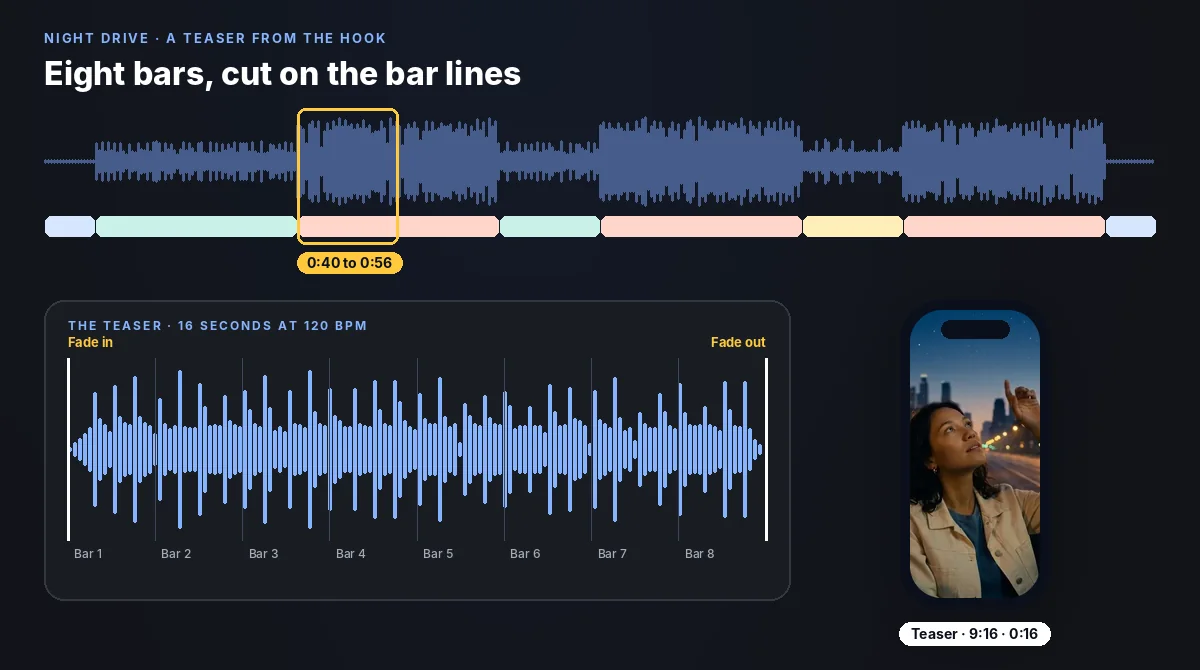
- 3.Pick the 15 to 30 seconds you lead with
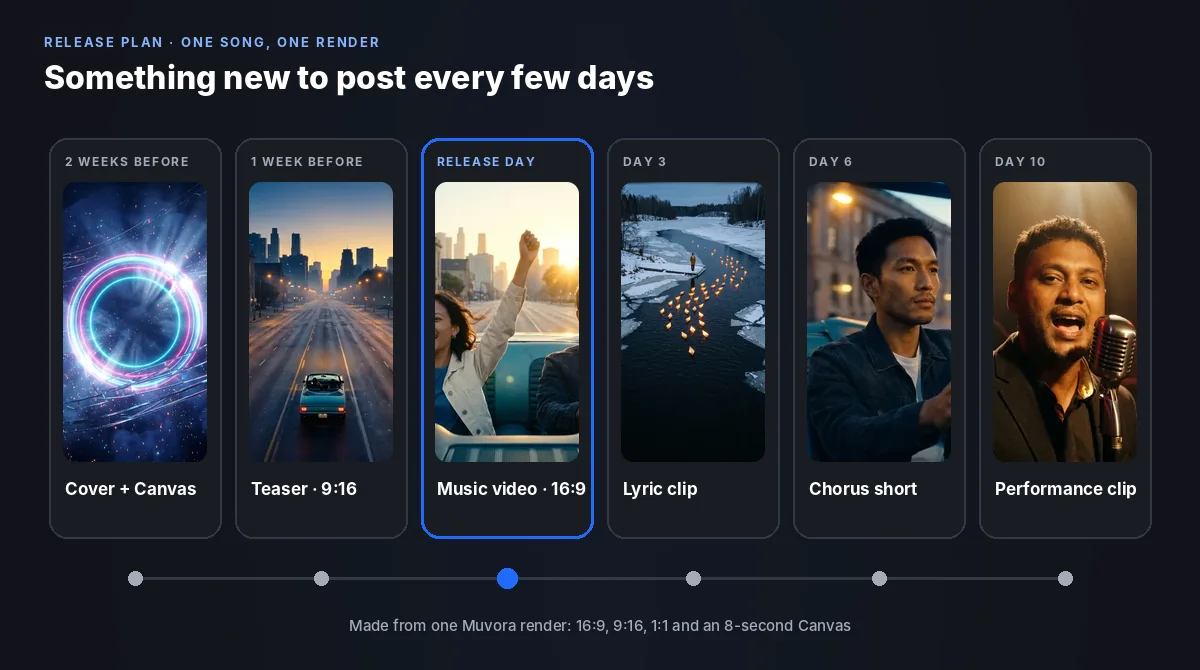
- 4.A content plan for the six weeks around release
- 5.Frame it for the phone and put the words on screen
- 6.Post consistently, then reuse every clip on Reels and Shorts
- 7.What to measure, and what to ignore
- 8.Make the vertical cut, the Canvas and the full video in one go
- Questions
TikTok music promotion in seven steps
Promoting a song on TikTok is less about one perfect video than about a system: a track that's easy to use, a hook people recognize within two seconds, and a steady supply of clips that point at it. It's also one channel among several: how to promote your music covers the rest of a release, from pre-saves and pitching to email and live shows. Here is the TikTok system; the sections after it take each part in turn.
- 01
Deliver the song so it becomes an official sound
Send the release to a distributor that delivers to TikTok, a few weeks before release day. Once it's live, the track has its own sound page, and every video that uses it links there.
- 02
Choose the 15 to 30 seconds you lead with
Find the moment someone would hum after one listen, usually the chorus or the bars before the drop, and note its start time. Nearly every clip will use it.
- 03
Set up the profile before the first post
Use your artist name, a short bio that mentions the new song, a picture that matches the cover art and, if your account can add one, a link to where the song streams.
- 04
Make a bank of clips before release
Produce two to three weeks of posts in one or two sittings: teasers, the story behind the song, lyric clips, a looping visual, performances and behind-the-scenes moments.
- 05
Post on a schedule you can keep
Choose a pace you can hold for two months, such as a clip a day in release week and three or four a week around it, and stick to it.
- 06
Invite people to use the sound
Turn on Duet and Stitch, ask a question the song answers, and reply to comments with videos. Every video someone else makes with your sound is another path back to the song.
- 07
Measure, then make more of what works
Once a week, see which clips held attention, were shared and saved, and moved streams. Then make variations of the winner: a new first frame, another lyric on screen, a new setting.
- 01
6 weeks out
- · Song mastered
- · Pick the visual idea
- · Storyboard drafted
- 02
4 weeks out
- · Pitch the song
- · Render the video
- · Cover art final
- 03
2 weeks out
- · Canvas uploaded
- · Vertical teasers cut
- · Lyric video ready
- 04
Release week
- · Premiere the video
- · Post a clip a day
- · Chapters and links set
Get the song onto TikTok as an official sound
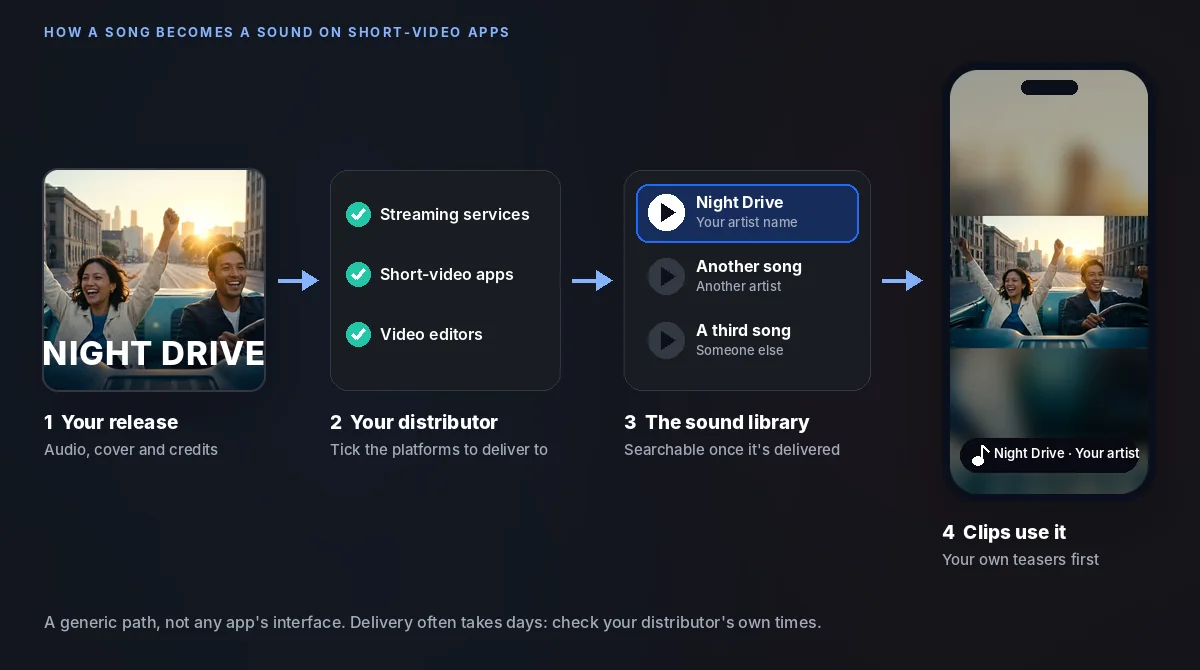
Songs reach TikTok's music library through distributors. The service that sends your release to Spotify and Apple Music very likely lists TikTok among its stores, and TikTok runs a distribution service of its own, SoundOn. Select TikTok when you deliver, and the song arrives as an official sound under your artist name, with your cover art.
That matters because an official sound has a page of its own, showing the artist, the cover and the public videos made with it. One tap on the sound name under any clip takes a viewer there, where they can save the sound for their own video and look up the full song. Your posts and a stranger's dance video feed the same page, so the song's reach adds up instead of scattering across copies.
Two more notes. Some distributors let you choose where TikTok's excerpt of your song starts; if yours does, set it to the hook. And until your distributor confirms the release is live on TikTok, teasers have to use an original sound, which is fine for a few weeks of build-up. From release day, every new post uses the official sound.
Once your music is on the platform, TikTok for Artists adds an artist profile and analytics for your sounds. TikTok sets who is eligible and how to sign up, so follow the site's current instructions rather than an old checklist.
Skip the blank page
Upload your song and Muvora's AI director plans a shot-by-shot storyboard on the beat. Edit every shot for free, and pay only if you render.
Pick the 15 to 30 seconds you lead with
A clip has a second or two to stop someone scrolling, and most songs don't open with their best idea. Lead with the part people remember after one listen: the chorus or its first line in most pop, hip-hop and R&B, the drop in dance music, one line that hits hard on its own in a slow song. Fifteen to thirty seconds lets a phrase land and loop while staying short enough to watch twice.
| Song type | Where to look | Start the clip | Clip length |
|---|---|---|---|
| Pop, R&B | The first chorus, or the pre-chorus lift into it | A bar before the chorus line | 15 to 25 seconds |
| Hip-hop | The hook, or the most quotable four bars of a verse | On the first word of the line | 15 to 30 seconds |
| EDM, drum and bass | The build and the drop | Two to four bars before the drop | 15 to 30 seconds |
| Rock, indie | The chorus, or a riff that announces the song | On the riff or the first chorus line | 15 to 30 seconds |
| Ballad, acoustic | The line with the strongest image or confession | A breath before the line | 15 to 30 seconds |
| Lo-fi, instrumental | Four or eight bars with a clear texture | On a downbeat, so it loops cleanly | 10 to 20 seconds |
Start each clip on a downbeat and end it at the end of a phrase, so a viewer watching it loop hears a clean restart. If you're unsure where the bars and sections fall, the free song structure visualizer shows every section's start time and energy from your audio file.

A content plan for the six weeks around release
Posting the same chorus clip thirty times wears thin fast. Mix the kinds of post so each gives viewers a different reason to care: a glimpse of the song, the person behind it, the words, the visuals, the performance. This plan starts three weeks before release day and runs three weeks after.
| When | What to post | Why |
|---|---|---|
| 3 weeks out | Two or three teasers: 5 to 10 seconds of the hook over a striking image, plus the date | Plants the hook before anyone can stream it |
| 2 weeks out | The story behind the song, told to camera; a first lyric clip | Gives people a reason to care who made it |
| 1 week out | A visualizer loop, behind-the-scenes from the video or the session, a countdown | Builds anticipation without repeating yourself |
| Release day | The first post with the official sound: your strongest hook clip, out now | Starts the sound page with your best clip |
| Release week | A clip a day: lyric clips, performances, a duet or reaction prompt | Gives each version of the hook its own chance |
| Weeks 2 and 3 | Three or four a week: video replies to comments, a second hook, the best clips re-cut | Keeps the song moving while new listeners find it |
- Before release
Teaser
The hook over one strong image with the date on screen, cut off before the payoff.
Use this idea on my songUse this idea on my song - Talking to camera
The story behind the song
Who or what the song is about in one specific sentence, then the hook.
Use this idea on my songUse this idea on my song - Words on screen
Lyric clip
The line people will quote, timed to the vocal and large enough to read on a phone.
Use this idea on my songUse this idea on my song - Easy to repost
Visualizer loop
A looping visual cut to the beat, posted again later with a different line on top.
Use this idea on my songUse this idea on my song - You and the song
Performance clip
The hook sung or played in a bedroom, a car, on a roof. Imperfect is fine.
Use this idea on my songUse this idea on my song - Process
Behind the scenes
The voice memo that started it, the beat being built, the take that went wrong.
Use this idea on my songUse this idea on my song - Invite others in
Reaction and duet prompt
A question the song answers or a simple move to copy, with Duet and Stitch on.
Use this idea on my songUse this idea on my song
Make three weeks of clips from one storyboard
Upload your song and Muvora plans a vertical video timed to its beats, for free. Render it once and cut your teasers, lyric clips and loops from the same footage.
Frame it for the phone and put the words on screen
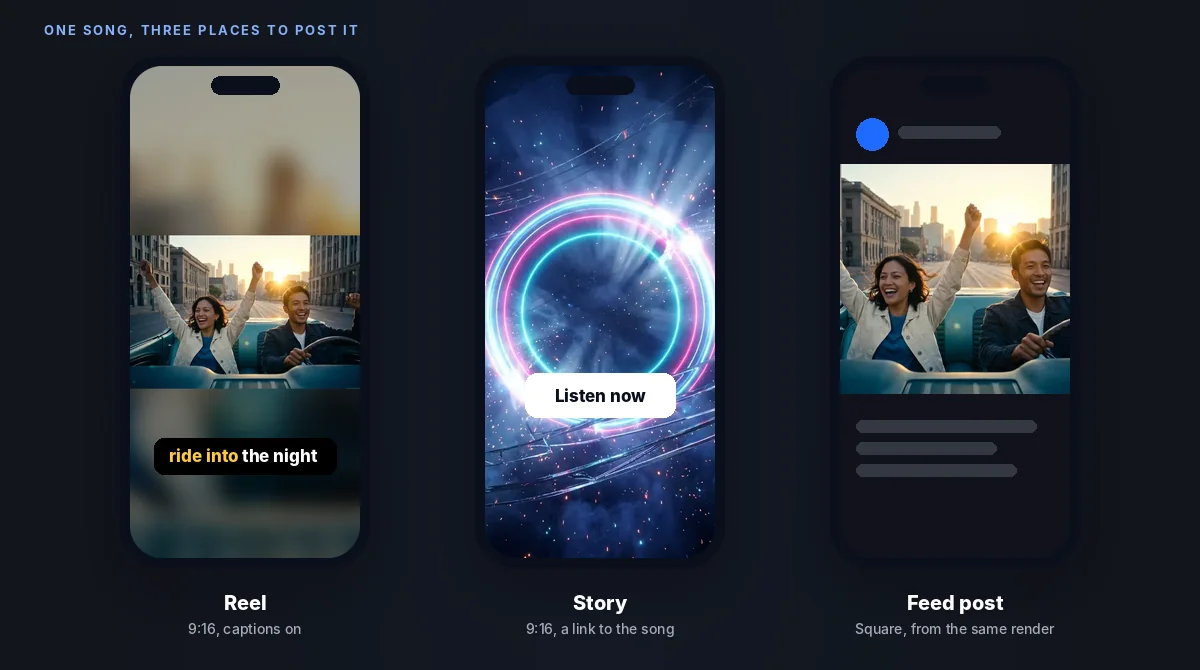
Everything on TikTok is watched on a tall screen, so make clips in 9:16 at 1080 x 1920 rather than squeezing a widescreen video into a letterboxed strip. Keep faces and action near the middle: the app lays your caption, name and sound along the bottom and its buttons down the right edge, and anything underneath is lost.
Text on screen helps too. Plenty of people scroll with the volume low, and a lyric or a one-line hook in text tells them what they're watching before they turn it up. Keep the words short, high in the frame and on screen long enough to read twice: a sung line as it's sung, one sentence of context at the top, TikTok's auto captions on talking clips (corrected before posting), and the release date once rather than throughout.



If a clip comes from a widescreen video, reframe it rather than shrinking it: crop close shots to the center, and show wide shots whole over a blurred fill of themselves. The music video aspect ratios guide covers each shape and its safe areas.
Post consistently, then reuse every clip on Reels and Shorts
No posting number works for everyone, and claims about the one right hour to post are mostly guesswork. What reliably helps is consistency you can sustain: four posts a week for two months puts more than thirty clips in front of people, while twelve in release week and then silence stops at twelve. Batching makes it possible: cut, caption and schedule a week or two of clips in one session.
- Export a clean file for Instagram Reels and YouTube Shorts, without another app's watermark on it
- Add the song from each app's own music picker where it's available, so those posts point to the official track too
- Rewrite the caption for each app instead of pasting the same text everywhere
- On YouTube, link each Short to the full music video
- Keep the opening frames consistent across apps, so people connect a clip to the song when they meet it again
- Log which clip went where and when, to compare the same clip across apps
YouTube's vertical feed has habits of its own, covered in how to promote music on YouTube Shorts; linking a Short to the full video is also in how to upload a music video to YouTube, and the wider release schedule (distribution, the Spotify pitch, the Canvas) in the music release checklist.
What to measure, and what to ignore
Views are the loudest number and the least useful on its own. A clip with modest views that sends people to the sound page and on to the song beats a big number that leads nowhere. Check weekly rather than hourly, and compare your clips with each other, not with someone else's account.
| Number | Where to find it | What it tells you |
|---|---|---|
| Average watch time and the share who watched to the end | The post's analytics in TikTok | Whether the opening seconds and the hook held people |
| Shares and saves | The post's analytics | Whether people wanted to hear it again or show someone |
| Where the views came from | The post's analytics | Whether the clip reached new people or mostly your followers |
| Videos made with your sound | The official sound's page | Whether anyone besides you is using the song |
| Profile visits and new followers | Your account's analytics | Whether the clip made people curious about the artist |
| Streams and new listeners | Your streaming dashboards, such as Spotify for Artists | Whether attention on TikTok turned into listening |
When one clip clearly beats the rest, make variations rather than reposting it: a new first frame, a different line on screen over the same moment, the visual version turned into a performance. Give each post about a week before judging it, and look for patterns across several clips instead of reacting to one.
Make the vertical cut, the Canvas and the full video in one go
Most of these clips need visuals: a loop behind the hook, a lyric clip, a teaser image, the official video for people who want more. Making each one separately is where release plans fall apart. Muvora works the other way round: one render of your song gives you every shape.
- Upload the song (MP3, WAV, M4A or FLAC, up to 8 minutes) and Muvora finds its tempo, beats, sections and drops for free.
- Choose 9:16 in the vibe step when TikTok comes first, so every shot is composed for the tall frame.
- Edit the free storyboard: every cut lands on a downbeat, and any shot, cut or look can change before you pay.
- Render once for 16:9, 9:16 and 1:1 videos plus an 8-second vertical Spotify Canvas loop, with optional karaoke-style lyric captions.
For a TikTok-first release you don't have to render the whole song straight away. Export the hook as its own audio file, 20 or 30 seconds trimmed from your master, and upload that. The video is exactly as long as the file you upload and credits are charged per finished second, so a 20-second clip costs about a ninth of a 3-minute video: at Visualizer quality, 20 seconds at 38 credits a second. If the hook catches on, render the full song next.
Render the hook first
Upload the 20 to 30 seconds you'll lead with, edit the storyboard for free and see the exact price before you render. The free plan includes 5 free storyboards a month.
Written by the Muvora team. Last updated November 13, 2026. Spotted something out of date? Tell us at [email protected].