The short answer
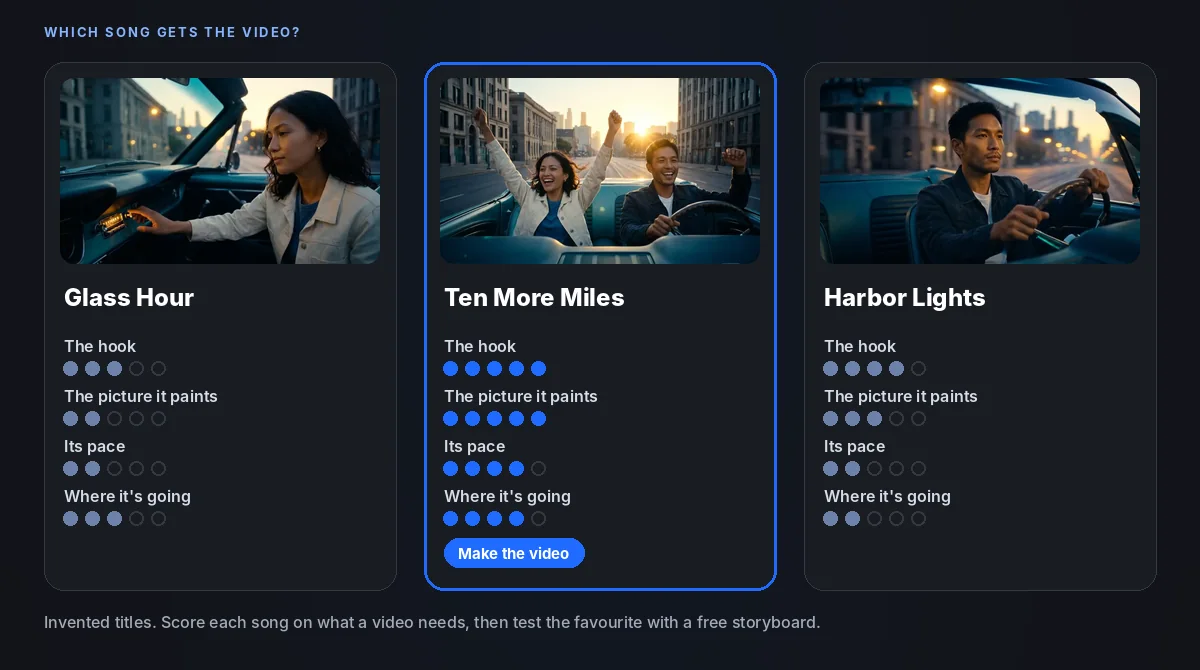
Give the music video to the song that reaches its hook early, puts a clear picture in your head, changes in energy from section to section, and already holds listeners: saves, repeat plays, a crowd singing it back. Usually that's the lead single or the release's focus track. Give the other songs lighter formats, and test the top two with free storyboards before choosing.
- Decide what the video is for before you choose the song.
- Look for a hook that arrives early and a video you can describe in one sentence.
- Read how listeners treat a song (saves, streams per listener, where they play it), not just its stream count.
- The other songs can carry a lyric video, a lighter visualizer or a Canvas loop instead.
- Storyboard two or three candidates for free and compare them before paying for one.
On this page (10 sections)ShowHide
- 1.Start with what the video is for
- 2.How to pick the song in eight steps
- 3.The scorecard: six things to rate
- 4.The hook and the picture it puts in your head
- 5.Listener signals: what the numbers can and can't tell you
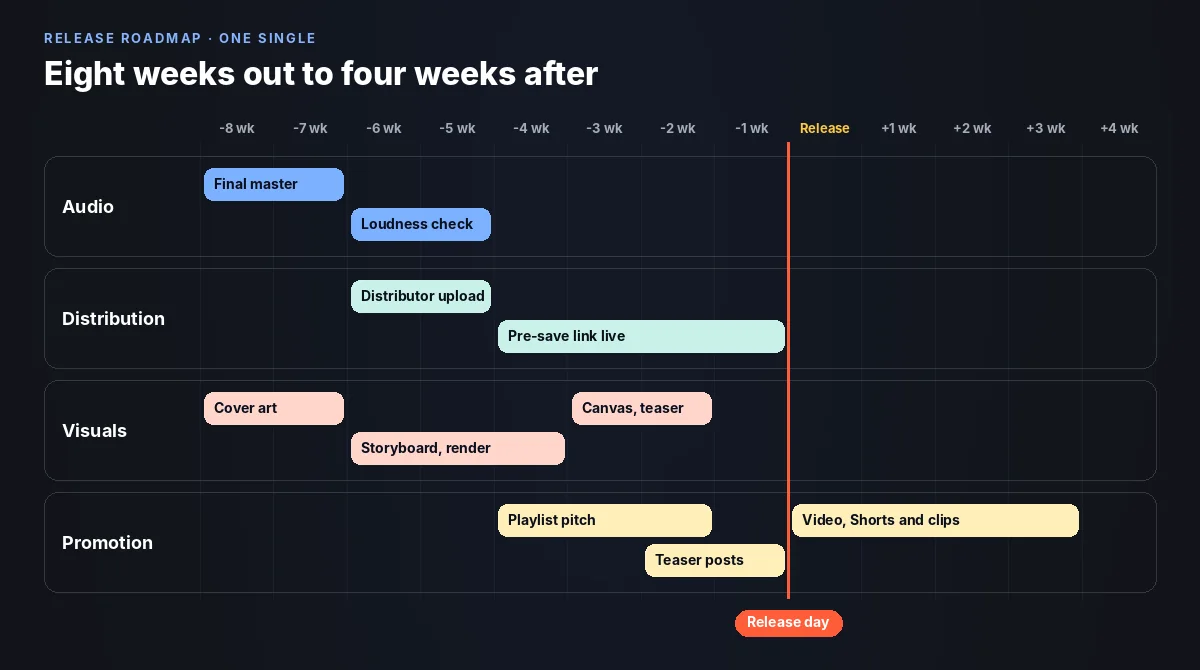
- 6.Fit the video to the release plan
- 7.The songs that suit a lighter format
- 8.Test the finalists with free storyboards
- 9.A worked example: one EP, one music video
- 10.What a music video can and can't do for a song
- Questions
Start with what the video is for
A music video does a different job depending on when it comes out and what it's attached to, and the right song depends on the job. A video that announces a new release needs the song that sums the release up. A video meant to keep a song going needs the one that's already moving. A first video for a new artist needs whichever song best says who they are. Write the job down first; it settles more arguments in a band than any scorecard.
| The video's job | The song it needs | Often released |
|---|---|---|
| Announce a release | The lead single: the song that sums up the record and has the strongest hook | On release day, or within the first week |
| Keep a song going | The song whose listening is growing, often one that's picking up saves or playlist adds | Weeks or months after release |
| Introduce a new artist | The song that best shows the voice, the sound and the attitude | With the first or second single |
| Push an album's focus track | The song the campaign is built around, usually not the first single | In the run-up to the album |
| Give fans something to share | A song with a line or a moment people already quote or sing | Any time; often between releases |
| Mark an occasion | A seasonal song, an anniversary, a live favorite | Tied to a date |
How to pick the song in eight steps
- 01
List the candidates and each one's role
Write down every song that could get a video and its place in the release: lead single, second single, focus track, album track or older song.
- 02
Time the first chorus
Note when each song's hook or first chorus arrives, in seconds from the start, since a video builds toward that moment.
- 03
Write one sentence of video for each
Describe the video each song suggests in a single sentence with a person, a place and something that happens, and mark the songs where no sentence comes.
- 04
Check how listeners treat the released songs
Compare saves, streams per listener and where the plays come from for each released song, and for unreleased ones, how a live crowd or a demo audience reacted.
- 05
Place each song on the release calendar
Mark which song is out first, which leads the campaign and how many weeks you have before each date, so the video arrives when the song needs it.
- 06
Price each candidate
Work out each song's cost at the quality it needs, since a music video's price grows with its length and its look.
- 07
Storyboard the top two or three
Make a free storyboard for each finalist and compare the concepts, the style frames and the quoted prices side by side.
- 08
Choose, then give the others a format
Pick the song for the full music video and decide what each remaining song gets instead: a lyric video, a visualizer, a Canvas loop or short clips.
Skip the blank page
Upload your song and Muvora's AI director plans a shot-by-shot storyboard on the beat. Edit every shot for free, and pay only if you render.
The scorecard: six things to rate
Score each candidate from 1 to 3 on six criteria. The totals aren't a formula, since a 3 on the video's job can outweigh everything else, but scoring makes you listen to each song with the same questions instead of picking the newest one or the one you enjoyed writing most.
| Criterion | Scores 3 when | How to check |
|---|---|---|
| The hook | The hook or first chorus arrives early and is easy to sing back | Time the first chorus; play it once to a friend and ask what they remember |
| The picture | You can describe a video for it in one sentence, and the sentence is specific | Write the sentence; if it needs "vibes" or "aesthetic", it isn't one yet |
| The pace | Its energy changes between sections, with a lift or a drop to build to | Look at the song's sections and energy on a timeline |
| Listener signals | People save it, replay it or sing it back at shows | Saves, streams per listener and active sources in your streaming stats; crowd reactions |
| The release role | It's the lead single or the focus track, and the timing works | Check the release calendar and the weeks left before each date |
| The cost | Its length and the look it needs fit the budget | Price it per finished second at the quality you'd pick |
The hook and the picture it puts in your head
A video builds toward the song's biggest moment, so the time before the first chorus is time the picture has to hold attention on its own. A song whose chorus lands at 0:35 reaches its first lift within a dozen or so shots; one that waits until 1:20 asks viewers to sit through two verses of setup first. That doesn't rule out a slow-burning song, but it makes it a harder video to hold, and a better fit for a lyric video where the words carry the opening. How to write a hook explains why so many songs now reach theirs early.
The picture test is the quickest filter of all. For each song, write the video it suggests in one sentence with a person, a place and something that happens. Songs that produce a sentence straight away are easier to make into a video people remember, and they're usually the ones with concrete verses, as how to write a verse explains. Songs that only produce a mood can still get one, but they'll need more work in the concept. The sentences below were written for this guide.
| Passes | Doesn't yet | What's missing |
|---|---|---|
| "Two siblings fix their grandfather's jukebox in a garage, and by the last chorus the whole street is dancing" | "A fun summer vibe with friends" | A place, an action and a change |
| "A night-shift nurse drives home at dawn and sings to an empty highway" | "Emotional and cinematic" | Who it is and what they do |
| "A ring of light breaks apart a little more at every drop" | "Cool visuals that match the beat" | One image that changes with the song |
Listener signals: what the numbers can and can't tell you
For songs that are already out, your streaming stats show how listeners treat each one, and that matters more than the raw stream count. Spotify for Artists counts a stream once someone has played a song, or a music video, for at least 30 seconds, and counts a save when a listener taps the plus button to add it to their library (a save from a music video also saves the audio track). Its source of streams view splits plays into active sources, where listeners chose the song (your profile, their own playlists and library, their queue), and programmed ones, such as editorial playlists, Release Radar, Discover Weekly, autoplay and other listeners' playlists, and it shows streams per listener.
- Saves relative to streams: divide a song's saves by its streams over the same period and compare songs. A song people keep is a song people will want to see.
- Streams per listener: more plays from each listener means people come back to it.
- Active share: a song played mostly from listeners' own libraries and playlists is chosen, not just served.
- Live reaction: the song a crowd sings back, or asks for, is evidence too, and for an unreleased song it's often the only evidence you have.
- Clips people make: if listeners already use a song in their own short videos, that moment is a strong candidate for the video's centerpiece.
Fit the video to the release plan
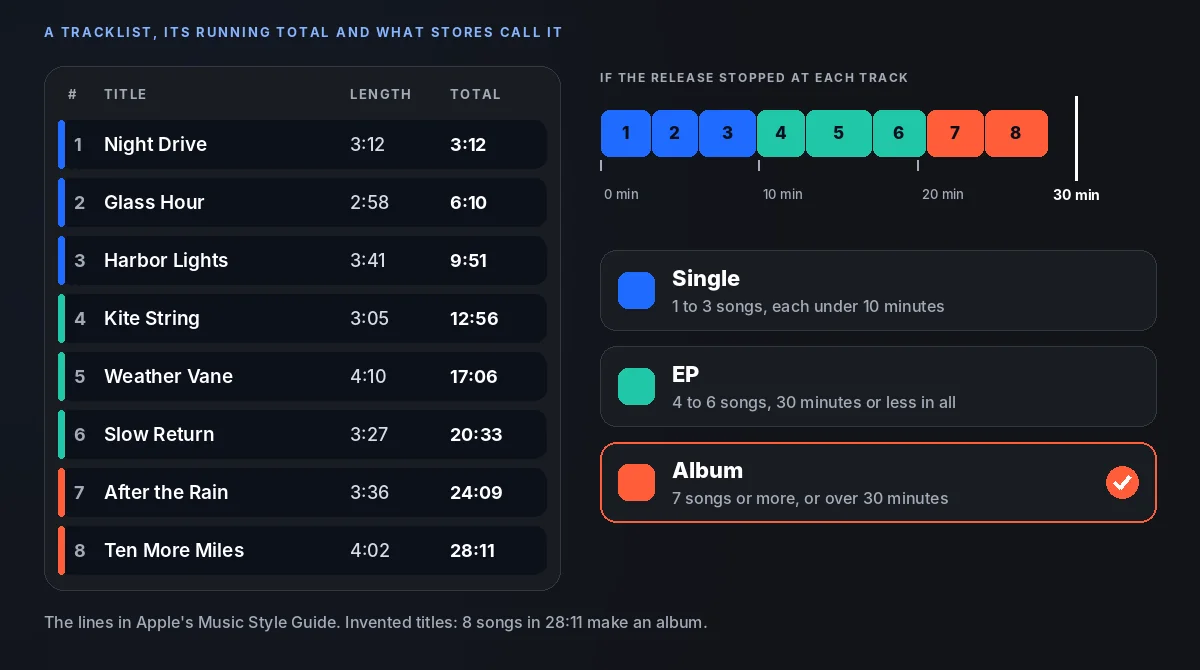
For a single, the choice is made for you: the single gets the video, and the questions are the concept and the date. For an EP or an album, the usual pattern is one full music video for the lead single, sometimes a second for the focus track, and lighter formats for the rest. How many songs on an album and what an EP is cover how stores count a release; the album length calculator adds up a tracklist and says what each store would call it. Whichever it is, plan the video on the same calendar as the audio, the artwork and the pitch.
- The lead single sets the look for the whole release, so its video's palette, places and characters often carry into the cover, the Canvas loops and the later visualizers.
- A second single gets a full video when it's taking off, or a lyric video when the words are the draw.
- An album's focus track may not be the first single. If the campaign is built around it, it earns the bigger video even when another song came out first.
- Older songs can get a video later, for an anniversary, a live favorite or a song that's picking up listeners again.
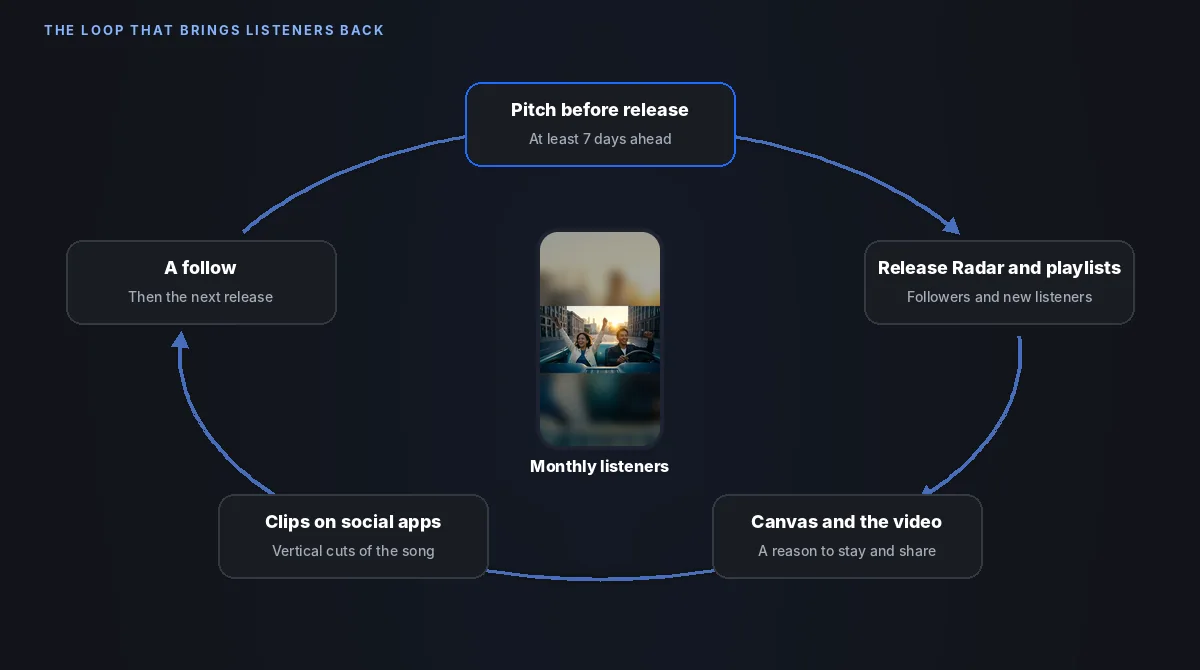
- Leave time before the date: plan the video several weeks ahead so it's finished, checked and scheduled before release day, with vertical cuts and a Canvas loop ready at the same time.
The songs that suit a lighter format
Not getting the music video doesn't mean getting nothing. Every song on a release can have a visual, scaled to its job. A lyric video suits a song whose words are the point; a visualizer suits an instrumental, an interlude or a long track; a Canvas loop gives every song a moving picture on Spotify; and short vertical clips can come from whichever moment works. Visualizer vs lyric video vs music video compares the three formats in detail.
Visualizer
Moving artwork that reacts to the song. No story needed.
Lyric video
The words on screen, timed to the vocal, over visuals.
Music video
Shots with a lead, places and a story, cut to the beat.
| The song | A format that suits it | In Muvora |
|---|---|---|
| The lead single or focus track | A full music video with a story or a performance | Story or Performance style, often at Standard (60 credits a second) or Cinematic (110) |
| A word-led song, a fan favorite with a quotable line | A lyric video | Lyric style with karaoke-style captions timed to the vocal |
| An instrumental, an interlude or a long track | A visualizer | Abstract style, at Visualizer quality (38 credits a second) |
| Every song on the release | A Canvas loop | Every render includes an 8-second Canvas loop |
| The song with a moment people clip | Short vertical clips | A widescreen render's 9:16 version, cut from the strongest part |
Test the finalists with free storyboards
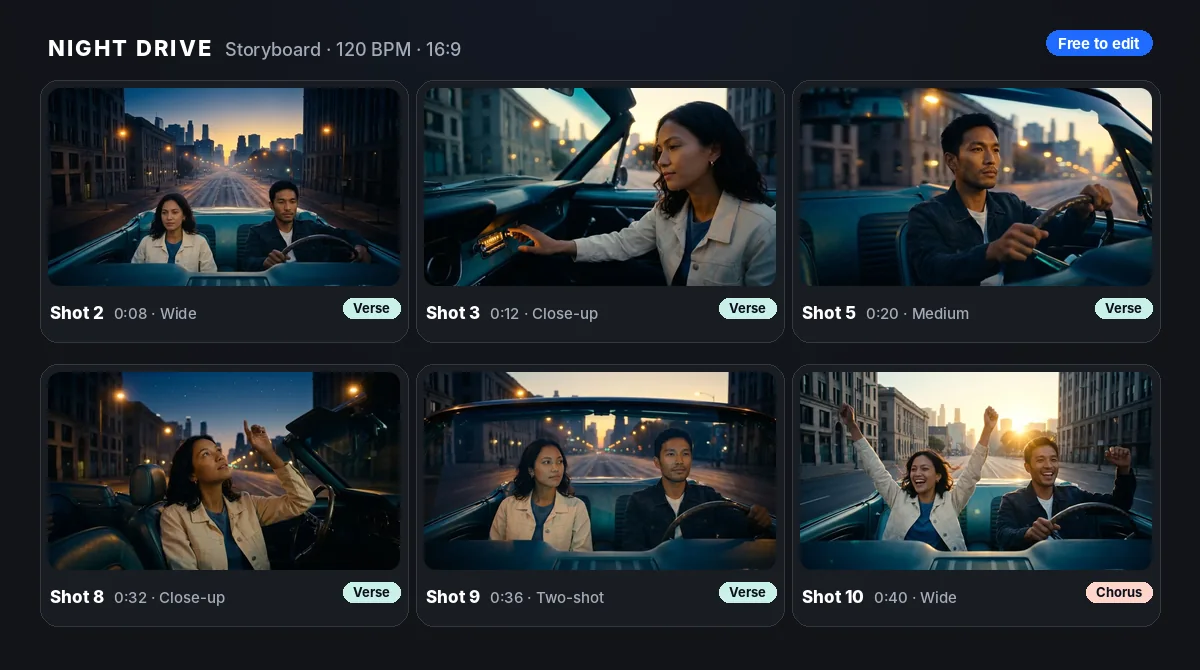
The scorecard narrows the list; seeing a storyboard settles it. In Muvora, a storyboard costs nothing to make and read: upload a song, pick a style and a genre look, describe your idea in the idea box (up to 600 characters), and it analyzes the song and an AI director writes a shot-by-shot plan timed to its beats, with style frames that show the look: an establishing frame, a chorus hero frame and a character sheet when there are characters. The free plan includes 5 new storyboards a month, enough to compare two or three finalists side by side.
- Compare the concepts: which storyboard has the clearer idea, the stronger chorus moment and a story you'd want to watch twice?
- Compare the style frames: which look feels like the release, and which could carry into the cover and the Canvas?
- Compare the prices: each storyboard shows its price in credits before anything renders, at each quality.
- Edit before you decide: rewrite a shot, move a cut or ask for a shot to be rewritten with AI, all free, so you compare each song's best version.
Storyboard your finalists before you choose
Upload your top two or three songs and compare their storyboards, style frames and prices side by side. Reading and editing every storyboard is free; you pay credits only for the one you render.
A worked example: one EP, one music video
Here is the scorecard applied to an EP invented for this guide, "Weather Report", five songs by a fictional singer-songwriter with a modest budget and six weeks until release. The scores are out of 3 for each of the six criteria.
| Song | Length, first chorus | One-sentence video | Total | Gets |
|---|---|---|---|---|
| "Copper Wire" (112 BPM) | 3:02, chorus at 0:34 | Two siblings fix their grandfather's jukebox and the street ends up dancing | 17 | The music video, released with the EP as the lead single |
| "Night Bus Home" (96 BPM) | 3:28, chorus at 0:51 | A rider counts the stops while the city empties out | 13 | A lyric video: the crowd already sings its bridge at shows |
| "Salt Flats" (72 BPM) | 4:24, chorus at 1:18 | A long drive across white ground at noon | 9 | A visualizer at Visualizer quality, and a Canvas loop |
| "Static" (instrumental) | 1:46, no chorus | A ring of light that hums and breaks | 9 | A Canvas loop and a short clip |
| "Copper Wire (Acoustic)" | 3:10, chorus at 0:40 | The same story, quieter | 8 | A Canvas loop that reuses the lead video's look |
"Copper Wire" wins clearly: an early chorus, a picture with a beginning and an end, a lift into every chorus and the lead-single slot. "Night Bus Home" scores best on listener signals, which is exactly why it suits a lyric video: people already know the words. "Salt Flats" has a strong picture but a long, slow build and a late chorus, so a lighter visualizer covers its four and a half minutes at a fraction of the cost. Nothing is wasted: every song gets a visual, and only one gets the budget.
What a music video can and can't do for a song
A music video gives a song more places to be found and more reasons to come back: a video on YouTube, a music video on Spotify where it's available, vertical clips for the short-video apps and a loop on the song's page. It can't make a song connect with listeners who don't respond to it, and no format, length or quality decides how many people watch. Choose the song that already moves people a little, give it a clear idea, and promote the video like the release itself; how to get more views on a music video covers the promotion, and getting your music video on Spotify covers that route.

Picked your song?
Upload it and read its storyboard before you pay. One widescreen render gives 16:9, 9:16 and 1:1 videos plus an 8-second Canvas loop, the price shows before you render, and shots that fail cost nothing. See the music video storyboard generator for how the plan is written.
Written by the Muvora team. Last updated November 18, 2026. Spotted something out of date? Tell us at [email protected].