The short answer
As of November 2026, a music video reaches Spotify in one of two ways: your distributor or label delivers it, which Spotify calls the primary path, or you upload it in Spotify for Artists, a beta opening gradually with a waitlist. Spotify asks for a landscape 16:9 video of one song, longer than 30 seconds and 1080p or higher, with the music as its focus.
- Distributors and labels are still the main route; direct upload in Spotify for Artists is a beta with a waitlist.
- Spotify wants a 16:9 video of one song, over 30 seconds and 1080p or more, with the music as the focus.
- Official videos, live performances, sessions, covers and visualizers count; lyric videos and still images don't.
- Videos over 30 seconds can earn royalties, and an official video can be pitched to editors separately from the song.
- Every artist can add a Canvas today, whether or not video has reached them.
On this page (9 sections)ShowHide
- 1.Can you put a music video on Spotify?
- 2.How to get your music video on Spotify, step by step
- 3.Route one: your distributor or label
- 4.Route two: uploading in Spotify for Artists
- 5.The specs: what file Spotify wants
- 6.Which videos Spotify takes, and which it doesn't
- 7.Pitching your video to Spotify's editors
- 8.What every artist can put on Spotify today
- 9.Making a music video that fits Spotify
- Questions
Can you put a music video on Spotify?
Yes, though not every artist yet, and not every listener can watch. Spotify widened its official music video beta to Premium listeners in over 100 markets in January 2025, with the videos delivered by a limited number of distributors. On June 17, 2026 it opened full-length video uploads in Spotify for Artists to tens of thousands of artists in a beta, with a waitlist for the rest, and stopped taking new Clips the same day. Spotify says videos longer than 30 seconds can earn royalties and may count toward charts, just like audio.
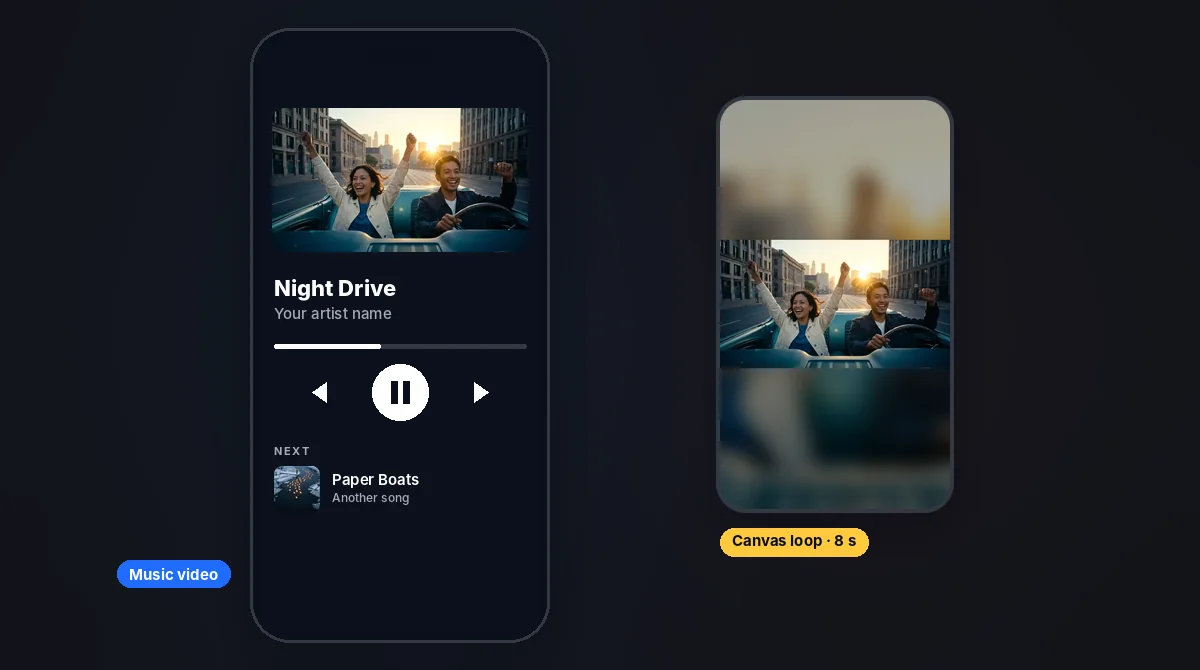
- In the Now Playing view, where a listener taps Switch to video and can turn the phone sideways for full screen.
- On your artist profile, in a Video tab that appears once you have videos on Spotify.
- In playlists of videos: Videos For You, Spotify's personalized video playlist, and editorial ones such as Today's Top Videos, Live Performances and Video Covers.
- In Music Video Charts Global, a daily top 50 ranked by music video streams.
- As short previews that Spotify cuts from an uploaded video by itself, for use around the app.
Who can watch is narrower. Spotify's music videos page says distributor-delivered videos play for Premium listeners in a long list of countries across Africa, Asia, Europe, the Americas and Oceania, including the US, Canada, the UK, Mexico, Brazil, Australia and Japan, and for free listeners in Brazil and Colombia, with more being added gradually. Videos uploaded directly can be seen by Premium listeners in most of the countries where uploading is open. Spotify's own figures give the reason to bother: after streaming a video, listeners stream that song 64% more often over the following three weeks, on average.
How to get your music video on Spotify, step by step
- 01
Release or schedule the song first
Spotify ties every video to a song, so have the audio out or delivered through your distributor before the video, with the title and artist spelled exactly as they'll appear on the video.
- 02
Make the video to Spotify's specs
Export one song as a landscape 16:9 MP4 at 1080p or higher, longer than 30 seconds, with the song itself as the soundtrack and no lyrics typed over the picture.
- 03
Pick your route
Ask your distributor or label whether it delivers music videos to Spotify, and look for Upload Video under Video & Visuals in Spotify for Artists on desktop; if neither is open to you, join Spotify's waitlist.
- 04
Clear the publishing for the US
Make sure every songwriter on the song is signed up with The MLC, has registered the song there, and has opted in to Spotify's audiovisual licensing agreement with The Harry Fox Agency.
- 05
Deliver or upload it with the right details
Link the video to its song, choose its type and version, add the original release date, songwriters and a video ISRC, set the 18+ and explicit flags honestly, and pick a thumbnail frame.
- 06
Pitch it to Spotify's editors
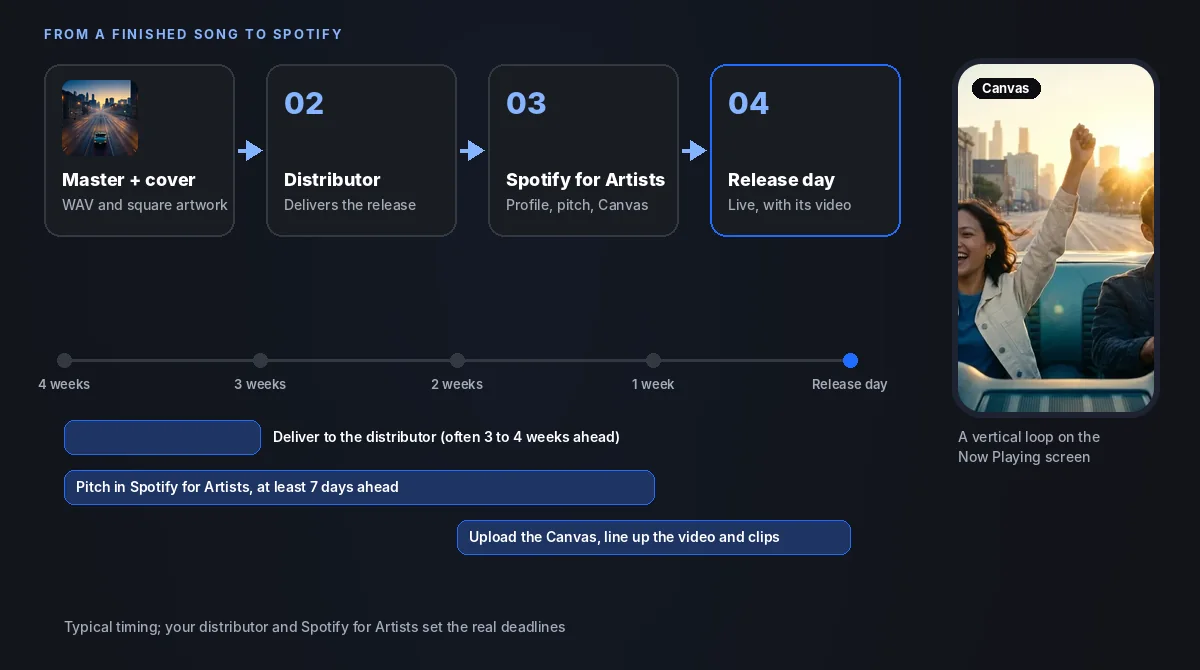
Before the video is released, or within seven days of its release or upload, send a video pitch describing its story, genre, mood, visual style and marketing plans, separately from the song's pitch.
- 07
Share it and read the numbers
Post the link where your fans are, and check the video's streams and listeners in Spotify for Artists, which show about a day after it goes live.
Need the video itself?
Upload the song and Muvora plans every cut on its downbeats in a storyboard you can edit for free. A widescreen render at 1080p is a 1920 x 1080 MP4 whose soundtrack is your master, unchanged.
Route one: your distributor or label
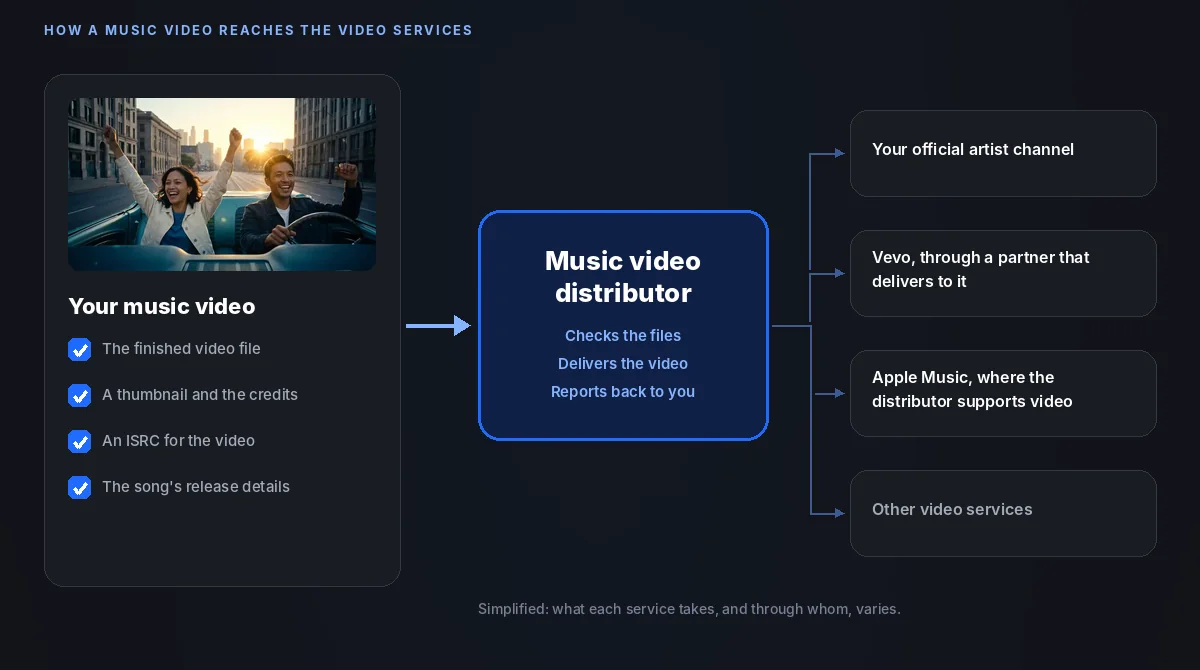
Spotify's help pages say delivery through labels and distributors remains the primary path for audio and video, and that the distributor delivering a video also pays its streaming royalties. Not every distributor delivers video to Spotify, and those that do set their own rules, so ask yours before you plan around it. DistroKid, for one, added Spotify to its separate music video service, DistroVid, in June 2025. Its Spotify video page says Spotify accepts full-length official music videos through it but not lyric or cover videos, that a video must match an original song already released on Spotify unless it's a live performance, and that going live can take from a couple of days to a few weeks.
- Does it deliver music videos to Spotify, and to which other services? Many video offers also reach Apple Music, Tidal or Vevo.
- Must the song's audio be released through it too? Some distributors only deliver a video for audio they distributed.
- Which kinds of video does it send? An official video, a live performance, a visualizer or a cover may each be treated differently.
- Does it assign the video its own ISRC, or do you bring one?
- What does it charge, per video or as a yearly plan, and how long does delivery take?
Once a delivered video is live, it shows in Spotify for Artists under Video & Visuals, then Video, with every video ordered by release date. If the distributor takes it down, it disappears from Spotify for Artists too. How to get your music video on Vevo compares the distributors that sell video plans, many of which deliver to Spotify and Vevo from one upload.
Skip the blank page
Upload your song and Muvora's AI director plans a shot-by-shot storyboard on the beat. Edit every shot for free, and pay only if you render.
Route two: uploading in Spotify for Artists
Direct upload is the newer route and still a beta. Spotify's upload page lists where eligible artists can use it: the US, Canada, Mexico, the UK and most of Europe, Australia and New Zealand, Brazil and Argentina, Japan, South Korea and other countries in Asia, Africa and the Caribbean. Its music videos page says the beta is open alongside labels and distributors; if Upload Video isn't in your Spotify for Artists yet, join the waitlist and keep delivering through your distributor meanwhile.
- Log in to Spotify for Artists on desktop as an Admin or Editor of the artist team.
- Go to Video & Visuals and click Upload Video, then drag in the file.
- Say whether the song is a cover or your own, and link it: a song from your catalog, Unreleased audio if it isn't on Spotify yet, or the original song for a cover.
- Keep the title the same as the song's, without the artist's name or words like Live, and set the version, the video type and the original release date.
- Pick a thumbnail from the frames Spotify offers, choose to publish now or schedule it, set the 18+ and explicit flags, and add songwriters and a video ISRC under advanced details.
- Submit. Spotify emails you when it's live, which can take up to 24 hours after processing; stats follow about a day later.
After a video is live you can still change its title, version and release date, or delete it. Anything else means deleting it and uploading it again, so check the details before you submit. If a video fails to process, the fix is the same: delete it and upload it again. If a rights holder blocks it, Spotify emails you, and you can appeal when you believe you have the rights.
The specs: what file Spotify wants
| Spec | Spotify recommends | Spotify also takes | A Muvora 16:9 render |
|---|---|---|---|
| Shape | Landscape 16:9 | Other shapes, shown letterboxed in a 16:9 space on most screens | 16:9 |
| Resolution | 1080p or higher (the upload page says at least 1920 x 1080) | 180p or higher | 1920 x 1080 at 1080p; 1280 x 720 at 720p |
| Length | Over 30 seconds, or the song's full length | Over 1 second and under 20 minutes; no still images | The whole song, up to 8 minutes |
| File | MP4 | MOV or MPEG-4 | MP4, H.264 video with AAC sound |
| Size | Up to 50 GB | Nothing larger | Far under the limit |
| Content | One song, with the music as the clear focus | Not multi-song videos or full concerts | One song, every shot moving |
Spotify's content policy for videos adds that it may remove blurry videos or others that aren't technically up to standard, that you must have every right to the music and the pictures, and that you should consider the 18+ tag for a video that prominently shows things like substance use or graphic violence in a prolonged or intense way. It asks for the explicit flag on profanity and on imagery of or references to violence, drugs or sexual behavior, so judge the pictures as well as the lyrics. Muvora's pictures never show nudity, sexual content or gore, but they can show mature themes when your song calls for them. Render at 1080p for Spotify: 720p is technically accepted, but it's below the size Spotify asks for.
Video file checkerOpen the exported file on your device to check its resolution, frame rate, length, codecs and bitrate before you hand it to a distributor or upload it.Which videos Spotify takes, and which it doesn't
| Spotify supports | Not supported, or not allowed |
|---|---|
| Official music videos | Lyric videos |
| Live performances | Videos with several songs, such as full concerts (split them into one video per song) |
| Acoustic or studio sessions | Videos with static or near-static images |
| Covers | Videos without music |
| Alternate versions, such as dance videos | Anything that breaks Spotify's platform rules |
| Visualizers | Videos you don't have the rights to |
Visualizers moved during the year: Spotify's June 2026 announcement said they weren't supported at launch, and its help pages now list them. Lyric videos are still out, on Spotify's list and on DistroKid's. Only official music videos and performance videos can be pitched to editors or enter the video chart, so the official video is the one to plan for.
Pitching your video to Spotify's editors
Song pitches and video pitches are separate, and Spotify's pitching page advises doing both when you release a song and a video. A video can be pitched if it's an official music video or a performance, delivered by your distributor or uploaded by your team, and unreleased or released within the past seven days. For a distributor's video the seven days start at its release date; for an upload they start at the upload date. Video pitching is still rolling out, so the Pitch your videos button under Video & Visuals only appears once you have access and an eligible video.
- The story: what happens in the video, in two or three sentences, and why it fits the song.
- The genre and mood, in the same words you used for the song's pitch.
- The visual style: the look, the palette, the places, and whether it's live action, animated or AI-made.
- The marketing plan: the premiere, the vertical clips, the ads or the press that will send people to it.
Pitched videos are considered for editorial video playlists; Spotify names Best New Videos, Live Performances and House Party among them. Spotify is plain that pitching doesn't promise a placement and that editors may pick a different song or video. The Spotify pitch generator drafts the song's pitch from your own details, and how to get on Spotify playlists covers what editors look for.
What every artist can put on Spotify today
If video hasn't reached you yet, three things can still move on your song's page. None of them needs the beta.
- A Canvas. The 3 to 8 second vertical loop that replaces your cover in the Now Playing view on the mobile app. Spotify's Canvas guidelines ask for 9:16, between 720 and 1080 pixels tall, as an MP4 or JPG, without talking, singing or rapping, and without rapid cuts or intense flashing. An Admin or Editor on the main artist's team adds it under Music in Spotify for Artists, on any track, upcoming ones included.
- Countdown videos. Short vertical videos with sound, longer than 3 seconds and shorter than 30, at least 1280 x 720, that sit on a Countdown Page for an eligible upcoming release; Spotify's countdown video page says they disappear once the release goes live.
- Your existing Clips. Spotify's Clips page says new Clips uploads ended on June 17, 2026; the ones already uploaded stay live and move to the Video tab.
Your song
Your name
Loops while the song plays
Length: 3 to 8 seconds
Shape: vertical 9:16, at least 720 px tall
Keep clear: the bottom of the frame, where the player sits
Outside Spotify, the official video belongs on YouTube on release day, with the Spotify link at the top of the description, as how to upload a music video to YouTube explains, and vertical cuts on Shorts, Reels and TikTok point people back to the song. The Spotify Canvas guide covers loops that don't jump, and the Canvas from an image tool makes a slow push-in loop from one picture.
Making a music video that fits Spotify
Muvora makes the video from the song file you release. It measures the tempo, every beat and downbeat, the sections and the drops, plans every cut on a downbeat, and writes a storyboard you edit for free before you pay to render. A widescreen render at 1080p is a 1920 x 1080 H.264 MP4 with AAC sound, inside Spotify's recommended specs, and its soundtrack is your upload from its first sample, so the video plays exactly the master your distributor delivered.
- The official video: 16:9, 1080p, captions off, ready for your distributor or the upload page.
- The Canvas: an 8-second 9:16 loop with no sound, cut from the video's strongest chorus moment. Spotify advises against rapid cuts and intense flashing, and a chorus cuts fast, so watch the loop before you upload it.
- A countdown video or a teaser: trim 15 to 25 seconds from the 9:16 export in any editor, keeping its sound.
- Vertical and square cuts for Shorts, Reels, TikTok and feed posts, from the same render.
Muvora doesn't deliver videos to Spotify, upload them or assign ISRCs: your distributor or Spotify for Artists does the delivery, and what is an ISRC code explains why the video gets a code of its own. Spotify Canvas maker shows the loop on its own, and how to get your music on Spotify covers the release that has to come first.

Make the video Spotify asks for
Upload the master, read and edit the storyboard for free, and render the 16:9 video, the Canvas and the vertical cuts together. The free plan includes 5 new storyboards a month, and you see the exact price before you render.
Written by the Muvora team. Last updated November 18, 2026. Spotted something out of date? Tell us at [email protected].