Aspect ratio calculator for every place your video goes
Enter a width and a height to get the frame's ratio in lowest terms and by name, the height for any new width, and a picture of what happens when you crop it to fill another shape or fit it inside one. The table lists the sizes a song's videos are delivered at.
Free, no sign-up. Runs in your browser: nothing is uploaded.
16:9
16:9 widescreen
Height: 720 px
Sizes for each platform
| YouTube (1080p) | 1920 × 1080 | 16:9 |
|---|---|---|
| YouTube (4K) | 3840 × 2160 | 16:9 |
| Shorts, Reels, TikTok | 1080 × 1920 | 9:16 |
| Spotify Canvas | 1080 × 1920 | 9:16 |
| Instagram feed (portrait) | 1080 × 1350 | 4:5 |
| Square feed post | 1080 × 1080 | 1:1 |
Song finished? Upload it and Muvora plans the whole video on its beats. The storyboard is free.
Make the videoUpload a new songHow to use the aspect ratio calculator
- 01
Enter the size
Type the width and height in pixels, or tap one of the common sizes.
- 02
Read the ratio
See the ratio in lowest terms and its common name, such as 16:9 widescreen.
- 03
Resize it
Enter a new width to get the height that keeps the shape, rounded to an even number.
- 04
Compare crop and fit
Pick a target shape and see how much a crop keeps and how much a fit leaves as bars.
One video, four shapes
A release usually needs a widescreen video, a vertical cut, a square post and a Canvas. Turning one into another means cropping, which loses part of the picture, or fitting, which adds bars or a fill. Knowing how much each costs your frame tells you where to keep the action.
- 16:9 for YouTube
- 9:16 for Shorts, Reels, TikTok and Canvas
- 1:1 and 4:5 for feed posts
Why the numbers are so different
Cropping a widescreen frame to vertical keeps under a third of its width, so anything off-centre is gone. Going the other way, a vertical frame fitted into widescreen fills under a third of the screen. The previews show both, to scale, for any size you enter.
- Crop previews show the part that survives
- Fit previews show the bars
- Even sizes for video encoders
How Muvora reframes for you
When Muvora assembles a video it exports every shape from the same render: the vertical and square cuts crop the centre of each shot, except a wide shot, which stays whole over a blurred fill of itself so the scene isn't lost. You choose the main shape before the storyboard is planned.
- Every shape from one render
- Wide shots kept whole over a blurred fill
- Choose the main aspect before planning

Make the video once and get every shape
Choose 16:9, 9:16 or 1:1 when you upload your song and Muvora plans the shots for that frame, then exports the other shapes and an 8-second Canvas loop from the same render. The storyboard is free to edit before you pay.
Questions, answered
Can't find what you need? Start a free storyboard and see for yourself.
What aspect ratio is 1920 by 1080?
16:9, the widescreen shape used by YouTube, TVs and most monitors. 1280 by 720 and 3840 by 2160 are the same shape at other sizes.
What size is a 9:16 vertical video?
1080 by 1920 pixels is the usual size for Shorts, Reels, TikTok and a Spotify Canvas; 720 by 1280 is the same shape at a smaller size.
Should I crop or fit when changing aspect ratio?
Crop when the action is near the centre and you want to fill the screen; fit when the whole frame matters, ideally over a blurred or colored fill rather than black bars.
Why should video sizes be even numbers?
The most common video encoding stores color at half resolution, which needs even widths and heights. Odd sizes are rejected or padded by many encoders.
Keep exploring
Music video sizes and ratios
16:9, 9:16, 1:1 or 4:5? The right size, shape and frame rate for every platform you release on.
Read the guideVideo bitrate calculator
Bitrate and length to file size, or a size limit to the bitrate that fits, with YouTube's upload figures built in.
Open the tool
TikTok, Reels & Shorts
Vertical 9:16 cuts of your hook, priced by the second.
Learn moreSpotify Canvas checker
Check a video against Canvas's specs before you upload: length, shape, resolution and format.
Open the tool
YouTube music videos
A full-length 16:9 video for your channel, plus the Shorts cut, from one render.
Learn moreSafe zone checker
Shade the TikTok, Reels or Shorts buttons over your frame, check where a caption stays clear and download an overlay.
Open the toolVideo frame grabber
Open a video, step to the exact frame and save it as a full-size PNG, JPEG or WebP, or a 1280 × 720 YouTube thumbnail.
Open the tool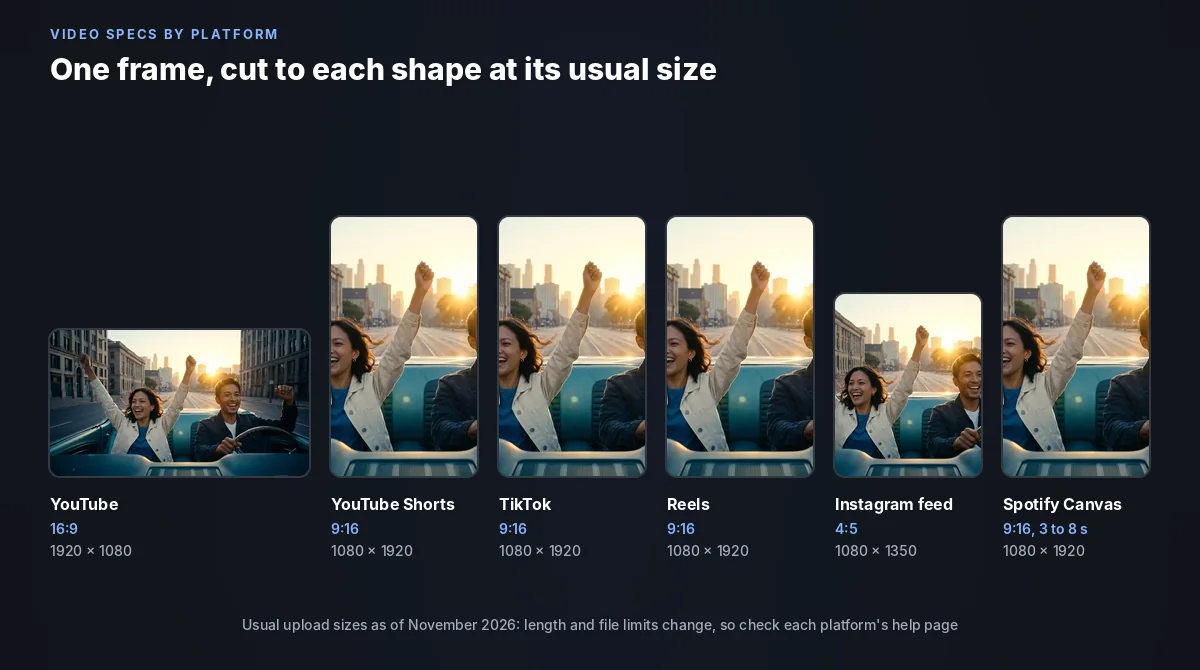
Social media video specs
Shape, size, length limit, file size and frame rate for YouTube, Shorts, TikTok, Reels, Facebook, X, Canvas and Apple Music, each sourced.
Read the guideVideo file checker
Open a video and see its resolution, frame rate, length, codec, bitrate and sound checked against YouTube, Shorts, TikTok, Reels and Canvas.
Open the toolVertical video converter
Turn a horizontal clip into a 9:16 video for TikTok, Reels and Shorts: crop with a position you choose, or fit it over a blurred fill.
Open the tool
More free tools: artwork and video formats
Cover art, Canvas loops, YouTube thumbnails, a spectrum visualizer, sizes, safe zones and bitrates, a video file's specs, and a vertical cut of any clip.
Your song deserves a music video
Upload a track and get a free beat-synced storyboard in minutes. Render it when you are ready.
No card needed to start.






