Video bitrate and file size, worked out both ways
Enter a bitrate and a length to see how big the file will be, or a size limit to see the bitrate that fits, audio included. YouTube's recommended upload bitrates for every resolution and frame rate are one click away, so a music video export is sized right before you render it.
Free, no sign-up. Runs in your browser: nothing is uploaded.
220 MB
209.9 MiB in binary units, which Windows labels MB and GB. About 62.9 MB a minute at 8.38 Mbps in all.
Sizes in decimal units: 1 MB is 1,000,000 bytes, 1 Mbps is 1,000 kbps.
No video yet? Muvora renders one for your song in widescreen, vertical and square.
Make the videoUpload a new songSong finished? Upload it and Muvora plans the whole video on its beats. The storyboard is free.
Make the videoUpload a new songHow to use the video bitrate calculator
- 01
Choose the direction
Find the file size from a bitrate, or the bitrate that fits a target size.
- 02
Enter the length and the audio
Type the length as minutes and seconds and pick the audio bitrate; 384 kbps is YouTube's figure for stereo uploads.
- 03
Pick a YouTube preset
Choose the resolution and the frame rate to see YouTube's recommended video bitrate, and fill it in with one click.
- 04
Read the result
The size in decimal MB or GB with the binary figure beside it, or the video bitrate to set in your encoder.
The arithmetic behind every export
File size is bitrate times length. Bitrates count bits a second, so add the video and audio bitrates, multiply by the seconds and divide by 8 for bytes: a 3:30 music video at 8 Mbps with 384 kbps audio comes to about 220 MB. Run it backwards to fit a limit: turn the size into bits, divide by the seconds and take off the audio, and what is left is the video bitrate.
- Video plus audio, in bits a second
- Divide by 8 for bytes
- Worked both directions
YouTube's upload bitrates, by resolution
YouTube recommends uploading SDR video at 8 Mbps for 1080p and 5 Mbps for 720p at 24 to 30 fps, rising to 12 and 7.5 Mbps at 48 to 60 fps, and 35 to 45 Mbps for 4K. Its help page says no bitrate limit is required, so these are figures to aim for rather than caps. Stereo audio is recommended at 384 kbps, in AAC-LC or Opus.
- 1080p: 8 Mbps, or 12 at 48 to 60 fps
- 4K: 35 to 45 Mbps, or 53 to 68
- Stereo audio at 384 kbps
Vertical video and the MB question
YouTube's table names each row by its resolution, so read a vertical video by its short side: 1080 × 1920 is a 1080p video and takes the 1080p figures. Sizes come out in decimal units, 1 MB being 1,000,000 bytes as drive makers and macOS count, with the binary figure beside them, because Windows counts in 1,024s and shows the same file a few percent smaller.
- 1080 × 1920 counts as 1080p
- Decimal MB and GB
- Binary MiB and GiB beside them

Render the video first, then size the file
Muvora renders your music video at 24 fps in 720p or 1080p with the original song as its soundtrack, then exports widescreen, vertical and square versions and a Canvas loop from the same render. Upload a track to get the storyboard for free and see the exact price before you render.
Questions, answered
Can't find what you need? Start a free storyboard and see for yourself.
How do I calculate video file size from bitrate?
Add the video and audio bitrates in kilobits a second, multiply by the length in seconds and divide by 8 to get kilobytes. At 8,000 kbps of video and 384 kbps of audio, 210 seconds comes to 220,080 KB, about 220 MB.
What bitrate should I upload to YouTube at 1080p?
YouTube recommends 8 Mbps for 1080p SDR at 24, 25 or 30 fps and 12 Mbps at 48, 50 or 60 fps, with stereo audio at 384 kbps. Going higher is fine: YouTube says no bitrate limit is required.
What bitrate fits a video under a file size limit?
Multiply the size in megabytes by 8,000 to get kilobits, divide by the length in seconds and subtract the audio bitrate. A 500 MB limit for a 4-minute video leaves about 16.3 Mbps for the picture beside 320 kbps of audio.
Is a megabyte 1,000 or 1,024 kilobytes?
Both are in use. Drive makers and macOS count 1 MB as 1,000,000 bytes; Windows counts in 1,024s and still labels the result MB. The calculator shows the decimal size first and the binary one, in MiB and GiB, beside it.
Which YouTube bitrate row fits a vertical video?
The row for its short side. A 1080 × 1920 vertical video is 1080p, so YouTube's 1080p figures apply; 720 × 1280 is 720p.
Why is my exported file bigger or smaller than the estimate?
An encoder set to a variable bitrate aims for an average, so a busy video can run over it and a calm one under, and the container adds a little data of its own. Aim a few percent below a hard limit, or use a two-pass encode, which holds the average more closely.
Keep exploring
Aspect ratio calculator
Any frame's ratio, a resize that keeps it, and what cropping or fitting to 9:16, 1:1 or 4:5 does.
Open the toolUpload a music video to YouTube
The title format, a description template, chapters, thumbnail, captions, premiere and the Short, in the order you set them.
Read the guideYouTube music videos
A full-length 16:9 video for your channel, plus the Shorts cut, from one render.
Learn moreMusic video sizes and ratios
16:9, 9:16, 1:1 or 4:5? The right size, shape and frame rate for every platform you release on.
Read the guideYouTube description generator
A music video's title, description, chapters, hashtags and tags, checked against YouTube's limits.
Open the tool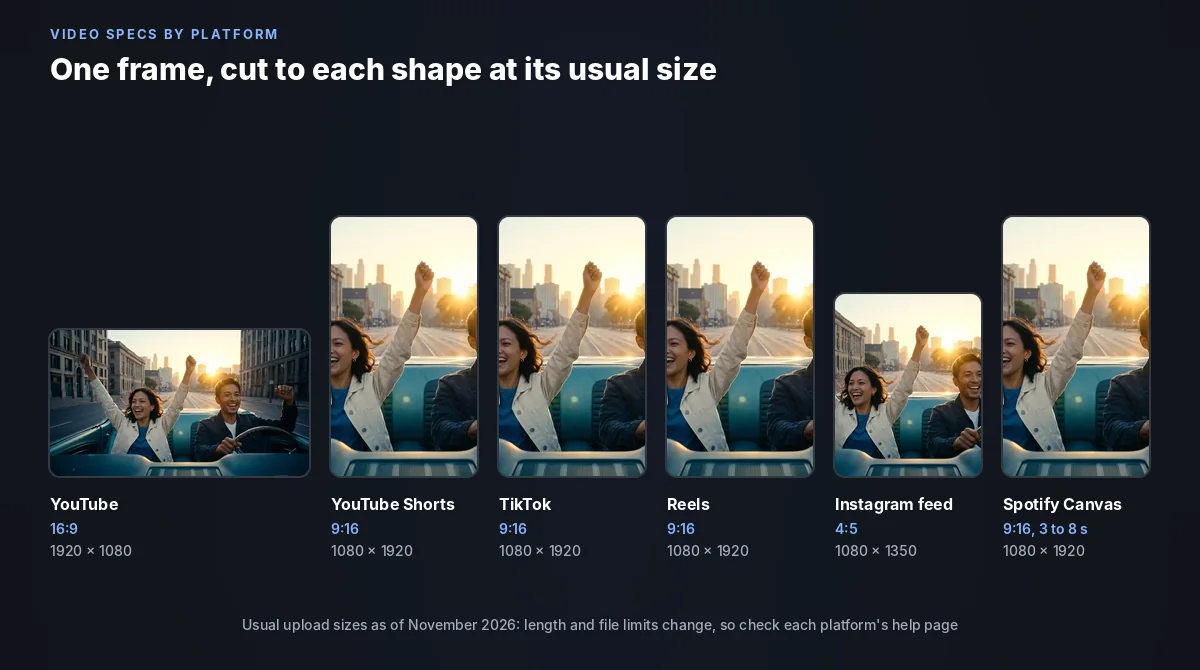
Social media video specs
Shape, size, length limit, file size and frame rate for YouTube, Shorts, TikTok, Reels, Facebook, X, Canvas and Apple Music, each sourced.
Read the guideVideo file checker
Open a video and see its resolution, frame rate, length, codec, bitrate and sound checked against YouTube, Shorts, TikTok, Reels and Canvas.
Open the tool
More free tools: artwork and video formats
Cover art, Canvas loops, YouTube thumbnails, a spectrum visualizer, sizes, safe zones and bitrates, a video file's specs, and a vertical cut of any clip.
Your song deserves a music video
Upload a track and get a free beat-synced storyboard in minutes. Render it when you are ready.
No card needed to start.






