Grab the exact frame you want from a video
Open a video from your device, step through it one frame at a time and save the frame on screen at the video's full resolution, as PNG, JPEG or WebP, or as a 1280 × 720 thumbnail weighed against YouTube's 2 MB limit. The video plays in your browser, so nothing is uploaded, and the tool opens whatever your browser can play: MP4 with H.264 almost everywhere.
Free, no sign-up. Runs in your browser: nothing is uploaded.
Open a video from your device. MP4 (H.264) works in every current browser and WebM in most; HEVC and some MOV files only where your browser can play them.
Keys: , and . step one frame, with Shift one second. Each step lands in the middle of a frame, so the browser shows that frame and not its neighbor.
Type a time and press Enter to jump to it.
Muvora's videos are 24 fps; phones often record 30 or 60.
Your grabs
Step to the frame you want and press Grab frame. The last 6 stay here while the page is open.
Save the still
PNG keeps every pixel as the browser decoded it; JPEG and WebP are far smaller.
YouTube thumbnail (1280 × 720)
Song finished? Upload it and Muvora plans the whole video on its beats. The storyboard is free.
Make the videoUpload a new songHow to use the video frame grabber
- 01
Open the video
Choose a video file on your device. It plays from your browser's memory, with its size, length and frame rate above the player.
- 02
Find the frame
Drag the slider, type a timecode, or step with the buttons or the comma and period keys, one frame at a time; hold Shift to move a second.
- 03
Grab it
Press Grab frame to keep the picture on screen at the video's own resolution. The last six grabs stay in a strip, so you can compare them.
- 04
Save a still or a thumbnail
Save the grab as PNG, JPEG or WebP, or as a 1280 × 720 thumbnail that fills the frame or fits a vertical shot over a blurred copy, with its file size shown.
Why frame by frame matters
Pausing by hand rarely lands where you meant to: at 24 frames a second each frame is on screen for about 42 milliseconds, and the frame you want (eyes open, the hair mid-swing, the light at its brightest) often sits between one that blurs and one that blinks. Stepping one frame at a time, at the rate the video was made at, lets you choose. Every step lands in the middle of a frame, because a seek to the exact edge between two frames can show the earlier one in some browsers.
- About 42 ms a frame at 24 fps
- Steps land mid-frame, never on an edge
- Pick the rate, or let playback reveal it
Which videos a browser can open
The tool can only open what your browser can play. MP4 files with H.264 video open in every current browser, and WebM in most. HEVC (H.265), which iPhones record in their default High Efficiency setting, and some MOV files depend on the browser and the device: Safari plays them on Apple devices, other browsers only where the system can decode HEVC. If a file won't open, export or convert it as an MP4 with H.264 video. Phone videos that change frame rate while recording step close to every frame, though not always exactly on it.
- MP4 with H.264: opens everywhere
- WebM: most browsers
- HEVC and some MOV files: it depends on the device
Stills, thumbnails and file sizes
A grab is kept at the video's own resolution: 1920 × 1080 from a 1080p export, 3840 × 2160 from 4K. PNG keeps every pixel as the browser decoded it and makes the biggest file; JPEG and WebP at 85 to 92% quality look the same to most eyes at a fraction of the size. The thumbnail export is 1280 × 720, the 16:9 size YouTube's thumbnail help recommended for years (its current version is reported to suggest 3840 × 2160), and its size is checked against 2 MB, the limit that page long gave and that uploads from the phone app are still reported to have.
- Native resolution, as PNG, JPEG or WebP
- A 1280 × 720 thumbnail, filled or fitted
- Its file size checked against 2 MB
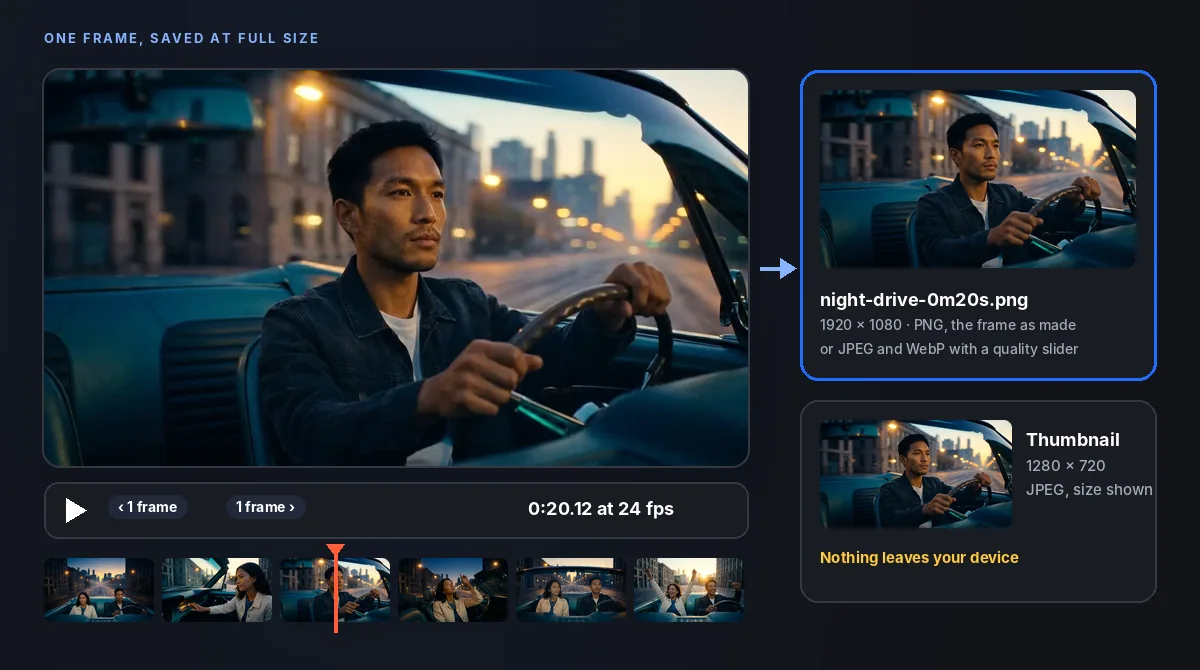
A music video worth taking stills from
Muvora turns a song into a music video planned shot by shot: an AI director writes the storyboard, every cut lands on a downbeat, and style frames show the look before you pay. The 16:9, 9:16 and 1:1 exports are MP4 files, so open one here to pull a frame for the thumbnail, the single's announcement or your press kit. The storyboard is free, and you see the price before you render.
Questions, answered
Can't find what you need? Start a free storyboard and see for yourself.
How do I save a frame from a video as an image?
Open the video in the frame grabber, find the frame with the slider, a timecode or the frame buttons, press Grab frame and save it as PNG, JPEG or WebP. It's saved at the video's own resolution, and the video never leaves your device.
What size should a thumbnail made from a video frame be?
For YouTube, 16:9 and at least 640 pixels wide. 1280 by 720 was YouTube's recommended size for years, with JPG, GIF or PNG files under 2 MB, and its help page is now reported to suggest 3840 by 2160. A 1280 by 720 JPEG from this tool fits the 2 MB limit with room to spare.
Why won't my video open?
The tool uses your browser's own video player, so it opens only what the browser can play. MP4 with H.264 works everywhere; HEVC and some MOV files, common from iPhones, need a browser and a device that decode them. Convert the file to an MP4 with H.264 and it will open.
How do I step through a video frame by frame?
Press the comma key to go back one frame and the period key to go forward, or use the arrow buttons under the player, and hold Shift to jump a second. Set the frame rate to the video's own, such as 24, 25, 30 or 60, so each step is exactly one frame.
How do I find out a video's frame rate?
Press play for a moment: in browsers that report each frame as it's shown, the tool reads the rate from playback and sets it. Otherwise check the file's details in your editor or media player, or try 24, 30 and 60 and watch whether every step changes the picture exactly once.
Is my video uploaded anywhere?
No. It plays from a temporary link to the file on your own device, and the frames and the saved images are drawn in your browser. Nothing is sent to Muvora or anyone else.
Keep exploring
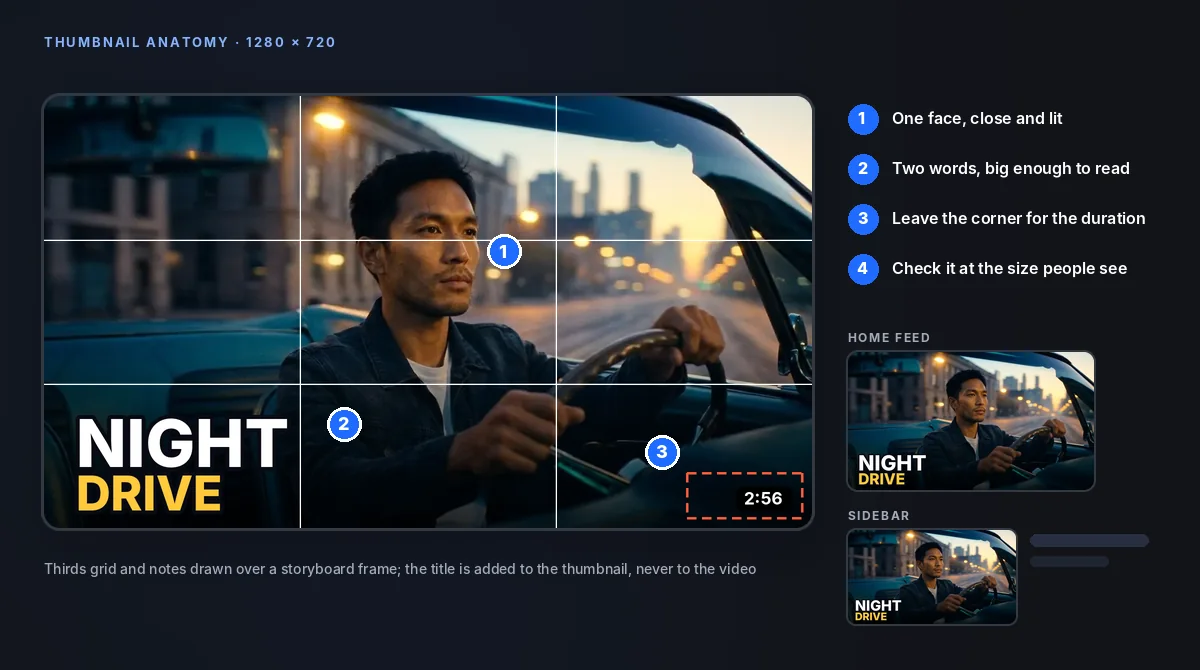
Music video thumbnails
YouTube's size and file rules, what gets a music video thumbnail clicked, grabbing the right frame, the words, the color and testing.
Read the guide
Upload a music video to YouTube
The title format, a description template, chapters, thumbnail, captions, premiere and the Short, in the order you set them.
Read the guideAspect ratio calculator
Any frame's ratio, a resize that keeps it, and what cropping or fitting to 9:16, 1:1 or 4:5 does.
Open the toolYouTube description generator
A music video's title, description, chapters, hashtags and tags, checked against YouTube's limits.
Open the toolYouTube music videos
A full-length 16:9 video for your channel, plus the Shorts cut, from one render.
Learn moreWaveform generator
Turn a song's waveform into artwork: bars, a line, a filled wave or a circle, with its title, saved as PNG or SVG.
Open the toolYouTube thumbnail preview
See a thumbnail and title as YouTube lays them out: home, search, up next and a phone, light or dark, up to three side by side.
Open the toolAlbum cover maker
Make 3000 × 3000 cover art from your own photo or a color, with the artist name and title in fonts licensed for commercial use.
Open the toolExtract audio from video
Take the soundtrack out of an MP4, MOV, WebM or MKV video and save it as a WAV, all of it or a part, on your device.
Open the toolMusic video thumbnail maker
Make a 16:9 YouTube thumbnail from your photo or a frame of your video, with the title set big and the duration corner kept clear.
Open the toolGig poster maker
Make a show poster from your photo, a video frame or a color: act, date, venue and tickets laid out for print and Instagram, with a QR code.
Open the tool
More free tools: artwork and video formats
Cover art, Canvas loops, YouTube thumbnails, a spectrum visualizer, sizes, safe zones and bitrates, a video file's specs, and a vertical cut of any clip.
Your song deserves a music video
Upload a track and get a free beat-synced storyboard in minutes. Render it when you are ready.
No card needed to start.






