The short answer
As of November 2026, make the main music video 16:9 at 1920 x 1080 for YouTube, and 9:16 at 1080 x 1920 for Shorts, TikTok, Instagram Reels and Facebook Reels. Shorts run up to 3 minutes, a Spotify Canvas 3 to 8 seconds, and X allows 140 seconds without Premium. Export H.264 MP4 with AAC audio at one frame rate, and keep captions clear of each app's buttons.
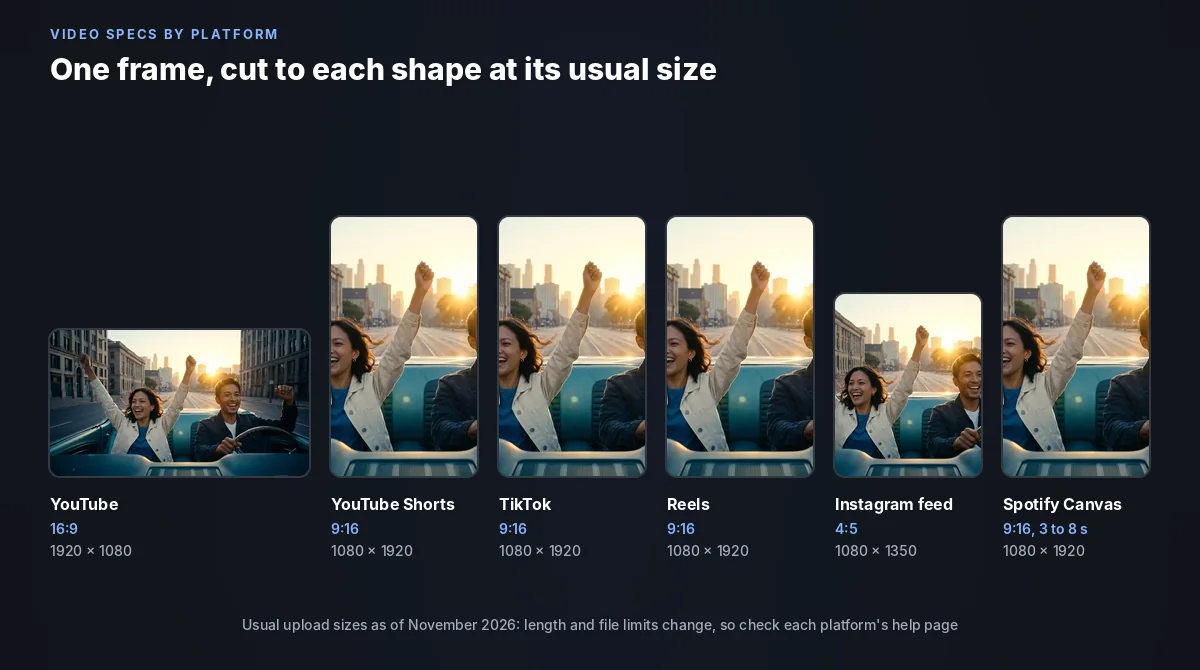
- 16:9 at 1920 x 1080 is the main video; 9:16 at 1080 x 1920 covers Shorts, TikTok, Reels and Facebook.
- Length limits differ most: Shorts up to 3 minutes, X 140 seconds without Premium, a Canvas 3 to 8 seconds.
- Export H.264 MP4 with AAC audio and keep one frame rate in every version.
- Each app lays its buttons over the bottom and right of a vertical video, so keep faces and captions clear of them.
- Limits roll out account by account: the upload screen has the last word.
On this page (10 sections)ShowHide
- 1.Video specs by platform, as of November 2026
- 2.YouTube: the main music video
- 3.YouTube Shorts
- 4.TikTok
- 5.Instagram Reels and the feed
- 6.Facebook and X
- 7.Spotify Canvas and Apple Music
- 8.Safe zones: where each app's buttons sit
- 9.Which Muvora export goes where
- 10.How to export one music video for every platform
- Questions
Video specs by platform, as of November 2026
Every platform accepts more than one shape, but each has a shape that fills its screen and a few hard limits that decide whether the upload goes through. The table holds both. Where a platform's own help page gives a figure, that's the one quoted; where it doesn't, the figure comes from reporting on the platform's announcements, linked in the platform's section below. A cell that says to check the upload screen is a figure no source we could check publishes.
| Platform | Shape | Size to export | Length | File size | Frame rate |
|---|---|---|---|---|---|
| YouTube video | 16:9 | 1920 x 1080, or 3840 x 2160 | Up to 15 minutes until the account is verified, then up to 12 hours | Up to 256 GB | The rate it was made at |
| YouTube Shorts | 9:16, or 1:1 | 1080 x 1920 | Up to 3 minutes | As for any YouTube upload | The rate it was made at |
| TikTok | 9:16 | 1080 x 1920 | 10 minutes since 2022; up to 60 minutes tested with some accounts since 2024 | Check the upload screen | 23 to 60 fps |
| Instagram Reels | 9:16 (1.91:1 to 9:16 accepted) | 1080 x 1920; at least 720 px | 3 minutes since January 2025; the Reels camera records up to 20 minutes since November 2025 | Check the upload screen | At least 30 fps |
| Instagram feed | 1:1 or 4:5 (the profile grid shows 3:4) | 1080 x 1080 or 1080 x 1350 | Video posts are shared as Reels, so the Reels limits apply | Check the upload screen | As for Reels |
| 9:16 fills the Reels player; other shapes post too | 1080 x 1920 | No upper limit since every new video became a Reel (2025) | Check the upload screen | Check the upload screen | |
| X | 16:9 or 1:1 (1:3 to 3:1 accepted) | Check the upload screen | 140 seconds without Premium; longer with it | 512 MB without Premium | 60 fps or less |
| Spotify Canvas | 9:16 | Spotify's pages say 720 to 1080 px tall (see below) | 3 to 8 seconds, looping | Check Spotify for Artists | Not stated; it plays without sound |
| Apple Music motion artwork | 3:4 and 1:1, both | 2048 x 2732 and 3840 x 3840 | 8 to 35 seconds in Apple's guide | Check your distributor | 23.976 to 30 fps, no audio track |
YouTube, websites, TV
Shorts, Reels, TikTok, Canvas
Feed posts
Instagram feed
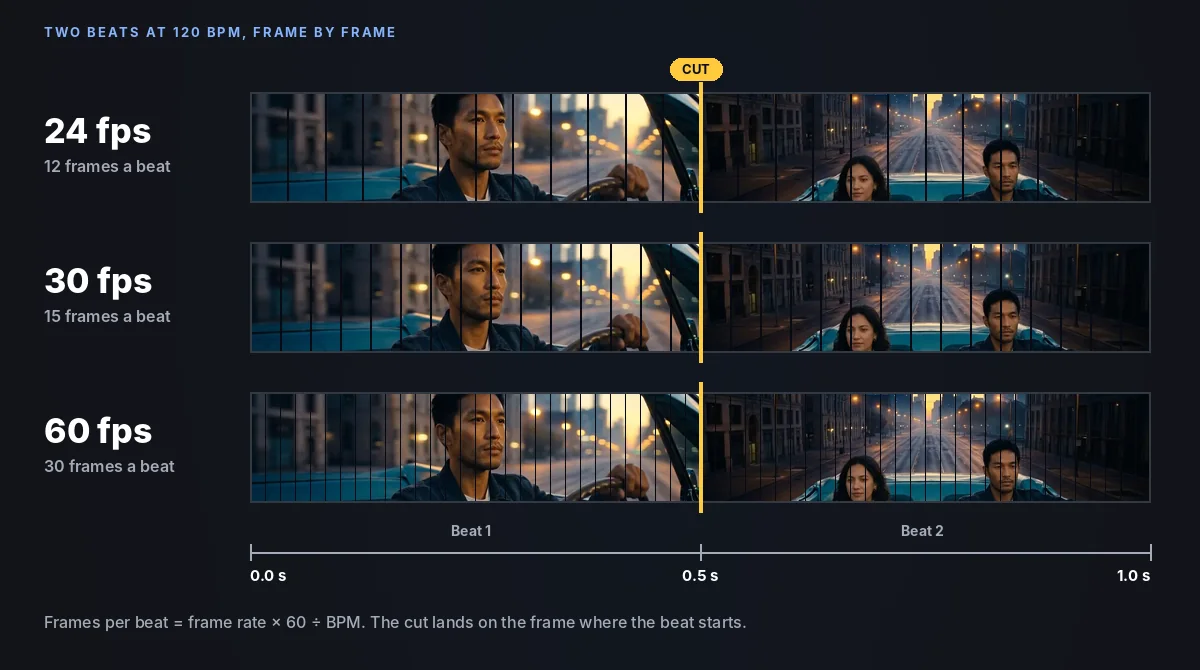
Two rules hold everywhere. Export H.264 video in an MP4 file with AAC audio, the pairing every platform here accepts, and give each platform the best file you have, since all of them compress it again. And pick one frame rate for the whole release: the cuts of a music video are timed to the beat, and a file converted from one rate to another can move them. The music video aspect ratios guide covers reframing one edit into each shape.
YouTube: the main music video
YouTube's page on video resolution and aspect ratios names 16:9 as the standard shape on a computer. The player resizes itself for other shapes and pads a vertical video with bars on a desktop screen, which is why the full music video belongs in 16:9 and the vertical cuts belong in Shorts. Leave black bars out of the file itself: the player adds whatever padding a screen needs.
Its recommended upload encoding settings ask for an MP4 with H.264 video and AAC-LC audio, uploaded at the frame rate it was made at, and suggest about 8 Mbps for 1080p and 5 Mbps for 720p at 24 to 30 fps, with stereo audio at 384 kbps. They are targets, not caps: the page says no bitrate limit is required. On length, YouTube's page on uploading videos longer than 15 minutes says an account can upload up to 15 minutes until it is verified, and after that up to 256 GB or 12 hours, whichever is less.
Video bitrate calculatorCheck how big a song-length export will be at YouTube's recommended bitrates, or the bitrate that fits a size limit, before you render it.The thumbnail has specs of its own (16:9, and a size and file limit set on YouTube's thumbnail page); how to make a music video thumbnail covers them, and how to upload a music video to YouTube walks through the title, description, chapters and premiere.
Skip the blank page
Upload your song and Muvora's AI director plans a shot-by-shot storyboard on the beat. Edit every shot for free, and pay only if you render.
YouTube Shorts
YouTube decides what is a Short from the file. Its help page on three-minute Shorts says a square or vertical video of up to three minutes is categorized as a Short, and that a Short longer than a minute with an active Content ID claim can be blocked. That second part matters to musicians: when your distributor registers the song for Content ID, a long Short of it can be caught by your own claim, so keep song clips to a minute unless your distributor has allowlisted your channel.
Export Shorts at 1080 x 1920, at the music video's own frame rate so nothing is re-timed. A Short of 10 to 30 seconds around the hook does more for a song than a long one; how to promote music on YouTube Shorts covers which seconds to post and how to link each Short to the full video, and the YouTube Shorts music video maker shows how a vertical cut comes out of one render.
TikTok
TikTok raised its maximum video length to 10 minutes in February 2022 (TechCrunch) and has tested uploads of up to 60 minutes with some users since May 2024 (TechCrunch). Which limit an account has depends on the rollout, so the upload screen is the only reliable answer for yours. For a song, the limit rarely matters: a TikTok post of the hook runs 15 to 30 seconds.
TikTok doesn't publish a file spec for posts made in the app, but its developer guide for posting videos lists what the platform takes from other apps: MP4 (recommended), WebM or MOV, H.264 as the recommended codec, and a frame rate of 23 to 60 fps. A 24 fps music video sits inside that range. Shoot or export 9:16 at 1080 x 1920 so the video fills the screen without bars; how to promote music on TikTok covers what to post.
Instagram Reels and the feed
Instagram's help page on Reels resolution and size accepts any shape from 1.91:1 to 9:16 and asks for a minimum frame rate of 30 fps and a resolution of at least 720 pixels. Reels have run up to 3 minutes since January 2025, when Instagram's head announced the change (Business Today), and since November 2025 the Reels camera records up to 20 minutes (PetaPixel), reaching accounts at different times.
A video posted to the feed is a Reel too: since 2022, video posts shorter than 15 minutes have been shared as Reels (TechCrunch), so a square or 4:5 video posted to the feed follows the Reels rules. The profile grid has shown posts as 3:4 rectangles since January 2025 (the same Business Today report), so a 9:16 Reel's cover is cropped top and bottom in the grid: keep its face or subject in the middle.
Aspect ratio calculatorSee how much of a 9:16 frame survives a crop to 4:5, 1:1 or the grid's 3:4, and the exact pixel size for each shape.Facebook and X
Facebook announced in June 2025 that every new video on the platform would be shared as a Reel, whatever its length or orientation, with no upper limit on how long a Reel can be (TechCrunch). In practice that means one upload path for everything: the 9:16 cut fills the Reels player, the 16:9 music video can be posted as it is, and the square cut suits a post that will mostly be seen in the feed.
X is the tightest platform here. Its help page on videos allows up to 140 seconds and 512 MB on accounts without a Premium subscription; Premium accounts can post longer, larger videos, with the current figures on the same page. Its developer docs take frame rates up to 60 fps and shapes from 1:3 to 3:1, with 16:9 and 1:1 the usual choices. A whole song won't fit in 2 minutes 20 seconds, so post the hook as a clip and put the YouTube link in the post.
Spotify Canvas and Apple Music
Spotify's Canvas guidelines and its page on fixing a Canvas upload error list the same checks: 3 to 8 seconds, a vertical 9:16 frame, an MP4 or a JPG, and a height they give as 720 to 1080 px, adding that a file even slightly off can fail. Guides commonly treat 720 pixels as the minimum and 1080 x 1920 as the target, which is how the free Canvas checker reads it too; if a file is refused, Spotify's error page suggests checking it again and trying the Spotify for Artists mobile app. A Canvas plays silently under the song, so leave the audio out. The Spotify Canvas guide covers designing the loop.

Apple Music has no Canvas; it shows motion artwork in place of the album cover. Apple's Album Motion guide asks for two files, a 3:4 at 2048 x 2732 and a 1:1 at 3840 x 3840, as MP4 or MOV without an audio track, looping, at 23.976 to 30 fps and 8 to 35 seconds long (some distributors quote 15 to 35, so follow yours). It is delivered with the release by a distributor that supports it, not uploaded in an app. Muvora's square export tops out at 1080 x 1080 and there is no 3:4 cut, so it isn't a motion artwork file; use the video's look and palette as the brief for the artwork instead.
Safe zones: where each app's buttons sit
Specs decide whether a video uploads; safe zones decide whether it reads. TikTok, Reels and Shorts lay their tabs across the top, the account name, post caption and sound across the bottom, and a column of buttons down the right. None of them publishes a safe zone for ordinary posts, so creator guides measure the apps; these are the figures the free safe zone checker uses, checked November 14, 2026.
| App | Top | Bottom | Right side | What covers the bottom |
|---|---|---|---|---|
| TikTok | 130 px | 484 px | 140 px | Name, caption and sound |
| Instagram Reels | 250 px | 340 px | 120 px | Name, caption and audio |
| YouTube Shorts | 154 px | 461 px | 173 px | Channel, title and sound |
Keep faces and the action in the middle of the frame, a little above center, and burn nothing important into the bottom quarter. Muvora's karaoke captions sit a fifth of the way up a vertical export (their foot about 384 pixels from the bottom of a 1080 x 1920 frame): clear of Reels' caption area by these measurements, but inside TikTok's and Shorts'. For those two, keep the post caption short or render a version without captions and use the app's own text.

Which Muvora export goes where
Muvora renders a music video once and exports it in several shapes, each cut on the beat to the song's exact length, at 720p or 1080p (Cinematic is made at 1080p natively), 24 fps, H.264 with your uploaded song as AAC audio. Here is where each one goes.
| Export | Size | Sound | Where it goes |
|---|---|---|---|
| 16:9 main video | 1920 x 1080 (1280 x 720) | Your song | YouTube, your website, Facebook, X (as a clip) |
| 9:16 vertical | 1080 x 1920 (720 x 1280) | Your song | YouTube Shorts, TikTok, Instagram Reels, Facebook Reels |
| 1:1 square | 1080 x 1080 (720 x 720) | Your song | Instagram and Facebook feed posts, X |
| Spotify Canvas | 8 seconds at 9:16, the vertical export's size | None | Spotify Canvas, as a loop |
Which exports you get follows the shape you choose for the storyboard. A 16:9 render gives all four. A 9:16 render gives the vertical, the square and the Canvas but no widescreen video, and a 1:1 render gives the square, the vertical and the Canvas. So if the song needs a YouTube video as well as short-form clips, render it in 16:9. In the vertical and square cuts, wide shots are shown whole over a blurred fill of themselves and closer shots are cropped to the center, with singing shots always cropped so the mouth stays big.

Every shape from one render
Upload the song, edit the storyboard for free, and render once: the widescreen video, the vertical cut, the square post and the Canvas loop come out together, every cut on the beat. The free plan makes 5 new storyboards a month.
How to export one music video for every platform
- 01
Render the widest shape you need
Make the main video 16:9 if it will go to YouTube at all, since the vertical, square and Canvas cuts can come from it but a 9:16 render has no widescreen version. Choose 9:16 only for a song meant mainly for short-form apps.
- 02
Pick 1080p
Every video app here takes 1080p, and each one compresses the upload again, so give them the sharpest file you have: 1920 x 1080 for the main video and 1080 x 1920 for the vertical cut.
- 03
Keep one frame rate
Upload every version at the rate the video was made at, 24 fps for a Muvora export. Convert only where a platform asks for more, such as Instagram's 30 fps minimum for Reels, and convert the finished cut rather than re-editing it.
- 04
Cut each clip to its platform's length
Trim the hook to 10 to 30 seconds for Shorts, TikTok and Reels, to 2 minutes 20 or less for X without Premium, and use the 8-second loop for the Canvas. Start each clip on a downbeat and end where the phrase ends.
- 05
Check the safe zones
Lay each app's overlay over the vertical cut and make sure no face, lyric caption or key moment sits under the bottom band or the button column on the right.
- 06
Watch it on a phone before it goes public
Upload each cut as a draft, private or scheduled post and play it in the app. Limits and layouts change with updates, and a two-minute check catches a cropped face or a refused file before your fans do.
When the release needs more than one video, the release timeline planner dates each cut against release day, and the music release checklist lists everything else the week needs. For the clips themselves, the music promo video maker explains how a teaser can be its own short upload or a trim of the full render.
Make the video, then cut it for every app
Muvora storyboards your song for free, shows the exact price before you render and exports the widescreen, vertical, square and Canvas versions together. See the examples for what the frames look like.
Written by the Muvora team. Last updated November 15, 2026. Spotted something out of date? Tell us at [email protected].