Where every instrument and voice sits, from 20 Hz to 20 kHz
An interactive chart of the whole audible range on a log scale: the seven bands engineers name, from sub-bass to brilliance and air, and where kick, 808, bass, snare, cymbals, guitars, piano, strings and voices put their notes and how far their harmonics reach, in note names and hertz. Pick a band to hear it as pink noise or as a sine at its center, type any frequency to see its band, its nearest note and what plays there, and read common EQ moves as places to start listening. It all runs in your browser, quietly, and only when you press play.
Free, no sign-up. Runs in your browser: nothing is uploaded.
Low mids: 250 Hz to 500 Hz
Center 354 Hz, 1.0 octaves wide. Sources draw these edges a little differently, and sounds cross them.
- What lives here
- The body of guitars, snare, piano, strings and most voices, which is why many parts pile up here.
- Too much sounds
- Muddy or boxy, as if the mix were played in a small room.
- Too little sounds
- Hollow, with instruments that sound distant and weightless.
Common moves here: clear the mud. See the moves
Turn your volume down before the first tone, then raise it slowly. Tones play quietly (their average level never above 20 dB below full scale) and stop by themselves after 2.5 seconds. Small speakers play little of the lowest bands: use headphones for those, at a low volume.
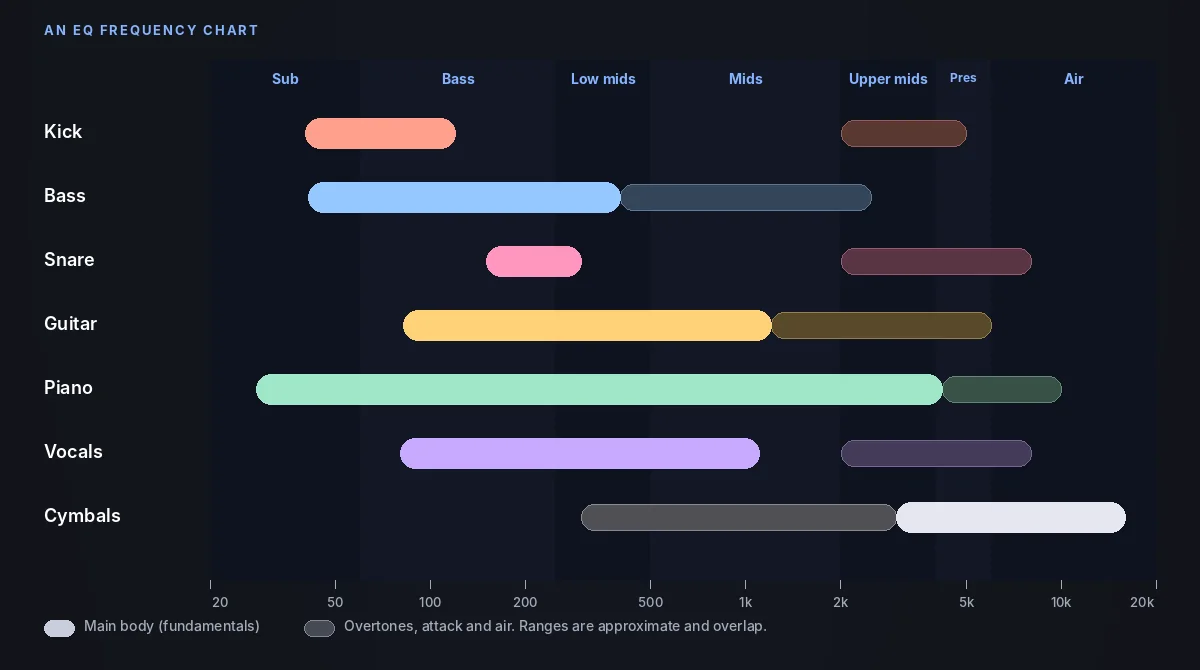
Where instruments and voices sit
A log scale, so every octave is the same width. Solid bars are each part's notes (a drum's main energy); faint bars show roughly how far its harmonics, attack and noise reach. All ranges are approximate.
Kick drum
About 40.0 Hz to 100 Hz
Its weight sits around 40 to 100 Hz; the beater's click often around 2 to 5 kHz.
808 and sub bass
B0 to G2, 30.9 Hz to 98.0 Hz
Tuned to the song's key, so its lowest note moves with the bass line; distortion adds harmonics a phone can play.
Bass guitar (4-string)
E1 to G4, 41.2 Hz to 392 Hz
Open E is 41.2 Hz, and 24 frets take the G string to G4; on small speakers you hear it through harmonics well above its notes.
Snare drum
About 150 Hz to 250 Hz
Body around 150 to 250 Hz, then the stick's crack and the wires' sizzle higher up.
Hi-hats and cymbals
About 3,000 Hz to 15,000 Hz
Mostly above about 3 kHz, their shimmer past 10 kHz.
Electric guitar
E2 to D6, 82.4 Hz to 1,175 Hz
E2 to D6 on 22 frets; a guitar amp's speaker often rolls the top off above about 5 kHz.
Acoustic guitar
E2 to C6, 82.4 Hz to 1,047 Hz
Its body sits in the low mids; string brightness and pick noise reach past 10 kHz.
Piano
A0 to C8, 27.5 Hz to 4,186 Hz
The widest range here: 88 keys from A0 to C8.
Lower voices (bass to tenor)
E2 to C5, 82.4 Hz to 523 Hz
Sibilance often around 5 to 8 kHz, breath and air above 10 kHz.
Higher voices (alto to soprano)
F3 to C6, 175 Hz to 1,047 Hz
The same consonants and air as lower voices, over higher notes.
Violin
G3 to A7, 196 Hz to 3,520 Hz
G3 to about A7; bow noise and brightness reach well past 10 kHz.
Cello
C2 to A5, 65.4 Hz to 880 Hz
C2 to about A5, with much of its warmth in the low mids.
Look up a frequency
Type a number from an EQ or a spectrum analyzer to see its band, its nearest note and what plays there.
Common EQ moves, as starting points
Places to start listening, not settings: every voice, instrument and room is different, so judge each move with the whole mix playing and at the same loudness.
High-pass under a vocal
High-pass, 80 Hz to 100 Hz
A common starting point is a high-pass filter at about 80 to 100 Hz on a lead vocal, which takes away rumble, handling noise and breath pops the voice doesn't need. Go lower for a deep voice, and back it off if the voice starts to thin.
High-pass where nothing lives
High-pass, 60 Hz to 150 Hz
Guitars, keys, pads and backing vocals often get a high-pass somewhere around 60 to 150 Hz too, so the kick and the bass have the bottom to themselves. Set it by ear with the mix playing, never just by number.
Room for the kick and the bass
Cut, 50 Hz to 100 Hz
When the kick and the bass blur together, a common approach is to decide which one owns the very bottom and make a small cut in the other there, often somewhere between 50 and 100 Hz.
Clear the mud
Cut, 200 Hz to 500 Hz
Mud often builds up around 200 to 500 Hz, where the bodies of many parts overlap. A cut of a few dB with a medium-wide bell, on the parts that don't need their weight there, often clears it better than one big cut on the whole mix.
Tame harshness
Cut, 2 kHz to 5 kHz
Harshness often sits around 2 to 5 kHz. Sweep a narrow boost slowly to find the spot that stings, then turn it into a small cut, and compare at the same loudness before you keep it.
Soften sibilance
De-ess, 5 kHz to 8 kHz
S and t sounds on a vocal often land around 5 to 8 kHz. A de-esser turns that range down only when they happen, which often works better than a fixed cut that dulls every word.
Add a little air
Boost, 10 kHz to 20 kHz
A gentle high shelf from about 10 kHz, often only a dB or two, is a common way to open up a vocal or a mix. Too much brings the hiss and the sibilance up with it.
Setting the delays and reverbs next? The delay time calculator gives every note value at your tempo.
Song finished? Upload it and Muvora plans the whole video on its beats. The storyboard is free.
Make the videoUpload a new songHow to use the EQ frequency chart
- 01
Pick a band
Choose one of the seven bands, from sub-bass to air, for its range, its center, what usually lives there and what too much or too little of it sounds like. The chart lights it up across every instrument.
- 02
Listen to it
Turn your volume down first. Then play the band as filtered pink noise or as a sine at its center; each tone plays at a quiet level you can set and stops by itself after 2.5 seconds.
- 03
Look up a number
Type a frequency from an EQ, a spectrogram or a mixing note, such as 250 or 3k, to see its band, its nearest note and which instruments have notes or harmonics there.
- 04
Start from a common move
Read the starting points (a high-pass under a vocal, a cut where mud builds, a de-esser on sibilance), hear the range each one works on, then make the move by ear in your own mix.
The bands, and why the chart is drawn in octaves
Engineers usually split the range into seven bands: sub-bass from about 20 to 60 Hz, bass from 60 to 250 Hz, low mids from 250 to 500 Hz, mids from 500 Hz to 2 kHz, upper mids from 2 to 4 kHz, presence from 4 to 6 kHz, and brilliance or air above 6 kHz. Sources draw the edges a little differently (some start presence at 5 kHz, some keep the word air for the top octave), and every real sound crosses them, so read the names as directions rather than borders. The chart's scale is logarithmic because pitch is: each octave doubles the frequency, so 20 to 40 Hz is one octave and so is 10 to 20 kHz, and the audible range is about ten octaves wide. On a straight hertz scale, everything below 1 kHz, where most notes live, would be squeezed into the first twentieth of the chart. To read exact notes against hertz, use the note frequency chart.
- Seven bands, from sub-bass to air
- Edges vary by source and overlap
- Each octave doubles the frequency
Fundamentals, harmonics and what your ears favor
Each solid bar is a part's notes, worked out from its range at A4 = 440 Hz: a 4-string bass's open E is 41.2 Hz, a piano runs from A0 at 27.5 Hz to C8 at 4,186 Hz, and a tenor's top C is 523 Hz. The faint bar is the rest of the sound. Every pitched note carries harmonics at whole multiples of its frequency (that low E also sounds at 82.4, 123.6 and 164.8 Hz and up), plus attack and noise, and much of an instrument's character, and so much of its EQ, lives there. That explains two things you'll hear in a mix. Small speakers play little of the lowest octaves, yet a bass line still comes through a phone, because the ear fills in a missing fundamental from its harmonics. And hearing is most sensitive around 2 to 5 kHz, as the equal-loudness contours in ISO 226 show, so a few dB there changes a mix more than the same move lower down. Drums have no single note, so their bars show where their energy usually sits. To see a real song's frequencies over time, open it in the spectrogram viewer.
- Harmonics at whole multiples of the note
- Phones play the harmonics, not the lowest notes
- Ears are most sensitive around 2 to 5 kHz
EQ moves are starting points, not settings
Every voice, instrument, microphone and room is different, so the moves in the tool are places to start listening. A few habits help them work. Many engineers cut what is in the way before boosting what is missing, and use a narrow boost only to find a problem before turning it into a cut. A high-pass under parts with nothing to say in the low end (a vocal around 80 to 100 Hz, to start with) leaves room for the kick and the bass. Judge each move with the whole mix playing rather than the track soloed, and at the same loudness before and after, because a boost sounds better partly for being louder. Small moves add up across a mix, and a few dB is often plenty. Then come the effects, timed with the delay time calculator; the order of a whole mix is in how to mix a song, and a vocal's chain in how to mix vocals.
- Cut before you boost, often
- Judge in the mix, at matched loudness
- A few dB is often plenty
The finished master is the video's sound
When the mix is balanced and mastered, upload that file: Muvora leaves the audio exactly as it is and uses it as the soundtrack of every export, so no EQ is added or changed on the way. It reads the song's tempo, sections and drops, writes a storyboard that cuts on the downbeats, and lets you change any shot before you see the price and render.
Questions, answered
Can't find what you need? Start a free storyboard and see for yourself.
What frequency range is bass, mids and treble?
Engineers usually call about 20 to 250 Hz the bass, with sub-bass below about 60 Hz, 250 Hz to 4 kHz the mids (low, middle and upper), and 4 kHz to 20 kHz the treble (presence, brilliance and air). The exact edges vary by source and the bands overlap, because instruments don't stop at a line.
Where should I high-pass a vocal?
A common starting point is about 80 to 100 Hz on a lead vocal: lower for a deep voice, a little higher for a light one or a busy mix. Raise the filter until the voice starts to sound thin, then back it off a little, listening with the rest of the song playing.
What frequency makes a mix muddy?
Mud usually builds up somewhere around 200 to 500 Hz, where the bodies of guitars, keys, snare and voices overlap. Cutting a few dB there on the parts that don't need their weight, rather than on everything, often clears the mix without making it thin.
What frequencies are harsh or sibilant on vocals?
Harshness often sits around 2 to 5 kHz, where hearing is most sensitive, and s and t sounds around 5 to 8 kHz. A narrow cut can tame a harsh spot; for sibilance a de-esser, which turns the range down only while the s sound lasts, often works better than a fixed cut.
What is the frequency range of human hearing?
About 20 Hz to 20 kHz for young ears, roughly ten octaves. The top end falls with age and noise exposure, so many adults hear little above about 15 kHz, and hearing is most sensitive around 2 to 5 kHz.
Why can't I hear the sub-bass band on my phone?
Phone and laptop speakers are too small to move much air at the lowest frequencies, so the sub-bass band and the bottom of the bass band barely sound on them. Use headphones or full-range speakers, at a low volume, to hear those bands; on a phone you still pick up a bass line through its harmonics higher up.
Are the test tones safe to play?
They play quietly: the tool never sets their average level higher than 20 dB below full scale, and each one stops by itself after 2.5 seconds. How loud that is in your ears depends on your volume, so turn it down before the first tone and raise it slowly; loud tones, especially on headphones, can harm hearing.
Keep exploring
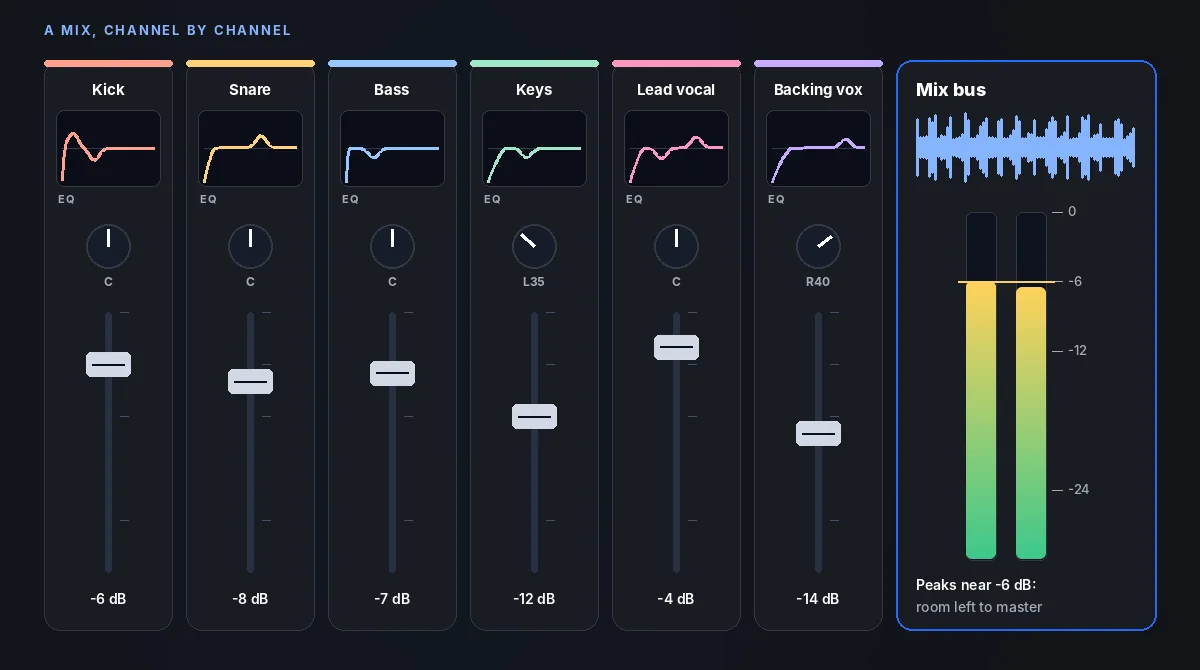
How to mix a song
Gain staging, a fader-and-pan balance, EQ, compression, reverb and delay on sends, automation, reference checks and the premaster bounce, step by step.
Read the guide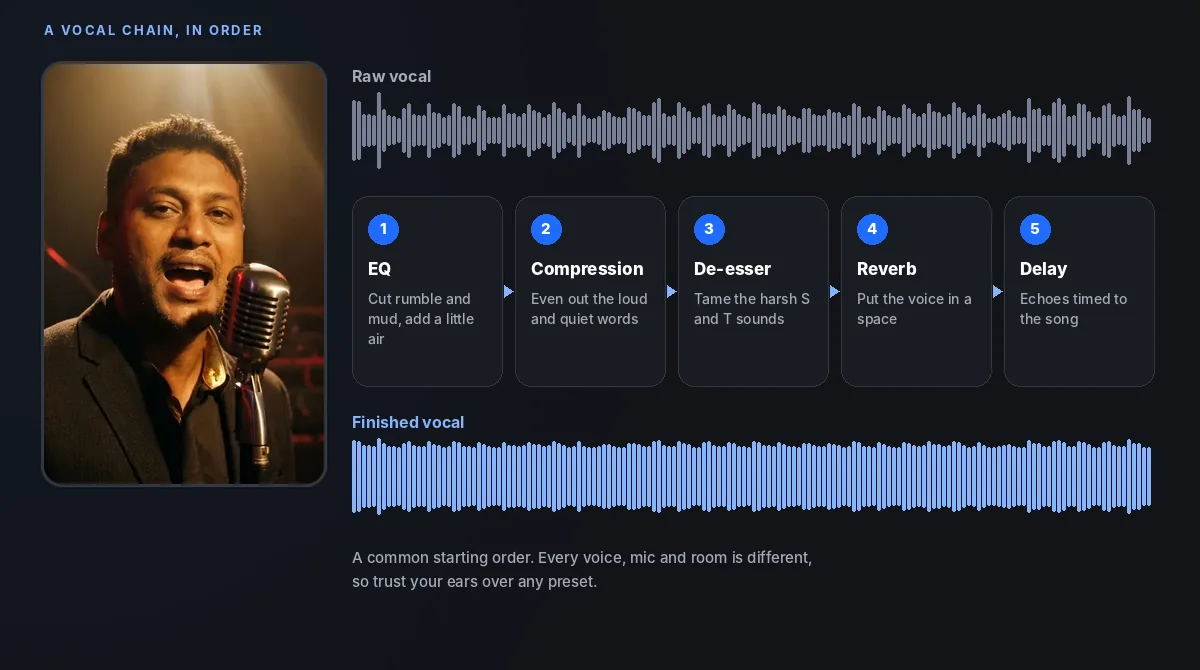
How to mix vocals
A vocal chain in order (cleanup, EQ, compression, de-essing, saturation, reverb and delay), then doubles, ad-libs and the level rides that make every word land.
Read the guideDelay time calculator
Every note value at your tempo in milliseconds, hertz and samples, dotted and triplet, with starting points for delay, reverb, release and LFOs.
Open the toolSpectrogram viewer
Open a song and see its frequencies over time, with the note and level under your pointer, a playhead, and a PNG to save.
Open the toolNote frequency chart
Every note's frequency from C0 to C8 for any A4, with MIDI numbers and piano keys, and a converter from hertz to the nearest note.
Open the toolLUFS meter
Open a song to read its integrated LUFS, true peak and loudness range, and how far Spotify, YouTube and Apple Music turn it down.
Open the tool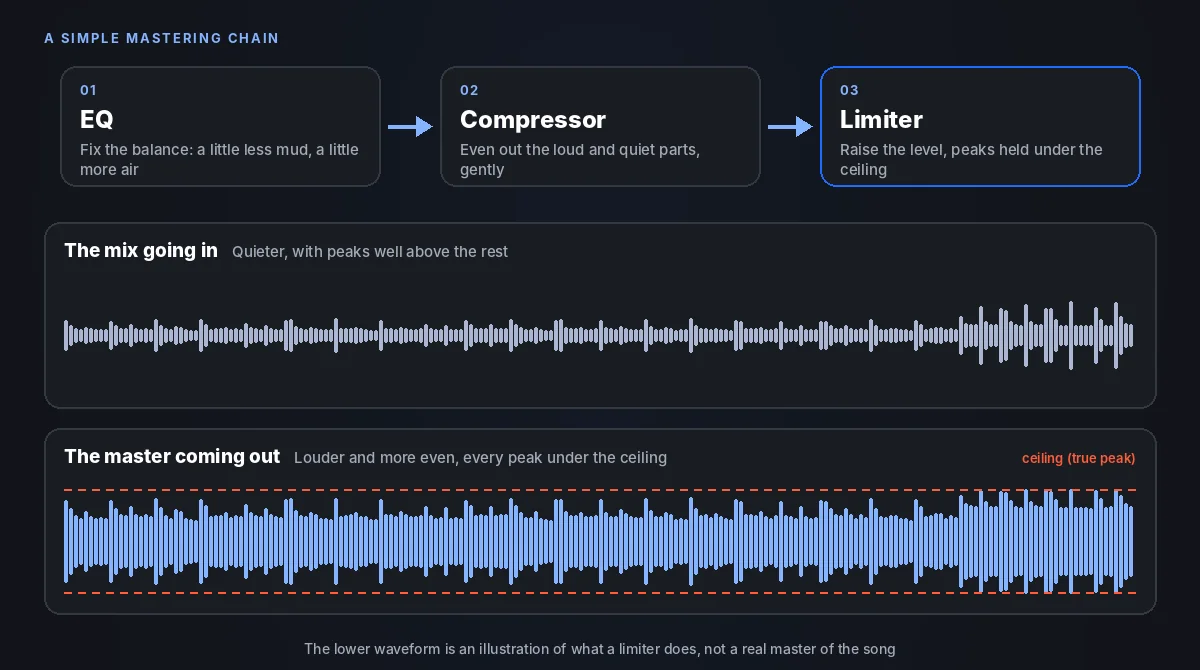
How to master a song
What mastering does and doesn't, a typical chain from EQ to the limiter, loudness and true peak, checks, export formats, and DIY or an engineer.
Read the guide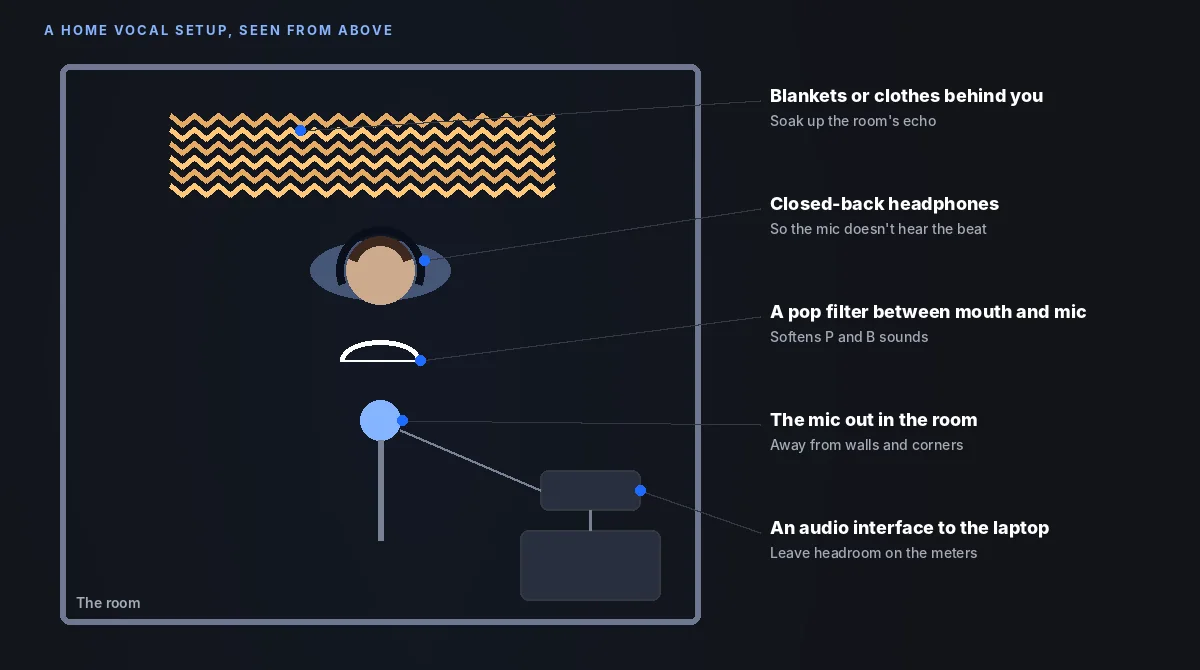
Record vocals at home
A quiet room, soft things behind the singer, the right distance from the mic, gain with headroom and a comped take: home vocal recording, step by step.
Read the guide
More free tools: loudness and audio
Check and normalize loudness, change the key, make a slowed and reverb or reversed version, join files, convert to WAV, cut a snippet and make waveform art.
Your song deserves a music video
Upload a track and get a free beat-synced storyboard in minutes. Render it when you are ready.
No card needed to start.






