Normalize audio to -14 LUFS or any loudness target
Open a song on your device and the normalizer measures it as the LUFS meter does (integrated loudness, true peak and sample peak, per ITU-R BS.1770), then works out the gain that takes it to your target: -14, -16 or -23 LUFS, a loudness you type, or a peak level of 0, -0.1 or -1 dBFS. It shows that gain, predicts the figures after it and keeps the true peak under a ceiling (-1 dBTP unless you change it), saying how far short of the target that leaves the song when the ceiling gets there first. The 16 or 24-bit WAV is saved at the file's own sample rate and measured again once it's written. Nothing is uploaded.
Free, no sign-up. Runs in your browser: nothing is uploaded.
Song finished? Upload it and Muvora plans the whole video on its beats. The storyboard is free.
Make the videoUpload a new songHow to use the audio normalizer
- 01
Open the song
Choose the WAV, FLAC, MP3, M4A or AAC file. Your browser decodes it at the file's own sample rate where it can, and a background worker reads its integrated loudness, true peak, sample peak and loudness range.
- 02
Pick a target and a ceiling
Choose a loudness in LUFS (-14, -16, -23 or your own) or a peak level in dBFS, then the true-peak ceiling the gain must stay under. The default, -1 dBTP, is the figure Spotify's mastering tips give.
- 03
Read the gain before you save
The panel shows the gain in decibels and as a multiplier, the loudness and peaks it predicts, and, when the ceiling stops the gain early, how many LU short of the target the song ends and why.
- 04
Save the WAV and check it
Pick 24-bit, or 16-bit with dither, and save. The file is written at the song's own sample rate, then measured again, so you can hold the result against the prediction before you send it anywhere.
Loudness normalization or peak normalization
Peak normalization moves a file until its highest sample sits at a set level, usually 0, -0.1 or -1 dBFS, which is what the Normalize command in most audio editors does. It says nothing about how loud the song feels: a sparse acoustic take and a dense rock mix can both peak at -1 dBFS and sit 8 LU or more apart. Loudness normalization uses integrated LUFS instead, the BS.1770 measure that weighs frequencies roughly as hearing does and averages the whole song with its silences gated out, so two files normalized to the same LUFS sound about equally loud. Use loudness to match songs to each other or to a delivery spec, and peak to bring a quiet recording up to a working level before you edit it.
- Peak: the highest sample, in dBFS
- Loudness: the whole song, in LUFS
- Same peak, very different loudness
When the true-peak ceiling stops the gain
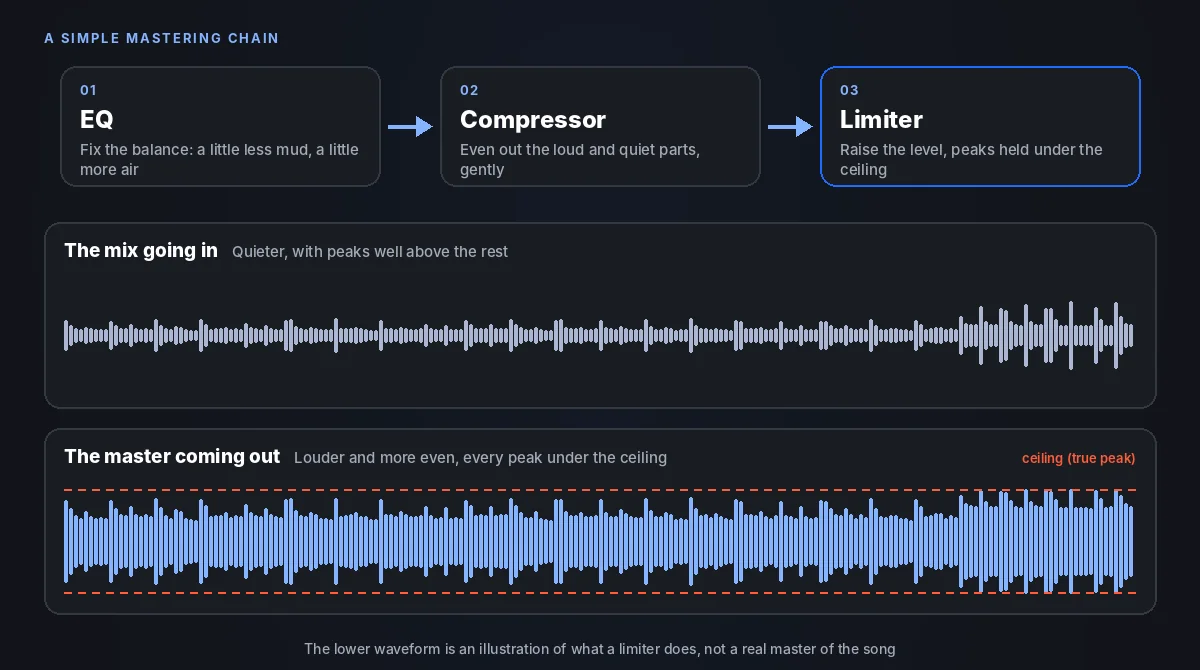
Normalizing is a single gain change: every sample moves by the same number of decibels, so the loudest instant in the song decides how far the whole song can go. The ceiling is read as true peak, 4× oversampled, because the waveform between samples can swing above the highest sample and clip in a converter or a lossy encoder. When the target needs more gain than the ceiling leaves, the normalizer stops at the ceiling and tells you how many LU short the song ends. It doesn't squash the peaks to get further, because that's a limiter's job: in mastering, a true-peak limiter holds the peaks down so the whole song can come up, trading some punch for density. The mastering guide shows where that limiter sits in the chain.
- One gain for every sample
- The ceiling is read as true peak
- Louder than the peaks allow takes a limiter
Which loudness target to choose
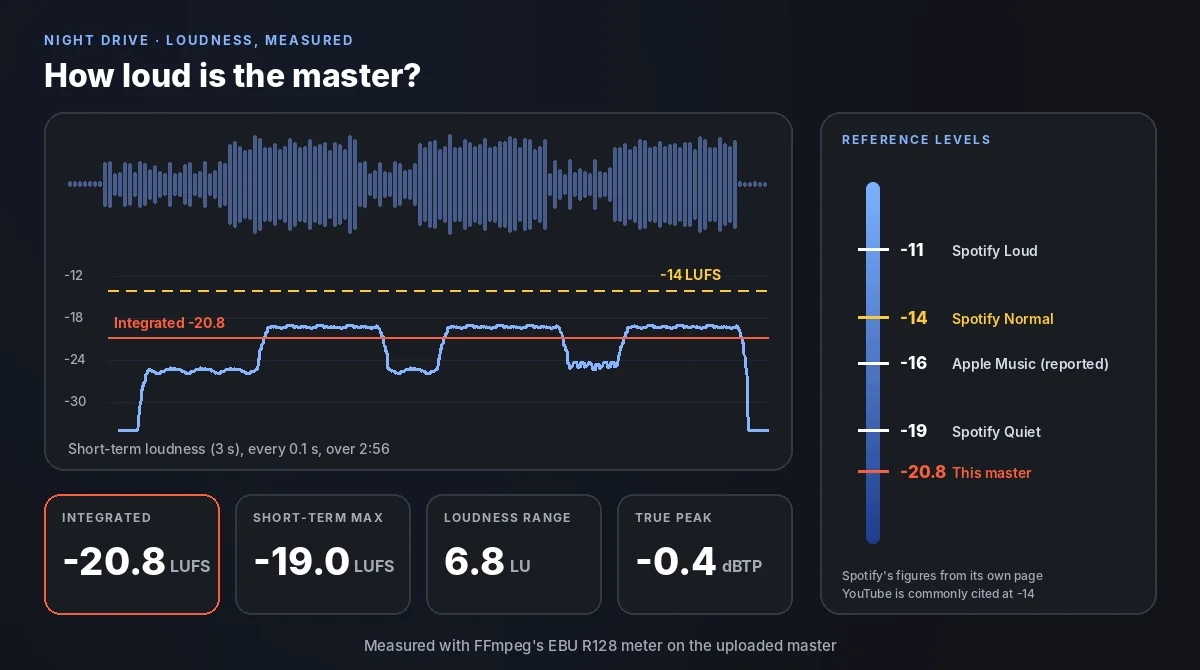
-14 LUFS is the level Spotify plays songs at by default, from its own page, and YouTube, Amazon Music and Tidal are reported near it; Apple Music's Sound Check is reported at about -16. Broadcast has standards of its own: -23 LUFS under EBU R128 in Europe, and -24 LKFS under ATSC A/85 for US television, which you can type as a custom target. For streaming you don't have to normalize at all, since the services adjust playback themselves without touching your file, as LUFS for streaming explains service by service. Normalizing earns its place elsewhere: leveling demos and rough mixes so you compare songs fairly, meeting a client's or a station's delivery spec, or handing a video editor a file at a known level.
- -14 LUFS: Spotify's default level
- -23 LUFS: EBU R128 broadcast
- Streaming services normalize at playback
The loudness you save is the loudness of your video
Muvora uses the song you upload, unchanged, as your music video's soundtrack: it doesn't normalize, limit or master it, so the level you settle on here is the level of the widescreen video and its vertical and square cuts. Upload the final file and Muvora finds its beats, sections and drops, then an AI director writes a storyboard cut to them that you can edit for free, and you see the price before you render. A 24-bit WAV of a long song can pass the 60 MB upload limit; upload a FLAC of the same file then.
Questions, answered
Can't find what you need? Start a free storyboard and see for yourself.
Should I normalize my song to -14 LUFS before uploading it to Spotify?
You don't need to. Spotify measures every song and sets the playback volume itself, without changing the file, so a louder master is simply played quieter. Turning a loud master down to -14 only makes the file quieter wherever normalization is off. Decide the loudness when you master, and use the normalizer for demos, deliveries with a spec, or a quiet file whose peaks leave room.
Why didn't my file reach the target loudness?
Its peaks reached the true-peak ceiling first. Gain moves every sample by the same amount, so a song with a quiet average and one loud transient can't come up far before that transient passes the ceiling. The page says how far short it stopped. A true-peak limiter in mastering can hold those peaks down so the level rises; a normalizer only changes the gain.
Is normalizing the same as compressing or limiting?
No. Normalizing changes the volume of the whole file by one amount, so the quiet and loud parts keep their distance from each other. A compressor or a limiter turns the loud parts down more than the quiet ones, which changes the dynamics and lets the overall level rise. Mastering usually uses both; this tool does only the first.
Does normalizing lower the audio quality?
A gain change worked out in floating point and saved at 24-bit adds rounding far below anything you can hear. At 16-bit, leave dither on so quiet fades stay smooth. Two things to watch: a large boost brings hiss and room noise up with the music, and normalizing an MP3 into a WAV doesn't restore what the MP3 encoder removed.
What's the difference between true peak and sample peak?
Sample peak is the highest sample in the file, in dBFS. True peak estimates the waveform between the samples by oversampling, in dBTP, and on loud, bright material it can read up to about a dB higher. Converters and lossy encoders have to handle that in-between peak, which is why ceilings for streaming are given in dBTP.
Is my song uploaded to normalize it?
No. Your browser decodes the file, and workers on your own device measure it, apply the gain and write the WAV. Nothing goes to a server, so it's safe for unreleased songs, and closing the tab clears everything.
Keep exploring
How to master a song
What mastering does and doesn't, a typical chain from EQ to the limiter, loudness and true peak, checks, export formats, and DIY or an engineer.
Read the guideLUFS meter
Open a song to read its integrated LUFS, true peak and loudness range, and how far Spotify, YouTube and Apple Music turn it down.
Open the toolLUFS for streaming
What LUFS means, the level each streaming service plays songs at, and how loud to master with true peak headroom to spare.
Read the guideMP3 to WAV converter
Convert MP3, M4A, AAC, FLAC or OGG files to 16-bit, 24-bit or 32-bit float WAV on your device, several at once.
Open the toolSlowed and reverb generator
Make a slowed and reverb, sped up or nightcore version of your own song, hear every change as you make it and save a WAV.
Open the tool
Audio to video
Turn any song file into a video timed to its beats, sections and drops.
Learn moreAudio joiner
Join MP3, WAV, M4A or FLAC files into one WAV in the order you set: back to back, with a gap or with a crossfade.
Open the toolPitch shifter
Move a song up or down by semitones and keep its tempo, or change its tempo and keep its key. Hear 15 seconds first, then save a WAV.
Open the tool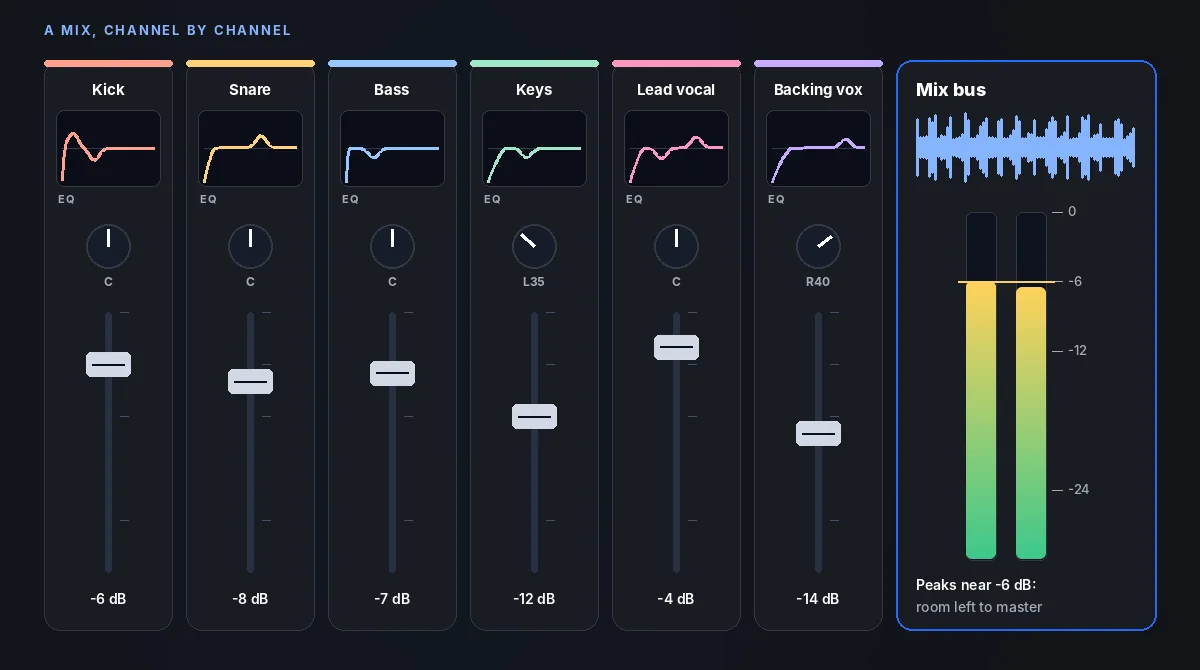
How to mix a song
Gain staging, a fader-and-pan balance, EQ, compression, reverb and delay on sends, automation, reference checks and the premaster bounce, step by step.
Read the guideSilence remover
Trim the silence from the start and end of a song file, with every cut shown on its levels, and save a WAV at the file's own rate.
Open the tool
More free tools: loudness and audio
Check and normalize loudness, change the key, make a slowed and reverb or reversed version, join files, convert to WAV, cut a snippet and make waveform art.
Your song deserves a music video
Upload a track and get a free beat-synced storyboard in minutes. Render it when you are ready.
No card needed to start.






