Cut a song clip that starts and ends on the beat
Open a song from your device and the cutter draws its waveform, finds the tempo and lays a bar line over every downbeat. Drag a window over the hook, pick 15, 30, 45 or 60 seconds or a number of bars, and both ends snap to bar lines, so the clip plays as a whole phrase and loops on the beat. Add fades, listen, and save it as a WAV. The song is decoded in this page and never uploaded.
Free, no sign-up. Runs in your browser: nothing is uploaded.
1. Your song
Opens on this device, never uploaded
MP3, WAV, M4A, AAC or FLAC. Only cut songs you own or have the rights to use.
Song finished? Upload it and Muvora plans the whole video on its beats. The storyboard is free.
Make the videoUpload a new songHow to use the audio cutter
- 01
Open your song
Choose an MP3, WAV, M4A, AAC or FLAC of a song you own or have the rights to use. It's decoded in this page and drawn as a waveform.
- 02
Check the bar lines
The tempo and a first downbeat are found for you. If the close-ups show a bar line off the kick, move the downbeat by a beat or by 10 ms, halve or double the tempo, or type or tap the BPM.
- 03
Pick the stretch
Click or drag on the waveform, type a start time or jump to the loudest part, then choose a length in seconds, in bars or your own. The arrow keys move the window a bar at a time.
- 04
Fade, listen and save
Set a fade in and out of up to two seconds each, play the cut on its own or looped, and save a 16-bit WAV named after the song and the cut.
Why a clip cut on the bar line sounds finished
Most pop, hip-hop, rock and EDM is counted in bars of four beats: at 120 BPM a bar lasts 2 seconds, at 87 BPM about 2.76. A clip that starts a quarter of a second after a downbeat opens mid-phrase, and one that stops short of the next downbeat ends mid-thought; looped, it stumbles every time it comes round. Start on one downbeat and end on another and the phrase is whole. That's why, with snapping on, a 30-second length becomes the most whole bars that fit: 15 bars at 120 BPM (30.0 seconds), 10 at 87 BPM (27.6). Choose bars instead to cut the 8 or 16 that most hooks and choruses are built from.
- 8 bars at 120 BPM is exactly 16 seconds
- Both ends land on downbeats
- Whole bars loop without a stumble
How the bar lines are found, and when to move them
The cutter reads the tempo from the middle of the song, fits evenly spaced beats to the attacks across the whole file, refines the tempo to a hundredth of a BPM and takes the beat nearest the first sound as the first downbeat. That holds for most songs made to a click. It can be fooled three ways: a track felt in half time can read at half the tempo (a 174 BPM drum and bass track as 87), a song that opens on a pickup puts the downbeat a beat out, and a live take that speeds up drifts off the grid by the last chorus. The two close-ups show each end of the cut with its beats drawn in, so you can see whether a bar line sits on the kick, and fix it in one click.
- Half or double time: one button
- A pickup: move the downbeat a beat
- A drift: nudge it 10 ms at the cut
Why it saves WAV, not MP3
The clip is written as 16-bit PCM WAV, stereo or mono as the song is, at the song's own sample rate when its file header says what that is (WAV, FLAC, MP3 and raw AAC files do; an M4A is saved at 44.1 kHz). Saving MP3 would mean encoding it in your browser, which takes an encoder this page doesn't ship, and every lossy encode takes a little more out of the sound. A WAV is larger, about 10 MB a minute in stereo at 44.1 kHz, but nothing is lost between your master and the clip, and every video editor, audio app and upload form opens it, Muvora's included.
- 16-bit PCM, channels as the source
- About 5 MB for 30 stereo seconds
- No second lossy encode
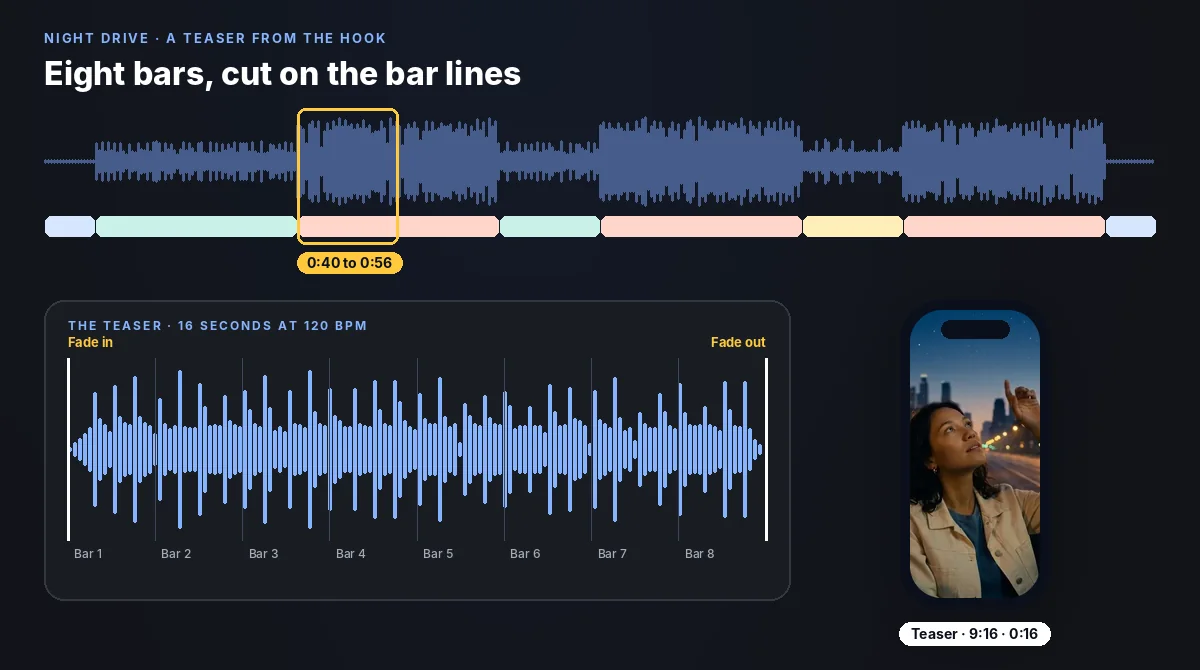
From a clip on the beat to a teaser video
A cut that starts and ends on bar lines is the right start for a vertical teaser. Upload the WAV to Muvora in 9:16 as a song of its own: it gets its own analysis, a storyboard with every shot cut on its downbeats, and a price for its own few seconds, far less than a full video. Or upload the whole song, render it once and trim the teaser from its vertical export. The storyboard is free to read and edit, and you see the price before you render.
Questions, answered
Can't find what you need? Start a free storyboard and see for yourself.
How do I cut a 30-second clip of a song for TikTok or Reels?
Open the song here, pick 30 s and drag the window over the hook. With snap to bars on, the start lands on a downbeat and the length becomes the most whole bars that fit in 30 seconds. Add a short fade out, play it to check, then save the WAV and add it to your video in your editor.
Can the audio cutter save an MP3?
No, it saves 16-bit WAV. Encoding MP3 in a browser takes an encoder this page doesn't include, and WAV keeps the clip exactly as good as the file you opened. If a site insists on MP3, convert the WAV in your audio editor.
Why did my 30-second clip come out at 27.6 seconds?
At 87 BPM a bar of four beats lasts about 2.76 seconds, so the most whole bars that fit in 30 seconds is 10, which is 27.6 seconds. Turn snapping off or choose a custom length when you need an exact number of seconds rather than whole bars.
What if the bar lines don't line up with my song?
Check the close-ups: each bar line should sit just before a kick or a chord change. If one sits a beat off, press Beat earlier or Beat later. If the bars feel twice as long or short as you count them, halve or double the tempo, or type the BPM from your session.
How long should the fades on a song clip be?
When the clip starts on a downbeat with a hit, leave the fade in off so the first beat lands at full strength, and fade out over 300 to 800 milliseconds so the last bar doesn't stop dead. For a clip meant to loop, set both to off: whole bars come round on the beat by themselves.
Is my song uploaded when I cut it?
No. Your browser decodes and cuts the file on your device, the tempo is measured in a background thread of this page, and the WAV is saved straight from memory. Nothing is sent to Muvora or anyone else, so cut only songs you own or have permission to use.
Keep exploring
Make a song teaser
Pick the seconds people will repeat, cut them on the bar line, give them a vertical video and post them before release day.
Read the guideBPM calculator
Beats and bars in seconds, frames and milliseconds: cut lengths for video and delay times for mixing.
Open the toolBeat marker generator
BPM to timecode: a marker on every beat or bar, as an EDL for DaVinci Resolve, a CSV or plain timecodes.
Open the tool
Music promo videos
A teaser, the full video, vertical and square cuts and a Canvas loop for one release.
Learn more
Promote music on TikTok
Make the song an official sound, lead with the hook, and post a six-week plan of vertical clips that send people to it.
Read the guide
TikTok, Reels & Shorts
Vertical 9:16 cuts of your hook, priced by the second.
Learn moreMP3 to WAV converter
Convert MP3, M4A, AAC, FLAC or OGG files to 16-bit, 24-bit or 32-bit float WAV on your device, several at once.
Open the toolSlowed and reverb generator
Make a slowed and reverb, sped up or nightcore version of your own song, hear every change as you make it and save a WAV.
Open the toolAudio joiner
Join MP3, WAV, M4A or FLAC files into one WAV in the order you set: back to back, with a gap or with a crossfade.
Open the toolReverse audio
Play a song or any sound backwards: reverse the whole file, one part on its own or a part in place, and save it as a WAV.
Open the toolExtract audio from video
Take the soundtrack out of an MP4, MOV, WebM or MKV video and save it as a WAV, all of it or a part, on your device.
Open the toolSilence remover
Trim the silence from the start and end of a song file, with every cut shown on its levels, and save a WAV at the file's own rate.
Open the tool
More free tools: loudness and audio
Check and normalize loudness, change the key, make a slowed and reverb or reversed version, join files, convert to WAV, cut a snippet and make waveform art.
Your song deserves a music video
Upload a track and get a free beat-synced storyboard in minutes. Render it when you are ready.
No card needed to start.






