Make a slowed and reverb version of your song
Open a song from your device and turn it into a slowed and reverb, slowed, sped up or nightcore version. Set the speed anywhere from 0.5x to 1.5x and see what it does to the pitch in semitones and to the length, give it a reverb room with its own size, decay and wet mix, add a low-shelf bass boost and set the output level. The preview plays through those settings while you move them, and the WAV is rendered in your browser with the reverb's tail left to ring out. The song never leaves your device.
Free, no sign-up. Runs in your browser: nothing is uploaded.
Pick a sound, then fine-tune it
Speed and pitch
3.86 semitones lower · 25% longer
Type it to see the new tempo
Reverb
How much of the room you hear against the song.
Seconds for the reverb to fade by 60 dB. The room is generated on your device.
Bass
A low shelf at 100 Hz: the kick and the bass come up, the rest stays.
Output
Bass and reverb add level. Lower this if the preview or the WAV clips.
The speed is a playback rate, so the pitch moves with it, as in every slowed and reverb or nightcore edit. The reverb is a room generated on your device from decaying noise, not a recording of a real space. Everything runs in this page; nothing is uploaded. A slowed version of someone else's song is still their song: post it only with the rights holders' permission.
Song finished? Upload it and Muvora plans the whole video on its beats. The storyboard is free.
Make the videoUpload a new songHow to use the slowed and reverb generator
- 01
Open the song
Choose an MP3, WAV, M4A, AAC or FLAC of a song you made or have permission to rework. It's decoded in this page at the file's own sample rate, up to 48 kHz, and never uploaded.
- 02
Start from a preset
Slowed + reverb starts at 0.8x with a large room, a 35% wet mix and 4 dB of extra bass. Slowed, sped up and nightcore start where those edits are often made, and every control stays yours to move.
- 03
Tweak it while it plays
Pick a point in the song and press Play. Changes to the speed, the reverb, the bass and the output are heard as you make them, and a warning appears whenever the preview goes past full scale.
- 04
Render the WAV
Choose 16 or 24-bit and render. The whole song runs through the same chain on your device, the reverb's tail rings out at the end, and the file is named after the song, the edit and the speed.
Why slowing a song down lowers its pitch
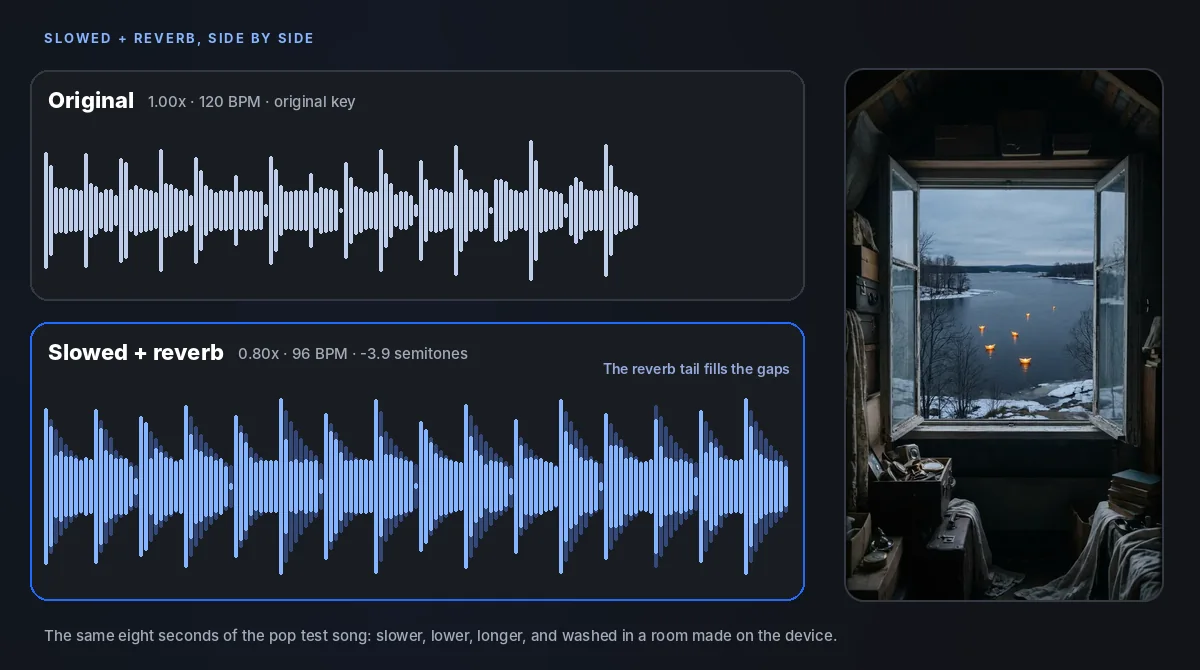
Slowed and reverb, sped up and nightcore edits all change the playback rate, the way a record played at the wrong speed does: the same waveform played slower stretches every cycle, so the tempo and the pitch fall together. The shift in semitones is 12 times the base-2 logarithm of the speed. At 0.8x a song runs 25% longer and sits 3.86 semitones lower; at 0.85x it sits 2.81 lower; at 1.25x it's 20% shorter and 3.86 higher. That change of tone is the sound of the style, so this tool doesn't hold the pitch apart from the tempo. A speed like 0.8x lands between two keys: tick whole semitones and it snaps to the nearest one (0.79x for four semitones down), so the edit stays in a key and mixes with other music.
- 0.8x: 25% longer, 3.86 semitones lower
- 1.25x: 20% shorter, 3.86 semitones higher
- Whole semitones keep it in a key
What each control does, and settings that work
Slowed and reverb edits are often made at 0.8x to 0.85x, sped up and nightcore edits at 1.2x to 1.35x. The reverb is an algorithmic room generated on your device, not a recording of a real space: stereo noise that falls 60 dB over the decay time and darkens as it fades, after a pre-delay of 5 to 40 ms that grows with the room size. A wet mix of 25 to 40% with a 3 to 4 second decay gives the washed, far-away sound the style is known for; under 15% only adds air, which suits a nightcore edit. The bass boost is a low shelf at 100 Hz, and 3 to 5 dB gives the low end the extra weight many slowed edits have. Bass and reverb both add level, so the presets start the output below 0 dB, and after a render the tool reports the peak and, if any samples clipped, the output setting that brings it back under -1 dBFS.
- Wet 25 to 40% and a 3 to 4 s decay for slowed + reverb
- Under 15% wet for nightcore
- Peak under -1 dBFS before you share it
Whose songs you can slow down and post
A slowed or sped-up version is still the original song: it uses the recording and the composition underneath it, so posting another artist's track this way needs permission from whoever owns them, usually the label for the recording and the publisher for the song. Many slowed and reverb uploads of other people's tracks are claimed through Content ID or taken down. Use this tool on your own songs, or on ones you've been given permission to rework. When your distributor registers your releases with Content ID, even your own slowed version can be claimed, so read the music video copyright guide on getting your channel allowlisted. Muvora asks the same of every upload, slowed versions included: you tick a box confirming you own the song or have the rights to use it.
- Your own songs, or ones you have permission for
- Another artist's track needs its owners' permission
- Allowlist your channel with your distributor

Give the slowed version a video of its own
Muvora keeps the file you upload as the video's soundtrack, untouched, so the slowed WAV goes in as a song of its own (save it as FLAC or MP3 first if it passes the 60 MB limit). Its analysis finds the new tempo, beats and sections, and the storyboard is planned for that version: the lo-fi look holds its shots longer, and the Abstract and Lyric styles suit a slow, washed sound. One render gives you widescreen, a 9:16 cut for clips and an 8-second Canvas loop. Reading and editing the storyboard is free, and you see the price before you render.
Questions, answered
Can't find what you need? Start a free storyboard and see for yourself.
What speed is slowed and reverb usually made at?
Most slowed and reverb edits sit between 0.8x and 0.85x, which makes a song about 18 to 25% longer and roughly 3 to 4 semitones lower. Some go down to 0.7x for a heavier, drowsier sound. Start at the preset's 0.8x and move the slider while the preview plays.
What's the difference between sped up and nightcore?
Both raise the speed and the pitch together, by the same process. Sped up is the general name, and those edits are often made at about 1.2x to 1.3x. Nightcore is the older style, named after a Norwegian duo who sped up trance tracks in the early 2000s: usually a little faster and brighter, often around 1.3x, with little or no reverb.
Can I change the tempo and keep the original pitch?
Not with this tool. It changes the playback rate, so pitch and tempo move together, which is what gives slowed and reverb and nightcore their sound. Changing the tempo alone takes time-stretching, and shifting the pitch alone takes a pitch shifter; most audio editors and DAWs have both.
Why does my slowed version clip or sound distorted?
The bass boost and the reverb both add level to a song that was probably mastered close to full scale. If the preview warns that it's clipping, or the WAV reports clipped samples, lower the output gain: the tool offers the setting that puts the peak 1 dB under full scale. Then render again.
Can I post a slowed version of someone else's song?
Only with permission from the people who own it. A slowed version still uses their recording and their composition, so it can be claimed through Content ID, muted or taken down, and a takedown can bring a copyright strike. Make slowed versions of your own songs, or of ones you have the rights to rework.
Is my song uploaded when I make a slowed version?
No. Your browser decodes the song, plays the preview and renders the WAV on your device, and the download is saved from this page's memory. Nothing is sent to Muvora or anyone else, and closing the tab clears it.
Keep exploring
Make a slowed and reverb song
What slowed and reverb, sped up and nightcore do to a song, the settings most edits use, how to make one, and whose songs you can use.
Read the guideSlowed and reverb videos
A video for the slowed and reverb or sped up version of your song, cut to its own new tempo.
Learn moreAudio cutter
Cut a 15 to 60 second clip from a song that starts and ends on a bar line, add fades and save it as a WAV.
Open the toolLUFS meter
Open a song to read its integrated LUFS, true peak and loudness range, and how far Spotify, YouTube and Apple Music turn it down.
Open the toolMP3 to WAV converter
Convert MP3, M4A, AAC, FLAC or OGG files to 16-bit, 24-bit or 32-bit float WAV on your device, several at once.
Open the tool
Lo-fi
Soft rain, warm lamps and slow shots for late-night calm.
Learn moreReverse audio
Play a song or any sound backwards: reverse the whole file, one part on its own or a part in place, and save it as a WAV.
Open the toolPitch shifter
Move a song up or down by semitones and keep its tempo, or change its tempo and keep its key. Hear 15 seconds first, then save a WAV.
Open the toolSped up song maker
Speed your own song up 1.05x to 1.5x, with the pitch rising for the nightcore sound or held in its key, and save a WAV.
Open the tool
More free tools: loudness and audio
Check and normalize loudness, change the key, make a slowed and reverb or reversed version, join files, convert to WAV, cut a snippet and make waveform art.
Your song deserves a music video
Upload a track and get a free beat-synced storyboard in minutes. Render it when you are ready.
No card needed to start.





