The short answer
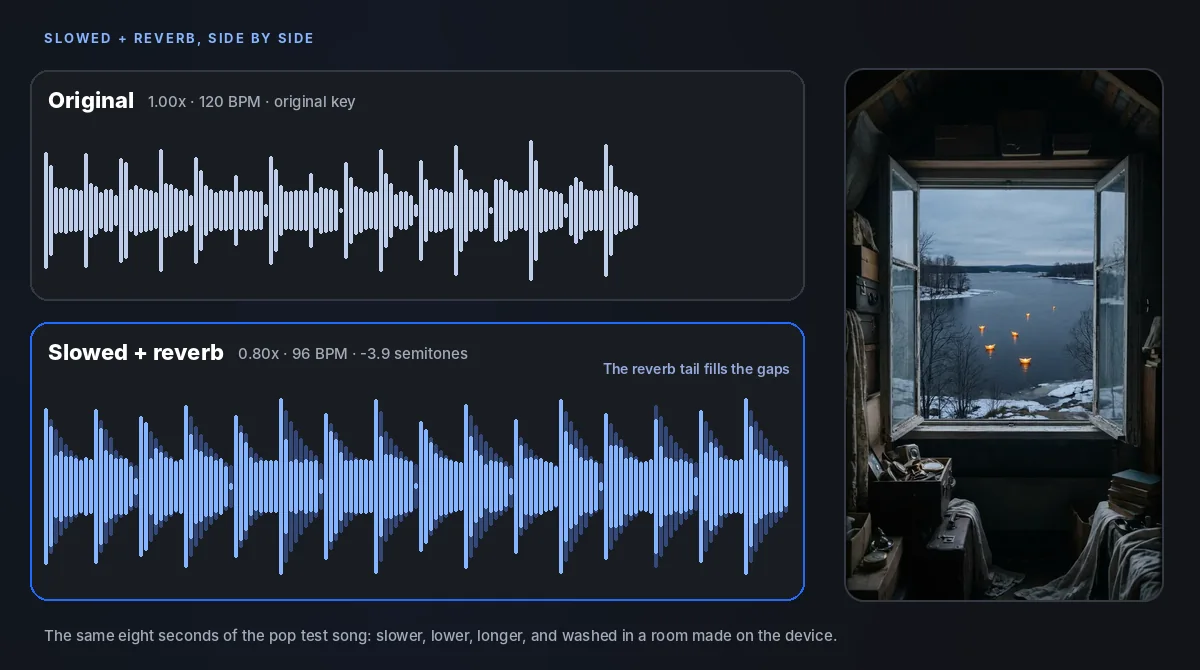
To make a slowed and reverb song, play it at 0.8x to 0.85x so its tempo and pitch drop together (0.8x is 3.86 semitones lower and 25% longer), add a large reverb (3 to 4 second decay, 25 to 40% wet), often boost the bass a few dB, lower the output so nothing clips, and export a WAV. Only rework songs you own or have permission to use.
- Slowed and reverb changes the playback rate, so the song gets slower and lower at once: that's the style, not a flaw.
- Most slowed edits sit at 0.8x to 0.85x; sped up and nightcore edits usually land between 1.2x and 1.35x.
- A long, fairly wet reverb (3 to 4 seconds, 25 to 40%) and a few dB of bass give the washed, heavy sound.
- Slow down only songs you own or have permission to rework: other artists' tracks get claimed or taken down.
- In Muvora a slowed version is its own upload, with its own tempo, sections, storyboard and video.
On this page (7 sections)ShowHide
- 1.What slowed and reverb is, and how sped up and nightcore differ
- 2.How the effect works: speed, pitch, reverb and bass
- 3.How to make a slowed and reverb song, step by step
- 4.Making one in a DAW or audio editor
- 5.Settings that work: a table of presets
- 6.The rights side: whose songs you can slow down
- 7.Uploading it and making a video for it
- Questions
What slowed and reverb is, and how sped up and nightcore differ
A slowed and reverb version is an existing recording played back slower, so it drops in pitch as well as in tempo, with a large reverb added so it sounds distant and dreamy. Many edits lift the bass as well. The style is often traced to the chopped and screwed mixes DJ Screw made in Houston in the 1990s, which slowed whole records down, and it spread through YouTube uploads in the late 2010s before taking over TikTok sounds. Sped up runs the other way: the same song played faster, so it's higher and shorter, which suits 15-second clips. Nightcore is sped up's older, brighter relative, named after a Norwegian duo who sped up trance tracks in the early 2000s.
- Slowed and reverb
- A song played at a lower speed, usually about 0.8x to 0.85x, so it's slower and lower in pitch, with a large reverb added and often a bass boost.
- Slowed
- The same drop in speed without the reverb: heavier and more laid back, but still close to the original's sound.
- Sped up
- A song played faster, often at about 1.2x to 1.3x, so it's quicker, higher and shorter than the original.
- Nightcore
- A sped-up style with roots in early-2000s trance edits, usually around 1.3x, bright and breathless, with little or no reverb.
- Playback rate
- How fast recorded audio plays compared with its original speed. Changing it moves tempo and pitch together, as a record does on a turntable set to the wrong speed.
- Reverb
- The sound of a space: the reflections that keep a note ringing after it stops. Software makes it with an algorithm, or with an impulse response, which captures how a room answers a single click.
- Wet and dry
- Wet is the reverb on its own, dry the untouched signal. The wet mix is how much of the reverb you hear against the song.
- Decay time (RT60)
- How long a reverb takes to fall by 60 dB: roughly how long it keeps ringing after the music stops.
How the effect works: speed, pitch, reverb and bass
Slowing a recording by its playback rate stretches every wave, so every frequency falls by the same ratio as the speed. In semitones the change is 12 × log2(speed): 0.8x lowers a song by 3.86 semitones, a little less than a major third, and 0.5x by a full octave. The length grows by the inverse of the speed and the tempo falls with it, so a 3-minute song at 120 BPM played at 0.8x runs 3:45 at 96 BPM.
| Speed | Pitch | Length | Tempo |
|---|---|---|---|
| 0.7x | 6.17 semitones lower | 4:17 | 84 BPM |
| 0.75x | 4.98 semitones lower | 4:00 | 90 BPM |
| 0.8x | 3.86 semitones lower | 3:45 | 96 BPM |
| 0.85x | 2.81 semitones lower | 3:32 | 102 BPM |
| 0.9x | 1.82 semitones lower | 3:20 | 108 BPM |
| 1.2x | 3.16 semitones higher | 2:30 | 144 BPM |
| 1.25x | 3.86 semitones higher | 2:24 | 150 BPM |
| 1.3x | 4.54 semitones higher | 2:18 | 156 BPM |
The reverb is what makes a slowed edit sound far away. A long decay, often 3 to 4 seconds in this style, keeps every chord ringing into the next, and a pre-delay of 20 to 40 milliseconds (the gap before the room answers) keeps each sung word clear of its own echo. The wet mix decides how buried the song sounds. Large halls and plates are the usual choices; the free generator further down builds its room on your device from decaying noise, so its room size moves the pre-delay and the early reflections, and its decay sets how long the tail rings.
A bass boost is optional but common: a low shelf around 80 to 120 Hz raised 3 to 5 dB gives the kick and the bass more weight under all that reverb. Both the boost and the reverb add level, so turn the output down as you add them. A song mastered close to full scale will clip otherwise, and clipping on a slow, sustained sound is easy to hear.
Skip the blank page
Upload your song and Muvora's AI director plans a shot-by-shot storyboard on the beat. Edit every shot for free, and pay only if you render.
How to make a slowed and reverb song, step by step
- 01
Start from the master
Use the final WAV, or a high-quality MP3, of a song you own or have permission to rework. A clean file that doesn't already clip leaves room for the bass and the reverb you're about to add.
- 02
Open it in a slowed and reverb generator
Load the file into the free generator below, which runs in your browser, or into your DAW with time-stretching turned off, so that changing the speed moves the pitch too.
- 03
Set the speed by ear
Start at 0.8x and move between 0.75x and 0.9x while the song plays. Follow the vocal: below about 0.75x many voices start to sound like a different singer.
- 04
Add the room
Give it a hall-sized reverb with a 3 to 4 second decay and a 20 to 40 millisecond pre-delay, then raise the wet mix until the song sounds distant but the words still come through, usually 25 to 40%.
- 05
Add weight, then set the level
If the mix feels thin, boost the lows 3 to 5 dB with a low shelf, then lower the output until nothing clips, aiming for peaks under -1 dBFS.
- 06
Render it with the tail
Export the whole song as a WAV and keep the reverb's last seconds after the final note, so the edit fades out instead of stopping dead.
- 07
Check it and name it
Measure the export's loudness, listen on headphones and on a phone speaker, and name the file so nobody mistakes it for the original master.
The generator renders the whole song in your browser and reports its peak; if any samples clipped, it offers the output setting that fixes them. Then measure the WAV with the LUFS meter before you post it, since the bass and the reverb change how loud the song reads, and LUFS for streaming explains what Spotify and YouTube do with that figure.
Made a slowed version of your song? Give it a video
Upload the slowed WAV as a song of its own: Muvora finds its new tempo and sections and writes a storyboard paced for them. Reading and editing it is free, and the free plan includes 5 new storyboards a month.
Making one in a DAW or audio editor
Any DAW can make a slowed edit. The one rule is to change the speed by resampling rather than time-stretching: a time-stretch gives you a slower song at the same pitch, which is a different sound. In Logic Pro that means Varispeed set to change speed and pitch together; in Reaper, an item's playback rate with Preserve pitch turned off; in Audacity, the effect that changes speed and pitch together. In other DAWs, look for the clip setting that turns off warping, stretching or pitch preservation.
- Speed first, on the whole stereo master, before any other effect.
- Reverb on a send, set 100% wet there so its fader sets the mix: a hall or a plate, 3 to 4 seconds of decay, 20 to 40 ms of pre-delay.
- EQ on the reverb's return: cut below about 200 Hz and above 6 to 8 kHz, so the tail doesn't muddy the bass or hiss.
- A low shelf on the mix if it needs weight, 3 to 5 dB around 100 Hz.
- A limiter last, with its ceiling at -1 dBTP, then a bounce long enough to keep the whole reverb tail.
Settings that work: a table of presets
These are the starting points the free generator's presets use, plus a heavier slowed setting some edits go for. Start from the closest one and adjust by ear: every song carries the speed and the room differently.
| Style | Speed | Pitch | Reverb | Mood |
|---|---|---|---|---|
| Slowed + reverb | 0.8x | 3.86 semitones lower | Large room, 3.5 s decay, 35% wet | Dreamy, distant, nostalgic |
| Heavy slowed + reverb | 0.7x to 0.75x | 5 to 6.2 semitones lower | Very large, 4 to 6 s decay, 40 to 50% wet | Drowsy, dark, underwater |
| Slowed | 0.85x | 2.81 semitones lower | None | Heavier and laid back, close to the original |
| Sped up | 1.25x | 3.86 semitones higher | None | Bright and urgent, made for short clips |
| Nightcore | 1.3x | 4.54 semitones higher | Small room, 1.2 s decay, about 12% wet | High, breathless, full of energy |
Two adjustments matter more than the exact numbers. Slow a song with fast, wordy vocals less, so the lyrics stay clear, and a sparse song more. And ease the reverb back as the speed rises: a long, wet tail on a sped-up edit smears its quick hits, which is why the sped up preset has none. If the edit is headed for a video, remember that the speed also sets how long each bar lasts, and so how long each shot holds; what is BPM explains the arithmetic.
The rights side: whose songs you can slow down
A slowed or sped-up edit doesn't make a new song. It copies the original recording (the master) and the composition (the words and music) at a different speed, so posting it needs permission from whoever owns them: usually the label or the artist for the master, and the publisher or the songwriters for the composition. Channels that post slowed and reverb versions of other artists' tracks routinely have uploads claimed through Content ID, muted or taken down, and a takedown can bring a strike against the channel. The safe ground is your own songs, or songs whose owners have given you permission in writing to rework them.
- Your own song, written and recorded alone: nothing to clear. If your distributor registers your releases with Content ID, get your channel allowlisted before you post the slowed version, as the music video copyright guide explains.
- A song you wrote or recorded with others: agree the edit with your co-writers and anyone who shares the master, the way you agreed the original's splits.
- Covers, samples and leased beats: a change of speed clears nothing the original needed, and a beat lease's terms still decide where a slowed version may go.
- Songs made with AI music tools: the tool's own terms decide what you may do with what it made, so check them as they read today.
- An official release of the edit: a slowed or sped-up version is a different recording, so it gets its own ISRC (the ISRC guide explains why) and goes out through your distributor like any other release.
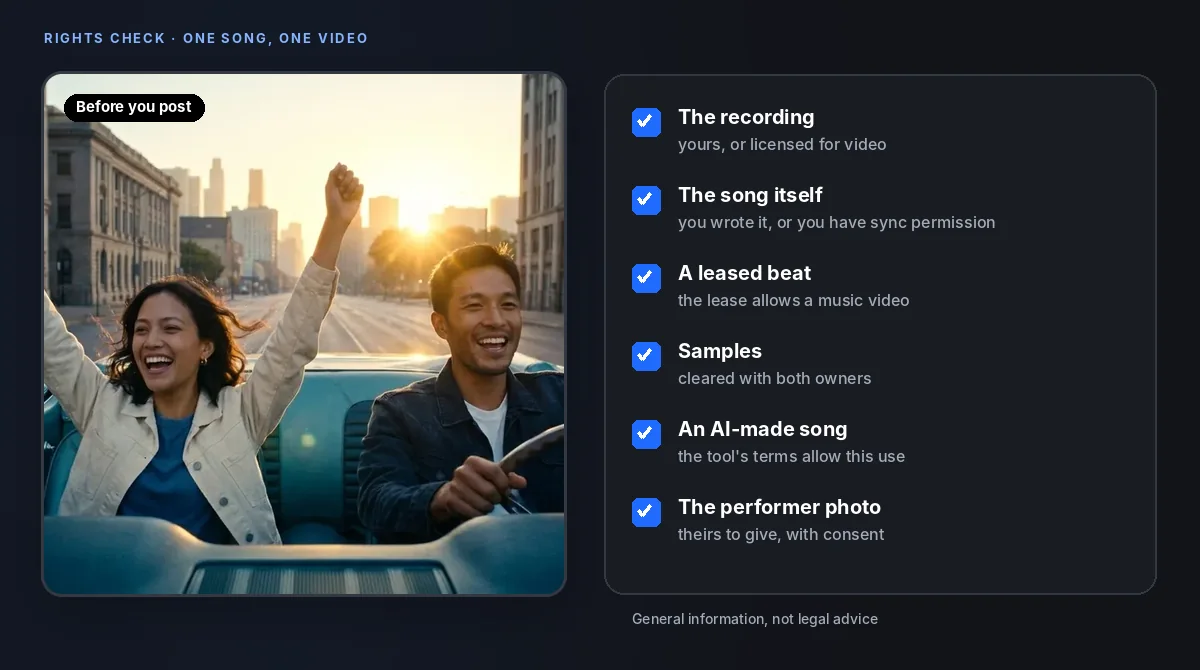
Muvora asks the same question of a slowed version as of any song: before the upload you tick a box confirming you own it or have the rights to use it, and that confirmation is stored with the time.
Uploading it and making a video for it
In Muvora a slowed version is a song of its own. The soundtrack of a Muvora video is always the file you upload, untouched: Muvora doesn't slow, master or otherwise change it. So make the slowed WAV first, then upload it (MP3, WAV, M4A, AAC or FLAC, up to 8 minutes and 60 MB; a WAV of a long slowed song can pass either limit, so save it as FLAC or MP3 then). The analysis measures the new tempo and finds every beat, downbeat and section at their new times, and the storyboard is planned for that version: at 96 BPM instead of 120 each bar lasts 2.5 seconds instead of 2, so every shot holds a little longer.
- The lo-fi look cuts slowest of the genre looks, which suits a slowed edit: rain on a window, a night bus, a bedroom lit by one desk lamp. The lo-fi music video page shows the look, and lo-fi music video ideas has more concepts.
- Abstract turns the song's energy into light, shapes and texture rather than a story, for an edit that's all mood.
- Lyric draws its pictures from what the words mean and adds karaoke-style captions timed to the slowed vocal.
- Story works too: describe one quiet scene and one character in the idea box, and let the shots unfold at the slower pace.

A 16:9 render gives every shape the edit needs: the widescreen video for YouTube, a 9:16 cut for Shorts, Reels and TikTok, a square version for feeds and an 8-second vertical Canvas loop for Spotify. A sped-up edit, which mostly lives as a short clip, can go in as 9:16 from the start. The slowed and reverb video maker page walks through the whole route.

Turn your slowed version into a music video
Upload the slowed file, pick the lo-fi look with the Abstract or Lyric style, and get a storyboard paced for its new tempo. Editing it is free, and you see the exact price before you render.
Written by the Muvora team. Last updated November 16, 2026. Spotted something out of date? Tell us at [email protected].






