The short answer
Upload the 16:9 file in YouTube Studio as private and title it Artist - Song (Official Music Video). Open the description with a line about the song and your streaming links, then add credits, lyrics, chapters from 0:00 and two or three hashtags. Add a 16:9 thumbnail (1280 x 720 or larger), captions, an end screen and the audience setting, then premiere or schedule it and link a Short.
- Title it Artist - Song (Official Music Video), or Official Lyric Video or Official Visualizer for those formats.
- Put the hook line and the streaming links in the first lines of the description.
- Chapters need a first timestamp at 0:00, at least three timestamps, and 10 seconds or more each.
- Upload as private, check every setting on a phone and a computer, then premiere or schedule.
- Post a vertical Short from the same render and link it to the full video.
On this page (8 sections)ShowHide
- 1.Before you upload: the file, the channel and the words
- 2.How to upload a music video to YouTube, step by step
- 3.The music video title format
- 4.A YouTube music video description template
- 5.Chapters: turn the song's sections into timestamps
- 6.The thumbnail and the captions
- 7.Premiere, end screens and cards
- 8.Post a Short, link it, and run the final checks
- Questions
Before you upload: the file, the channel and the words
Most of a good upload happens before YouTube Studio is open. Gather everything in one document first, so you aren't typing credits from memory while the progress bar crawls.
- The final 16:9 video, an MP4 at 1920 x 1080 or higher, with the mastered song as its audio
- The title, in the format below, with any featured artists spelled exactly as on the release
- The description: a one-line hook, streaming or pre-save links, credits, lyrics and chapters
- A custom 16:9 thumbnail, 1280 x 720 or larger
- A timed lyric file in SRT or WebVTT, if you want captions viewers can switch on and off
- The publish date and time, and whether it will be a premiere
- The vertical cut for a Short, ready to post the same day
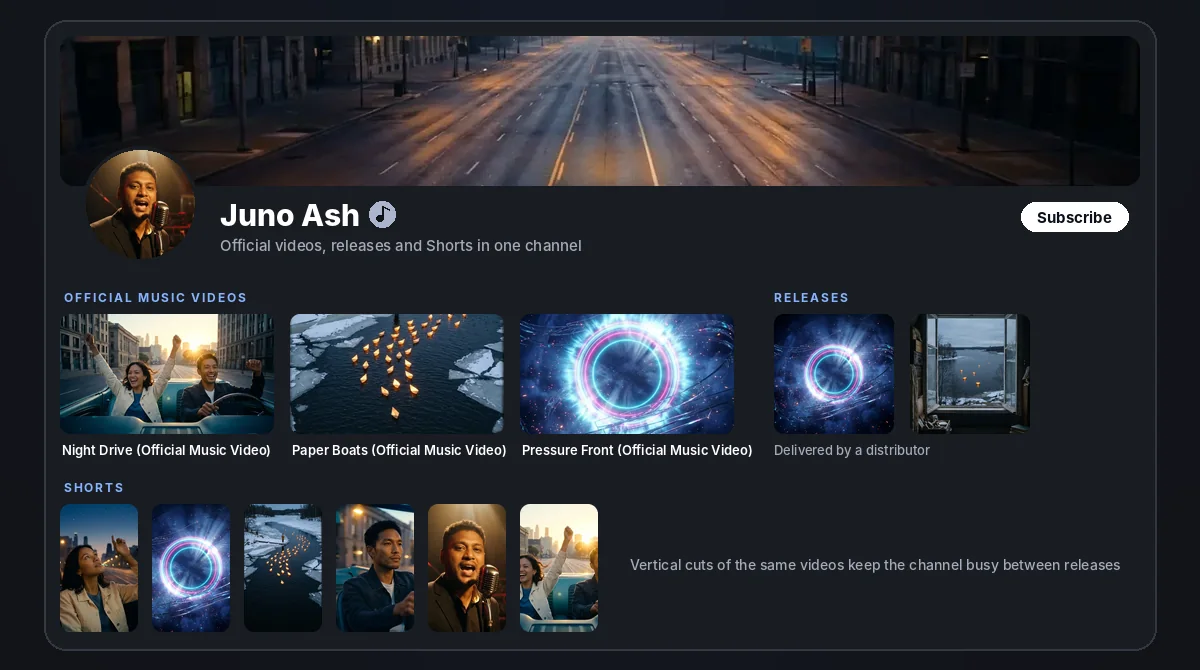
Check the channel too. If you release through a distributor, ask whether they can request an Official Artist Channel for you: it merges your own uploads with the Topic channel YouTube builds from your releases, under a music note next to your name, so fans find one official home. The help page lists the current requirements.
If the video comes from Muvora, the 16:9 export is ready as it is: its soundtrack is the song file you uploaded, and it runs exactly as long as the song.
How to upload a music video to YouTube, step by step
- 01
Start the upload in YouTube Studio
Open YouTube Studio, choose Create, then Upload videos, and select the 16:9 file. It processes while you fill in the details.
- 02
Add the title and the description
Paste the title in the Artist - Song (Official Music Video) format, then the prepared description, with the hook line and streaming links at the top.
- 03
Add the thumbnail and a playlist
Upload the custom thumbnail, then add the video to a playlist of your music videos or of the release, so viewers have somewhere to go next.
- 04
Answer the audience question
Every upload has to say whether it's made for kids. Most music videos aren't, so answer honestly: a video set as made for kids loses features such as comments and cards.
- 05
Fill in the extra details
Under Show more, set the category to Music, answer the altered content question, and add tags for common misspellings of your artist name or the song title.
- 06
Add subtitles, an end screen and cards
In the video elements step, upload your lyric file as subtitles, add an end screen over the last seconds, and add cards that point to the release playlist or your other videos.
- 07
Let the checks finish
YouTube checks the upload for copyright matches before you publish. If your own release claims it, sort that out with your distributor before the video goes public.
- 08
Save as private, then schedule or premiere
Keep the video private, watch it once on a phone and once on a computer, then set a publish time or a premiere. A time chosen in advance lets you announce it everywhere else.
Skip the blank page
Upload your song and Muvora's AI director plans a shot-by-shot storyboard on the beat. Edit every shot for free, and pay only if you render.
The music video title format
Music video titles follow a convention that fans, other artists and search engines all read the same way: the artist, a hyphen, the song, then the kind of video in brackets. Sticking to it tells viewers at a glance that this is the official upload, not a fan re-upload or a lyric page someone else made. Some labels use the shorter (Official Video), and both are understood.
| Video | Format | Example |
|---|---|---|
| Music video | Artist - Song (Official Music Video) | Kite Season - Night Drive (Official Music Video) |
| Lyric video | Artist - Song (Official Lyric Video) | Kite Season - Night Drive (Official Lyric Video) |
| Visualizer | Artist - Song (Official Visualizer) | Kite Season - Night Drive (Official Visualizer) |
| With a featured artist | Artist - Song ft. Featured Artist (Official Music Video) | Kite Season - Night Drive ft. Theo Lark (Official Music Video) |
| Remix or alternate version | Artist - Song (Remixer Remix) (Official Visualizer) | Kite Season - Night Drive (Glasshouse Remix) (Official Visualizer) |
| Live or performance | Artist - Song (Live at Venue) | Kite Season - Night Drive (Live at The Lantern) |
| A Short from the video | The song and a few words; no format label needed | Night Drive, out now: the chorus at sunrise |
- Artist and song first. Long titles are cut off on phones and in search results, so nothing should come before them.
- One label in brackets. (Official Music Video) is enough; adding 4K, HD or NEW makes a title look less official, not more.
- Normal capitalization. A title in capitals reads as shouting and looks like a re-upload.
- No keyword lists. Put the genre and the mood in the description, not the title.
A YouTube music video description template
Only the first lines of a description show under the video before a viewer expands it, so those lines do most of the work: what the song is and where to stream it. Everything else (credits, lyrics, chapters) goes below, in roughly the order a curious fan would look for it.
| Part | What to write | Example |
|---|---|---|
| Hook line | One sentence about the song, in your own voice | Night Drive is about the last hour before sunrise, when the city belongs to you. |
| Streaming links | A smart link or the main services, one per line | Listen everywhere: your link |
| Release details | The single, EP or album, its date, and the label if there is one | From the EP Blue Hour, out now |
| Credits | Writers, producers, mixing and mastering, the video's director, featured artists | Written by …, produced by …, mixed by … |
| Lyrics | The full lyrics, with the sections labeled | [Verse 1] … |
| Chapters | One timestamp per section, starting at 0:00 | 0:00 Intro, 0:14 Verse 1 … |
| Socials | Where to follow you, one link per line | Instagram, TikTok, your website |
| Hashtags | Two or three about the artist, the song or the genre | #KiteSeason #NightDrive #synthpop |
Hashtags in a description link to pages of other videos with the same tag. A few precise ones (your artist name, the song, the genre) do more than a long list, and YouTube's hashtag rules ignore every hashtag on a video that has more than 60. Leave out unrelated tags: YouTube treats misleading hashtags as a policy problem.
Chapters: turn the song's sections into timestamps
Chapters split the progress bar into labeled parts, so a viewer can jump straight to the chorus or the bridge, and they can appear as key moments when the video shows up in Google Search. For a music video, the song's sections are the natural chapters.
YouTube builds chapters from timestamps in the description, as long as the list follows its rules for video chapters: the first timestamp must be 0:00, there must be at least three timestamps in ascending order, and each chapter must last at least 10 seconds. A pre-chorus of eight seconds has to be folded into the verse before it.
| Timestamp | Chapter | Length |
|---|---|---|
| 0:00 | Intro | 14 s |
| 0:14 | Verse 1 | 32 s |
| 0:46 | Chorus | 24 s |
| 1:10 | Verse 2 | 32 s |
| 1:42 | Chorus | 24 s |
| 2:06 | Bridge | 24 s |
| 2:30 | Final chorus | 36 s |
| 3:06 | Outro | 18 s |
Bar height: how loud the section is. The strip under them: the shots, each cell one cut. Louder sections get more, shorter shots.
There's no need to find the times by ear. The free song structure visualizer reads your audio file and writes the chapter list for you, ready to paste. Keep chapter titles plain (Verse 2, Chorus, Bridge), or use a lyric from that section if it helps people find the moment they came for.
The thumbnail and the captions
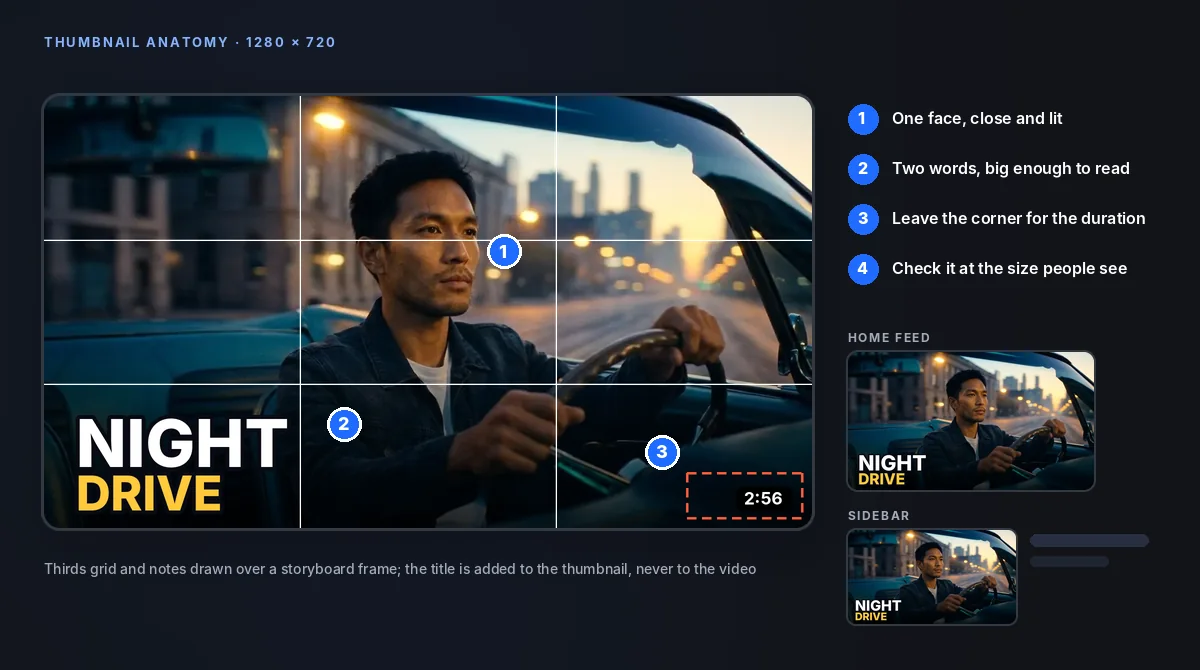
The thumbnail is what most people judge the video by before they press play. YouTube's thumbnail guidelines ask for a 16:9 image at least 640 pixels wide; 1280 x 720 was long the recommended size, and the page now suggests up to 3840 x 2160. Custom thumbnails need a verified channel. Choose a frame from the strongest moment, usually the first chorus, rather than the opening shot.
- One clear subject: a face, a figure or an object that still reads at the size of a thumbnail in a phone's results.
- Strong contrast: a bright subject on a darker ground, or the reverse, stands out among a page of other videos.
- Little or no text: the title already names the song; if you add words, keep them to two or three, large.
- A frame from the video: a moment viewers will actually see, so the click feels honest.

Captions make the lyrics readable with the sound off, for viewers who are deaf or hard of hearing, and for anyone learning the words. A subtitle file uploaded in YouTube Studio can be switched on and off and corrected later; YouTube accepts formats including SRT and WebVTT (supported caption files). Captions burned into the picture can't be switched off, but they travel with every clip cut from the video.
Have an LRC file? The free lyric file converter turns it into SRT or WebVTT in your browser; with no timed lyrics at all, the lyric timestamp exporter times them from the song. Muvora's optional karaoke-style captions are burned in, each word lighting up as it's sung, so add a subtitle file too for viewers who want them switchable.
Premiere, end screens and cards
A premiere publishes the video at a set time as a shared first viewing: the watch page goes up in advance, people can set a reminder, and everyone watches together with a live chat. It gives fans one place and time to gather, with you in the chat. An ordinary scheduled publish time works just as well for the video itself.
End screens and cards keep viewers moving once the song is over. End screens sit over the last 5 to 20 seconds of a video, which must be at least 25 seconds long, and can point to another video, a playlist, your channel or a subscribe button. Cards are small prompts that appear during the video, up to five per video.
- End screen: the next thing you want watched, such as the lyric video or the previous single, plus a subscribe button.
- A card at the first chorus: the release playlist, for viewers who are already hooked.
- A card near the end: a live version or the visualizer, if you have one.
Get a video that's ready to upload
Upload your song and Muvora plans every shot on the beat in a free storyboard. One render gives you the 16:9 video for YouTube, a vertical cut for the Short and a Spotify Canvas loop.
Post a Short, link it, and run the final checks
Many people will meet the song in a Short before they ever see the full video, and YouTube lets you send them from one to the other. Post the vertical cut of the hook, the best 15 to 30 seconds, as a Short on release day: YouTube treats a vertical or square video of up to three minutes as a Short. Then, in YouTube Studio, set the Short's related video to the full music video, which adds a link to it on the Short, as YouTube's own guide to related video links describes.
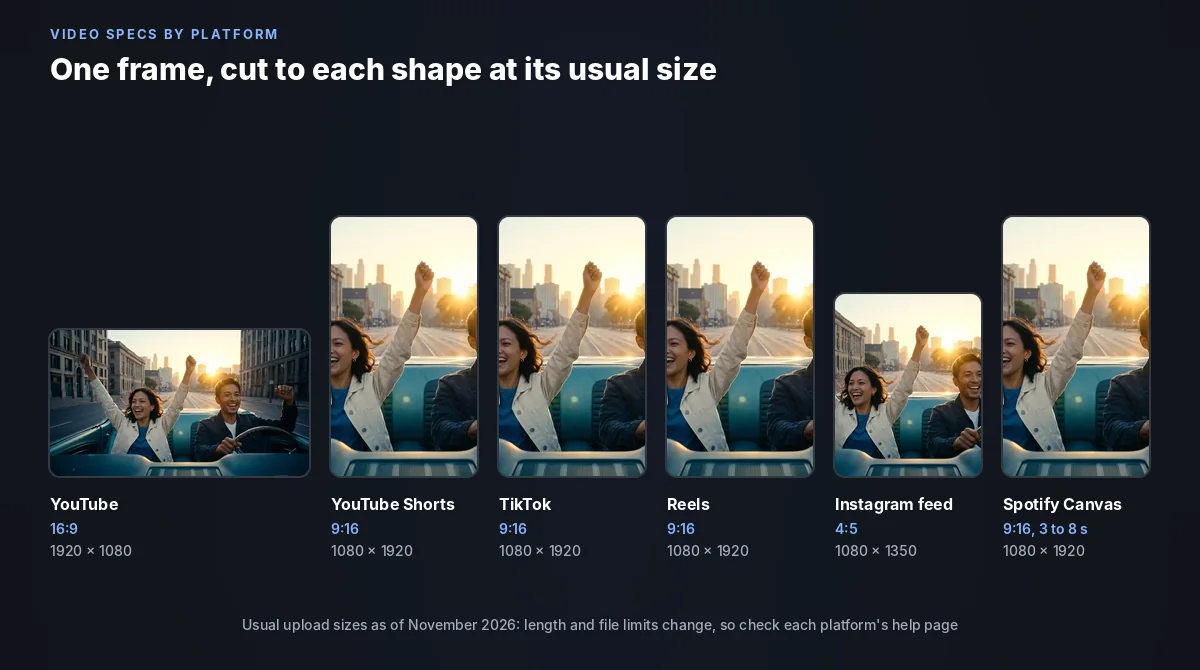
Make the Short from the same render as the music video rather than as a separate project, so the look matches and the tap-through feels like a continuation. One Short is a start; how to promote music on YouTube Shorts plans a whole series from the video and explains which numbers to watch. For the vertical framing itself (what to crop, what to show whole), see music video aspect ratios; for the rest of release week, the music release checklist.
- Title in the Artist - Song (Official Music Video) format, featured artists spelled right
- Hook line and streaming links in the first lines of the description
- Credits, lyrics and chapters from 0:00 further down the description
- Two or three relevant hashtags, no more
- Custom thumbnail from the strongest moment
- Subtitles uploaded and checked against the audio
- Audience set, altered content answered, category set to Music
- End screen and cards pointing to your next video and the release playlist
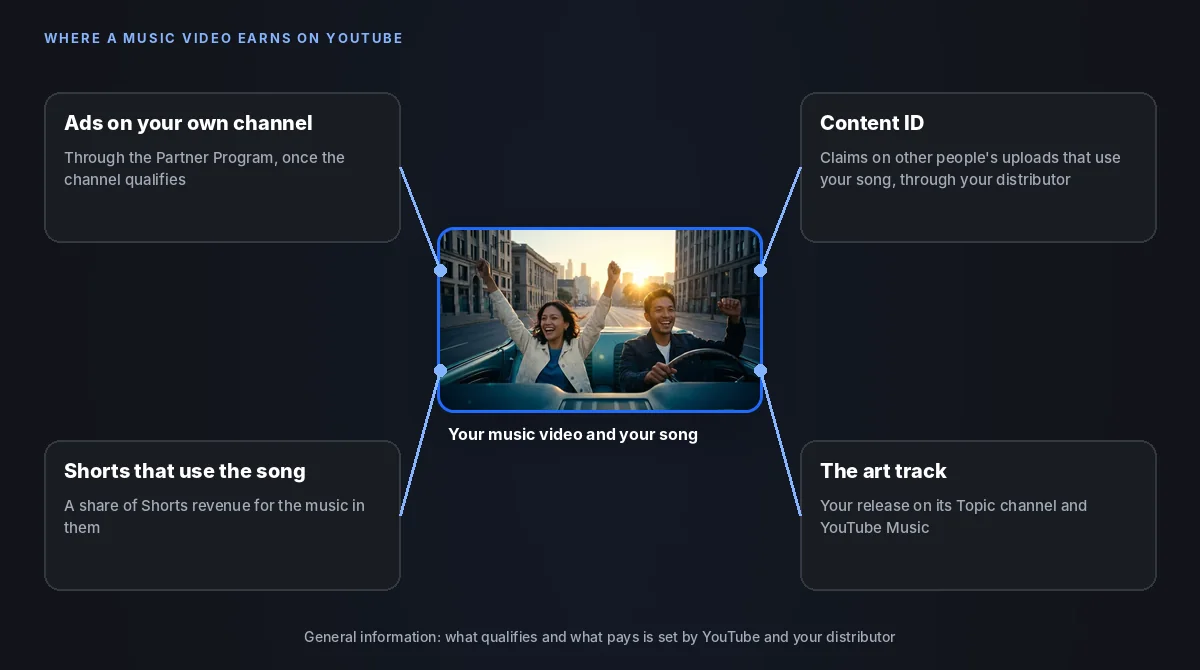
- Your channel allowlisted with your distributor for Content ID
- Premiere or publish time set and announced
- The Short ready, with its related video set to the full music video
Make the video and the Short together
Choose 16:9 when you upload, edit the free storyboard and render once. You download the YouTube video, a 9:16 cut for Shorts and a square version for the feed, all from the same footage.
Written by the Muvora team. Last updated November 14, 2026. Spotted something out of date? Tell us at [email protected].