
The focus single, with the artist in it
Performance style, 16:9: the artist sings in one strong location, with story shots between the choruses.
An independent label, a manager or a collective rarely runs short of songs that deserve a video; what runs short is money and time across a whole release schedule. Muvora turns each song into a storyboard you can read and change for free, prices it to the second before anything renders, and makes every file a campaign needs from one render. Here's how that works across a roster, and what Muvora doesn't do yet.
Free to start · 5 storyboards a month · No card needed
Each release is its own upload (up to 8 minutes) and its own storyboard, priced for its exact length before you press Generate: 38 credits a finished second in Visualizer, 60 in Standard and 110 in Cinematic, with lip-synced seconds at 75. That lets the budget follow the plan: Cinematic for the focus single, Standard for the follow-up, Visualizer for the album tracks. Credits come from a plan, a pack or both. The Studio plan comes in sizes up to ten times its monthly credits on one subscription, at the same price per credit; unused subscription credits roll over up to 2 months' worth, so a quiet month carries into a busy one; and pack credits never expire, which suits a surprise single. Paid plans have no monthly limit on new storyboards, a shot that fails to render costs nothing, and re-rolls are free up to 10% of each video's length. Price a slate in the cost calculator, and compare the plans on pricing.
See your song as a storyboard first
Upload the track and the AI director plans every shot on the beat in minutes. Edit anything for free; you only pay if you render.
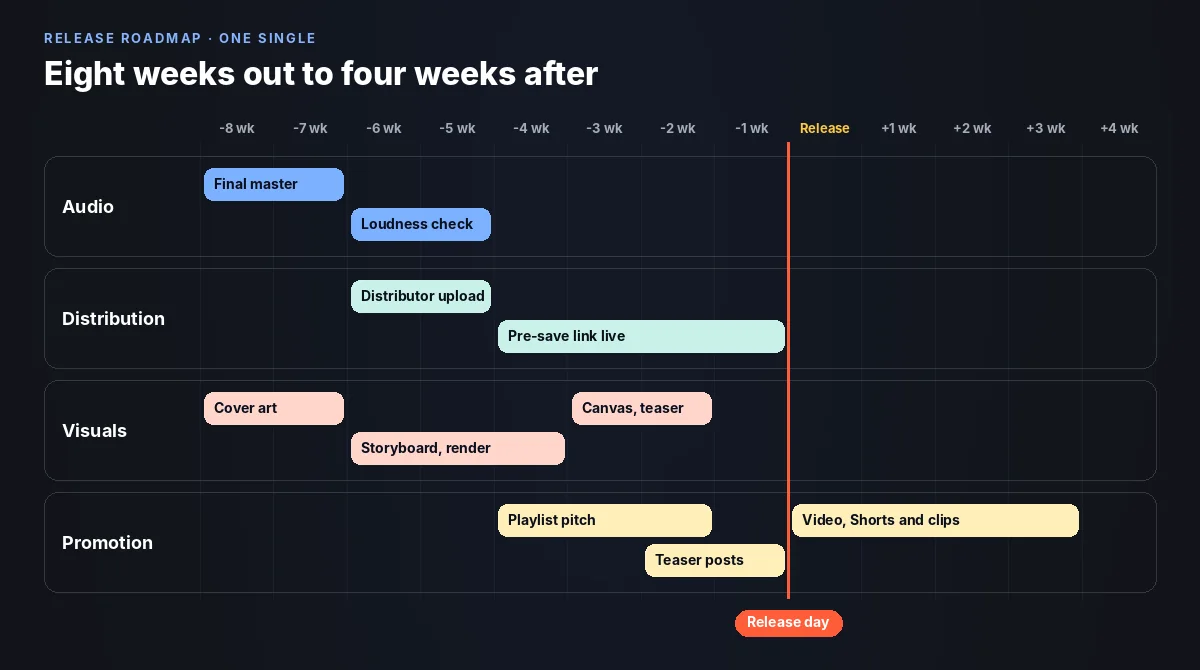
A 16:9 render gives the YouTube video, a 9:16 cut for Reels, TikTok and Shorts (wide shots sit whole over a blurred fill, the rest is cropped to the center), a square post and an 8-second Spotify Canvas, at 720p or 1080p with karaoke captions on or off. A 9:16 render gives the vertical, square and Canvas files but no widescreen, so start widescreen when one video has to carry a whole campaign. Each storyboard renders in one style and one quality, so plan song by song: an EP might get a Standard story video for its focus track and a Lyric or Abstract video for each of the others (what is an EP covers sequencing), and the album visualizer page covers a full tracklist. Each genre on a roster cuts differently: the trap, indie and metal pages show how. A teaser can be its own upload, cut on the bar lines with the free audio cutter. The files are H.264 MP4 at 24 frames a second with the master you uploaded as the soundtrack, so they open in any editor for an end card or a label ident. Lay out the dates with the release timeline planner.
Muvora works one account per person: there are no team seats, shared folders, brand kits or API, and each song is uploaded through the site by hand. Every video gets its own creative brief, and a character sheet when it has characters, which keeps its cast consistent from shot to shot within that video. Nothing carries a look from one video to the next, so keep each artist's recurring look as a paragraph you paste into the idea box (up to 600 characters) for every release. There's no way to invite an artist into a storyboard: walk them through it on a shared screen, and once the video is rendered, send them its share link from the review page. The uploader ticks that they own the song or have the rights to use it in a video, which for a label means checking that your deal covers the master and that the songwriters or their publishers allow the song in a video, along with any samples, features and leased beats; a cover needs the composition's sync permission too (cover song music videos). A Performance video uses an artist's photo only with their permission. The music video copyright and sync license guides set out the basics.
Each card opens the upload with a style and a sample idea for one kind of release. Replace the idea with the artist's own world before the storyboard is written, and keep that paragraph to paste again for their next release.
Performance style, 16:9: the artist sings in one strong location, with story shots between the choruses.
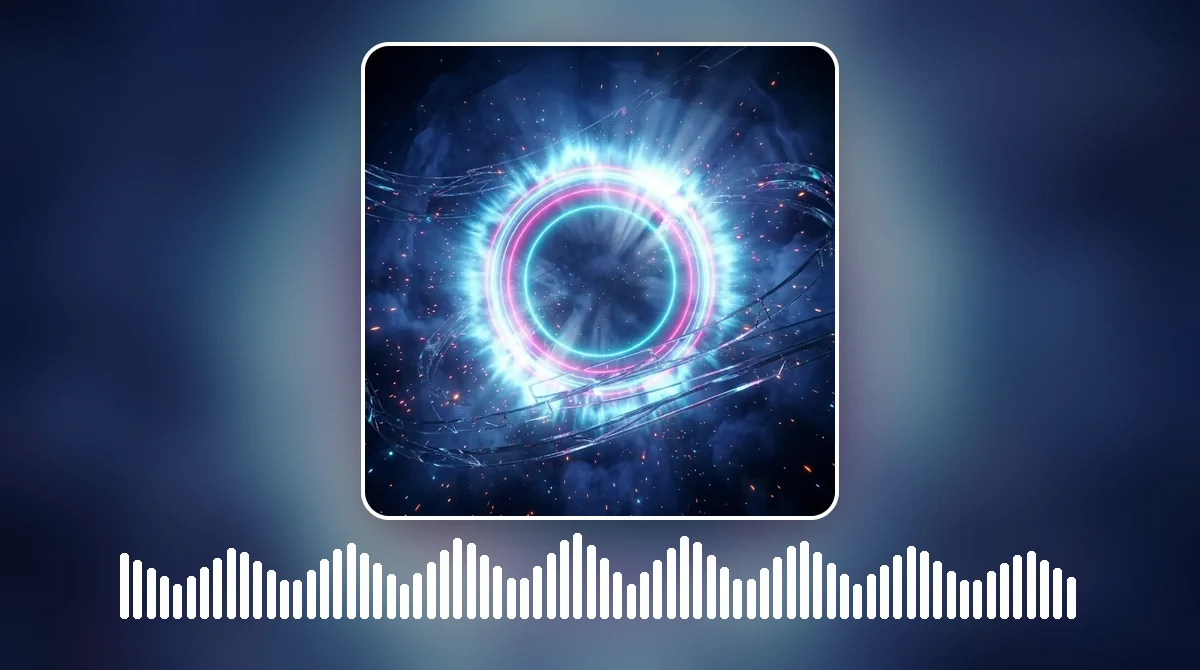
Abstract style, 16:9: no cast, only light, texture and the album artwork's colors, for tracks that won't get a full video.

Lyric style, 16:9: calm pictures with room for the captions, a quick follow-up after the main video.
Drop in an MP3, WAV, M4A or FLAC up to 8 minutes. Muvora finds the tempo, the beats, the downbeats and the sections of your song, like intro, verse and chorus.
An AI director writes a shot-by-shot plan timed to your downbeats. Rewrite any prompt, drag a cut (it snaps to the beat) or ask AI to redo a shot. None of it costs anything.
See the final price, then render. Pick Visualizer, Standard or Cinematic quality. If a shot fails, its credits come straight back.
Free storyboard in minutes. No card needed.
Can't find what you need? Start a free storyboard and see for yourself.
Not yet. Each account belongs to one person, and there are no team seats, shared folders, brand kit or API. One person, such as whoever runs video at the label, holds the credits, uploads each song, edits the storyboards and sends each finished video to its artist through a share link.
Studio is made for it: it comes in sizes up to ten times its monthly credits on one subscription, at the same price per credit. Unused subscription credits roll over up to 2 months' worth, yearly billing saves at least 30%, and packs, which never expire, cover a release that lands outside the plan. The smallest plan is US$39 a month.
Within one video, yes: the brief and the character sheet keep the cast and the look consistent from shot to shot. Across videos nothing is saved, so paste the same description of the artist's world into the idea box for each release, and use the same photo, with the artist's permission, for Performance videos. Each video is drawn new, so expect small differences from one release to the next.
You can review the plan. The storyboard, with its brief, every shot's prompt and the style frames that show the look, is free to read and edit, and its exact price is shown before you press Generate. After the render, re-rolls are free up to 10% of the video's length, and making a new version on the review page costs nothing.
Whoever uploads it confirms they own the song or have the rights to use it in a video, so for a label that's a check against each artist's deal: the master, the songwriters' or publishers' permission for a video, and any samples, features or leased beats. A performer's photo needs that person's permission. This is general information, not legal advice; your contracts decide.
It depends on the song's length and the quality. A 3-minute song is 6,840 credits in Visualizer, 10,800 in Standard and 19,800 in Cinematic, with lip-synced seconds at 75 in place of the quality's rate. Every storyboard shows its exact price before you render, and a shot that fails costs nothing.
Plans, credit packs and what a music video of any length costs in each quality.
Learn moreYour song's length and quality in, the credits and the plan or pack that covers it out.
Open the toolA dated release plan from your release day: the master, the video, the pitch, the Canvas and the clips.
Open the toolWhat to finish six weeks, four weeks and two weeks before release day, and what to do that week.
Read the guideA visualizer for every track on an EP or album, each cut to its own song.
Learn more
A music video for a self-released single: no crew, a free storyboard and the price shown before you render.
Learn more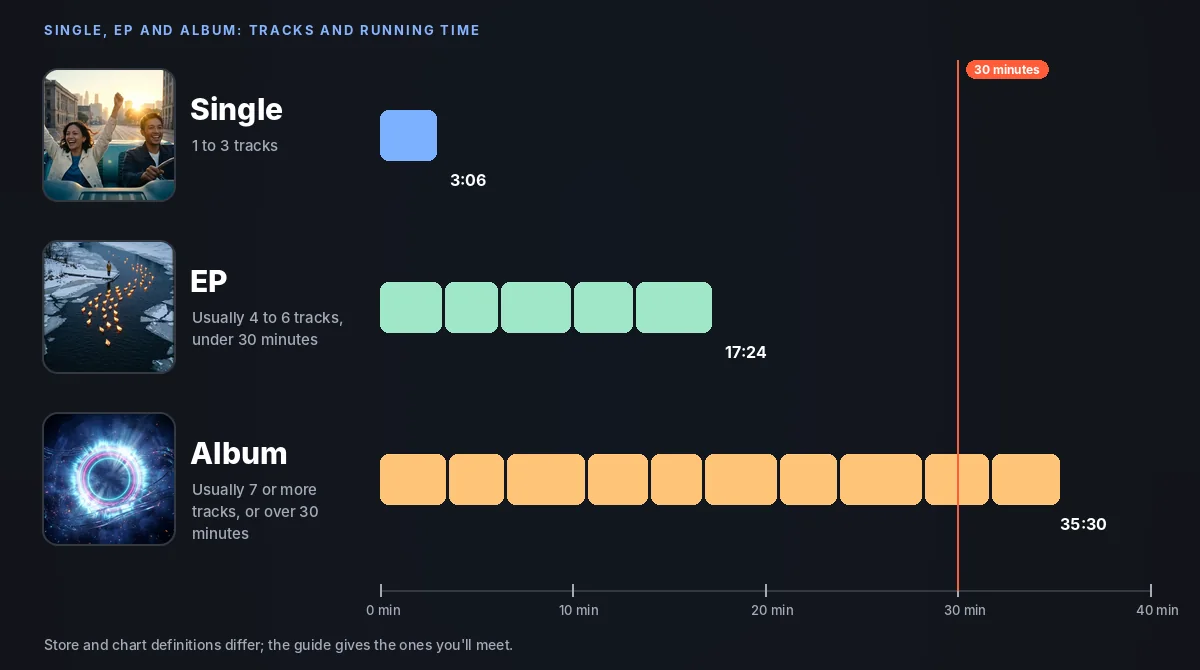
Singles, EPs and albums by track count and length, how stores and charts sort them, how to sequence an EP and a visual plan for every track.
Read the guide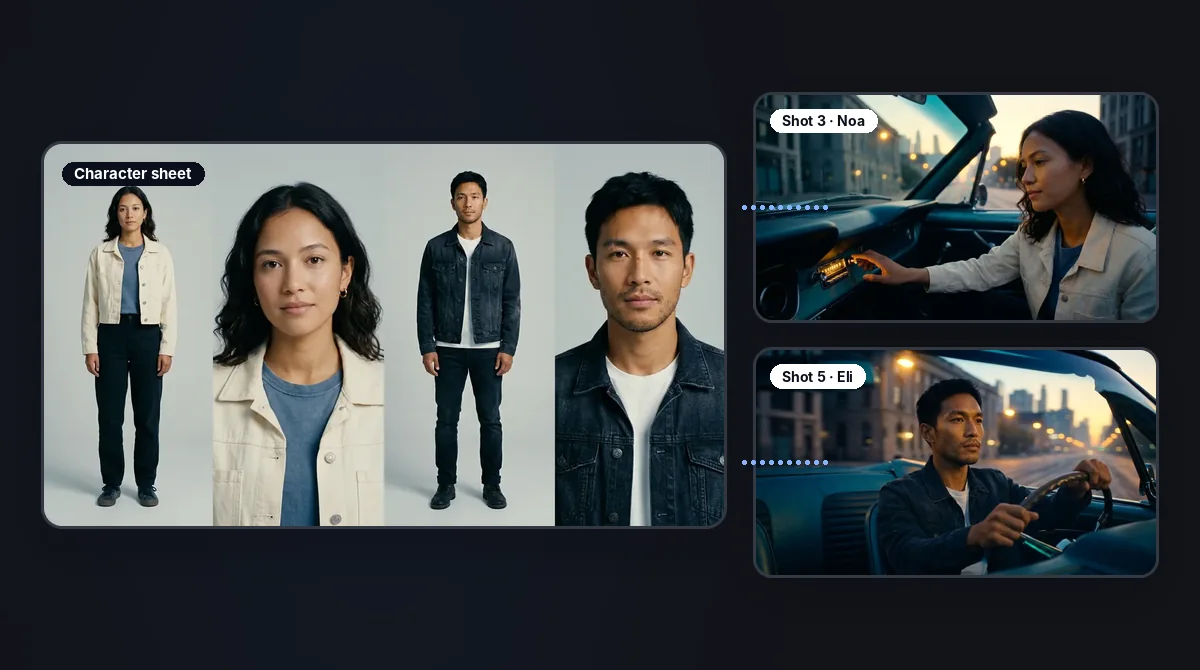
The same faces, clothes and props in every shot: a character sheet first, every keyframe checked against it.
Learn more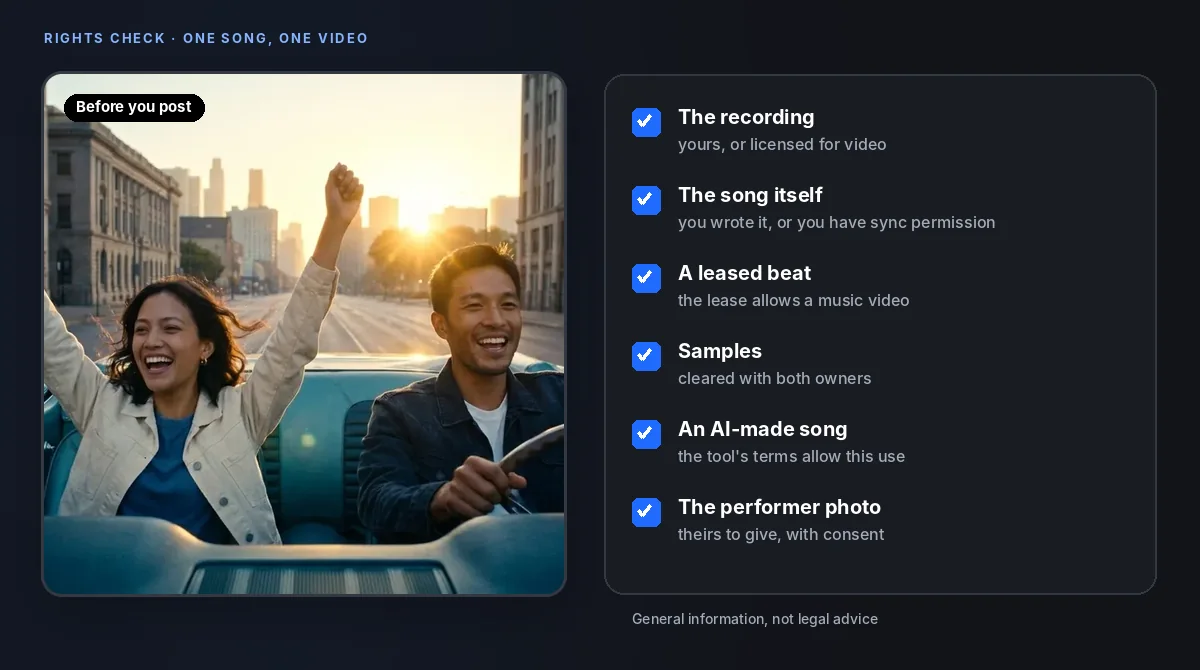
Covers, samples, leased beats, AI songs and Content ID: what to clear before you make and post a music video.
Read the guideA one-page electronic press kit from your own bio, photos, links, music video and contacts, printed or saved as a single HTML file.
Open the tool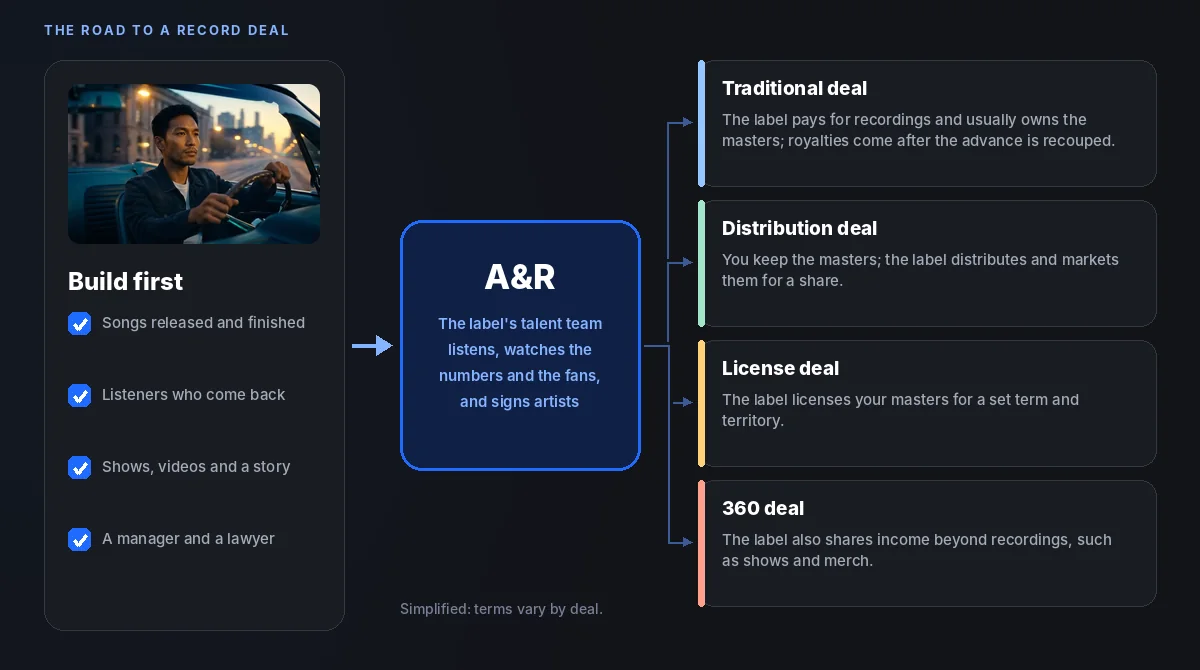
What labels say they look for, how to approach one, the kinds of deal and the terms inside them, the red flags, and why staying independent is a real option.
Read the guide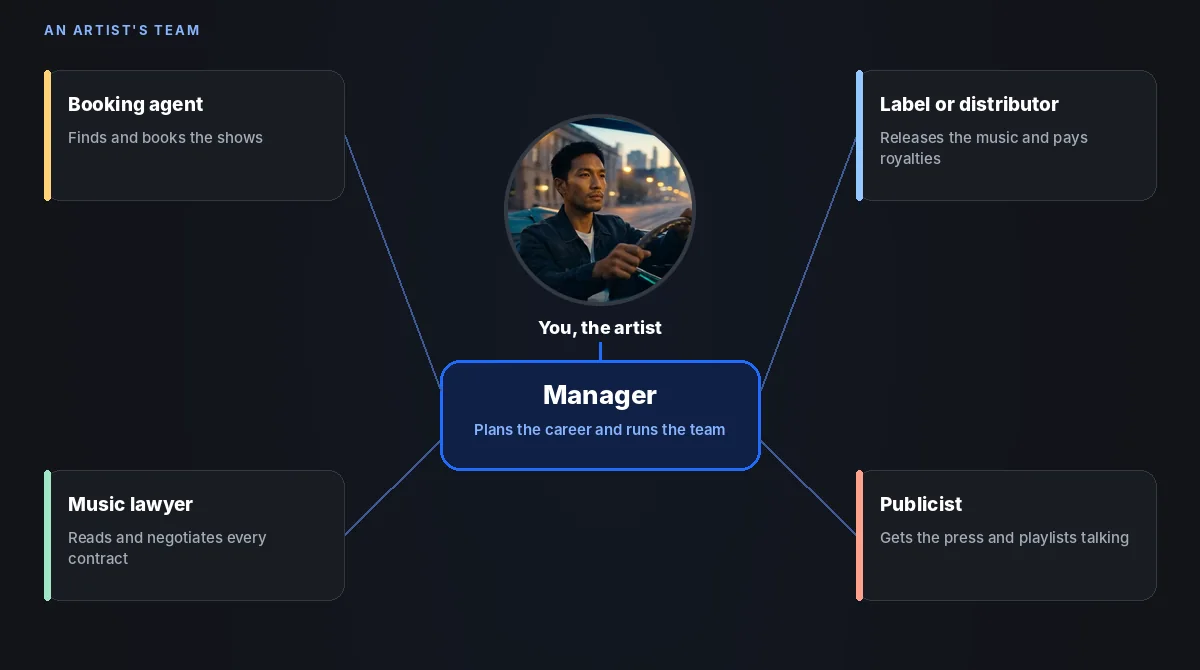
What a manager does, when you're ready for one, how to find and approach one, how managers are paid, the contract terms to read and the red flags.
Read the guideUpload a track and get a free beat-synced storyboard in minutes. Render it when you are ready.
No card needed to start.





