The short answer
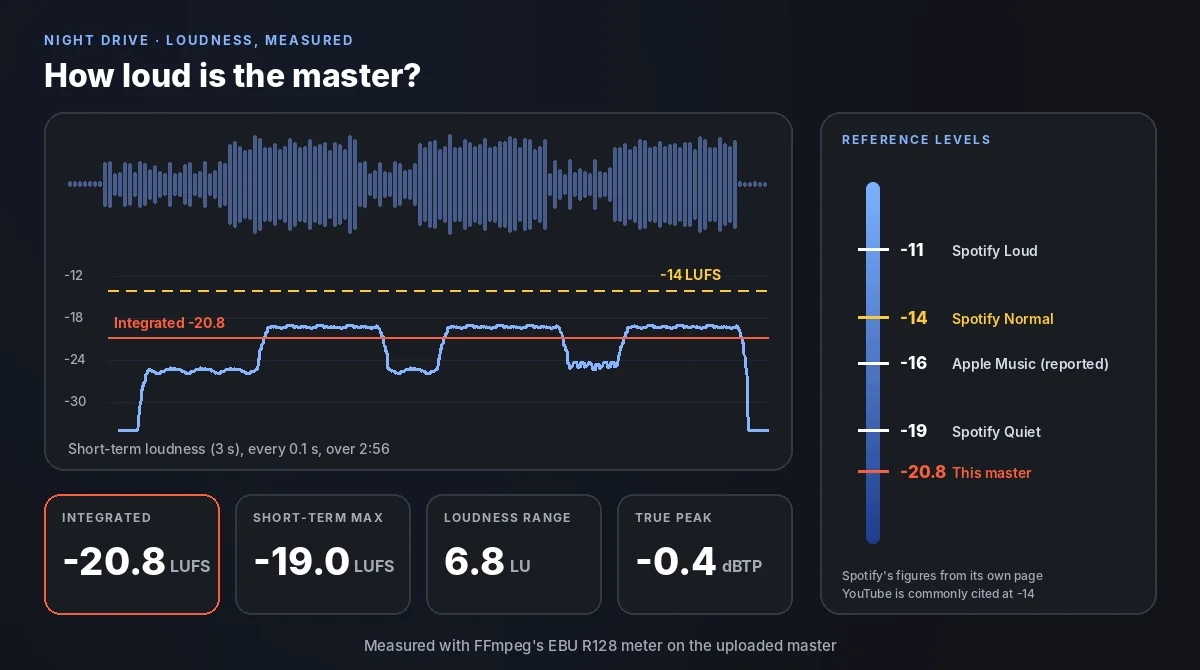
Spotify plays songs at -14 LUFS by default and publishes that figure; YouTube, Amazon Music and Tidal are reported at about -14, Deezer at about -15 and Apple Music at about -16. Louder masters are turned down at playback, so extra loudness doesn't make a song play louder. Master for the sound you want and keep the true peak under -1 dBTP.
- Spotify publishes -14 LUFS (Loud -11, Quiet -19); the other services' levels are reported by people who measured them.
- Normalization turns loud masters down when they play; it doesn't change the file you deliver.
- A master louder than the reference gains density, not volume, for listeners with normalization on.
- Keep the true peak under -1 dBTP so lossy encodes don't clip.
- Your music video's soundtrack is the master you upload, so measure it before anything else.
On this page (7 sections)ShowHide
- 1.What LUFS, LU, true peak and dBTP mean
- 2.How loudness normalization works on each service
- 3.How to measure your song's loudness
- 4.How loud should you master for streaming?
- 5.True peak, lossy encoding and distortion
- 6.Measure and prepare a master for streaming, step by step
- 7.Checks before you upload to a distributor and to Muvora
- Questions
What LUFS, LU, true peak and dBTP mean
A peak meter tells you how close the waveform comes to full scale; it says little about how loud a song feels. LUFS measures loudness instead, as the ITU's BS.1770 standard defines it and the EBU's R128 recommendation applies it: the audio is filtered to weigh frequencies roughly as we hear them, then its power is averaged over time. Two songs at the same LUFS sound about equally loud, even when one peaks far higher than the other.
- LUFS
- Loudness units relative to full scale: loudness measured as BS.1770 defines it. LKFS is the ITU's name for the same unit, so -14 LKFS and -14 LUFS are the same level.
- LU
- A loudness unit, a difference between two loudness readings. One LU is one decibel, so a song at -9 LUFS is 5 LU louder than one at -14.
- Integrated loudness
- The loudness of a whole song in one number, with silence and passages more than 10 LU under the rest left out (the gating). It's the figure streaming services normalize by.
- Short-term and momentary loudness
- The same measurement over a sliding 3-second window (short-term) or 400-millisecond window (momentary). Their maximums show how loud the loudest moments get.
- Loudness range (LRA)
- How far the short-term loudness moves over a song, in LU, from its quieter parts to its louder ones (EBU Tech 3342). A heavily limited master often reads under 5 LU; a dynamic ballad can read 10 or more.
- True peak (dBTP)
- The highest point of the waveform between the samples, estimated by oversampling, in decibels relative to full scale. It can read above the highest sample, which is the figure most channel meters show.
- K-weighting
- The filter loudness meters run first: a high-pass that cuts more and more below about 100 Hz, and a shelf that lifts the frequencies above a few kHz by about 4 dB, so deep bass counts for less and presence for more, as in hearing.
Integrated loudness is the one to watch for streaming, since it decides how far a service turns your song down. The others explain why a song reads the way it does: a short-term maximum well above the integrated figure means a chorus that jumps out of its verses, and a true peak near 0 dBTP means a master that may distort once it's encoded.
How loudness normalization works on each service
A service measures each song when it arrives, stores the figure and changes the playback volume by the difference between the song and its reference level. The file you delivered isn't altered. A song 5 dB over the reference plays 5 dB quieter than the file; a song under it is turned up only by some services and only so far. Spotify normalizes unless a listener turns it off, Apple turned Sound Check on by default for new devices in 2022 (as MeterPlugs reported), and YouTube is reported to apply its own to every upload.
| Service | Reference level | Published or reported | Songs under the reference |
|---|---|---|---|
| Spotify (default) | -14 LUFS | Published by Spotify | Turned up only as far as the true peak allows, leaving 1 dB of headroom |
| Spotify, Loud (Premium) | -11 LUFS | Published by Spotify | Turned up with a limiter catching the peaks |
| Spotify, Quiet (Premium) | -19 LUFS | Published by Spotify | Few songs are this quiet; how they are treated isn't spelled out |
| YouTube | About -14 LUFS | Reported (MeterPlugs, 2019) | Reported to stay as they are: only louder uploads are turned down |
| Apple Music (Sound Check) | About -16 LUFS | Reported (MeterPlugs, 2022) | Not published |
| Amazon Music | About -14 LUFS | Reported (KVR Audio, 2019) | Not published |
| Tidal | About -14 LUFS | Reported (Grimm Audio) | Reported to stay as they are; a whole album is set by its loudest track |
| Deezer | About -15 LUFS | Reported (KVR Audio, 2019) | Not published |
Spotify's loudness normalization page gives the most detail. Its example of a quiet song: a master at -20 LUFS whose true peak is -5 dB is lifted only to -16 LUFS, since lifting it further would push the peak past the 1 dB of headroom Spotify keeps for lossy encodes. On the Loud setting it turns songs up regardless of their peaks and lets a limiter hold them down. Tidal works by album, following a recommendation by the engineer Eelco Grimm that it adopted: the loudest track of an album is set to the reference and the rest keep their place beside it, so a quiet interlude stays quiet.
Skip the blank page
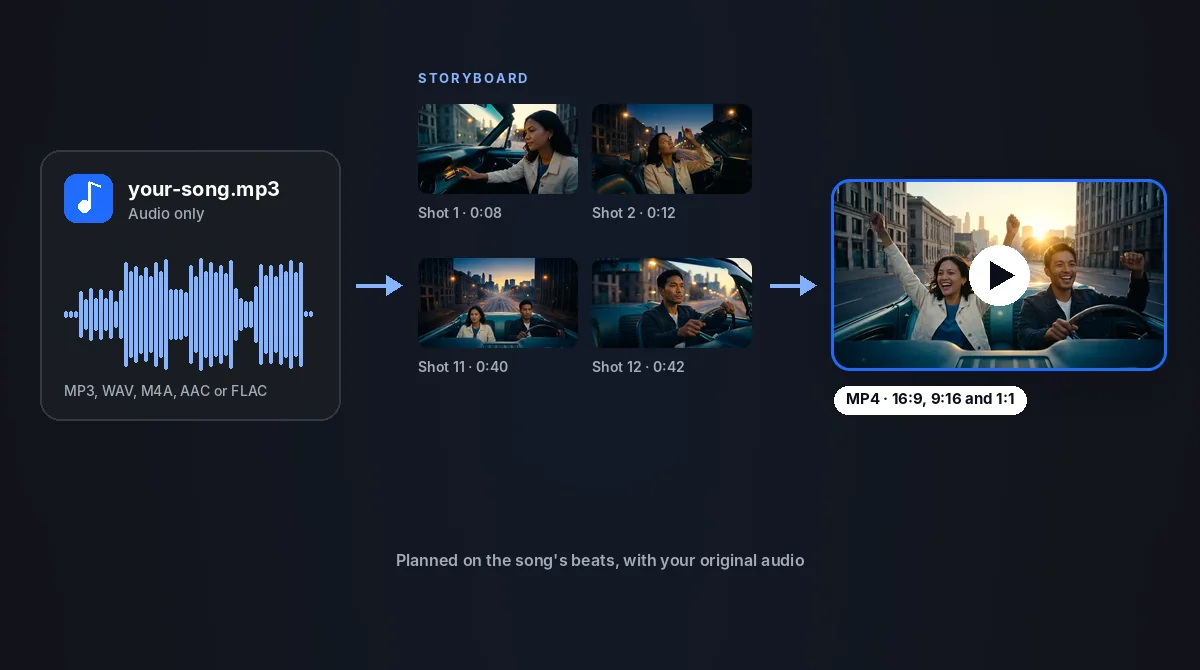
Upload your song and Muvora's AI director plans a shot-by-shot storyboard on the beat. Edit every shot for free, and pay only if you render.
How to measure your song's loudness
Measure the whole song in one pass, from its first sample to its last: integrated loudness is a property of the full file, so a loop of the chorus reads louder than the song does. Any meter that follows BS.1770 works, from the one in your DAW or mastering plugin to a free one in the browser.
LUFS meterOpen a song on your device to read its integrated, short-term and momentary loudness, loudness range and true peak, with a chart and what each service would do to it. Nothing is uploaded.- Integrated loudness: compare it with -14 LUFS to see how far Spotify, YouTube and Tidal turn the song down.
- True peak: under -1 dBTP leaves room for lossy encoding; above it, lower the limiter's ceiling.
- Short-term chart: the choruses should rise above the verses. A flat line from start to finish means the limiting has evened them out.
- Loudness range: a figure, not a grade. Under about 5 LU is common in dense pop, rap and EDM masters, and 8 LU or more in acoustic songs and ballads.
Read an MP3 or AAC file with a little caution: decoders differ slightly, and lossy encoding raises peaks a little, so the WAV you deliver is the one to measure. For where loudness changes inside a song, the song structure guide explains why choruses and drops are built to sit above the verses.
How loud should you master for streaming?
There's no correct number, only a trade. A master pushed louder with compression and limiting sounds denser and more forward, and it plays louder wherever normalization is off: in a DJ's software, on a downloaded file, for a listener who switched normalization off. With normalization on it's turned down to the same level as everything else, and what remains is the sound of the limiting. A master left nearer the reference keeps the jump from verse to chorus and the snap of a snare, and loses nothing on the services.
| Integrated loudness | On Spotify (default) | The trade-off |
|---|---|---|
| About -14 LUFS | Plays as it is | The most contrast kept; turned up with a limiter on the Loud setting |
| -11 to -9 LUFS | Turned down 3 to 5 dB | Denser and more forward; some punch traded for it |
| -8 LUFS and louder | Turned down 6 dB or more | Heavy limiting: choruses barely rise above verses, and peaks near full scale can distort when encoded |
| Quieter than -14, such as -18 | Turned up only as far as its true peak allows | Full dynamics; may play a little under other songs where it isn't turned up |
Many current pop, hip-hop and EDM releases measure well above -14 LUFS because their sound is dense on purpose, and many acoustic, jazz and classical releases sit below it. Choose by ear against a reference track you like, with both at the same loudness (turn the louder one down until the meters match), so the louder one doesn't win just for being louder.
Master measured? Give it a video
Upload the final master and Muvora reads its beats, sections and the energy of every beat, then plans a music video that cuts faster where the song gets louder. The storyboard is free.
True peak, lossy encoding and distortion
Services stream compressed formats (Spotify, for example, encodes to Ogg Vorbis and AAC), and encoding reshapes the waveform slightly, which can push a peak higher than it was in the WAV. A master whose true peak already sits at -0.1 dBTP has nowhere to go: the encoded file clips, and a dense mix can crackle on loud transients. Spotify's mastering tips ask for a true peak under -1 dBTP, and versions of its page have asked masters louder than -14 LUFS to stay under -2 dBTP, since loud masters gain more in encoding.
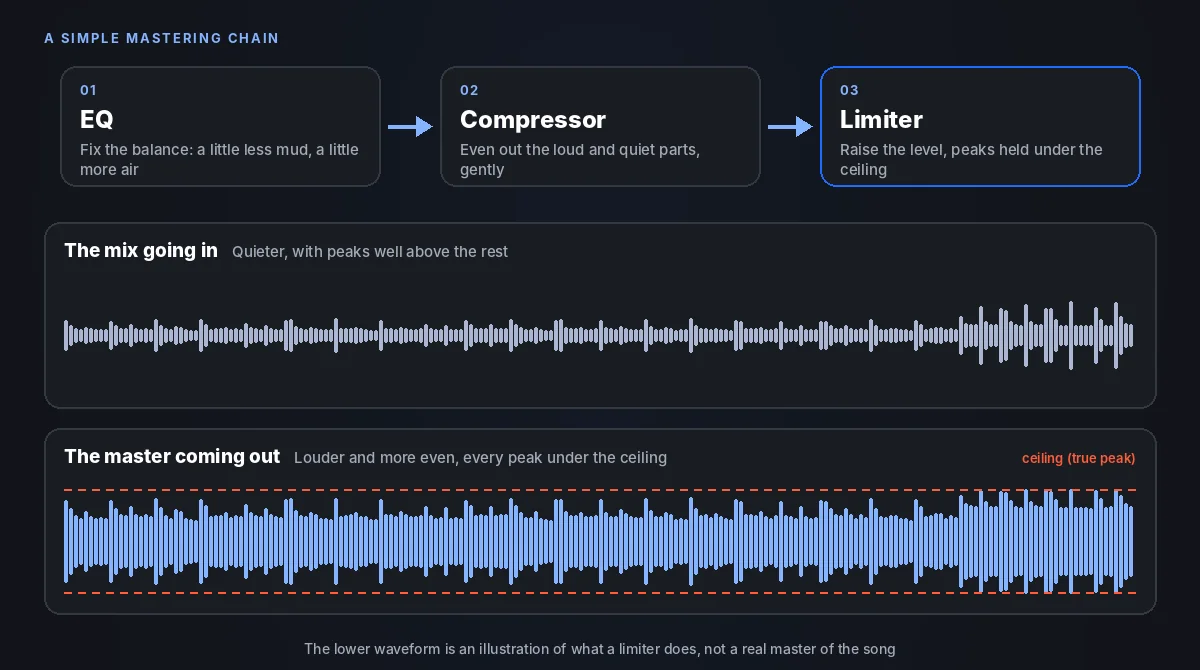
- Set the final limiter to true-peak mode (often called ISP or oversampling) with its ceiling at -1 dBTP, or lower for very loud masters.
- Measure the true peak after the limiter, on the exported file: a sample-peak meter can read -0.3 dB while the true peak is above 0.
- Listen to an MP3 or AAC export of the master at a high bitrate; distortion that appears only there comes from peaks with no headroom.
Measure and prepare a master for streaming, step by step
- 01
Export the final master as a WAV
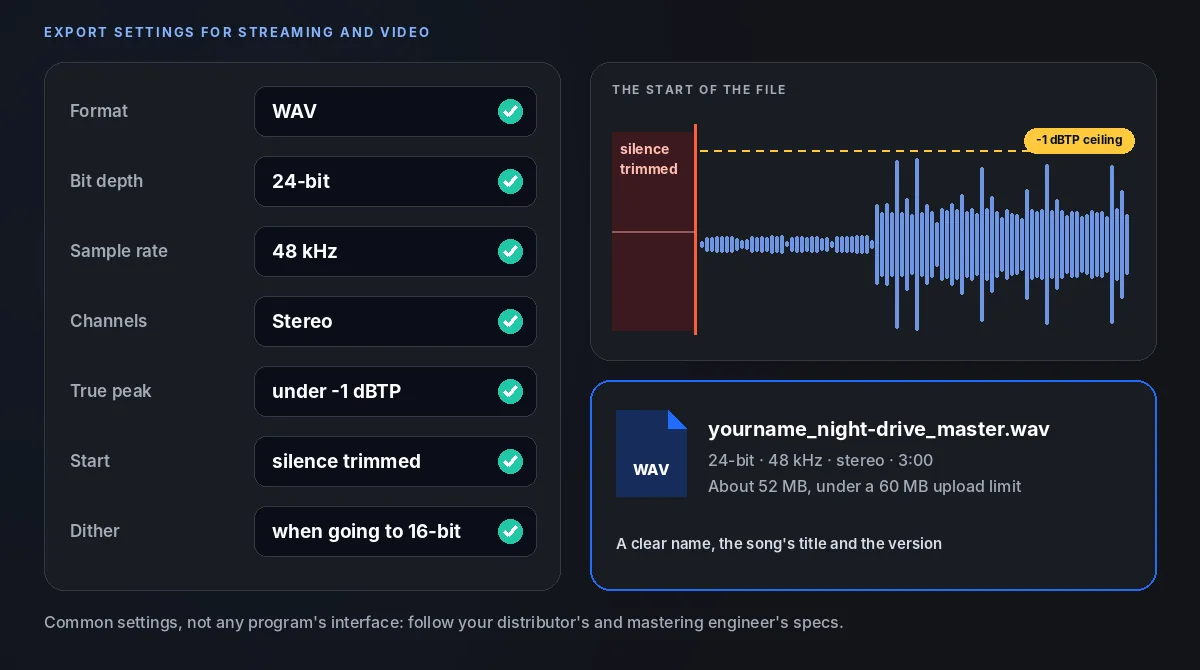
Bounce the finished master at the session's sample rate as a 24-bit or 16-bit WAV (check what your distributor takes), straight from the final limiter, adding dither only if you reduce it to 16-bit.
- 02
Measure the whole file
Run the full song through a BS.1770 meter in one pass and note the integrated loudness, the short-term maximum, the loudness range and the true peak.
- 03
Fix the true peak first
If the true peak is above -1 dBTP, lower the limiter's ceiling in true-peak mode and export again; for a master louder than -14 LUFS, consider -2 dBTP.
- 04
Compare at matched loudness
Turn a reference track and your master to the same LUFS and switch between them, so you judge tone and punch rather than volume.
- 05
Check what each service will do
Subtract the reference levels from your integrated loudness to see how far each service turns the song down, and decide whether the density you bought is worth the dynamics you spent.
- 06
Listen to a lossy version
Export a high-bitrate MP3 or AAC of the master and listen on headphones for crackle on the loudest hits; if you hear it, lower the ceiling again.
- 07
Lock one file for everything
Name the approved master clearly and send that same file to your distributor, to your video and to anyone making clips, so every version of the song sounds the same.
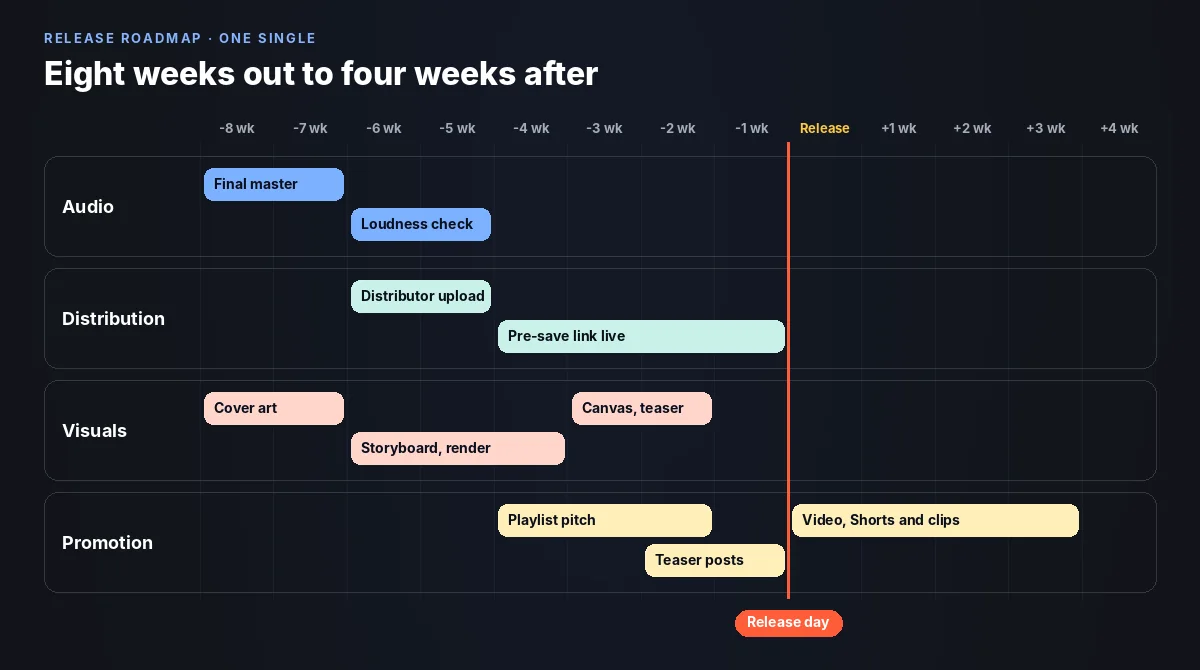
The master is one line on a longer list: the music release checklist puts it six weeks before release day, and how to release music independently covers the distributor, metadata and pitching that follow.
Checks before you upload to a distributor and to Muvora
- Integrated loudness measured on the final file and written down with the release's notes
- True peak under -1 dBTP (under -2 dBTP if the master is louder than -14 LUFS)
- No click at the start, and the last reverb tail left to fade out before the file ends
- The WAV in the format your distributor asks for, usually 16-bit or 24-bit at 44.1 kHz or more
- The same approved file kept for the music video, the Canvas and the short clips
Muvora uses the master you upload as your music video's soundtrack, encoded for the video with its level left as it is, so the video carries the loudness you measured, and every cut is timed to that file's beats. It takes MP3, WAV, M4A, AAC or FLAC up to 8 minutes and 60 MB. A WAV runs about 10.6 MB a minute at 16-bit and 44.1 kHz, and about 17.3 MB a minute at 24-bit and 48 kHz, so a long song can pass the limit: a FLAC of the same master keeps every sample in a smaller file.

Short clips for TikTok, Reels and Shorts are cut from that render's vertical export, or from a snippet of the master: the audio cutter trims a section on the bar lines, and the song teaser guide shows where to cut. For the whole route from a finished file to a video, see audio to video.
Upload the master you measured
Muvora finds the song's beats, sections and drops, writes a storyboard cut to them, and shows the price before you render. The soundtrack is your file, at the loudness you chose.
Written by the Muvora team. Last updated November 14, 2026. Spotted something out of date? Tell us at [email protected].