The short answer
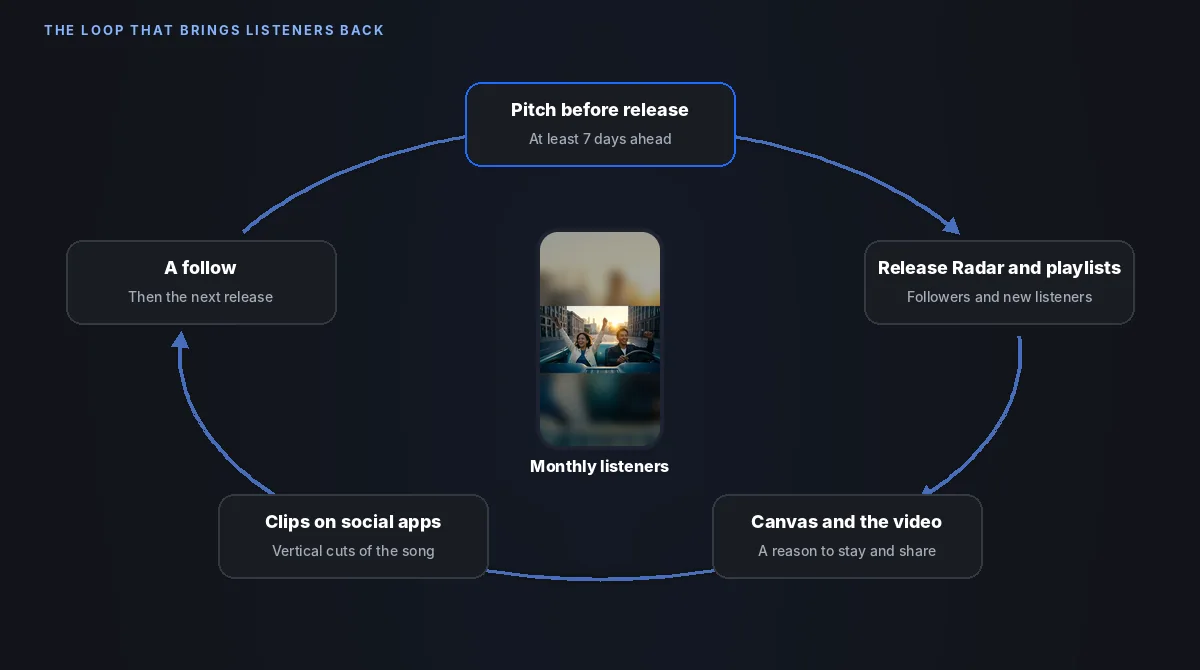
Spotify counts monthly listeners as everyone who streamed your music in the last 28 days, from playlists and recommendations as well as your profile. To grow it, pitch each release at least 7 days early so followers get it in Release Radar, turn listeners into followers, add a Canvas, post your video and vertical clips where people scroll, and never buy streams.
- Monthly listeners are unique people over a rolling 28 days, so the count moves every day.
- Followers get your new release in Release Radar; a pitch at least 7 days ahead picks the song.
- Active listeners, who choose your music, keep streaming more than people who heard you on a playlist.
- Canvas, Artist Pick, artist playlists and video are free; Discovery Mode and display campaigns cost money or royalties.
- Streams Spotify finds to be artificial earn nothing and can get a song taken down.
On this page (8 sections)ShowHide
- 1.What Spotify counts as a monthly listener
- 2.A release plan that grows your listeners
- 3.Before release: the pitch, Release Radar and followers
- 4.Free tools inside Spotify
- 5.Paid tools: Discovery Mode, Marquee and Showcase
- 6.Bring listeners in from outside Spotify
- 7.Read the numbers that matter
- 8.What not to do: bought streams and bots
- Questions
What Spotify counts as a monthly listener
Spotify's page on audience segments gives the definition: "Your monthly listeners are your total listeners in the last 28 days", counting both the people who chose your music and the people who heard it from programmed sources such as playlists and Radio. Its listener stats page adds that listeners are unique people who stream your audio tracks or your music videos in the period, and its page on how streams are counted says a song or video stream counts once it has played for at least 30 seconds.
Three things follow from that. One person playing your song fifty times is still one listener. The window moves forward every day, so somebody who heard you once four weeks ago drops out of the count unless they come back. And a listener who found you on a big playlist counts exactly like a fan, which is why a placement can lift the number for a few weeks and its end can take it down again.
| Number | What it counts | Why it matters |
|---|---|---|
| Monthly listeners | Everyone who streamed your music in the last 28 days, from any source | The public number on your profile |
| Monthly active listeners | People who chose your music in the last 28 days: from your profile, your release pages, their library or their own playlists | The listeners most likely to keep streaming; some of Spotify's tools need a minimum |
| Super listeners | Active listeners who streamed you 15 or more times in the last 28 days | Your core fans |
| Programmed listeners | People who have only heard you on playlists, mixes, Radio or Autoplay in the last 2 years | Reach you haven't turned into fans yet |
| Followers | People who follow your artist profile | They get your new music in Release Radar and the What's New feed |
Spotify for Artists also shows where streams come from. Its source of streams page separates active sources (your profile and catalog, listeners' own playlists and library, their queue) from programmed ones (editorial playlists, personalized playlists such as Discover Weekly and Release Radar, Radio, Autoplay, daylist, AI DJ and other listeners' playlists). The segments page says that on average your monthly active listeners generate more future streams of your music than other listeners do, so growth that lasts means moving people from the programmed column into the active one.
A release plan that grows your listeners
- 01
Deliver four weeks before release
Upload the release to your distributor at least four weeks ahead, so it shows under Upcoming in Spotify for Artists with time to pitch it and build the campaign around it.
- 02
Set up the profile people land on
Claim Spotify for Artists, add a current picture and bio, and make the new release, its countdown or your latest video your Artist Pick at the top of the profile.
- 03
Pitch one song at least 7 days ahead
Pitch the single to Spotify's editors from Music, then Upcoming, so it's considered for editorial playlists and becomes the song your followers get in Release Radar.
- 04
Add a Canvas to every track
Upload a 3 to 8 second vertical loop for each song, upcoming ones included, so the Now Playing screen moves and every share to Instagram Stories carries it.
- 05
Have something to watch on release day
Finish the music video and a set of vertical clips before release, for YouTube, Shorts, Reels and TikTok, each pointing people to the song on Spotify.
- 06
Ask for the follow and the save
In every post and at every show, ask people to follow you and save the song: a follower gets your next release in Release Radar, and a save brings them back from their library.
- 07
Make a playlist of your own
Build an artist playlist with the new song among songs your listeners already like, post it to your profile and share it as the link people land on.
- 08
Read the numbers after 28 days
Check release engagement and source of streams, note which posts and playlists brought people in, and plan the next release around what worked.
Get the release-day visuals made now
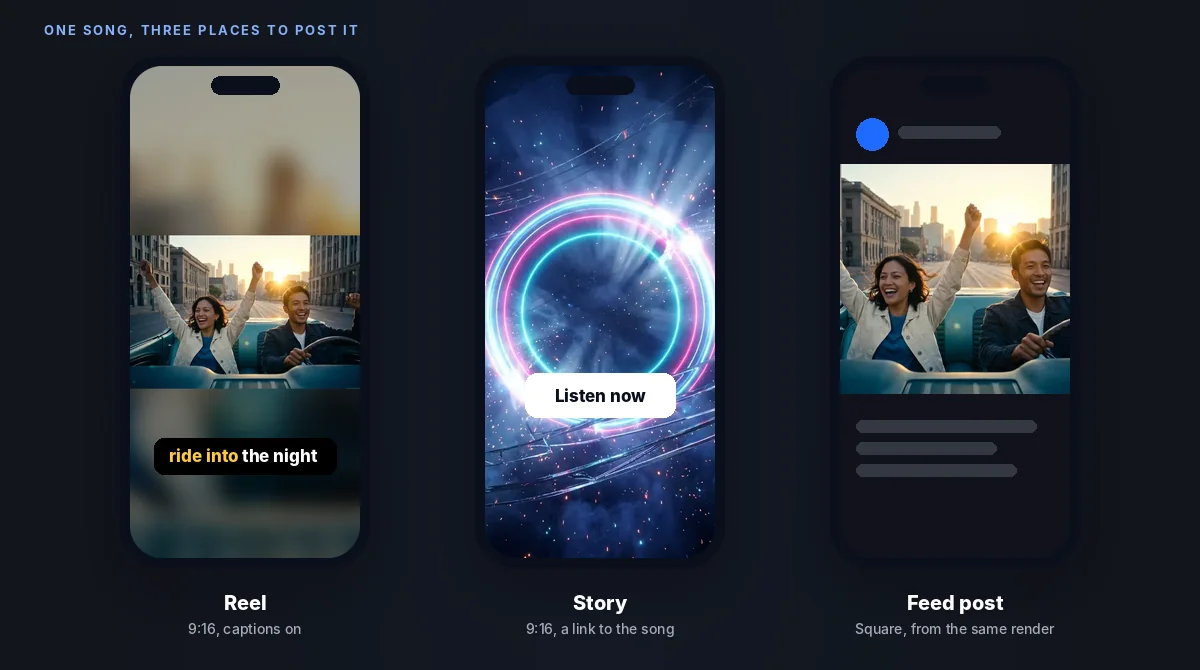
Upload the single and Muvora writes a shot-by-shot storyboard on its beats for free. One render gives you the 16:9 video, a 9:16 cut, a square post and an 8-second Canvas loop, so the Canvas and the clips in steps 4 and 5 come from the same edit.
Before release: the pitch, Release Radar and followers
The surest listeners on release week are the people who already follow you. Spotify's Release Radar page says the playlist updates every Friday and that your followers get songs from your new release; pitch a song at least 7 days before release day and that's the song they get. A song stays in a listener's Release Radar for up to 4 weeks if they haven't heard it yet, and each listener gets only one song per artist per week.
That makes a follow worth more than a single stream. Spotify's listener stats page says that on average, after following an artist, listeners are 3 times more likely to stream their music in the next 6 months. Ask for the follow plainly, in captions, at shows, in your video's description and on your Artist Pick.
How to write the pitch is covered in how to get on Spotify playlists. One change since: Spotify's pitching page now takes music videos too, pitched separately from songs, for official videos and performances delivered by your distributor or uploaded in Spotify for Artists, within 7 days of release. It's also clear that a pitch is no promise of a place on a playlist, which is why the rest of this plan matters.
Spotify pitch generatorType the song's genre, moods, story and release plan and get three versions of the pitch, counted against the limit you set, with your last day to pitch for Release Radar.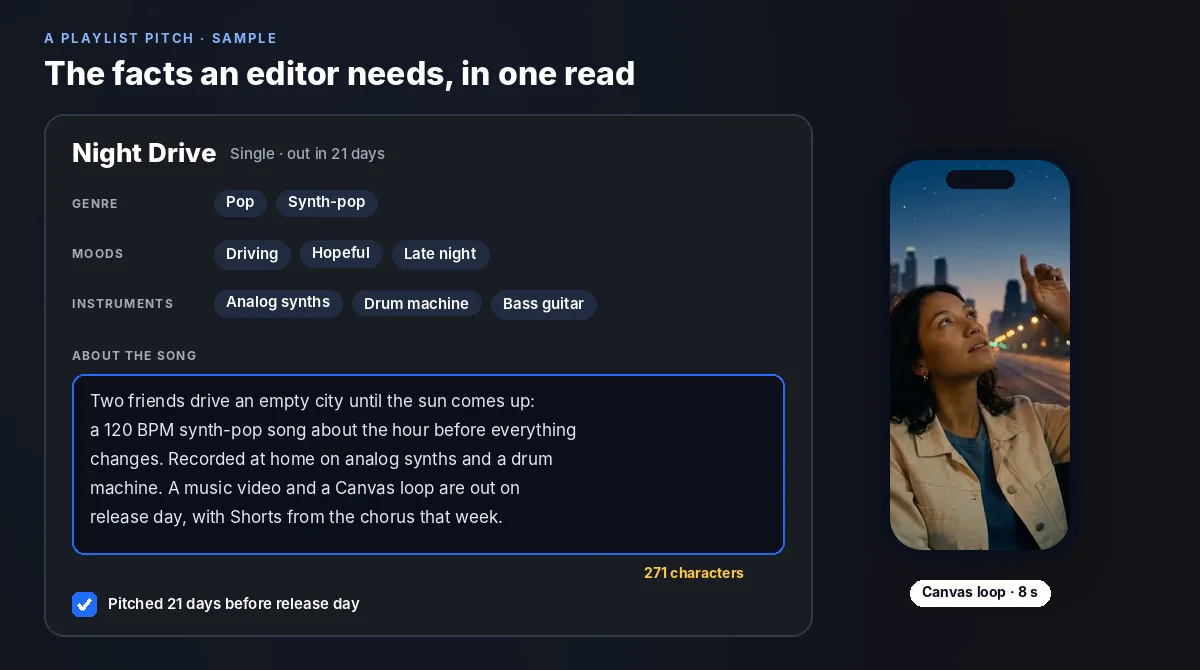
Skip the blank page
Upload your song and Muvora's AI director plans a shot-by-shot storyboard on the beat. Edit every shot for free, and pay only if you render.
Free tools inside Spotify
| Tool | What it does | Where to set it |
|---|---|---|
| Canvas | A 3 to 8 second vertical loop that replaces your cover art on the Now Playing screen in the mobile app | Music, then the track, then Add Canvas |
| Artist Pick | Pins a song, release, video, playlist, concert or merch to the top of your profile for up to 180 days | Your profile, under Artist Pick |
| Artist playlists | Any playlist you've made, shown on your profile | Your profile, under Artist Playlists |
| Promo Cards | Shareable cards for a song, a release, your profile or a milestone, for social media | Spotify for Artists |
| Music videos | Videos listeners can switch to from the Now Playing view; direct upload is in beta for eligible artists | Through your distributor, or Video & Visuals |
| Release engagement | The share of your active listeners who played a new release in its first 28 days | Audience, then Release engagement |
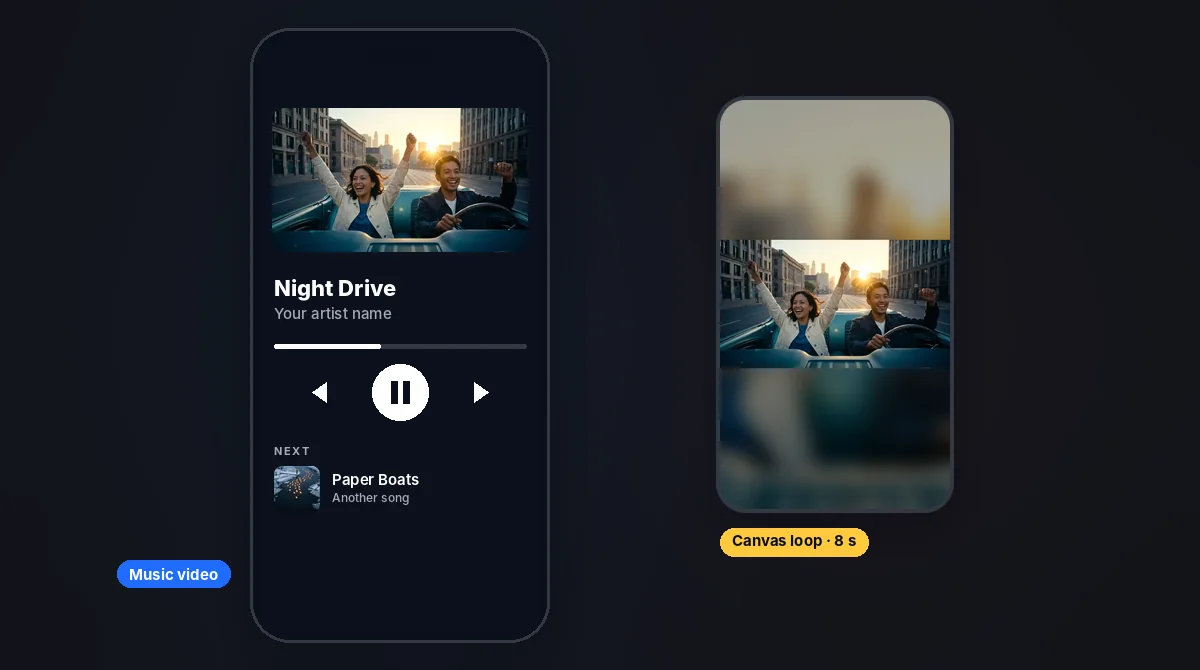
A Canvas works twice. On Spotify it keeps the screen moving while the song plays, and Spotify's Canvas page says that when a listener shares your track from the Spotify app to Instagram Stories, your Canvas loops in the background of the Story with a link to play it on Spotify. You can add one to any track, upcoming releases included. The Canvas guidelines ask for 3 to 8 seconds in a vertical 9:16 frame, as an MP4 or a JPG, and suggest footage without singing or rapping, since a loop that short won't stay in time with the lyrics.


Two parts of your profile you can't edit still respond to what you do. Spotify says Fans Also Like is built from your fans' listening habits and improves with more data, and its advice is to encourage fans to listen, save and add your music to playlists, and to make and share artist playlists with descriptive titles. Search ranking mixes each person's listening history with current and all-time popularity; in general, Spotify says, the more streams and followers you have, the higher you appear. Your Artist Pick stays up for 180 days unless you change it, so change it with every release.
Video on Spotify changed in 2026. Its Clips page says new Clips uploads stopped on June 17, 2026, with existing Clips staying live in a Video tab on artist profiles. Eligible artists can now upload full-length videos, official music videos included, as long as they're landscape 16:9, at least 1920 x 1080 and longer than 30 seconds, and those videos can earn royalties. They count toward your listeners too, because Spotify's listener figure includes people who stream your music videos. A 16:9 Muvora render at 1080p is 1920 x 1080, with your uploaded master as its soundtrack.
A Canvas and a video from one storyboard
Muvora cuts the 8-second Canvas from the strongest chorus moment of the video it renders, so the loop, the vertical clips and the 16:9 video share one look. Edit the storyboard as much as you like before you pay; the free plan includes 5 new storyboards a month.
Paid tools: Discovery Mode, Marquee and Showcase
Spotify also sells reach, through the tools on its promoting music page. None of them is needed to grow, each has entry rules, and each costs something, so know exactly what you'd give up before you switch one on.
| Tool | What it does | What it costs | Who can use it |
|---|---|---|---|
| Discovery Mode | Helps songs you pick get heard in Radio, Autoplay and Spotify's Mixes | No upfront budget: a 30% commission on recording royalties from streams in those places during the campaign | In beta: at least 25,000 monthly listeners and 3 eligible songs, released 30 days or more, through a participating distributor, in listed countries |
| Marquee | A full-screen recommendation of a new release in the mobile app | A budget you set | Within 21 days of release, with at least 5,000 monthly active listeners in the target market |
| Showcase | A banner on Home and Browse for a new or older release | A budget you set | At least 1,000 streams in the last 28 days in a target market |
| Spotify Ads Manager | Audio and video ads played to free listeners | A budget you set | Any budget, Spotify says |
Read Discovery Mode's terms twice. Spotify's Discovery Mode page says it needs no upfront budget; instead a 30% commission is taken from the recording royalties of every stream of the chosen songs in Discovery Mode contexts (Radio, Autoplay and the Daily, Artist, Mood, Decade and Genre Mixes) during the campaign, while streams anywhere else stay commission-free. You trade part of those streams' royalties for the chance of more of them, and it's in beta, open to some teams, not all.
Marquee and Showcase are display campaigns, sold by budget in a list of countries, with your payment card issued in one of them. Marquee runs for 10 days or until the budget is spent, Showcase for 14. A full-screen recommendation can get a stranger to press play once; whether they become an active listener depends on what they find next, which is the same work as everything else in this guide.
Bring listeners in from outside Spotify
Spotify recommends what people already play, so many new listeners hear you somewhere else first: a Reel, a Short, a TikTok, a YouTube video, a friend's Story. Spotify's sharing page covers sharing straight from the app to social and messaging apps, copying a link to paste anywhere, and scannable Spotify Codes that open a song, album or profile.
- Vertical clips of the hook, 15 to 30 seconds, on Reels, Shorts and TikTok, each with the Spotify link in your bio or the post. How to promote music on Instagram covers Reels, Stories and the link sticker.
- The music video on YouTube, with the Spotify link in the first lines of its description; how to get more views on a music video covers the rest of the page.
- Shares from the Spotify app to Instagram Stories, which carry your Canvas: ask fans to share the song from Spotify rather than posting a screenshot.
- Your artist playlist as the link in your bio, so a new listener lands on your song among others they'll like.
- Shows, with a Spotify Code on the merch table and a request to follow you that night, while the set is fresh.

Make the clips that send people to Spotify
Pick 9:16 when you upload and Muvora renders a vertical music video cut on the beat, with a square post and an 8-second Canvas from the same render. Trim each hook from the vertical file, or upload the hook alone as its own short video. The storyboard is free.
Read the numbers that matter
The monthly listener count is a headline, not a diagnosis. Three views in Spotify for Artists tell you what's actually working.
- Segments. Whether your monthly active listeners and super listeners are growing, not just the total. Spotify's segments page shows how listeners moved between groups over the last 28 days, with counts of new, new active and reactivated listeners.
- Source of streams. Whether growth came from your profile and fans' libraries (active) or from playlists and Radio (programmed), by country and by song.
- Release engagement. The share of your monthly active listeners, as of the day before release, who played the new release in its first 28 days, as Spotify explains it.
| What you see | What it usually means | What to do |
|---|---|---|
| A jump that's mostly programmed listening | A playlist, Radio or a mix picked a song up | Make the profile worth landing on, and ask new listeners to follow |
| A slow fall after a peak | A playlist moved on and its listeners rolled out of the 28 days | Release again, and give programmed listeners reasons to come back |
| Active listeners rising | People are choosing you: from your profile, their library, their own playlists | Keep releasing at a pace you can sustain, and keep asking for follows |
| A spike from one unexpected country, then a drop | One of the warning signs Spotify lists for artificial streaming | Tell your distributor and report the playlist, as below |
What not to do: bought streams and bots
Spotify also warns against fans doing it for you. It asks artists to discourage coordinated efforts to stream a song inauthentically, such as playing it on loop or using extra accounts on a Family or Duo plan to stream one track, because its detection catches those patterns too. Ask people to listen, follow and share, and leave the counting to Spotify.
- A sudden spike in streams for no clear reason, then a drop
- Streams from a country where your music has never had listeners
- Most streams from "Other" or a source that makes no sense
- A short burst of new followers out of nowhere
- An offer of streams, followers or placements in return for money
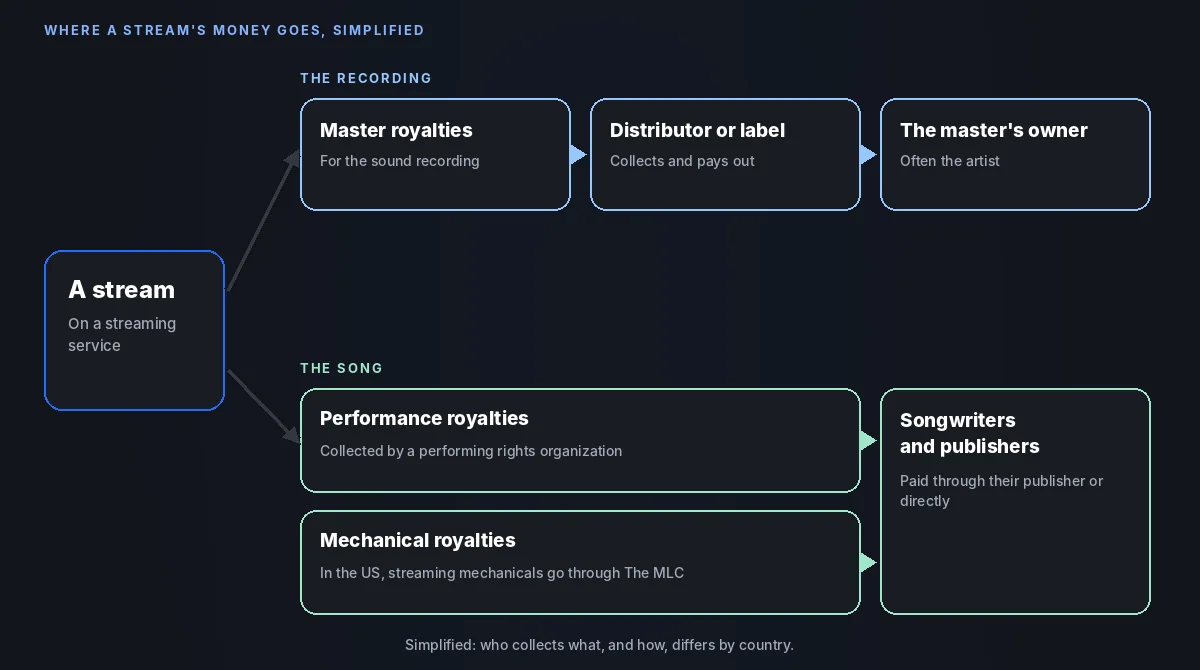
If you see any of these, Spotify's advice is to tell your distributor or label, with details of any promotion service you paid, and to report suspicious playlists your music was added to. Then put the money into things listeners see and keep: the video, the Canvas and the clips. What streams actually pay, and who collects it, is in how music royalties work.
Written by the Muvora team. Last updated November 16, 2026. Spotted something out of date? Tell us at [email protected].