The short answer
Promote music on Instagram with Reels for new listeners and Stories for followers. Deliver the song to Instagram's music library through your distributor, post vertical 9:16 clips of the hook that open strong and loop, keep captions clear of the buttons, use up to five specific hashtags, and put a link to the song in Stories and your bio. Measure watch time and sends.
- Reels mostly reach people who don't follow you; Stories mostly reach people who do.
- Your distributor puts the song in Instagram's music library, so any Reel can use it by name.
- Instagram shows fewer reels that are watermarked, low resolution, bordered, mostly text or reposted.
- Posts and Reels take five hashtags at most since December 2025: make each one specific.
- Instagram's head names watch time, likes and sends as the signals that matter most.
On this page (9 sections)ShowHide
- 1.How each part of Instagram reaches people
- 2.Promote a release on Instagram in eight steps
- 3.Your song as a sound: the music library and original audio
- 4.Make Reels people finish and send
- 5.Lyrics on screen, clear of the buttons
- 6.Stories, feed posts and collabs
- 7.Hashtags and captions
- 8.A six-week Instagram plan around release day
- 9.What to measure, and what to avoid
- Questions
How each part of Instagram reaches people
Instagram doesn't run one algorithm. Its own ranking explainer says Feed, Stories, Explore, Reels and Search each rank things their own way, because people use them differently. For a musician the difference that matters is who each one reaches. Stories come from accounts a person follows and are ordered by how often they watch and interact with each one, while in Reels and Explore, Instagram says, the majority of what people see comes from accounts they don't follow.
| Format | Who mostly sees it | Use it for | Shape |
|---|---|---|---|
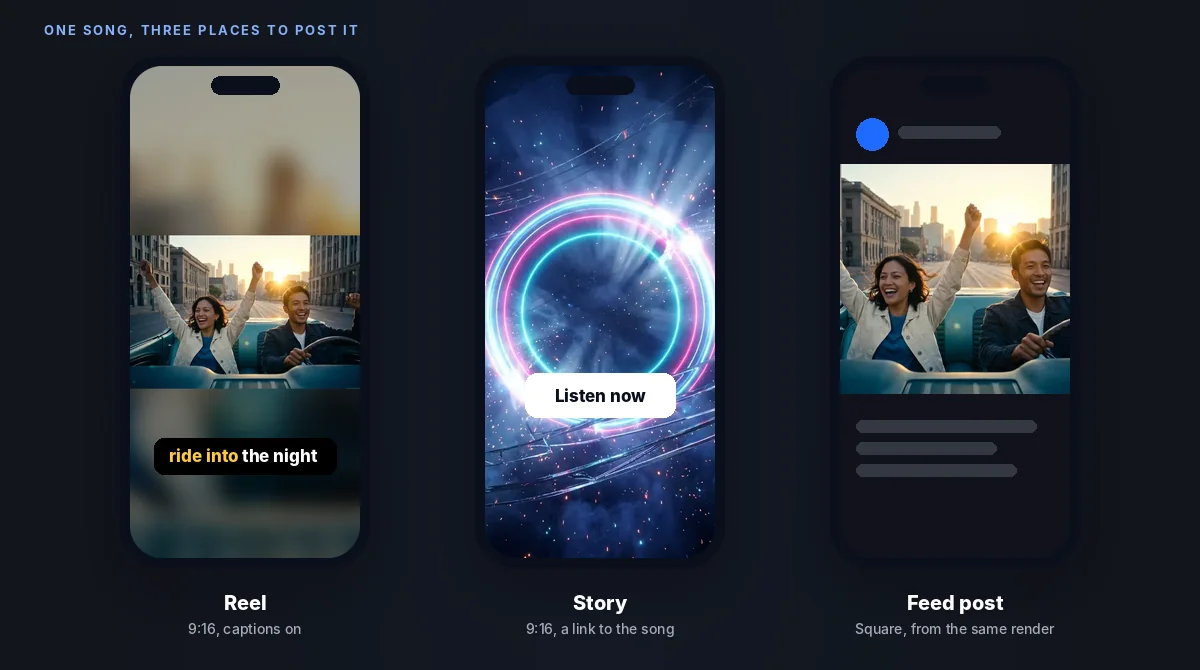
| Reels | People who don't follow you yet | Reaching new listeners with the hook | 9:16, 1080 x 1920 |
| Stories | Your followers, the closest first | Release day, links, behind the scenes, sharing fans' posts | 9:16, 1080 x 1920 |
| Feed posts and carousels | Followers, plus people Instagram suggests them to | Announcements, cover art, credits, photo sets of up to 20 | 4:5 or 1:1; the grid shows 3:4 |
| Your profile | Anyone who taps your name | Bio, link, the song on your profile, the grid | The grid of 3:4 tiles |
So the most common mistake is posting everything to one place. A Reel of the chorus finds strangers, a Story on release day reminds fans, a carousel holds the cover, the credits and the photos, and the profile turns a curious visitor into a follower. The rest of this guide takes them in turn, starting with the plan.
Promote a release on Instagram in eight steps
- 01
Deliver the song to Instagram's music library
When you deliver the release, select Instagram (often listed together with Facebook) among your distributor's stores, so the song can be added to Reels and Stories by its title.
- 02
Set up a professional profile
Switch to a professional account for Insights and Trial Reels, write a one-line bio, link the song or your link page, and add the song to your profile once it's in the library.
- 03
Make a bank of vertical clips
Before release, cut six to ten vertical clips of 15 to 30 seconds from the video: the chorus, the drop, a lyric line, a performance shot, each starting on a downbeat.
- 04
Test new ideas as Trial Reels
Post a clip you're unsure about as a Trial Reel, which only people who don't follow you see, and share it to your profile only if it holds attention after 24 hours.
- 05
Lead release week with the strongest Reel
Post the clip you trust most on release day, then keep a schedule you can sustain for the next month, with a new angle on the song each time.
- 06
Use Stories for the people who follow you
Share the song from the Spotify app to your Story, add a link sticker to the release, and share fans' posts that use your song.
- 07
Co-author with your collaborators
Invite the featured artist, the producer or the video's director as a collaborator on a Reel or post, so it shows on both profiles and reaches both audiences.
- 08
Measure, then make more of what worked
In Insights, compare watch time, likes and sends against reach clip by clip, and make the next clips like the ones that held people.
Get a month of clips from one render
Pick 9:16 when you upload and Muvora draws every shot for the phone, cuts on the beat and exports the vertical video, a square post and an 8-second Canvas loop together. Trim each hook from the vertical file, or upload the hook alone as its own short video. The storyboard is free.
Your song as a sound: the music library and original audio
Songs reach Instagram's music library through distributors, not by uploading them to Instagram. Distributors that deliver there describe it the same way: Ditto Music's page on Instagram, for one, says releasing through it puts your songs in Instagram's official audio library, where people can find them and use them in their own posts. Ask your distributor whether it delivers to Instagram and how long it takes, and check the song is there before release-day posts depend on it.
Once it's there, you have two ways to post a clip of your own video. You can post it with its own sound, which Instagram labels as original audio next to your username, or add the library track to the clip and turn the clip's own sound down. The library track names the song on every post that uses it, so anyone who taps the audio finds the release. Instagram can also match a reel's sound to a library track by itself; its help page on audio explains how to take a reel off the wrong song's audio page, after which it shows as original audio under your name.
Two more places for the song. Instagram lets anyone add a song to their profile: up to 30 seconds from its licensed library, shown in the bio area, which visitors can play. And the audio page matters more than it looks. Instagram's ranking explainer says one of the things it predicts for every Reel is how likely a viewer is to open its audio page, which it treats as a sign they might make a reel of their own.
Skip the blank page
Upload your song and Muvora's AI director plans a shot-by-shot storyboard on the beat. Edit every shot for free, and pay only if you render.
Make Reels people finish and send
Instagram has said what drives Reels. Its ranking explainer lists the predictions that matter most: how likely you are to reshare a reel, watch it all the way through, like it and visit its audio page. Its head, Adam Mosseri, narrowed it further in January 2025, telling creators that "the top three signals that matter most for ranking are watch time, likes and sends", with likes counting slightly more among followers and sends slightly more among people who don't follow you (Social Media Today). For a song, that means a clip people watch to the end and forward to someone.
- Open on the hook. Start on the chorus, the drop or the line people will quote, a beat before it lands, never on the intro.
- Make it loop. End where a phrase ends, so the restart sounds like the song coming round again rather than a jump.
- Fill the frame. Vertical 9:16 at 1080 x 1920, every shot composed for the phone, not a wide video with bars above and below.
- Give people a reason to send it. A line someone will quote to a friend, a moment that lands on the drop, a small story that ends on a question.
- Keep it short enough to finish. Reels have run up to 3 minutes since January 2025 (Business Today), but a 15 to 30 second hook is easier to watch twice.
The same explainer lists what Instagram aims to show less of in Reels: "low-resolution or watermarked reels, reels that are muted or contain borders, reels that are majority text, or reels that have already been posted on Instagram." So upload a clean file rather than a TikTok with its watermark, compose for the vertical frame instead of boxing a wide video inside it, and make each Reel a new cut rather than a repost of an old one.
Trial Reels make testing cheap. Instagram rolled them out to professional accounts in December 2024 (TechCrunch): a trial is shown only to people who don't follow you, stays off your grid and Reels tab, and after 24 hours shows its views, likes, comments and shares, when you decide whether to share it with your followers or archive it. Use them for the clips you're unsure of: another section of the song, a new look, a different first second.
- Performance · one room
The chorus in one bedroom
A singer in a small bedroom lit by one desk lamp and a string of warm bulbs, singing the chorus straight to camera from the edge of the bed. The verses are close details: hands on a guitar, a phone glowing face down, the window at night. On the last chorus the lamp clicks off and only the bulbs are left.
Use this idea on my songUse this idea on my song - Lyric · close-ups
A lyric line worth sending
Each line of the hook paired with one object that means it: a door key on a kitchen table, a train window streaked with rain, a cup of coffee going cold. Slow push-ins in soft daylight, muted blues and warm browns, and the chorus line landing on the clearest image so it reads as the clip's punchline.
Use this idea on my songUse this idea on my song - Abstract · build and drop
The drop as a reveal
A dark rooftop over a city at night, with a ring of cold light hanging in the air. Through the build the camera pushes in as the ring gathers sparks; on the drop it bursts into white light that floods the skyline, then settles into pulses on every kick until the loop starts again.
Use this idea on my songUse this idea on my song - Story · loop
A night drive that loops
Two friends crossing a sleeping city in an old car before sunrise. Every shot is a small moment: a hand on the radio dial, a laugh at a red light, an arm out of the window. The last shot ends on the same empty avenue as the first, so the Reel runs straight back into its start.
Use this idea on my songUse this idea on my song

One technical note. Instagram's Reels page asks for at least 30 frames a second, and Muvora renders at 24, the rate most music videos are made at. The social media video specs guide explains how to convert the vertical file if you want to match that page exactly.
Lyrics on screen, clear of the buttons
Plenty of people scroll with the sound low, so words on screen give the hook a second way in. Put them where Instagram's interface won't cover them: the bar along the top, the name, caption and audio line along the bottom, and the column of buttons on the right. Creator guides commonly measure Reels' interface at about 250 pixels at the top, 340 at the bottom and 120 down the right of a 1080 x 1920 frame. Instagram doesn't publish a safe zone for ordinary posts, so treat those figures as approximate.
Muvora's karaoke captions sit a fifth of the way up the vertical export, their foot about 384 pixels from the bottom edge, which clears that bottom strip on Reels. Each word lights up as it's sung, timed to the vocal, and pasting your lyrics keeps the spelling yours. How to make a karaoke video covers the look.
Safe zone checkerLay Reels' top bar, caption area and buttons over a frame of your clip, see where text stays readable, and download a transparent 1080 x 1920 overlay for your editor.
Stories, feed posts and collabs
Stories are for the people who already follow you, and they're where a link works best. Instagram opened the link sticker to every account in October 2021, except new accounts and accounts that break its guidelines, Engadget reported at the time. Put the song, the pre-save or the video behind it, and say in a few words what's on the other side.
The neatest release-day Story comes from Spotify. Its Canvas page says that when a listener shares your track from the Spotify app to Instagram Stories, your Canvas loops in the background with a link to play the song on Spotify. Share it yourself first, then ask fans to share it the same way rather than posting a screenshot, and share theirs on. The Spotify Canvas guide covers making a loop that doesn't jump.
Feed posts hold what people come back to: the cover, the credits, the tour dates, a set of stills from the video. A carousel takes up to 20 photos and videos (MacRumors), and since January 2025 the profile grid shows posts as 3:4 tiles rather than squares (the same Business Today report), so check how a cover or a Reel's first frame crops there before you post.
Collabs let two accounts co-author one post or Reel. Invite the other account from the tagging screen, and once they accept, the post appears on both profile grids and is shown to both audiences, with both names on it (Social Media Today). It's the natural way to post with a featured artist, a producer, a dancer in the video or whoever directed it.
YouTube, websites, TV
Shorts, Reels, TikTok, Canvas
Feed posts
Instagram feed
Hashtags and captions
Instagram takes five hashtags at most now. In December 2025 it said it would "gradually update the number of hashtags that you can include in a caption for a reel or post to five", adding that fewer, more targeted tags work better than many generic ones (Social Media Today). Spend them on what describes this post: your artist name, the song, the genre, the scene its fans gather in, and what the clip is.
Music hashtag generatorPick the genre, the platform and what the post is for, add your name and the song, and get a five-tag set with a caption to start from.The caption does more work than the tags. Name the song, say what the clip is in plain words, and ask for one thing only: send it to someone, follow for the next one, or find the full song through the link in your bio. If the lyrics are already on screen, the caption doesn't need to repeat them.
A six-week Instagram plan around release day
| When | Reels | Stories | Feed and profile |
|---|---|---|---|
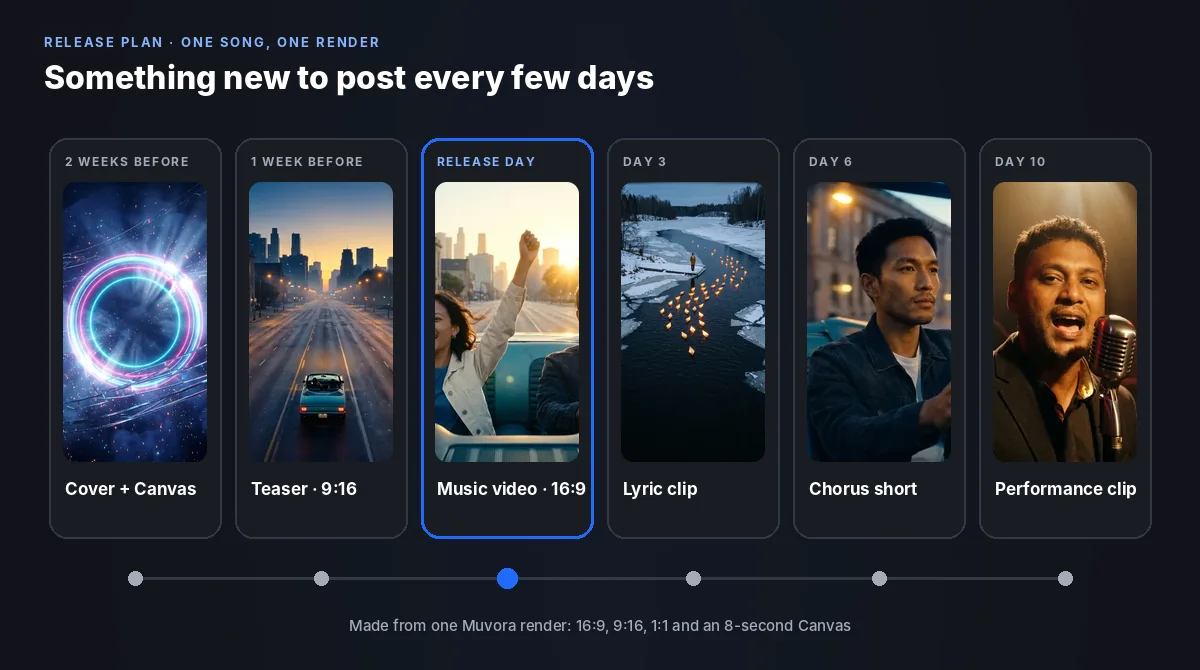
| 3 weeks before | A Trial Reel of the hook, to see whether it holds strangers | A clip from writing or recording the song | Announce the title and date with the cover |
| 2 weeks before | A teaser of the hook, cut off before the payoff | The pre-save link on a link sticker | A carousel of stills from the video |
| 1 week before | A lyric clip with the line people will quote | A countdown and the pre-save link again | Bio link switched to the pre-save |
| Release day | The strongest clip, with the song from the library | The track shared from Spotify, so the Canvas plays | The song on your profile; bio link to the song |
| Weeks 1 to 3 after | A new angle every few days: the drop, a performance shot, another verse | Fans' posts that use the song, shared on | The video's best frames, then the next date |
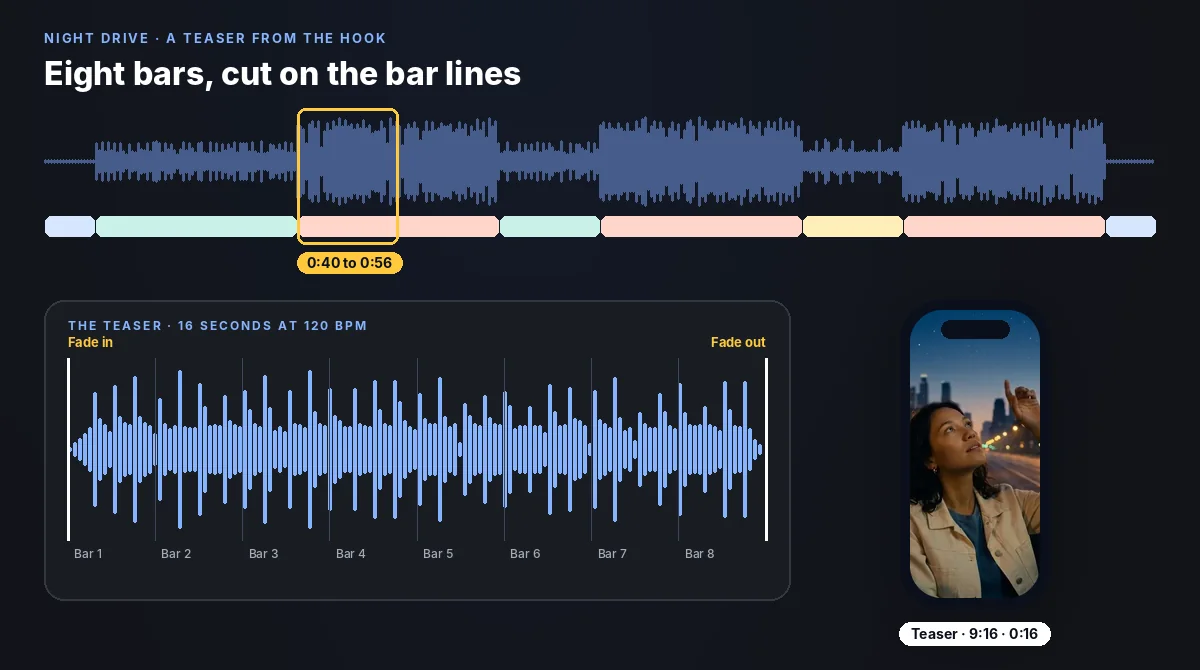
The same clips work on TikTok and YouTube Shorts, exported clean for each app rather than downloaded from one and uploaded to the other. How to promote music on TikTok covers its official sound, and how to make a song teaser covers cutting the pre-release clips on the bar lines.
What to measure, and what to avoid
A professional account gets Insights on every post. Mosseri's advice was to look at average watch time, likes per reach and sends per reach, and compared clip by clip those three show which parts of the song hold strangers and which they pass on. Make more of what held people, whatever it cost to make, and stop making what didn't. A Reel that lifts views but not follows, saves or Spotify clicks found an audience that didn't stay: try a different part of the song.
- Another app's watermark on the video
- A wide video letterboxed inside a vertical frame
- The same Reel posted twice
- Lyrics or a call to action under the caption and buttons
- A block of generic hashtags pasted from a list
- A clip that starts on the intro instead of the hook
Turn the whole song into Reels
Upload the song, pick a style and 9:16, and Muvora writes the storyboard on its beats for free. Render it once for a vertical video with karaoke captions if you want them, a square post and a Canvas loop, then cut a month of Reels from it. The free plan includes 5 new storyboards a month.
Written by the Muvora team. Last updated November 16, 2026. Spotted something out of date? Tell us at [email protected].