The short answer
To make a song teaser, choose the 10 to 30 seconds people will remember (the hook, a line they'll quote or the build into the drop), cut it from the master so it starts and ends on a bar line, give it a vertical 9:16 video, put the lyric or the release date on screen, and post two or three teasers across the weeks before release day.
- Tease the moment people will repeat, never the intro: the hook, a quotable line or the build before the drop.
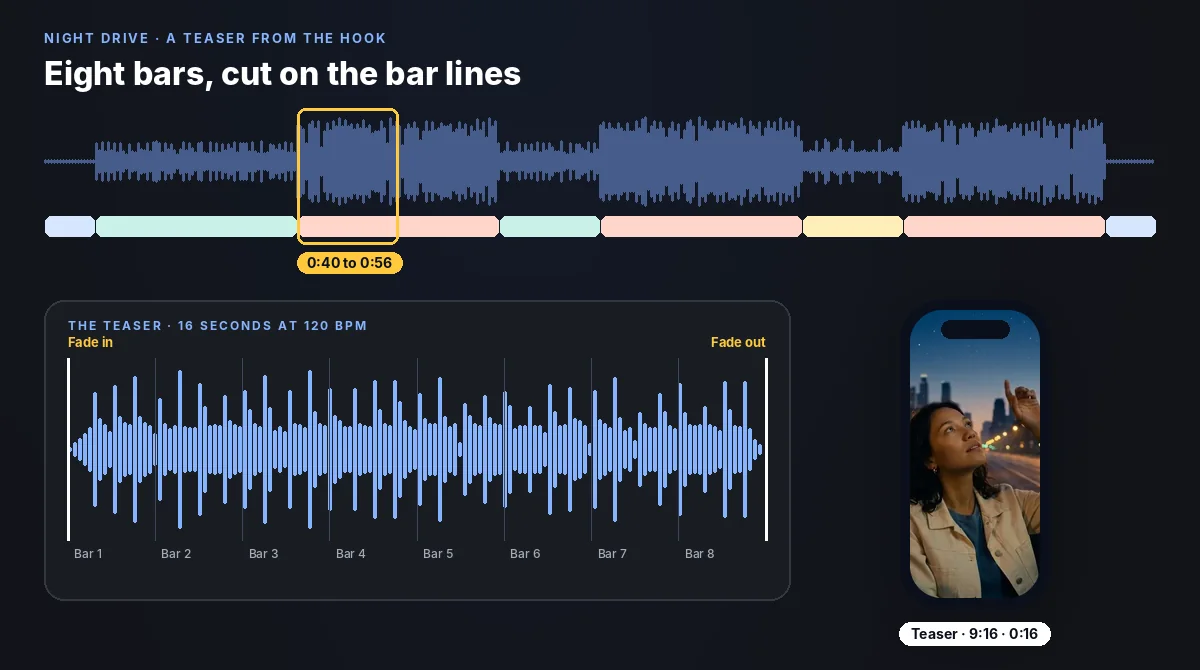
- Count the teaser in bars: 8 bars is 16 seconds at 120 BPM and about 22 at 87, and it loops cleanly.
- Give the snippet a moving picture: a short video made for it, or a trim of the full video's vertical file.
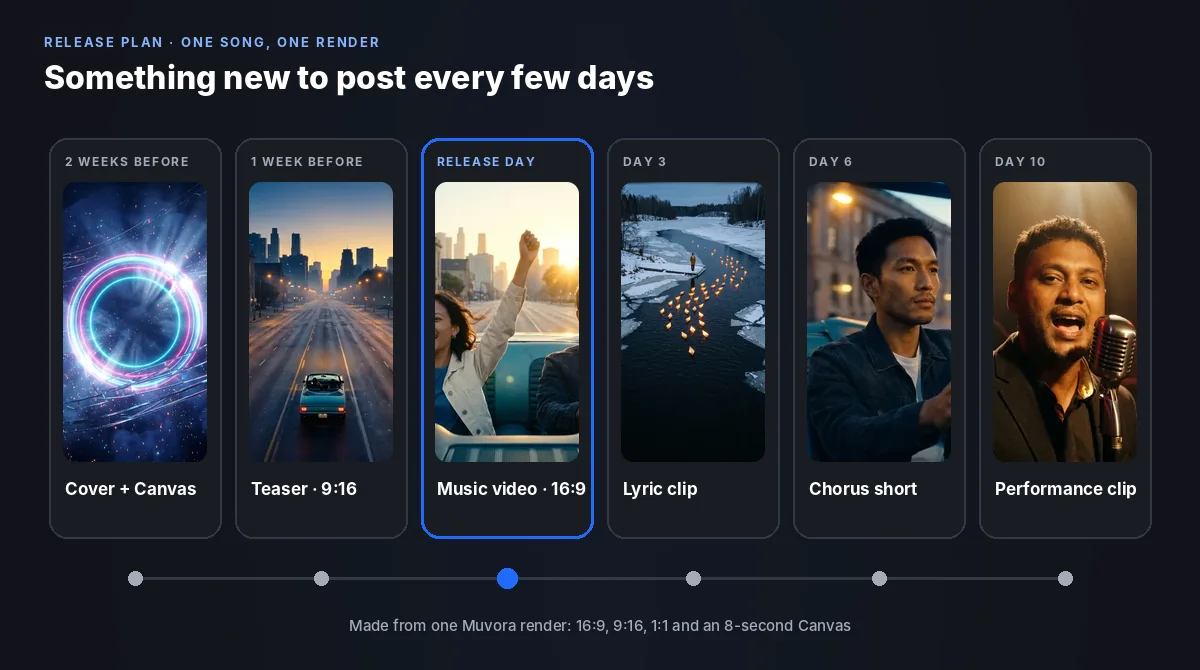
- Post two or three teasers in the weeks before release, each with the date and a pre-save link.
On this page (8 sections)ShowHide
How to make a song teaser, step by step
Here is the whole job in six steps. Each one has a section of its own below, with the reasons and the numbers behind it.
- 01
Pick the moment
Listen for the seconds you'd play a friend first: the opening line of the chorus, a line that works without context, or the build into the drop.
- 02
Measure it in bars
Find the song's tempo and count 4, 8 or 16 bars from a downbeat, so the teaser is a whole phrase of roughly 10 to 30 seconds.
- 03
Cut it from the master
Trim that stretch from your final master exactly on the bar lines, with no fade in and a short fade out, and save it as a WAV.
- 04
Give it a picture
Put a vertical 9:16 video to the clip, made for the snippet or trimmed from the full music video's vertical file.
- 05
Put the words on screen
Burn in the line being sung, or a few words with the release date, clear of the buttons each app draws over the bottom and the right edge.
- 06
Post it ahead of release
Post the first teaser two to three weeks before release day with a pre-save link, then a different moment each week until the song is out.
Which part of the song to tease
A teaser isn't a trailer for the whole song. It's one moment, chosen because it sticks after a single listen. The intro is almost never that moment: it was written to ease a listener in, and a teaser has no time to ease anyone in. Pick from the parts people will hum, quote or wait for.
| Moment | Why it works | Cut | Watch out for |
|---|---|---|---|
| The hook (the chorus's first line) | It's the part people will search for once it's stuck | 8 bars from the chorus downbeat | Giving away the whole chorus; stop before its second half |
| A quotable line | It works as a caption on its own, with no context | The line and the bar after it, often 4 bars | A line that only makes sense after the verse before it |
| The build into the drop | The wait is the hook: people come back for the payoff | The 4 or 8 bars before the drop, ending on it | Ending on silence; land on the drop's first hit or just before it |
| The beat switch or the bridge | A turn people didn't expect makes them replay | 4 bars either side of the change | A turn that needs the rest of the song to land |
| The first line of verse one | It sets the story, good for a second teaser | The first 8 bars of the verse | A slow verse that won't hold a scroll |
Skip the blank page
Upload your song and Muvora's AI director plans a shot-by-shot storyboard on the beat. Edit every shot for free, and pay only if you render.
How long a song teaser should be
Most teasers land between 10 and 30 seconds: long enough for the hook to land once, short enough that people watch it twice. Each app sets its own maximum and changes it now and then, and YouTube's help page says a square or vertical upload of up to three minutes counts as a Short; a teaser of 10 to 30 seconds sits well inside every app's limit, so the music decides the length, not the platform.
Count the length in bars, not seconds, because the bar is what your ear counts. A bar of four beats lasts 240 divided by the BPM, so the same 8 bars run 16 seconds at 120 BPM and nearly 26 at 75. When you need a teaser under a round number of seconds, take the most whole bars that fit, then drop to the nearest 4 or 8 if that count is odd: phrases come in fours.
| Tempo | One bar | 8 bars | Most bars in 15 s | Most bars in 30 s |
|---|---|---|---|---|
| 75 BPM | 3.2 s | 25.6 s | 4 (12.8 s) | 9 (28.8 s) |
| 87 BPM | 2.76 s | 22.1 s | 5 (13.8 s) | 10 (27.6 s) |
| 95 BPM | 2.53 s | 20.2 s | 5 (12.6 s) | 11 (27.8 s) |
| 110 BPM | 2.18 s | 17.5 s | 6 (13.1 s) | 13 (28.4 s) |
| 128 BPM | 1.88 s | 15.0 s | 8 (15.0 s) | 16 (30.0 s) |
| 150 BPM | 1.6 s | 12.8 s | 9 (14.4 s) | 18 (28.8 s) |
A trap beat at 140 to 150 BPM is usually felt at half time, so count its bars at 70 to 75 and the same 8 bars last twice as long. If you don't know the tempo, tap along with the tap tempo tool, or let the BPM calculator turn a known BPM into bar lengths in seconds and frames.
Cut the audio on the bar line
Where the teaser starts and stops matters more than how long it is. Start a quarter of a second after the downbeat and the first thing people hear is the tail of a note; stop short of the next downbeat and the phrase hangs unfinished. Start exactly on one downbeat and end exactly on another, and the snippet sounds like a piece of music instead of a slice of one. It also loops: on TikTok, Reels and Shorts a clip plays again from the top, and whole bars come round on the beat.
Bar 1
Bar 2
Bar 3
Bar 4
- Cut from the master. Use the final mixed and mastered file, not a bounce from a phone recording or a rough mix. Whatever you cut is what people hear.
- No fade in, or a very short one. If the first bar starts with a kick or a chord, let it land at full strength. A fade in from silence spends the most important second on nothing.
- A short fade out. 300 to 800 milliseconds stops the last bar ending dead. Leave it off if the clip is meant to loop, since whole bars already join up.
- Save a WAV. Apps compress what you post, so start from the cleanest copy you have rather than an MP3 of an MP3.
Check the cut by ear before you use it. Loop it a few times: if the join jumps, a bar line is a beat or a few milliseconds off. Songs recorded to a click line up with an evenly spaced grid; a live take that speeds up may need the start and end placed by ear. And cut only music you have the rights to post. A leased beat or an uncleared sample can limit where a clip may go, which the music video copyright guide explains.
Give the teaser a picture
Sound alone doesn't stop anyone scrolling: the first thing people see decides whether they stay to hear the hook. A still of the cover art is the quickest option and better than nothing, but a picture that moves on the beat gives people something to watch while the hook lands. Muvora gives you two ways to make one, and which to use depends on whether the full music video exists yet.
| Route | Best when | What you upload | What it costs |
|---|---|---|---|
| A teaser of its own | The full video isn't made yet, or the teaser should look different | The snippet WAV, in the 9:16 shape | Only the snippet's seconds, at the quality you pick |
| Trimmed from the full video | You want the teaser and the video to share a cast and places | The whole song, rendered once | The full video; the teaser is a trim of its vertical file |
A teaser of its own. Upload the snippet as if it were a song, choose 9:16, and Muvora analyzes those seconds on their own: the beats, the downbeats, any drop and the sung words. The AI director writes a storyboard for them, every cut lands on a downbeat, and the render is priced by the snippet's length, so a 20-second teaser costs a small fraction of a full-length video at the same quality (60 credits a second at Standard, for example). It gets its own storyboard and cast, so if a full video will follow, give both the same idea wording, style and look, and they'll feel like one release.
Trimmed from the full video. Render the whole song early in 16:9 and the downloads include a 9:16 version and a square one cut from the same shots, plus an 8-second Canvas loop. Trim the teaser from the vertical file at a section start, where every cut already sits on a downbeat, and it shares the cast, the places and the light of the video it's promoting. A render made in 9:16 gives the vertical, square and Canvas files but no widescreen one, so choose 16:9 when the YouTube video comes from the same render.

Make the teaser video from your snippet
Upload the hook as its own file in 9:16. The storyboard for those seconds is free to read and edit, and you see the exact price before you render. Read more about teasers, release-day files and clips.
Put the words on screen
Plenty of people scroll with the sound low, and a teaser has to work for them too. The line being sung, on screen as it's sung, tells them what they're missing and gives them something to quote. Keep the release date and the call to action for the first two seconds or for the post's own caption, so the picture isn't crowded while the hook plays.
- Timed lyrics. Muvora's optional karaoke-style captions highlight each word as it is sung, burned into every file but the Canvas. You switch them on or off for each render.
- Keep text off the edges. Each app lays its buttons down the right and its caption and account name across the bottom. The free safe zone checker shades them over a frame of your own.
- One idea per teaser. The date, the title or a lyric, not all three at once. Four or five words at the top of the frame is plenty.

A vertical teaser with the words timed to the vocal
Upload the snippet in 9:16 and paste its lyrics: they're aligned to the vocal word by word, and the captions light up each word as it's sung. Edit the storyboard for free before you render.
When to post teasers before release
One teaser posted the night before release is an announcement, not a campaign. Spread two or three across the weeks before, each built on a different moment and each pointing to the pre-save link, so people meet the hook more than once before they can stream it. Then keep posting after release day, when every clip can send people straight to the song.
| When | Post | With it |
|---|---|---|
| 3 weeks before | Teaser 1: the build into the drop, stopping just short of it | The title and the date |
| 2 weeks before | Teaser 2: the hook, played through | The pre-save link and the cover |
| 1 week before | Teaser 3: a quotable line with its words on screen | The pre-save link again |
| Release day | The full music video | Links to every service |
| The weeks after | Clips cut from the video: the chorus, the drop, the performance | The song, now streamable |
The apps differ in what helps a teaser travel. On TikTok it's whether the clip uses your song's official sound once the release is delivered, covered in how to promote music on TikTok. On Shorts it's linking every clip to the full video, covered in promoting music on YouTube Shorts. For the rest of the release, from pitching the song to playlist editors to the files you deliver, see how to get on Spotify playlists and the music release checklist.
Plan the teaser and the release video together
Upload the full song in 16:9: one render gives the widescreen video, its vertical and square versions and an 8-second Canvas, ready to trim teasers from. The storyboard is free, and the free plan includes 5 new storyboards a month.
Teaser mistakes that cost listens
- Opening on the intro. The first second decides whether people stay, and the intro is the part of the song least likely to hold them.
- Fading in from silence. A teaser that takes two seconds to reach full volume has already lost the people who scroll in one.
- Cutting mid-word or mid-bar. A clip that ends in the middle of a sung word or a beat sounds like a mistake, and loops like one.
- A different look from the video. If the teaser and the music video look like two artists' work, the teaser doesn't build anything the video can collect.
- No date, no link. A teaser people like but can't act on is wasted. Say when, and put the pre-save link where the app allows one.
- A recording of your speakers. Filming the song playing in the studio sounds thin next to every clip around it. Use the master.
Not sure the hook is strong enough to lead with? Post two teasers built on different moments a few days apart and see which one people finish, replay and share. Lead with that moment in the music video's first vertical clips after release.
Written by the Muvora team. Last updated November 14, 2026. Spotted something out of date? Tell us at [email protected].