The short answer
The best DAW for beginners is the one that runs on the computer or phone you already have and suits the music you make. As of November 2026, GarageBand (Mac, iPhone, iPad) and BandLab (browser, iOS, Android) are free places to start; FL Studio and Ableton Live suit beat-making; Logic Pro, Reaper and Pro Tools suit recording; most offer free versions or trials.
- Choose by your device first: some DAWs run only on Apple hardware, some only on Windows.
- Beat-making from loops and MIDI and recording voices and instruments favor different workflows.
- Use the free version or the trial to finish one whole song before you pay for anything.
- Several names changed recently: Studio One is now Fender Studio Pro, Cakewalk by BandLab is now Cakewalk Sonar.
- Every fact about another product is as of November 2026 and linked to its source.
On this page (9 sections)ShowHide
- 1.What a DAW does
- 2.How to choose your first DAW
- 3.Common DAWs at a glance
- 4.Free DAWs and free versions
- 5.Paid DAWs you can try first
- 6.Which DAW for what you want to make
- 7.Names that changed: Studio One, Cakewalk and Pro Tools First
- 8.Your first week in a new DAW
- 9.From your DAW to a music video
- Questions
What a DAW does
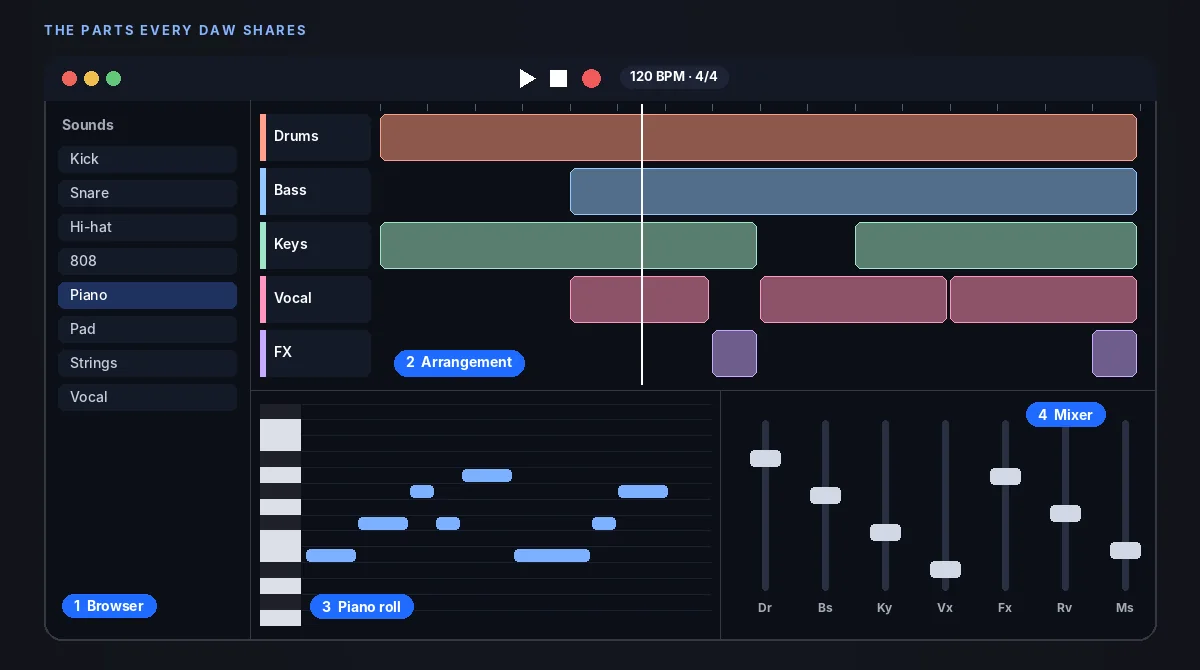
A DAW (digital audio workstation) is the program where a song is made: you record voices and instruments, program drums and synths with virtual instruments, arrange the parts along a timeline, mix them and export the finished file. Underneath their different looks, almost all of them share the same parts, so the first DAW you learn mostly teaches you how every DAW works.
- Track
- One lane of a project holding a recording (an audio track) or the notes for a virtual instrument (a MIDI or instrument track).
- Arrangement view
- The timeline where every track's recordings and notes are laid out from the start of the song to the end, in bars and beats.
- Piano roll
- A grid for drawing and editing notes, with pitch running up the side and time across, used to program melodies, chords and drums.
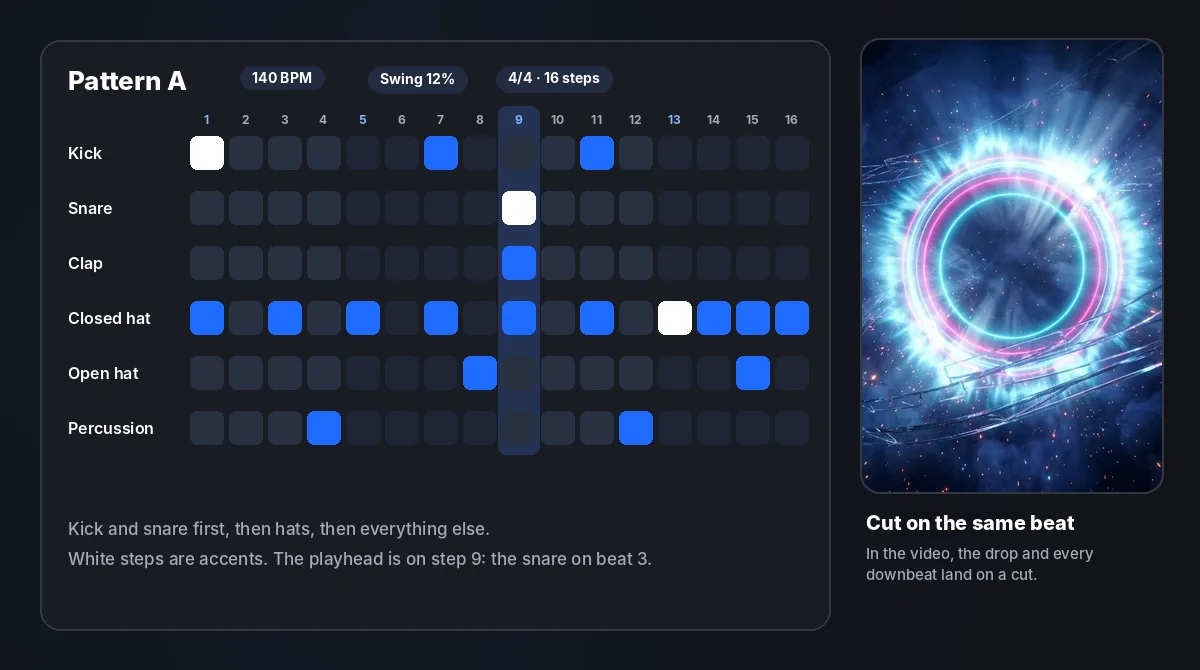
- Step sequencer
- A grid of steps, usually 16 to a bar, that you switch on to program a drum pattern. Some DAWs build their whole workflow around one.
- Mixer
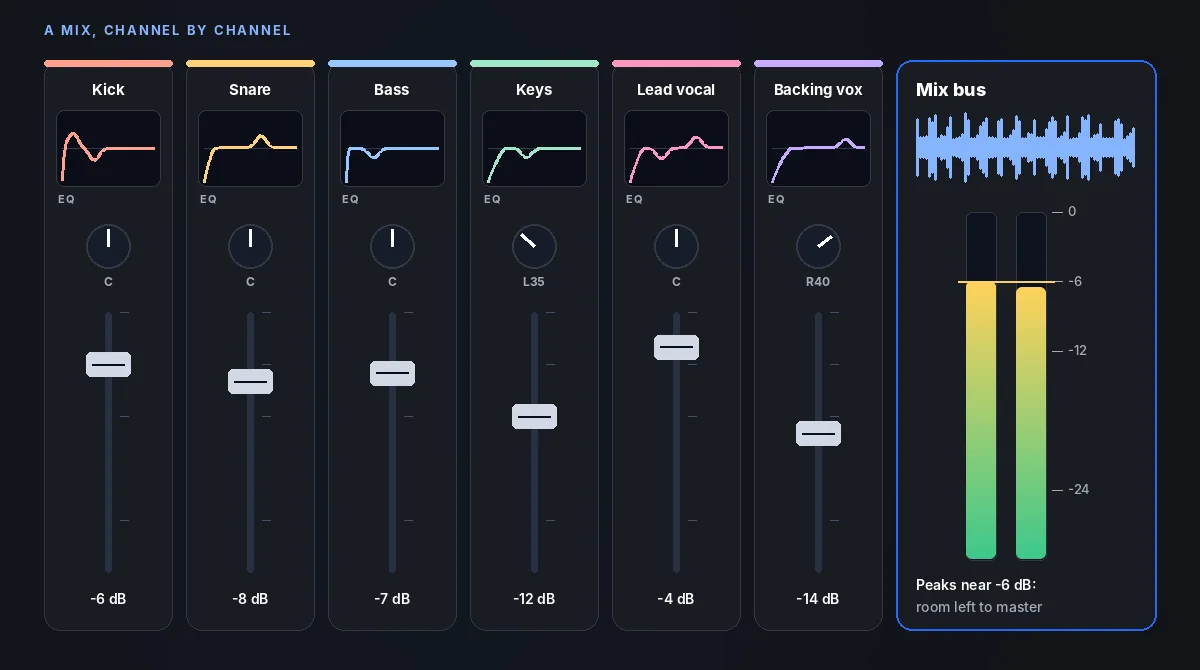
- The page of channel strips, one per track, with faders, pan, effects and sends, where the parts are balanced into one song.
- Plug-in
- An instrument or effect that loads inside a DAW, in formats such as VST3, AU, AAX or CLAP. Which formats a DAW accepts depends on the program and the system.
How to choose your first DAW
- 01
Start from the device you already own
Check what each DAW runs on before anything else. Logic Pro and GarageBand need Apple hardware, Cakewalk Sonar runs only on Windows, and BandLab works in a browser and on phones; a program that won't run on your computer isn't a choice.
- 02
Decide what you'll make most
If you'll mostly build beats from loops, samples and MIDI, look at DAWs built around patterns and clips. If you'll mostly record singing, guitar or a band, look at DAWs known for recording, comping and editing audio.
- 03
Check what the free version leaves out
Free versions and entry editions limit different things: some cap the number of tracks, one doesn't record audio, another can't reopen saved projects. Read the edition comparison before you build a song in one.
- 04
Try one properly before you pay
Use a free version or a trial to finish one whole song: record or program each part, mix it and export a WAV. A trial spent clicking through menus tells you little.
- 05
Commit and learn it deeply
Pick the one that let you finish and stay with it for months. Learn its shortcuts, its stock instruments and its mixer; switching programs every few weeks teaches menus rather than music.
Skip the blank page
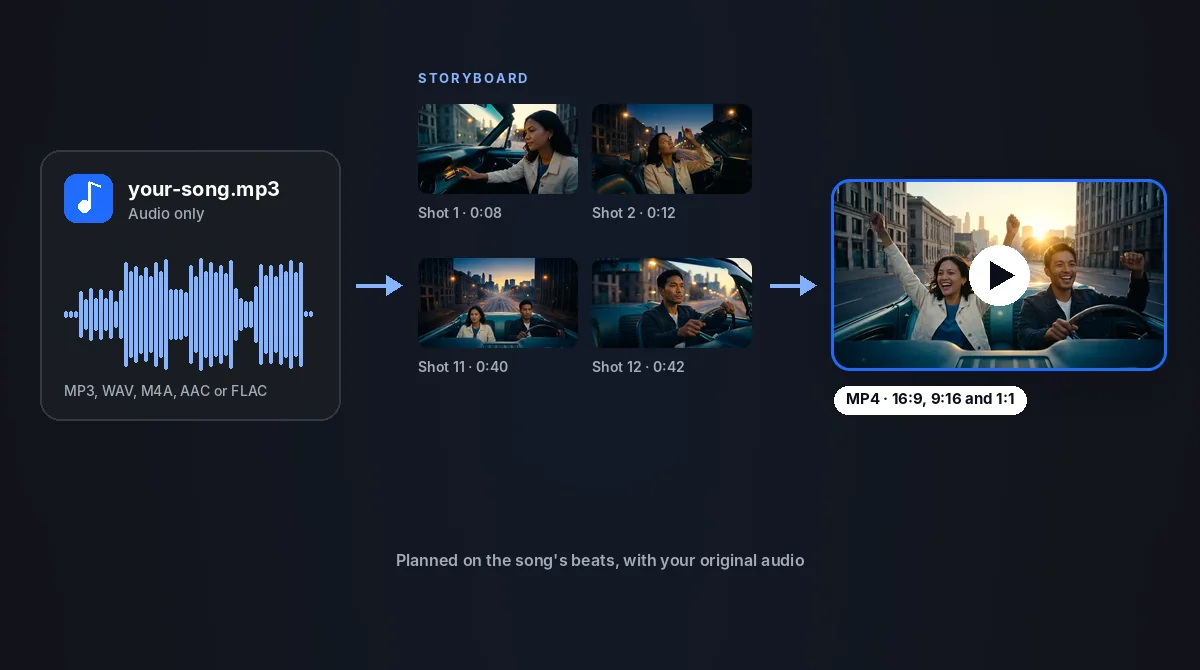
Upload your song and Muvora's AI director plans a shot-by-shot storyboard on the beat. Edit every shot for free, and pay only if you render.
Common DAWs at a glance
The table sums up where each program runs, how you can start with it and what it's known for, then who it often suits in our judgment. The sections after it take the free and the paid programs in turn, with links to each maker's own pages.
| DAW | Runs on | How to start | Known for | Often suits |
|---|---|---|---|---|
| GarageBand | Mac, iPhone, iPad | Free from Apple | Virtual session drummers, lessons, projects that open in Logic Pro | A first song on Apple devices |
| BandLab | Web browser, iOS, Android (online) | A free plan, with a paid membership for extras | Making music on a phone or in a browser, projects across devices | Phone-first makers and borrowed computers |
| Cakewalk Next | Windows, macOS | Free with a BandLab account; optional membership | A streamlined, modern workspace | Songwriters and beatmakers who want a simple start |
| Cakewalk Sonar | Windows 11 | A free tier; membership for premium features | Traditional recording, MIDI editing and mixing | Windows users recording full songs |
| Pro Tools | Mac, Windows | Pro Tools Intro is free; Artist, Studio and Ultimate are paid | Recording and editing audio; long called an industry standard | Singers and bands recording, and anyone heading for studio work |
| Audacity | Windows, macOS, Linux | Free and open source | Recording and editing audio files | Voice takes, demos and quick edits, beside a DAW |
| Ableton Live | Mac, Windows | A 30-day trial; Intro, Standard and Suite editions | Session View for clips and loops, warping, live performance | Electronic music, loop-based writing, performing live |
| FL Studio | Windows, macOS | A trial that never expires but can't reopen saved projects; four editions | Pattern-based beats on a step sequencer and the Piano Roll | Hip-hop, trap and electronic beatmakers |
| Logic Pro | Mac with Apple silicon, iPad | A subscription with a free month, or a one-time Mac purchase | A large sound library and AI Session Players, recording and mixing | Mac owners moving up from GarageBand |
| Reaper | Windows, macOS, Linux | A full 60-day evaluation, then a paid license | One full-featured version, deep customization, a small download | Recording and editing on any computer, Linux included |
| Fender Studio Pro (formerly Studio One) | macOS, Windows, Linux | A perpetual license or a subscription | Recording and mixing, with Fender amp and effects models built in | Guitarists and singer-songwriters recording full songs |
| Bitwig Studio | Windows, macOS, Linux | A 30-day trial | A clip launcher beside the timeline, modular sound design | Electronic producers and sound designers, on Linux too |
Sources: Apple's GarageBand page and Logic Pro page; BandLab's download page and supported platforms; Cakewalk's Sonar and Next pages; Avid's system requirements and Production Expert's 2026 comparison of Pro Tools versions; Audacity's download page; Ableton's Live page and trial; Image-Line's FL Studio editions and download page; Reaper's site; Sound on Sound on the Fender Studio Pro rename and Macworld's review; Bitwig's site.
Free DAWs and free versions
You can make and finish songs without paying for software. These are free outright or have a free tier with no time limit; each has limits worth knowing before you build a song in it.
- GarageBand. Free on the App Store for Mac and for iPhone and iPad. Apple's GarageBand page describes up to 255 audio tracks on a Mac, Drummer (virtual session drummers that play along with your song) and built-in piano and guitar lessons; the iPhone and iPad app supports up to 32 tracks. A GarageBand project opens in Logic Pro if you outgrow it.
- BandLab. Free to download, with a free plan in most regions, running in a web browser and on iOS and Android, with an internet connection. The way in for anyone whose main device is a phone, or who moves between computers.
- Cakewalk Next. Free with a free BandLab account, for Windows and macOS, with unlimited tracks, virtual instruments, built-in effects and VST and AU plug-ins; a BandLab Membership adds premium features such as stem separation.
- Cakewalk Sonar. The successor to Cakewalk by BandLab, for Windows 11. Its free tier keeps the core of the old program and adds new features, while some premium tools need a BandLab Membership. It suits people who want a traditional recording and mixing layout.
- Pro Tools Intro. Avid's free version, with 8 audio, 8 instrument and 8 MIDI tracks, on Mac and Windows. Small, but it's the same program the paid versions are built on, so what you learn carries straight over.
- Audacity. Free, open-source audio software for Windows, macOS and Linux, with no mobile version, as its FAQ notes. It records and edits audio very well, but it's an editor rather than a place to program drums and synths, so many people keep it beside a DAW for trimming takes and cleaning demos.
- Fender Studio. A free recording app from Fender, launched in 2025 for iOS, Android, macOS, Windows and Linux, made for self-recording guitarists with amp models and editable jam tracks. Songs started in it move into Fender Studio Pro, the paid DAW.
Waveform Free and LMMS are two more free DAWs for Windows, macOS and Linux; they're covered, with their makers' links, in the best free tools for musicians, alongside free tools for every other job of a release.
Paid DAWs you can try first
Every program below can be tried before you buy it, in one way or another, and each is sold differently: subscriptions, one-time licenses, editions of different sizes. Compare the current offers on each maker's site, since they change.
- Ableton Live. For Mac and Windows, in Intro, Standard and Suite editions (Intro is limited to 16 tracks), with a free 30-day trial of Live 12 Suite; a Lite edition comes free with some hardware and isn't sold on its own. Its Session View lets you launch and combine clips without a timeline, beside a traditional Arrangement View. Ableton has announced Live 13 for early 2027.
- FL Studio. For Windows and macOS, in four editions from Fruity to All Plugins, each with Lifetime Free Updates, as Image-Line's editions page describes. The entry Fruity Edition makes beats and songs without audio recording; recording starts at the Producer Edition. The trial has every feature and never expires, but a saved project can't be reopened until you buy an edition. Image-Line's own page traces the program back to a step sequencer.
- Logic Pro. For Mac and iPad only, and on the Mac it needs Apple silicon and macOS 15.6 or later. Since January 2026 it comes with the Apple Creator Studio subscription, which has a free month, or as a one-time purchase of the Mac app. It includes a large sound library, AI Session Players that play along, Stem Splitter and a Mastering Assistant.
- Reaper. For Windows, macOS and Linux, as one fully featured version you can evaluate for 60 days. After that you buy a license, either a discounted one (for personal use, small businesses, schools and non-profits) or a commercial one, depending on how you use it, and a new license includes free updates through version 8.99. The download is small, and the program can be customized down to its keyboard shortcuts and mouse behavior.
- Pro Tools Artist, Studio and Ultimate. Avid's paid versions, for Mac and Windows, add tracks and features to Intro; Avid sells them as subscriptions and, since 2023, as perpetual licenses again. A 2023 TechRadar review notes that Pro Tools is widely touted as the industry standard, which matters most if you're heading for work in recording studios.
- Fender Studio Pro. The DAW known as Studio One until 13 January 2026, when Fender, PreSonus's owner, renamed it and added its Mustang and Rumble amp models. Macworld's review lists macOS, Windows and Linux (Ubuntu officially), a perpetual license or a subscription, and found no free trial, though some Fender interfaces come with a six-month demo.
- Bitwig Studio. For Windows, macOS and Linux, with a 30-day trial. It pairs a clip launcher with a timeline, and its modular Grid lets you build your own devices.
Which DAW for what you want to make
If your device leaves you several choices, the music you make narrows them. These pairings are where many beginners in each situation start, not the only programs that can do the job.
| You want to | Look for | Often chosen |
|---|---|---|
| Make your first song on a Mac or iPhone | Free, simple, room to grow | GarageBand, then Logic Pro |
| Make music on a phone or in a browser | Runs on what you have, saves online | BandLab |
| Build hip-hop, trap or EDM beats | A fast step sequencer and piano roll, patterns | FL Studio, Ableton Live |
| Write with loops and perform live | Clip launching without a timeline | Ableton Live, Bitwig Studio |
| Record vocals, guitar or a band | Comping, audio editing, a traditional mixer | Pro Tools, Logic Pro, Reaper, Fender Studio Pro, Cakewalk Sonar |
| Spend nothing on Windows | A free tier with no time limit | Cakewalk Sonar, Cakewalk Next, Pro Tools Intro |
| Work on Linux | A native Linux version | Reaper, Bitwig Studio, Fender Studio Pro |
| Just trim and clean audio files | A fast editor, not a full DAW | Audacity |
Genre matters less than workflow. Any of these programs can make any style of music; what differs is whether the program's way of working (patterns and clips, or one long timeline of takes) matches how you think. If you make beats, how to make a beat and how to make a trap beat work in any of them.
Names that changed: Studio One, Cakewalk and Pro Tools First
Tutorials stay online long after the software they describe has moved on, so a few name changes trip beginners up. Studio One is now Fender Studio Pro: Sound on Sound reported the rename from 13 January 2026, and its March 2026 review found everything from Studio One Pro 7 still there. Cakewalk by BandLab, long a free Windows DAW, now continues as Cakewalk Sonar, which opens old Cakewalk projects, while Cakewalk by BandLab can no longer save projects once its activation expires; Cakewalk Next is a separate, simpler program. And Pro Tools First, Avid's old free version, was replaced by Pro Tools Intro in 2022.
Your first week in a new DAW
The fastest way to learn a DAW is to finish something small in it. Set yourself one short song, a minute or two long, and use it to touch every part of the program once.
- Set the project's tempo and key, and turn the click on.
- Program a 4-bar drum pattern in the step sequencer or piano roll.
- Play or draw a bass line and a few chords with the built-in instruments.
- Record one audio track: your voice or an instrument, with the level well below 0 dBFS.
- Copy the loop into an intro, a verse and a chorus on the timeline.
- Balance the tracks with the faders and pan knobs, then add one reverb on a send.
- Export the song as a WAV and play it on your phone.
- Learn the shortcuts for play, record, undo, split and loop.
When the song is written, mixing is the next skill: how to mix a song works in any DAW's stock plugins, and how to master a song covers the last step before release.
Already finished a song?
Upload it to Muvora and see its music video as a storyboard first: the tempo, sections and drops found for free, and every shot planned on your downbeats, with 5 new storyboards a month and no card.
From your DAW to a music video
A DAW's job ends with an exported file: the mastered song, usually a 24-bit WAV at the project's sample rate. That file is where Muvora starts. Upload it (MP3, WAV, M4A, AAC or FLAC, up to 8 minutes and 60 MB) and the free analysis finds the tempo, every beat and downbeat, the sections and the drops; an AI director then writes a storyboard with every cut on a downbeat, which you can edit for free before you render anything.
The video's soundtrack is the file you upload, exactly as you exported it: Muvora never mixes, masters or changes your audio. So finish the song in your DAW first, and export the version the video is for, whether that's the main mix, a clean edit or an instrumental for a beat release (an instrumental gets no captions or lip-synced shots, since there's no vocal).
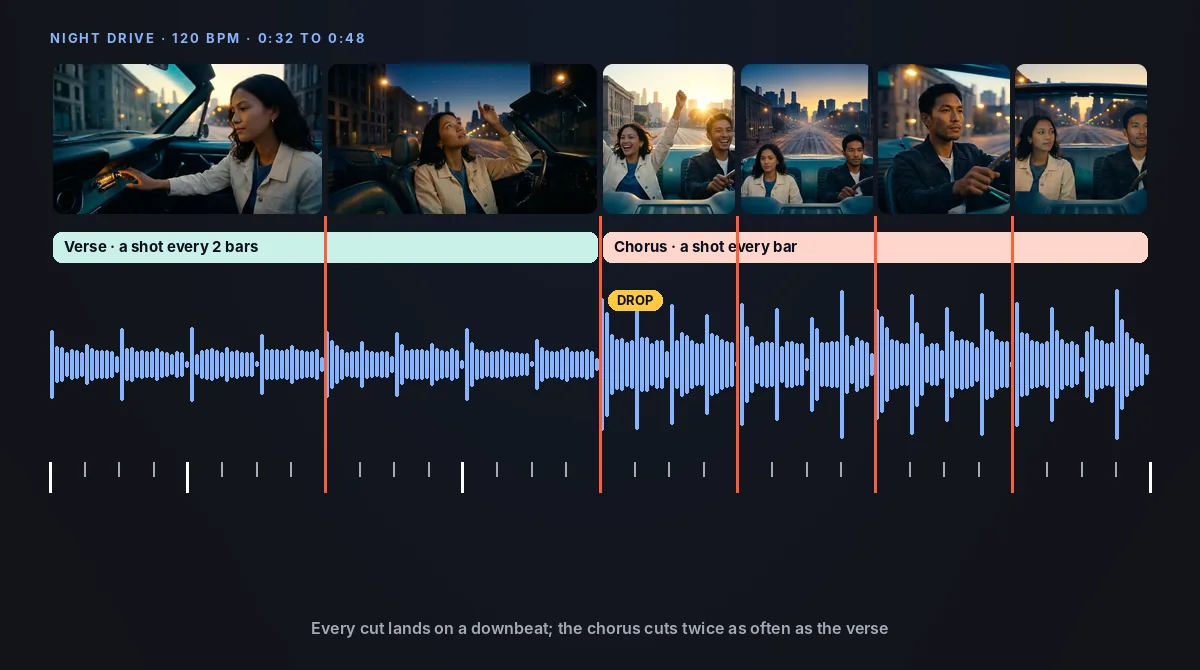
Turn the song you exported into a music video
Pick a style (Story, Abstract, Lyric or Performance), a genre look and a shape, describe your idea, and read the storyboard free. The price is shown in credits before you render, and one render gives widescreen, vertical and square videos and a Canvas loop. See MP3 to video for the steps.
Written by the Muvora team. Last updated November 18, 2026. Spotted something out of date? Tell us at [email protected].