Make a beat online with a free 16-step drum machine
Click steps on the grid to program a kick, snare, clap, closed and open hi-hats, two toms and a rimshot, or start from a groove: four on the floor, boom bap, trap, dembow-style, afrobeats-style, drum and bass, lo-fi, rock or a reggae one drop. Set the tempo from 60 to 200 BPM, add swing, accents and hi-hat rolls, balance each drum, then save the loop as a WAV or a MIDI file. Every sound is synthesized in your browser and nothing is uploaded.
Free, no sign-up. Runs in your browser: nothing is uploaded.
Delays every second 16th: 50% is straight, 66% a triplet feel.
Length
Start from a groove
A punchy kick, a hard snare on 2 and 4 and swung hats: the classic hip-hop backbeat.
A click places
Mixer
Save the loop
The WAV is 16-bit, 44.1 kHz stereo, with sounds that ring past the end wrapped onto the start so it loops cleanly. The MIDI file uses channel 10 and General MIDI drum notes, so any DAW's drum kit plays it. Muted voices are left out of both.
Space plays and stops. In the grid, the arrow keys move between steps and Enter places or clears one. Every sound is synthesized in your browser: nothing is uploaded or recorded. On a phone, keep this page on screen while it plays.
Song finished? Upload it and Muvora plans the whole video on its beats. The storyboard is free.
Make the videoUpload a new songHow to use the drum machine
- 01
Start from a groove or an empty grid
Pick one of nine starting grooves to hear a pattern at a tempo and swing that suit it, or the empty grid to build your own from the kick up. The pattern stays in this tab, so a reload doesn't lose it.
- 02
Program the steps
Each row is one drum and each column a 16th note. Click a step to place a hit, or switch what a click places to an accent or a roll, and click it again to clear it. The arrow keys move around the grid and Enter places a step.
- 03
Set the tempo, the swing and the mix
Press Play or the space bar and adjust while it loops: tempo, swing from straight to a heavy shuffle, and each drum's volume, mute and solo. Randomize gently suggests a few small changes, and Undo takes back any of them.
- 04
Save a WAV loop or a MIDI file
Choose 1, 2 or 4 bars and save a 16-bit WAV that repeats without a click, or a MIDI file on channel 10 that plays your DAW's own drum kit, ready to build the rest of the track on.
How a step sequencer counts a bar
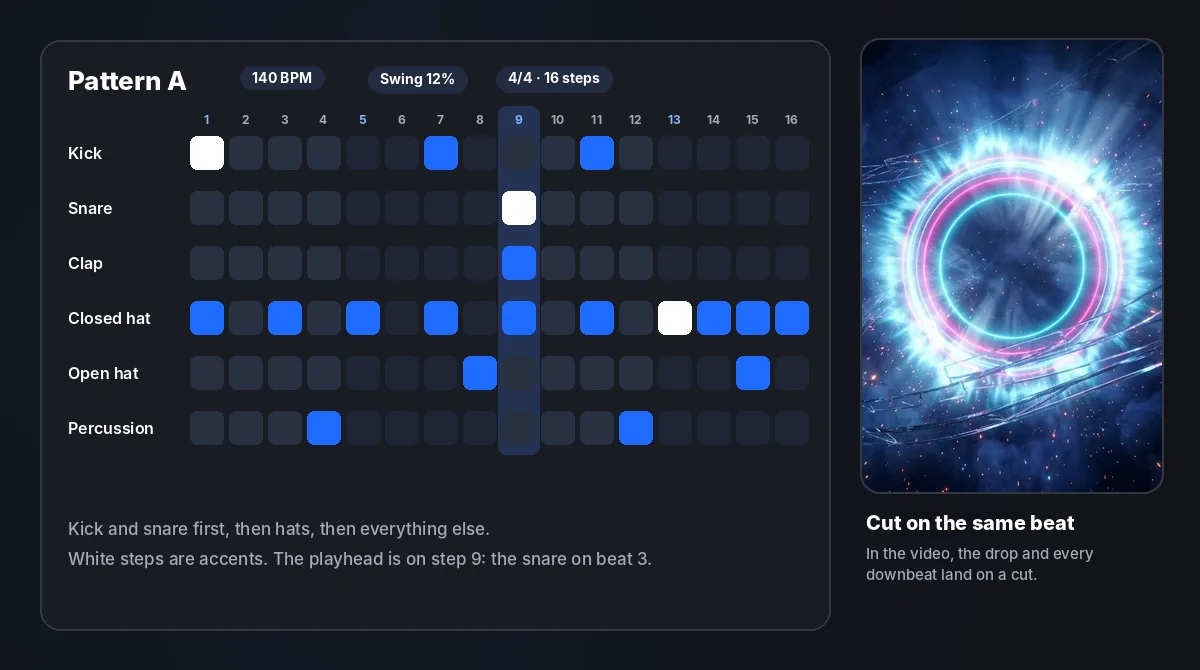
The grid splits one bar of 4/4 into 16 steps, four to each beat, so every step is a 16th note: at 120 BPM a step lasts 0.125 seconds and the bar two seconds. Steps 1, 5, 9 and 13 are the four beats, the bold columns; steps 3, 7, 11 and 15 are the "ands" halfway between them, and the rest are the 16ths that make a groove busy. Most beats start from three moves: a kick on step 1, a snare or clap on steps 5 and 13 (beats 2 and 4, or step 9 alone for a halftime feel), and hi-hats on every other step. Switch to 32 steps for a two-bar pattern whose second bar answers the first.
- 16 steps to a bar of 4/4
- Beats on steps 1, 5, 9 and 13
- 32 steps for a two-bar phrase
Swing, accents and rolls: where the feel comes from
Swing here is counted the way MPC-style drum machines count it: at 50% every 16th is dead even, and higher settings push each second 16th of a pair later, so 66% lands it on a triplet and 75% is a heavy shuffle. Boom bap and lo-fi often sit somewhere between 55 and 62%, house a touch above 50, while trap and drum and bass are usually played straight. An accent plays a step at full velocity against a softer normal hit, which is how a hi-hat line breathes instead of ticking. A roll fires two 32nd notes inside one step: the stutter trap hi-hats make before a snare or at the end of a bar.
- 50% straight, 66% a triplet feel
- Accents at full velocity
- A roll is two 32nds in one step
WAV or MIDI: which file to take
The WAV is the sound itself: 16-bit, 44.1 kHz stereo, rendered a second past the loop so an open hat or a kick ringing over the bar line folds back onto the start, and the loop repeats without a gap or a click. Drop it on a track in any DAW or video editor. The MIDI file is the pattern without the sound: notes on channel 10 in General MIDI's drum map (kick 36, snare 38, clap 39, closed hat 42, open hat 46, low tom 45, high tom 50, side stick 37), accents at velocity 127 and other hits at 96, with the swing written into the timing. Put it under a drum instrument and your own samples play the groove.
- WAV: 16-bit, 44.1 kHz, loops cleanly
- MIDI: channel 10, General MIDI notes
- Muted drums are left out of both
Finished the beat? Give it a video
Once the drums sit under a bass line and chords and the track is bounced, upload the WAV or MP3 to Muvora. It finds every beat, downbeat and drop, then writes a storyboard whose cuts land on the downbeats, with a flash at each drop and no vocals needed. Choose abstract motion or a moody scene for a type beat video or a visualizer, change any shot free, and see the price before you render.
Questions, answered
Can't find what you need? Start a free storyboard and see for yourself.
How do I make a beat with this online drum machine?
Load a starting groove or clear the grid, then click steps to place a kick, a snare or clap and some hi-hats. Press Play or the space bar to loop it, adjust the tempo and swing while it plays, and save it as a WAV loop or a MIDI file once it grooves.
What tempo should a beat be?
It depends on the style. House usually sits around 120 to 128 BPM, boom bap often around 85 to 95, trap often 130 to 150 with the snare on beat 3, reggaeton around 90 to 100 and drum and bass around 170 to 175. Each starting groove loads at a typical tempo; move it until it suits your song.
Can I use beats made here in my own songs?
Yes. Every sound in the WAV is synthesized by your browser rather than taken from someone else's sample pack, and the starting grooves are common patterns heard across many songs, not copies of any one record. If you add samples or loops from elsewhere later, check their licenses.
How do I open the MIDI file in my DAW?
Drag it onto a drum or sampler track in GarageBand, Logic, Ableton Live, FL Studio, Reaper or any other DAW. The notes follow the General MIDI drum map on channel 10, so a General MIDI kit plays them as written; with another kit, map the notes to its pads. The file also carries the tempo, though some DAWs ask before using it.
Why can't I hear the drums?
Browsers only start audio after a click or a key press, so press Play first and check the volume and the mixer's mute and solo buttons. On an iPhone, flip the ring switch off silent, since some iPhone browsers mute web audio while it is on. A phone may also pause a page that isn't on screen.
Does the drum machine record or upload anything?
No. It never uses the microphone, every drum sound is generated as it plays, and the WAV and MIDI files are built on your device. The only thing kept is the pattern, in this browser tab's own storage, so a reload brings it back; closing the tab clears it.
Keep exploring
How to make a beat
Make a beat from scratch: a tempo for the style, the drums first, then bass, chords and a melody, an arrangement in bars, a quick mix, a WAV and a video.
Read the guideMetronome
A steady click from 20 to 300 BPM in seven time signatures, with accents, subdivisions, tap tempo and a tempo trainer.
Open the toolChord progression generator
Pick a key and a mood for common chord progressions as Roman numerals and chord names, then play them, copy the chart or save a MIDI file.
Open the tool
Type beat videos
Visuals for the beats you sell or share, cut on the kick and ready for YouTube.
Learn moreBPM calculator
Beats and bars in seconds, frames and milliseconds: cut lengths for video and delay times for mixing.
Open the tool
Edit a music video to the beat
The bar maths, the shot lengths by section and the cutting tricks that make a video play the song.
Read the guideClick track generator
Make a click track and download it as a WAV: any tempo and time signature, a count-in, accents, subdivisions and a length in bars or minutes.
Open the toolSong structure builder
Lay out a song's sections in bars at your tempo and see every start time, the length and a colored timeline. Export text, CSV or YouTube chapters.
Open the tool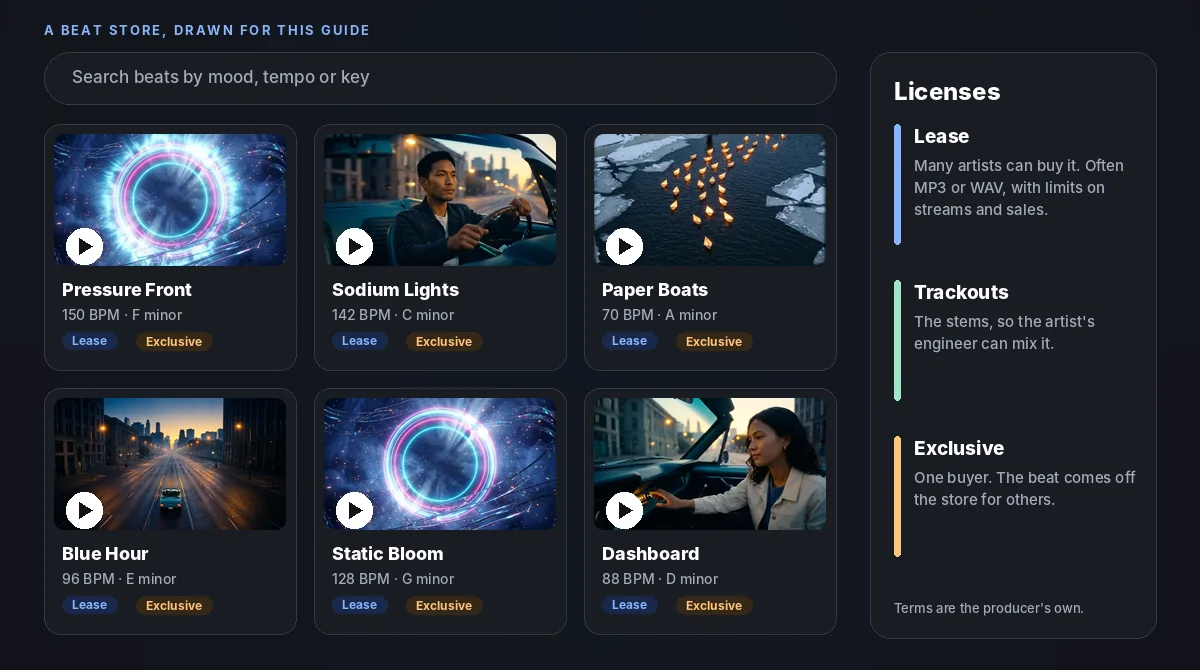
How to sell beats online
Leases and exclusives, what a beat license spells out, tagged previews and trackouts, where producers sell, type beat videos and Content ID on leased beats.
Read the guide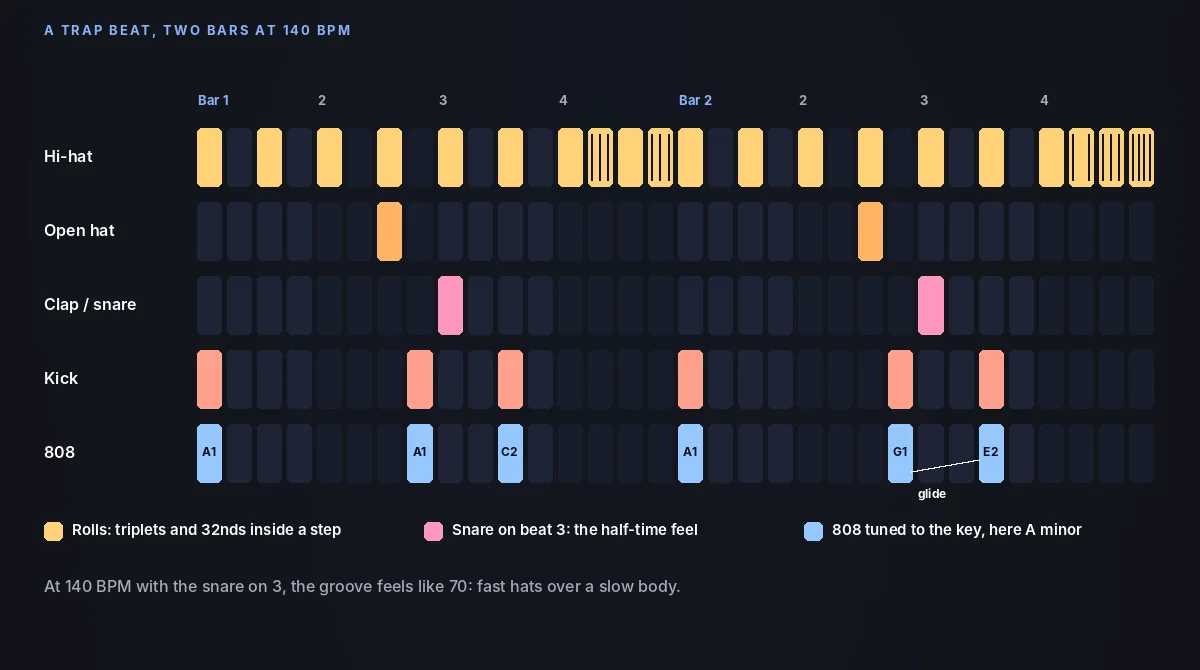
How to make a trap beat
A trap beat from an empty grid: the half-time snare, hi-hat rolls in milliseconds, a tuned 808 with glides, a dark melody, the arrangement and the low end.
Read the guide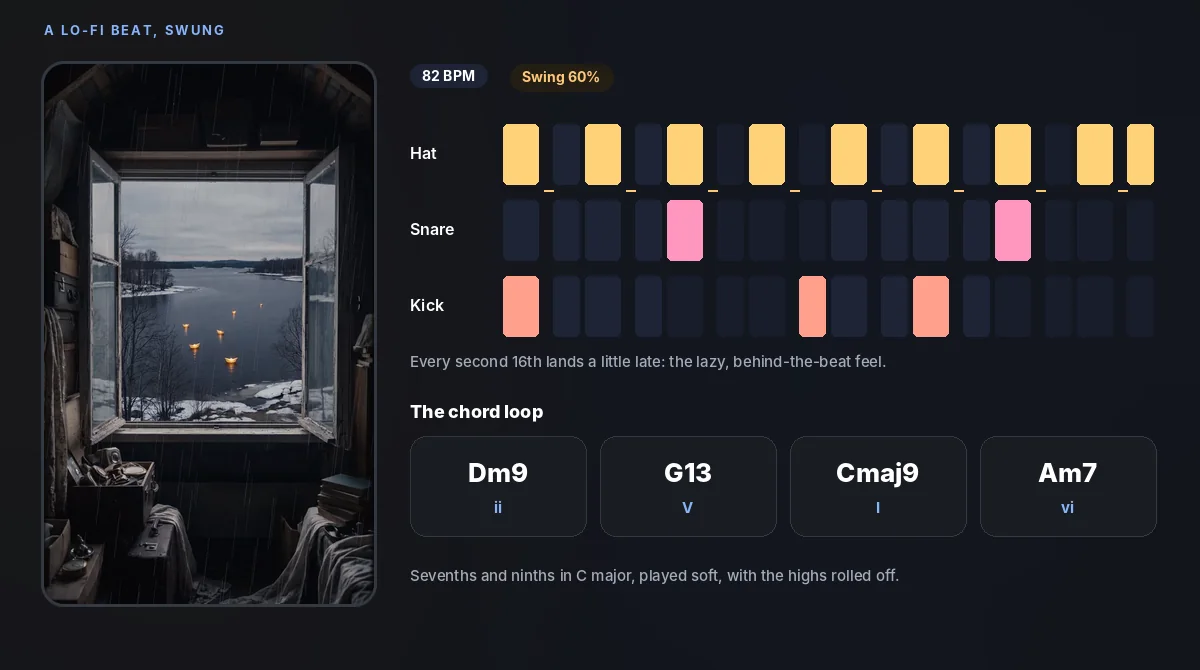
How to make lo-fi beats
Lo-fi beats from scratch: a slow, swung groove, jazz chords with 7ths and 9ths, sounds you have the rights to, filter, tape and crackle, and a short loopable arrangement.
Read the guide
More free tools: beats, chords and voice
Play a piano, program a beat, name a chord, find a key on the circle of fifths, build a progression, change key, tune up and find your vocal range.
Your song deserves a music video
Upload a track and get a free beat-synced storyboard in minutes. Render it when you are ready.
No card needed to start.




