The short answer
To promote music on YouTube Shorts, post vertical clips of 10 to 30 seconds that open on the song's strongest moment, never the intro. Cut a series from one music video (the hook, the drop, a lyric line, a performance, the making-of), set each Short's related video to the full video, post a few a week, and judge them by viewed versus swiped away and subscribers gained.
- A Short is a square or vertical video of up to three minutes; for a song clip, 10 to 30 seconds works best.
- Open on movement and sound in the first second: the frame people swipe onto decides whether they stay.
- Cut five or more Shorts from one music video, each giving a different reason to watch.
- Set the full music video as every Short's related video, so each viewer is one tap from the whole song.
- Keep Shorts of your song under a minute unless your channel is cleared for Content ID.
On this page (7 sections)ShowHide
- 1.How to promote a song on YouTube Shorts, step by step
- 2.The Shorts format: shape, length and the limits that matter for music
- 3.Choose the 10 to 30 seconds, then win the first one
- 4.Make a series of Shorts from one music video
- 5.Link each Short to the full video, then title and tag it
- 6.Posting rhythm and reading the numbers
- 7.Make the vertical cut from the same render
- Questions
How to promote a song on YouTube Shorts, step by step
One Short rarely changes how a release goes. A run of them, all pointing at the same full video, can. Here is the routine; the sections below explain each step and the settings behind it.
- 01
Put the full music video on your channel first
Have the music video uploaded before the first Short goes up, so every Short in the series has somewhere to send people.
- 02
Pick the seconds
Choose 10 to 30 seconds around the hook, the drop or the line people will quote, starting on a downbeat and ending where the phrase ends.
- 03
Cut it vertical
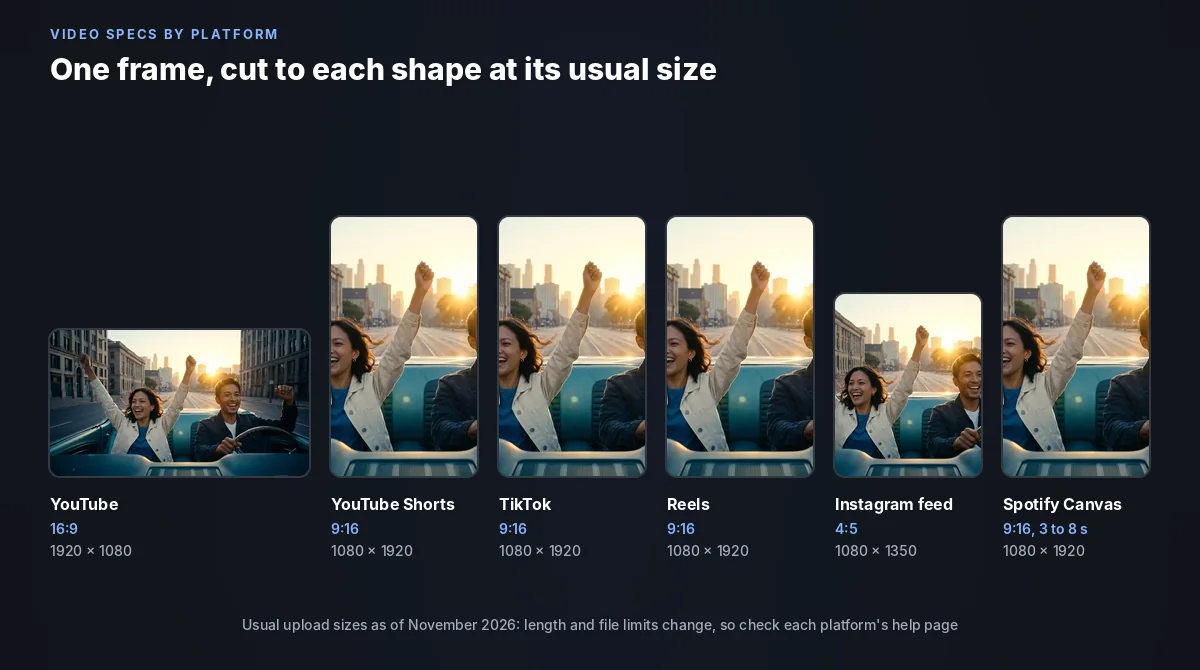
Export a 9:16 file at 1080 x 1920 from the same footage as the full video, framed for the tall screen rather than shrunk from the wide one.
- 04
Make the first second count
Open on motion with the music already playing and the subject in the middle of the frame.
- 05
Post a series, not a one-off
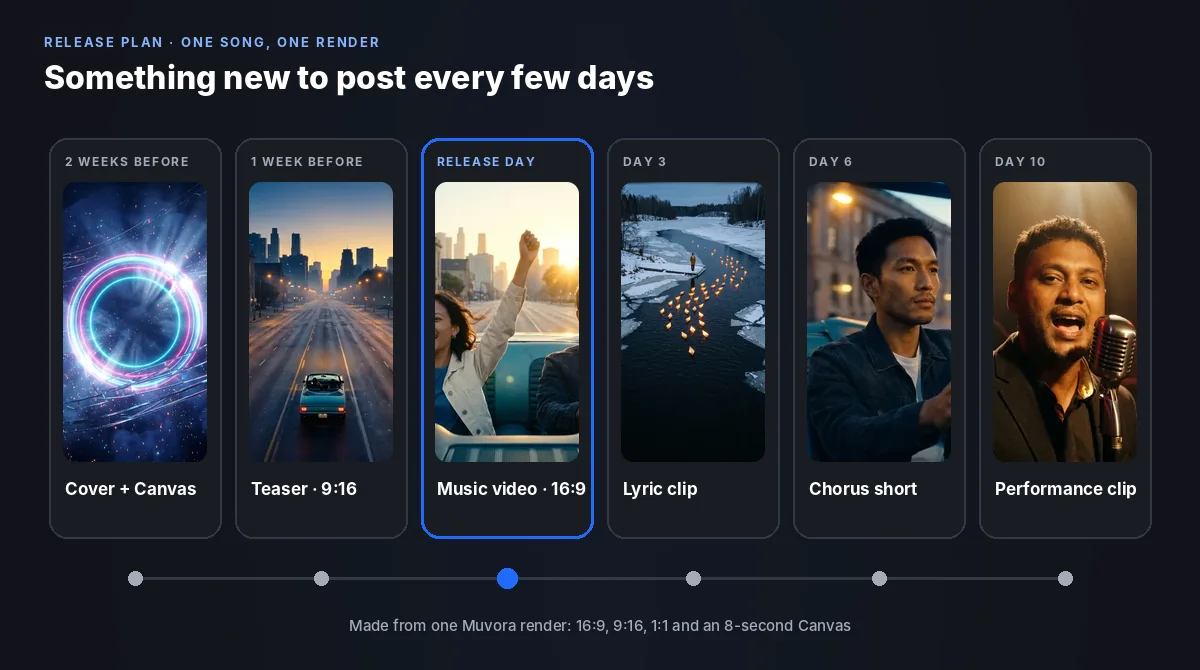
Cut five to ten Shorts from the one video, each built on a different moment, and post two or three a week.
- 06
Link, title and tag every Short
Set the full music video as the related video, write a title that names the song and the moment, and add two or three hashtags.
- 07
Read the numbers once a week
Compare viewed versus swiped away and subscribers gained across the series, then remake the openings that held people.
The Shorts format: shape, length and the limits that matter for music
YouTube decides what counts as a Short from the file itself. Its help page on three-minute Shorts says a square or vertical video of up to three minutes is categorized as a Short. Anything wider, such as your 16:9 music video, stays a regular video with its own watch page, chapters and end screen, which is exactly what you want the Shorts to point at.
| Setting | Use | Why |
|---|---|---|
| Shape | Vertical 9:16 (square also counts as a Short) | Fills a phone screen; a wider file is treated as a regular video |
| Size | 1080 x 1920 | Sharp on every phone; 720 x 1280 works but looks softer |
| Length | 10 to 30 seconds for a song clip, within the 3-minute limit | Short enough to loop and to be watched twice |
| Frame rate | The music video's own, such as 24, 25 or 30 fps | No re-timing, so the cuts stay on the beat |
| Sound | The master, at full level from the first frame | The song is the point; don't let it fade in |
| Words on screen | Burned in, above the bottom fifth of the frame | Plenty of people watch with the volume low, and the bottom fifth sits under the title |
The Shorts camera in the YouTube app can't record a full three-minute Short, so post a finished file instead, uploaded from the app or from YouTube Studio. For the tall frame itself (what to crop, what to show whole over a blurred fill, where the app's buttons sit), see music video aspect ratios.
Skip the blank page
Upload your song and Muvora's AI director plans a shot-by-shot storyboard on the beat. Edit every shot for free, and pay only if you render.
Choose the 10 to 30 seconds, then win the first one
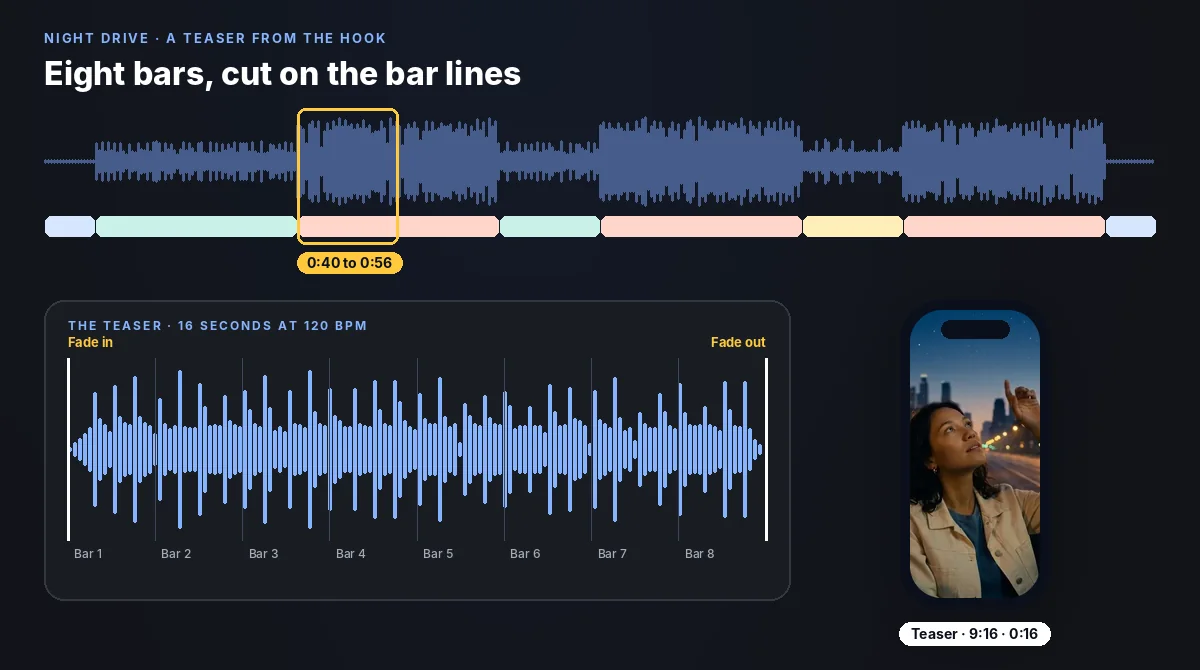
The seconds you post decide more than any caption. Look for the moment someone would play again: the first line of the chorus, the bar where the drop breaks, a line that lands without any context. Then measure it in bars rather than seconds, so the clip starts and ends where the music does and loops back to its start without a jolt.
| Tempo | One bar | 4 bars | 8 bars | 16 bars |
|---|---|---|---|---|
| 70 BPM | 3.4 s | 13.7 s | 27.4 s | 54.9 s |
| 90 BPM | 2.7 s | 10.7 s | 21.3 s | 42.7 s |
| 100 BPM | 2.4 s | 9.6 s | 19.2 s | 38.4 s |
| 120 BPM | 2.0 s | 8.0 s | 16.0 s | 32.0 s |
| 140 BPM | 1.7 s | 6.9 s | 13.7 s | 27.4 s |
| 174 BPM | 1.4 s | 5.5 s | 11.0 s | 22.1 s |
So eight bars of a 120 BPM chorus run 16 seconds, while eight bars of a 70 BPM ballad run past 27. If you don't know where the sections start, the free song structure visualizer reads your audio file and lists each one's start time and energy, and the BPM calculator turns any tempo into bar lengths in seconds and frames.
Then the first second. A Short starts playing the moment someone swipes onto it, and the frame they land on works as the thumbnail and the opening line at once. It's the second that decides whether someone stays or swipes on.
- Start mid-motion. A car already moving, a hand already turning the dial, light already breaking through. A slow fade up from black invites a swipe.
- Start with sound. Cut a beat before the line or the drop, so the music is there at frame one rather than rising out of silence.
- Keep the subject in the middle. The title, channel name and buttons sit along the bottom and the right edge of a Short, so faces and action belong in the central band. The free safe zone checker shades them over a frame of your own.
- One idea per Short. If the opening needs explaining, put four or five words at the top of the frame for the first two seconds, then let the song carry it.

Make a series of Shorts from one music video
A music video holds far more than one Short. Cut it into a series where each part gives a viewer a different reason to care, and post them across several weeks. Someone who meets the song a third time is far more likely to recognize it, and the related video link sends every one of those viewers to the same place.
| Short | What it shows | Length | Ends on |
|---|---|---|---|
| The hook | The chorus's first line over the video's strongest shot | 15 to 25 s | The end of the line, so it loops into its own start |
| The drop | The build and the moment it breaks, cut tight | 10 to 20 s | Two bars after the drop |
| The lyric line | One line on screen, each word lighting up as it's sung | 8 to 15 s | The last word, held for a beat |
| The performance | The lip-synced singing shots, or you singing it in one take | 15 to 30 s | A look to camera or the last held note |
| The making-of | The storyboard, the voice memo, how one shot came together | 20 to 45 s | The finished shot, with the song at full volume |
| The callback | The Short that did best, posted again with a new first frame | As the original | A different shot from the video |
If the song has a singer, the performance Short is often the one that travels, because a face singing the line explains itself in a second. Muvora's Performance style makes those shots from one clear photo of the singer, lip-synced to the separated vocals; the AI lip sync music video guide explains how it works and what makes a good photo.

Get a whole series of Shorts from one render
Upload your song and Muvora storyboards the full video on its beats for free. Render it once, and the vertical export gives you the hook, the drop and the lyric line as Shorts, already framed for the phone.
Link each Short to the full video, then title and tag it
The related video is the most useful Shorts setting a musician has. In YouTube Studio you can add a related video to a Short, chosen from your own channel, and it shows as a link in the Shorts player under your channel name. Set it to the full music video on every Short cut from it, so anyone hooked by 20 seconds is one tap from the whole song.
Then the words. The title is what people read while the clip loops, so name the song and the moment: "Pressure Front, the drop" over a ring of light about to burst tells a viewer what's coming, where "new music out now" tells them nothing. Keep the artist and the song's name in every title of the series so they add up in search.
- Title: the song and the moment, in plain words, short enough to read in one glance.
- Description: one line about the song, then where to stream it. The related video does the linking inside the player.
- Hashtags: two or three that name the artist, the song or the genre. YouTube's hashtag policy ignores all of a video's hashtags once there are more than 60, and tags unrelated to the video count as misleading.
- Comments: pin one that names the song and points to the full video, linked under your channel name.
One more setting lives on the full music video rather than the Shorts. YouTube lets people remix parts of eligible videos into Shorts of their own, and every remix that uses your song is another path back to it. Check that remixing is allowed on the music video before release week.
YouTube description generatorWrite the full music video's title, description, chapters and hashtags in one pass, checked against YouTube's limits, then reuse its first lines for every Short in the series.- A 9:16 file at 1080 x 1920, with the master as its sound from the first frame
- Under a minute, unless your channel is cleared for Content ID with your distributor
- The subject in the middle of the frame, any words above the bottom fifth
- A title that names the song and the moment
- The related video set to the full music video
- Two or three precise hashtags
- A pinned comment, and time set aside to answer the first questions
Posting rhythm and reading the numbers
There's no magic posting count. Two or three Shorts a week for six weeks gives you 12 to 18 tries, enough to see a pattern, whereas ten in release week and silence afterwards leaves the song alone just as people start finding it. Batch the work: cut two weeks of Shorts in one sitting and schedule them in YouTube Studio.
YouTube Studio reports Shorts with measures of their own, defined in its help page on content performance. These are the ones that matter for a song.
| Number | What it is | What to do with it |
|---|---|---|
| Viewed vs. swiped away | The share of people who stayed on the Short instead of swiping past it | Grades the opening. If it's low, try a new first frame, or start a bar later |
| Average percentage viewed | How much of the Short people watched; replays can push it past 100% | Grades the clip. If it's low, the Short runs past its best moment: end it sooner |
| Shown in feed | How often YouTube put the Short in the Shorts feed | Reach. A late rise means the feed is trying it on more people |
| Subscribers gained | New subscribers who came from the Short | The payoff: people who want more of you, not just this clip |
| Traffic to the full video | Where the music video's views came from, in its own traffic sources | Whether the related video links are sending people on |
Read view counts with care. Since March 2025 YouTube counts a Short's view every time it starts or replays, and keeps the older, stricter count as engaged views. Compare your Shorts with each other on the measures above, give each one a week before judging it, and remake the openings of the Shorts that held people best rather than reposting them unchanged.
Make the vertical cut from the same render
Shorts work best when they look like the video they point to. Cutting them from the same footage keeps the faces, the light and the palette identical, so tapping through to the full video feels like the next scene rather than a different artist. Muvora makes the vertical cut and the full video from one render of your song.
- Choose the shape at upload. Pick 16:9 and one render gives you the YouTube video, a 9:16 cut, a square version and an 8-second Canvas loop. Pick 9:16 when the vertical version matters most: every shot is composed for the tall frame, and the square version and the Canvas come with it.
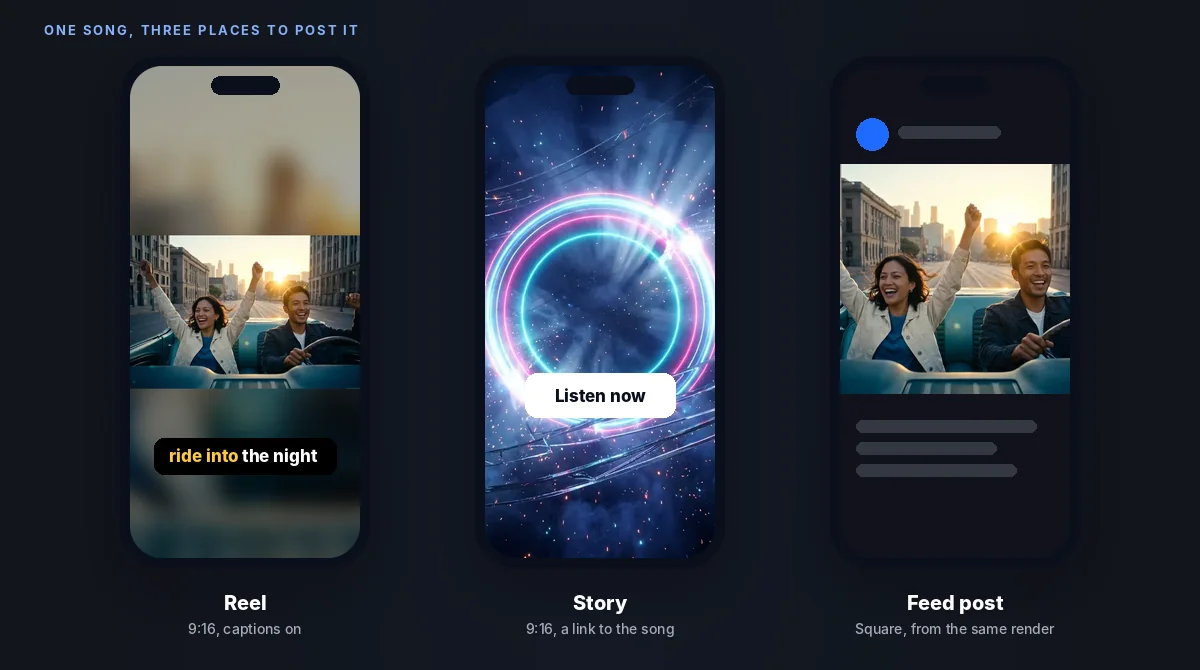
- The vertical cut is reframed shot by shot. Close shots are cropped to the center, and wide shots are shown whole over a blurred fill of themselves, so nothing important falls off the edge.
- Every cut lands on the music. The shot planner cuts on downbeats and at every section change and drop, so any stretch you trim for a Short starts and ends on a clean edit.
- Captions are optional. Karaoke-style captions, timed to the vocal word by word, are sized for each export and set a fifth of the way up the vertical one. Shorts lays its title and channel line over roughly the bottom quarter, so keep the Short's own title to a line and check the frame with the safe zone checker before you post.

You can also render just the part you'll post. Trim the hook from your master as its own audio file, upload it and render that alone: the video runs exactly as long as the file, and credits are charged per finished second, so 30 seconds at Standard quality costs 30 times 60 credits. If the Short takes off, render the whole song next. The same vertical cut works on TikTok and Reels too (the TikTok music video maker shows it there), and how to upload a music video to YouTube covers the full video's title, description and premiere.
Render the hook as your first Short
Upload the 20 or 30 seconds you'll lead with, or the whole song, and edit the storyboard before you pay anything. The price is shown before you render, and the free plan includes 5 storyboards a month.
Written by the Muvora team. Last updated November 14, 2026. Spotted something out of date? Tell us at [email protected].