The short answer
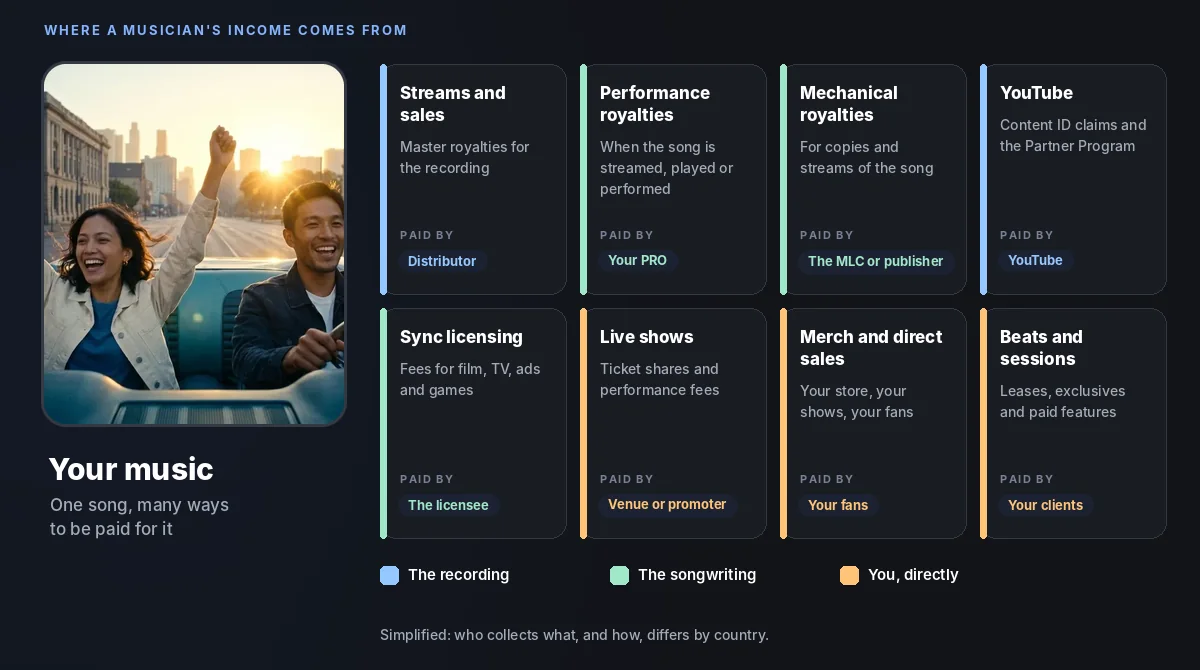
Independent musicians make money from several streams at once: royalties for their recordings through a distributor, songwriting royalties through a performing rights organization and, in the US, The MLC, YouTube ads and Content ID, sync fees, live shows, merch, direct sales and fan memberships, plus beats, session work and teaching. Register for the royalties first, since they pay for songs already out.
- A recorded song earns twice: once for the recording, once for the composition, through different bodies.
- Registrations come before promotion: an unregistered song can be streamed for years without paying its writers.
- YouTube pays through your distributor from the first upload; your own channel's ads wait for the Partner Program.
- Shows, merch and direct sales pay more per fan than streams, so a small audience can still earn.
- Never pay for streams or placements: services strip fake plays of their royalties and can remove the track.
On this page (11 sections)ShowHide
- 1.Where a musician's money comes from
- 2.Set up what pays you, in order
- 3.Streams and sales of your recordings
- 4.Royalties for the songs you wrote
- 5.YouTube: your channel and everyone else's uploads
- 6.Sync licensing: fees for film, TV, ads and games
- 7.Live shows
- 8.Merch, direct sales and fan support
- 9.Beats, session work and teaching
- 10.Money traps to avoid
- 11.Give every release something to watch
- Questions
Where a musician's money comes from
The first Musicians' Census, a 2023 survey of UK music creators by Help Musicians and the Musicians' Union, found that a working musician holds three to four different roles in music on average, that 80% consider themselves performers, and that 53% also earn money outside music to sustain their careers. That's the normal shape of a music income, not a failure: a handful of streams, each small, that add up. The table lists them in the order most artists set them up.
| Income stream | Who pays | How you get set up | Set it up |
|---|---|---|---|
| Streams and downloads of your recordings | Streaming services and stores, through your distributor | An account with a distributor, and the release delivered with full credits | Before your first release |
| Performance royalties for your songs | Streaming services, broadcasters and venues, through a performing rights organization | Join a PRO (ASCAP or BMI in the US, PRS in the UK, SOCAN in Canada) and register every song | Before release |
| Mechanical royalties for your songs | Streaming services and stores; in the US, through The MLC | Become a member of The MLC and register every song, or use a publishing administrator | Before release |
| Digital radio and neighboring rights | Internet and satellite radio in the US, through SoundExchange; broadcasters elsewhere, through performers' societies | Register as the featured artist and, if you own the master, as its owner | Once songs are out |
| YouTube | Ads on your videos, other people's uploads claimed by Content ID, art tracks and YouTube Music | A distributor that offers Content ID now; the Partner Program for your own channel later | Content ID at release; the Partner Program at its thresholds |
| Sync licensing | Producers of films, shows, ads, games and online videos, often through a music supervisor or a library | Both rights cleared, instrumentals and clean versions exported, metadata complete | Once you have a few finished songs |
| Live shows | Promoters, venues and ticket buyers | Booking, a set, and setlists reported to your PRO | Whenever you can play |
| Merch | Fans, at shows and online | A store linked from your profiles, and stock or print on demand | When fans start asking |
| Direct sales and fan support | Fans buying downloads, records and memberships | A Bandcamp page, a membership platform or your own site | Early: it grows with your list of fans |
| Beats, sessions and teaching | Other artists, clients and students | A catalog or a rate, and a written agreement for each job | Any time |
The first four rows are royalties: money owed to you every time a song is used, collected by organizations that pay only those who registered. The rest are fees and sales you earn by doing something, from playing a show to licensing a song. Royalties are slow to start and keep paying for years; fees and sales start paying the day you make them happen. Most careers need both.
Set up what pays you, in order
- 01
Put the splits in writing
Before a song comes out, write down each writer's share of the composition and each owner's share of the recording, and have everyone sign, so every registration after it uses the same numbers.
- 02
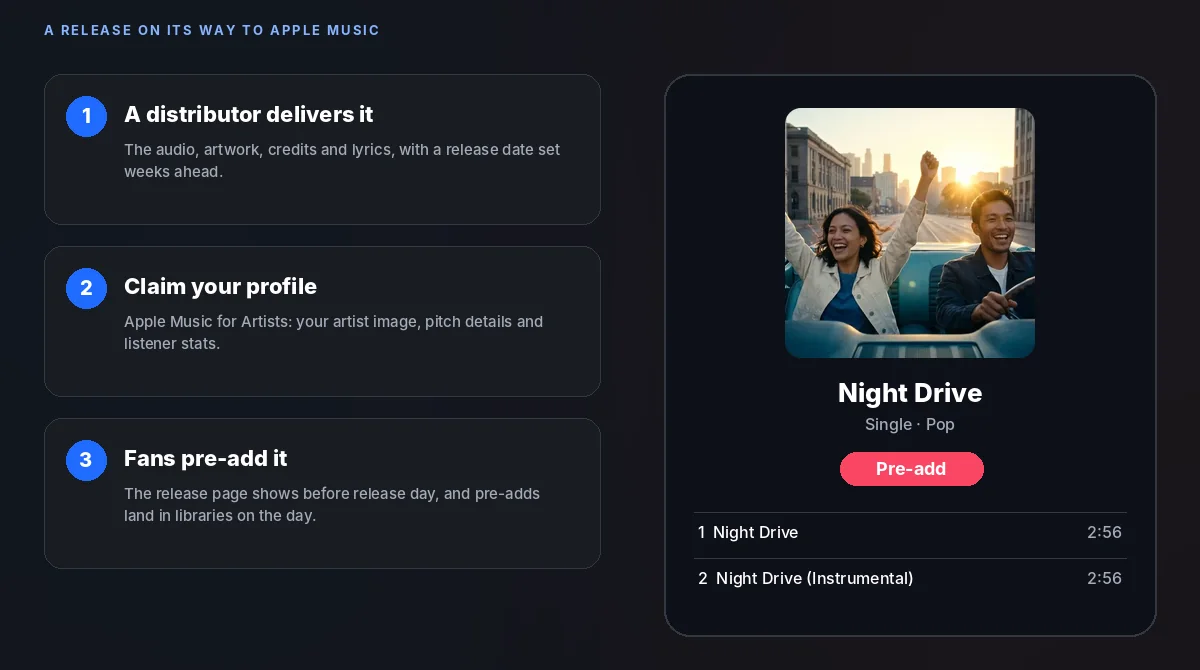
Release through a distributor
Choose a distributor that delivers to the services your fans use, offers YouTube Content ID and pays collaborators their splits, then deliver each release with every writer, producer and featured artist credited.
- 03
Join a performing rights organization
Join the society for songwriters where you live and register every song with its writers and shares, so performance royalties from streams, radio and venues reach you.
- 04
Collect your mechanical royalties
In the US, become a member of The MLC and register each song if you publish your own; elsewhere, check whether your society collects mechanicals or a separate one does.
- 05
Register for digital radio and neighboring rights
Register with SoundExchange in the US as the featured artist and as the master's owner, and join a performers' society in other countries, so broadcast and internet radio plays pay you.
- 06
Claim your artist profiles
Claim Spotify for Artists and Apple Music for Artists, and ask your distributor for an Official Artist Channel on YouTube, so your stats, your pitch and your channel are in your hands.
- 07
Give fans a place to pay you directly
Open a Bandcamp page or a store, list your shows where streaming apps can find them, and link both from every profile and every video description.
- 08
Make something to watch for each release
Put out a music video, short vertical clips and a Spotify Canvas with every release, so people who find the song on YouTube or social apps have a reason to stream, follow and buy.
Steps 1 to 5 are paperwork you do once per song, and they pay for every play from then on. How music royalties work explains each body and what it collects, and how to choose a music distributor covers the second step in detail. If several of you wrote the song, what is a split sheet explains what goes on the page.
Start the video while you do the paperwork
Upload the master you're sending your distributor. Muvora finds the beats and sections and writes a shot-by-shot storyboard for free, so the video is ready when the registrations are done. The free plan includes 5 new storyboards a month.
Streams and sales of your recordings
Every stream and download of a recording pays its owner, and if you released the song yourself, the owner is you. The service pays your distributor, and your distributor pays you under its terms: some pass on everything they receive in return for a yearly fee, others keep a share. Either way the payment comes through the company that delivered the release, which is why the choice of distributor touches every stream you'll ever earn.
There's no fixed price per stream. Services share out their revenue by each recording's share of listening, so the average moves with where your listeners live and which plans they pay for. Spotify adds a threshold: its track monetization page says a track has to reach at least 1,000 streams in the previous 12 months, and a minimum number of unique listeners it keeps private, before it earns recording royalties. The same page notes that distributors usually set a minimum amount before you can withdraw and may charge a fee to do it, so very small balances can sit unpaid.
Streaming royalty calculatorEstimate what streams on each service pay after your distributor's cut and the master's split, using rates people have reported, or work out the streams a target amount needs.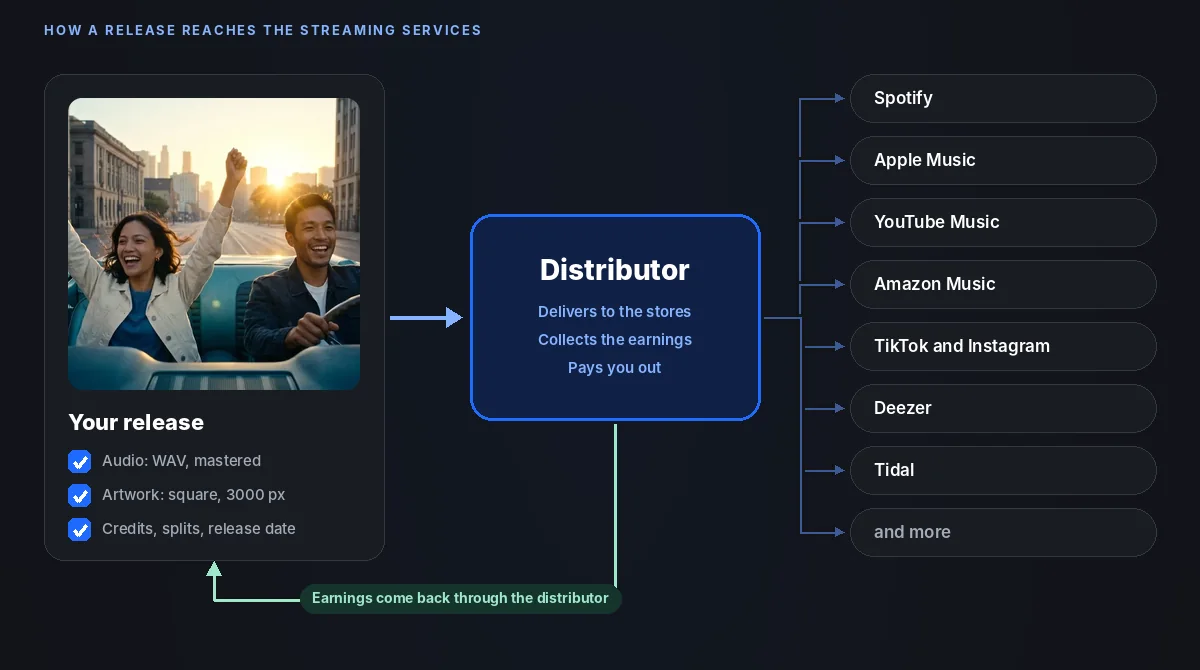
Skip the blank page
Upload your song and Muvora's AI director plans a shot-by-shot storyboard on the beat. Edit every shot for free, and pay only if you render.
Royalties for the songs you wrote
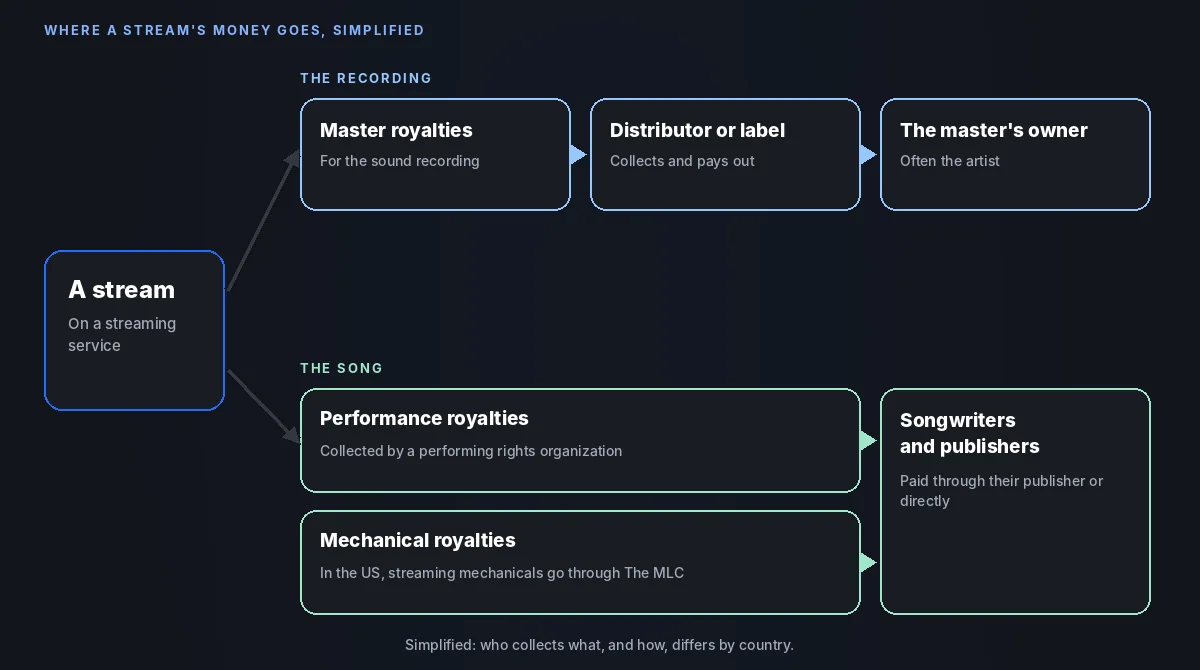
The composition, the words and music you wrote, earns separately from the recording. Apple Music for Artists' publishing basics names three ways a song can be used: performance (streamed, broadcast or played in a public place), mechanical (reproduced, digitally or physically) and synchronization (set to pictures). The first two are royalties that collecting societies gather; the third is a license you negotiate.
Performance royalties need a performing rights organization: the same Apple page calls PRO membership important for receiving your writer's share. In the US, a writer who publishes their own songs also needs The MLC for the mechanical royalties streaming services pay; Apple notes it has licensed from The MLC since January 2021. A publishing administrator can register and collect for you worldwide in return for a commission, and many distributors sell administration as an extra. How to copyright a song covers protecting the composition itself.
YouTube: your channel and everyone else's uploads
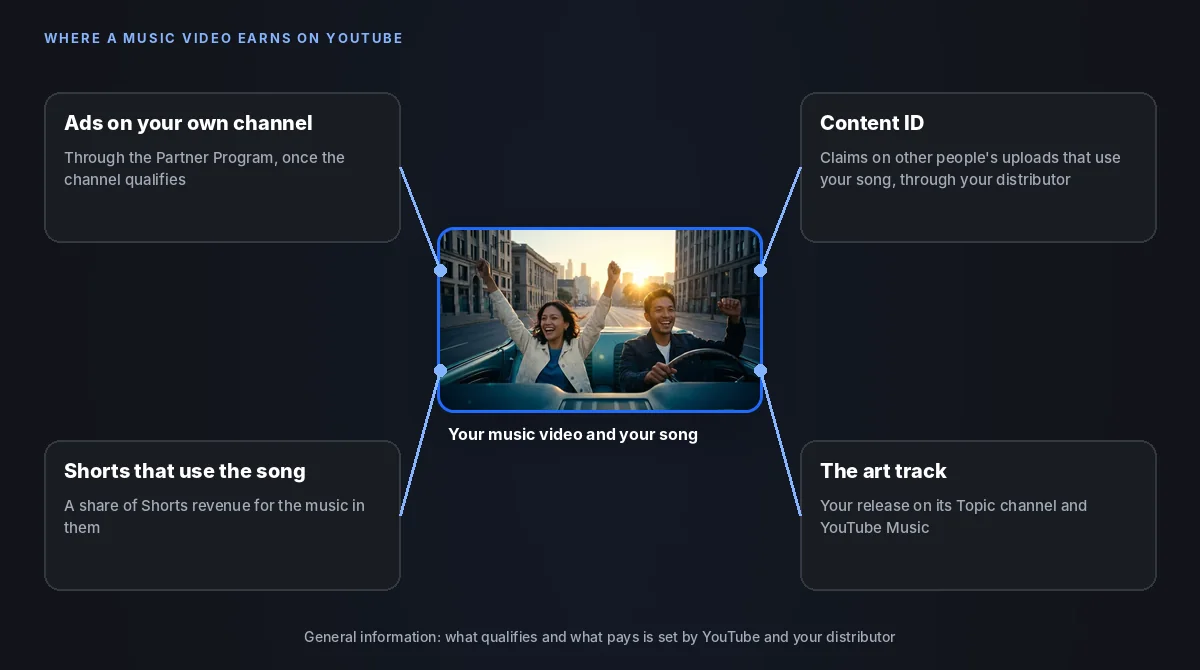
YouTube pays for music in two ways, and only one of them needs a big channel. Through your distributor, the art tracks YouTube makes from your release, streams on YouTube Music, and other people's videos and Shorts that use your recording can all earn from the day the song comes out, as long as your distributor offers Content ID and you hold the rights. Ads on your own uploads need the YouTube Partner Program.
As of November 2026, the Partner Program's ad tier asks for 1,000 subscribers plus either 4,000 public watch hours in a year or 10 million Shorts views in 90 days, and YouTube has announced higher thresholds for new applicants from February 1, 2027. A lower tier at 500 subscribers opens memberships, Super Thanks and Shopping without ads. How to monetize music on YouTube has every threshold and the steps, and the Official Artist Channel guide explains why your releases and videos belong on one channel.
A music video for the channel that pays
Muvora turns your song into a music video with every cut on the beat, from a storyboard you edit for free. One render gives the 16:9 video for your channel, a 9:16 cut for Shorts and a square post, and the soundtrack is your file, untouched.
Sync licensing: fees for film, TV, ads and games
Sync works differently from every other stream. A producer pays a fee to set your song to pictures, negotiated once, and needs two licenses: one for the composition and one for the recording. When you wrote and own both, you can grant both at once, which makes your music quick to clear. Then, when the show or the ad is broadcast, the broadcaster's license with the PROs pays your songwriting side again. What is a sync license covers both directions in detail.
Placements come through music supervisors, sync libraries and agencies, and increasingly through distributors. As of November 2026, CD Baby lists sync licensing among the extras in its CDB Boost add-on, Ditto offers pitching for TV and film briefs on its Pro plan, and UnitedMasters puts brand and sync deals at the center of its service. None of them can promise a placement; what they can do is put your songs in front of people who license music.
- Export the instrumental and a clean version of every song when you export the master: a supervisor often needs one or the other.
- Keep the metadata complete: writers, publishers, shares, ISRC and contact, so a yes can become a license the same day.
- Know who controls each side. A leased beat or a sample can mean someone else must approve every placement.
- Send a link, not a file: a private streaming link or a music video shows the song's mood in seconds.
Live shows
Shows pay in three ways: the fee or the share of ticket sales you agree with the promoter, the merch you sell on the night, and the performance royalties for your own songs, which a PRO pays only when the setlist reaches it. Report every show where you play your own songs, the small ones most of all, since a small venue's own reports may never list them.
Streaming apps can sell tickets for you if your dates are listed in the right place. Spotify's concerts page says it imports shows automatically from its ticketing partners and that new dates usually appear within 24 hours. Apple's page on making concerts discoverable says dates kept up to date in Bandsintown can appear in Apple Music, Shazam, Spotlight Search and Apple Maps, and that shows on Ticketmaster may appear too.
A video behind the band does a lot for a small room. A music video made to the song's length can play muted on the screen behind you, started on the same cue as the track, so its cuts land on the beat you're playing; concert visuals explains how that works with a Muvora video, and where it doesn't fit.
Merch, direct sales and fan support
Selling directly to fans leaves you a large share of each sale. On Bandcamp, artist accounts are free, and its help center's page on fees puts its revenue share at 15% on digital items, falling to 10% once an artist passes a sales threshold, and 10% on physical goods, with payment processing charged on top. On Bandcamp Fridays, Bandcamp waives its share for the day; its list of 2026 dates ends on December 4.
- Merch in the streaming apps. Spotify's page on connecting a Shopify store explains how to sell merch on your Spotify profile, one store per artist; YouTube Shopping counts Partner Program membership, or an Official Artist Channel, toward its conditions for selling your own products.
- Records and physical copies. Vinyl, CDs and cassettes sell at shows and on Bandcamp to the fans who want an object, and they make a signed bundle easy.
- Memberships. A monthly membership, on YouTube's channel memberships or a platform such as Patreon, works when you give members something regular: demos, early releases, a monthly livestream.
- Your own list. An email address belongs to you in a way a follower count doesn't: collect them at shows, on Bandcamp and in your link in bio.
Design merch from what fans already recognize: the cover, a line from the chorus, the look of the video. Muvora claims no ownership of the videos you make with it, so a still from your own music video can become a poster or a shirt print; album cover ideas shows how frames become artwork.
Beats, session work and teaching
Much of a musician's income comes from skills rather than releases, which is why the census found most people working three or four roles. The common ones, each with its own way of pricing:
- Selling beats. Producers lease beats to many artists at once or sell exclusive rights to one; how to sell beats online covers licenses, files and stores, and the type beat video maker makes the videos that sell them.
- Session work. Playing or singing on other people's records is usually paid by the session or the song, and US non-featured performers also have a share of SoundExchange's digital radio royalties set aside for them.
- Writing for and with others. A co-write pays through the composition, so it needs a signed split sheet like your own songs.
- Mixing, mastering and production for other artists, priced per song or per project.
- Teaching. Lessons in person or online, workshops and courses pay steadily between releases and tours.
Put every job in writing, however small: who pays, how much, by when, and who owns what you made. A one-paragraph email both sides reply to is better than nothing, and a contract is better still for anything that includes royalties or rights.
Money traps to avoid
- Paying for streams or playlist placements. Services strip fake plays of their royalties and can take the track down.
- Unregistered songs. A song your distributor delivered but no PRO or MLC knows about can be streamed for years without paying its writers.
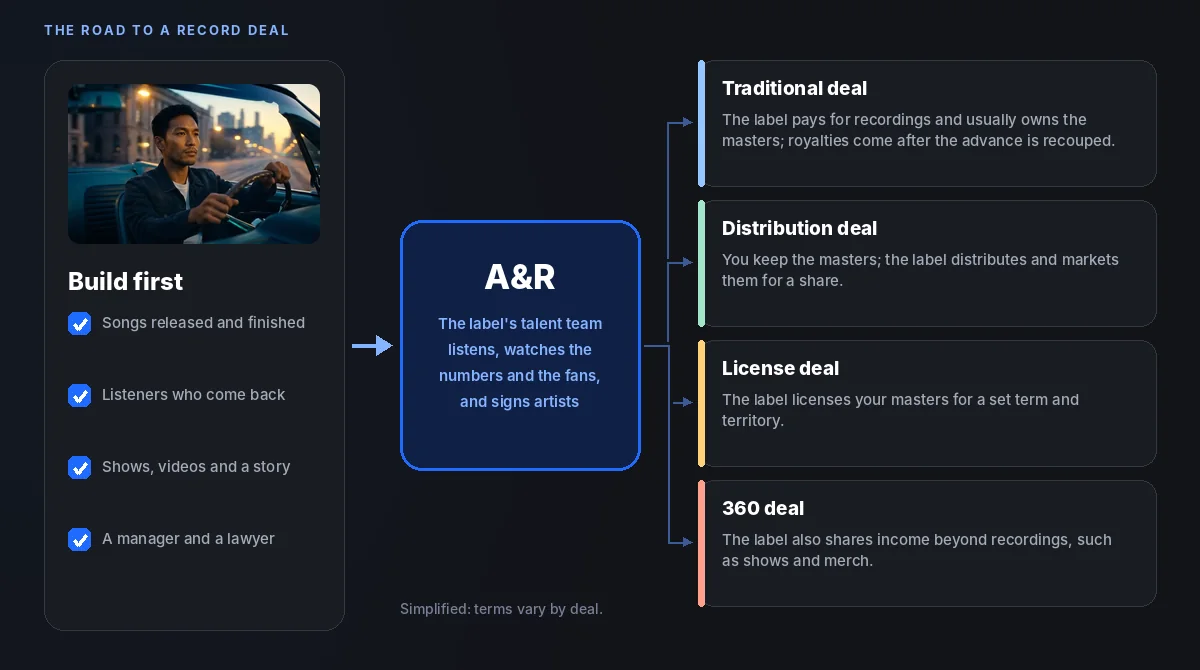
- Deals with no end date. Read how long a distribution, publishing or label agreement lasts and how you leave it before you sign; a music lawyer is worth the fee for anything that takes a share of your rights.
- Uncleared samples, covers and beats. The owner can claim the income or take the release down, so clear them first: cover song music video and music video copyright explain what each needs.
- Songs from unlicensed AI tools. Some distributors now refuse them: Music Business Worldwide reported in April 2026 that Believe and TuneCore block AI tracks made on platforms they consider unlicensed. Check your distributor's rules before you upload.
- Fees you didn't notice. A distributor's share of social platform income, a yearly renewal per release, a fee on each withdrawal: TuneCore's pricing page, for one, lists a 20% fee on what it collects from TikTok, Facebook, Instagram and YouTube. Read the whole price list once a year.
None of this is legal, tax or financial advice, and the rules differ by country. For a contract or a dispute, talk to a music lawyer; for tax on music income, talk to an accountant who works with musicians.
Give every release something to watch
Most of the streams above start with someone finding the song, and more and more people find songs on a screen: a Short, a Reel, a Canvas, a video a friend sent. A music video earns on YouTube itself, and its vertical cuts send people to the song on every other service. That is why the last step of the setup is visual, and why it pays to have the video ready on release day rather than a month later.
Muvora makes those visuals from the song you upload (MP3, WAV, M4A, AAC or FLAC, up to 8 minutes). It finds the tempo, sections and drops, writes a storyboard with every cut on the beat that you can edit for free, and renders the music video, a vertical cut, a square post and an 8-second Canvas loop from one render. Rendering costs credits per finished second, from 38 a second at Visualizer quality, and the storyboard shows the exact price before you pay. You confirm you have the rights to the song, and the videos you make are yours to monetize.

Turn the next release into a video
Upload the song, read the storyboard Muvora writes for it, change anything you like, and render when the price looks right. Failed shots cost nothing, and you can see the plans before you start.
Written by the Muvora team. Last updated November 17, 2026. Spotted something out of date? Tell us at [email protected].