The short answer
The most useful music video terms are the shot sizes (wide, medium, close-up, insert), the camera moves (pan, push-in, tracking, crane), the edit (cut on the beat, crossfade, aspect ratio, frame rate), the music (BPM, bar, downbeat, chorus, drop) and the AI terms (keyframe, character sheet, re-roll, lip sync). Each is defined below in one or two sentences.
- Shot sizes describe how much of the scene the frame shows; camera moves describe how the frame changes.
- Cuts land on downbeats, which is why bars and BPM matter to an editor.
- In AI video, a keyframe is the first image a shot is made from.
- Release formats differ mainly in shape (16:9, 9:16, 1:1) and length.
- Every recorded song holds two copyrights, so a song in a video takes two licenses unless you own both.
On this page (7 sections)ShowHide
Planning and shot sizes
Wide
Where are we?
Medium
What are they doing?
Close-up
How do they feel?
Insert
A detail that matters
Change the framing at every cut, so two shots in a row never look alike.
- Treatment
- A short written pitch for a video: the concept, the characters, the places and the mood, usually with reference images. It comes before the storyboard and is what an artist or label approves.
- Storyboard
- The video drawn out in advance, one frame per shot, in order and timed to the song. See how to storyboard a music video.
- Shot list
- A table of every shot to capture, with its framing, camera move and location. Crews use it to schedule a shoot; the free shot list generator times one to a song.
- Call sheet
- The one-page plan a crew gets the night before a shoot: call times, locations with addresses, contacts and the day's shots in order. The call sheet generator prints one.
- Shot
- One continuous piece of picture between two cuts. A three-minute music video typically has a few dozen of them.
- Logline
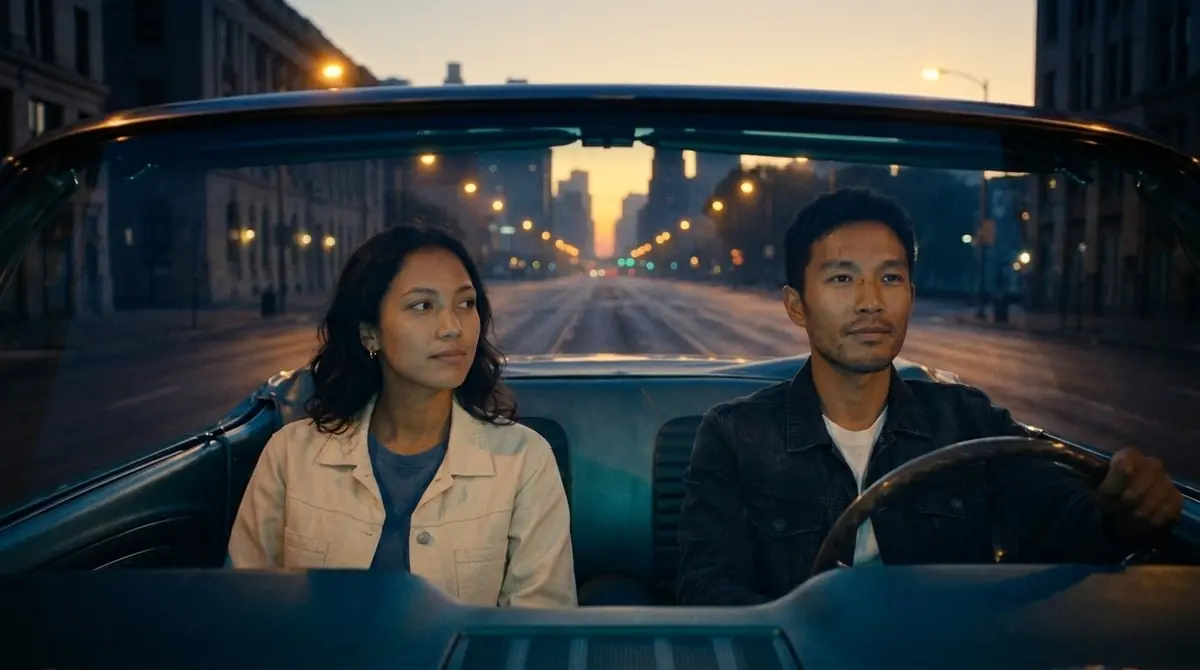
- The idea of a video in one sentence, naming who we follow, where, and what changes: “two friends drive through a sleeping city until sunrise.”
- Establishing shot
- A wide shot that shows where a scene takes place, usually the first shot in a new location.
- Extreme wide shot
- A frame so wide that people are small in the landscape or the city. Used for scale, openings and endings.
- Wide shot
- A frame showing people head to toe with their surroundings. Also called a long shot or full shot.
- Medium shot
- A frame cutting people at about the waist. The most common size for action and for two people talking or driving together.
- Close-up
- A face, or a single object, filling most of the frame. The size that carries emotion, so it's worth saving for the moments that matter.
- Insert
- A close shot of a detail, such as hands on a steering wheel, a ring or a radio dial. Inserts are easy to cut on the beat and tell the story without dialogue.
- Depth of field
- How much of the frame, from front to back, is in focus. A shallow depth of field keeps a face sharp and the background soft, one of the marks of a cinematic look.
- Two-shot
- A frame holding two people, often used to show a relationship in one image.
- Coverage
- The set of different framings captured for the same moment, so the editor can cut between them. In AI video it means writing varied framings across shots.
- A-roll
- The main footage of a video. In a music video that is usually the performance or the central story.
- B-roll
- Supporting footage cut in between the A-roll: places, details, cutaways and texture.
- Performance shot
- A shot of the artist singing or playing to camera, in sync with the track. Usually intercut with the story rather than filling the whole video.
Camera movement
- Static shot
- A shot where the camera doesn't move at all, also called locked off. Calm and deliberate; good for quiet sections.
- Pan
- The camera turns left or right from a fixed point, sweeping across a scene or following something through it.
- Tilt
- The camera turns up or down from a fixed point, for example from someone's shoes up to their face.
- Push-in
- The camera moves slowly toward the subject, building attention or tension. Sometimes called a dolly in.
- Pull-out
- The camera moves away from the subject to reveal more of the scene around it.
- Dolly
- A wheeled platform that lets the camera move smoothly; by extension, any smooth forward, backward or sideways move.
- Tracking shot
- The camera travels with a moving subject, such as alongside a car or behind someone walking.
- Crane shot
- The camera rises or falls through the air, lifting the viewer above a scene or bringing them down into it.
- Orbit
- The camera circles around the subject, keeping it in the centre of the frame. A big, energetic move best kept for a chorus.
- Handheld
- The camera is carried rather than mounted, so the frame moves with a slight, human shake. It adds urgency and intimacy.
- Whip pan
- A pan so fast that the image blurs, often used as a transition into the next shot on a hit in the music.
- Aerial shot
- A shot from high above, traditionally from a drone or helicopter. Useful for scale and for moving the story from one place to another.
Skip the blank page
Upload your song and Muvora's AI director plans a shot-by-shot storyboard on the beat. Edit every shot for free, and pay only if you render.
Editing and timing
- Cut
- The instant change from one shot to the next. In music videos, where the cuts fall matters as much as what is in the shots.
- Cut on the beat
- Placing cuts on beats of the music, usually downbeats, so the picture seems to play along with the song. See editing to the beat.
- Pacing
- How long shots last and how quickly cuts come. Music videos usually cut faster in loud sections and slower in quiet ones.
- Crossfade
- A transition where one shot fades into the next over a few frames, also called a dissolve. Suits quiet, slow passages.
- Match cut
- A cut between two shots that share a shape, movement or position, such as a spinning record into a spinning wheel.
- Jump cut
- A cut between two moments of the same shot, so the subject seems to jump forward in time. Often used for energy in performance edits.
- Flash frame
- One or two frames of pure white (or another colour) between shots, used to hit a drop or a big accent in the music.
- Montage
- A run of short shots that compresses time or builds a feeling, common in choruses.
- Color grade
- The final adjustment of colour and contrast across the video, which gives it a consistent look.
- Aspect ratio
- The shape of the frame, written width to height: 16:9 for YouTube, 9:16 for vertical video, 1:1 for square. See music video aspect ratios.
- Letterbox
- Black bars above and below the picture that make it look wider, like a 2.39:1 film frame. They are added in an editor; see how to make a music video look cinematic.
- Frame rate
- How many still frames make each second of video, measured in frames per second (fps). Film-style video usually runs at 24 fps.
- Timecode
- A time stamp on every frame, written hours:minutes:seconds:frames, which lets editors refer to exact moments. The beat marker generator writes the timecode of every beat in a song.
- Drop-frame timecode
- A way of numbering 29.97 fps video so its timecode keeps pace with the clock: it skips two frame numbers each minute, except every tenth minute, and never drops a frame of picture. 23.976 fps has no drop-frame version. The BPM to frames calculator writes cut points in timecode.
- Bitrate
- How much data each second of video or audio takes, in megabits or kilobits a second. Bitrate times length is the file size; the video bitrate calculator works out either from the other.
- Export
- The finished file rendered out of the editor. A release usually needs several: a widescreen master plus vertical and square versions.
Music terms every editor needs
- BPM
- Beats per minute, the song's tempo. At 120 BPM a beat lasts half a second. The free BPM and key finder reads it from a file and tap tempo finds it by ear.
- Beat
- The steady pulse you tap your foot to. Most popular music has four beats in each bar.
- Bar
- A group of beats, also called a measure. In 4/4 time a bar has four beats, so at 120 BPM it lasts 2 seconds.
- Downbeat
- The first beat of a bar, where the music feels heaviest. The most natural place for a cut.
- Time signature
- How many beats make a bar, written like a fraction: 4/4 for most pop, rock and hip-hop, 3/4 for a waltz feel.
- Half time
- Feeling or counting a song at half its tempo. Drum and bass at 174 BPM is often felt at 87, and edited that way.
- Song section
- A part of a song with its own role, such as the intro, verse, chorus or bridge. See song structure explained.
- Verse
- The section that tells the story of the song, usually with new lyrics each time over the same music.
- Pre-chorus
- A short section that builds from the verse into the chorus.
- Chorus
- The repeated, usually loudest section with the song's main lyric and melody. Music videos save their biggest images for it.
- Hook
- The catchiest phrase in the song, often the chorus's first line or a short repeated riff.
- Bridge
- A contrasting section, usually after the second chorus, that changes the melody or chords before the final chorus.
- Breakdown
- A stripped-back section where most instruments drop out, common in electronic and rock music.
- Build
- A rising section that adds tension before a drop, often with a rising pitch or a snare roll.
- Drop
- The moment the full beat and bass return after a build. In a video it always gets a cut, and often the biggest shot.
- Musical key
- The set of notes a song is built around, such as A minor or C major. DJs mix by key using Camelot codes.
- Stems
- Separate audio tracks for parts of a mix, such as vocals, drums and bass, each running the song's full length so they line up again. See what stems are.
- Isolated vocals
- The vocal stem on its own. Lip-sync tools use it to time mouth movement to the singing.
- Pitch shift
- Moving a recording up or down in pitch, in semitones. Paired with time-stretching it changes the key and keeps the tempo; the pitch shifter does it in the browser.
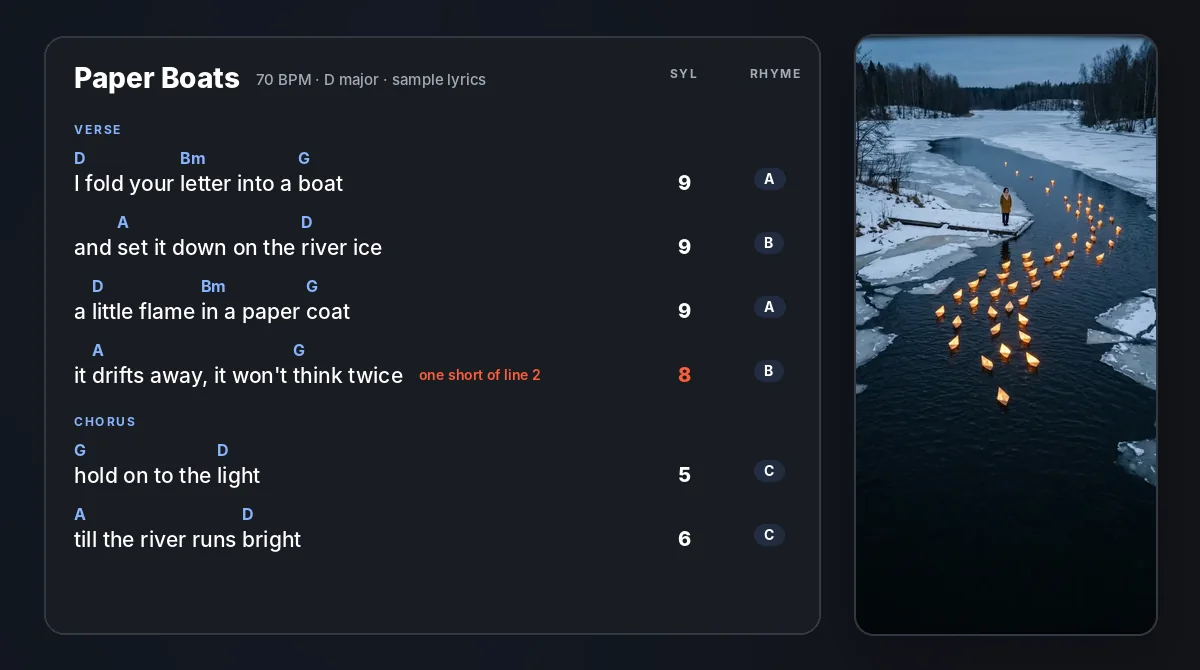
- Rhyme scheme
- The pattern of rhymes at the ends of lines, written as letters: AABB for couplets, ABAB for alternating lines. The rhyme generator finds words for each slot.
- Flow
- How a rapper's words sit on the beat: where the syllables land, how fast they come and where the breaths fall. See how to write rap lyrics.
- Multisyllable rhyme
- A rhyme that runs over two or more syllables, such as margins and bargain, common in rap verses.
- Scale
- A set of notes in order, such as C D E F G A B for C major. The scale finder shows any scale in any key on a keyboard and a guitar neck.
- Interval
- The distance between two notes, counted in half steps: three for a minor third, seven for a perfect fifth, twelve for an octave.
- Chord progression
- The order of a song's chords, often written in Roman numerals such as I–V–vi–IV so it works in any key. See music theory for songwriters.
- Standard tuning
- A guitar's usual tuning, E A D G B E from the thickest string to the thinnest. See how to tune a guitar.
- Spectrogram
- A picture of sound: time runs across, frequency rises and loudness shows as brightness or color. The spectrogram viewer draws one for a song file.
- DAW
- A digital audio workstation: the program you record, arrange and mix music in. See the best DAW for beginners.
- Gain staging
- Setting each track's level so nothing clips and every stage of the mix has headroom. See how to mix a song.
- EQ
- Equalization: turning frequency ranges up or down to shape a sound. The EQ frequency chart shows where each instrument sits.
- Compression
- Turning the loudest moments down so a sound's level stays more even; set by threshold, ratio, attack and release.
- Sidechain
- Letting one sound control an effect on another, often the kick briefly ducking the bass or a pad so both are heard.
- Panning
- Placing a sound between the left and right speakers.
- Reverb
- The sound of a space: the reflections that make a voice sound like it's in a room, a hall or a plate.
- Delay
- An echo of a sound, often timed to a note value of the song's tempo. The delay time calculator works the times out.
- De-esser
- A processor that turns down harsh S and T sounds in a vocal. See how to mix vocals.
- Bit depth
- How many bits describe each sample of digital audio: 16-bit is CD quality and 24-bit gives a mix more headroom. See how to export a song.
- Sample rate
- How many samples of audio are taken each second, such as 44.1 kHz for music or 48 kHz for video; a higher rate records higher frequencies, not louder ones.
- Dither
- A very quiet noise added when audio is reduced to a lower bit depth, such as 24-bit to 16-bit, so the rounding doesn't turn into distortion. It's applied once, at the last step.
- 808
- The deep, tuned bass drum sound at the heart of trap and much of hip-hop, named after the drum machine that made it famous. See how to make a trap beat.
- Swing
- Delaying every second note of a beat slightly so it grooves instead of marching; lo-fi and hip-hop use it often. See how to make lo-fi beats.
- EP
- An extended play: a release between a single and an album, usually four to six tracks under 30 minutes, though stores define it in their own words. See what an EP is.
- Single
- A release of one song, sometimes with one or two more; Apple's style guide calls one to three songs under 10 minutes each a single. The album length calculator checks a tracklist.
- Chord inversion
- A chord played with a note other than its root at the bottom: C major as E–G–C is the first inversion, G–C–E the second. The piano chord chart draws every inversion.
- Voicing
- How a chord's notes are spread out: which octave each one sits in, which are doubled and which are left out. Two voicings of one chord can sound bright or dark.
- Tempo marking
- An Italian word for a speed, such as andante or allegro, each with a usual range of BPM that sources give a little differently. The tempo markings chart lists them with a click to hear each.
- Drum and bass
- Electronic music around 170 to 176 BPM with fast broken beats and deep bass, often felt at half that speed. See the drum and bass music video maker.
- Synthwave
- Electronic music built on 1980s-style synths and drum machines, usually paired with neon, chrome and night-drive images. See the synthwave music video maker.
- Trap
- Hip-hop built on rolling hi-hats, booming 808s and sparse snares, often around 130 to 150 BPM and felt at half that speed. See the trap music video maker and trap music video ideas.
- Techno
- Electronic dance music on a steady four-on-the-floor kick, often 120 to 140 BPM, built from repetition and slow changes over long tracks. See the techno music video maker.
AI video terms
- Prompt
- The written description an AI model works from. For video, a good prompt names the subject, the action, the place, the light and the camera.
- Negative prompt
- A list of things the model should avoid, such as on-screen text, distorted hands or extra people.
- Keyframe
- In AI video, the first image of a shot. The video model starts from it and animates it, so the keyframe decides the shot's look.
- Image-to-video
- Generating a video clip from a still image plus a description of the motion, rather than from text alone. It gives far more control over how a shot looks.
- Style frame
- A finished-looking reference image that fixes a video's look, such as an establishing shot or the chorus's hero image. Every keyframe is matched to the style frames.
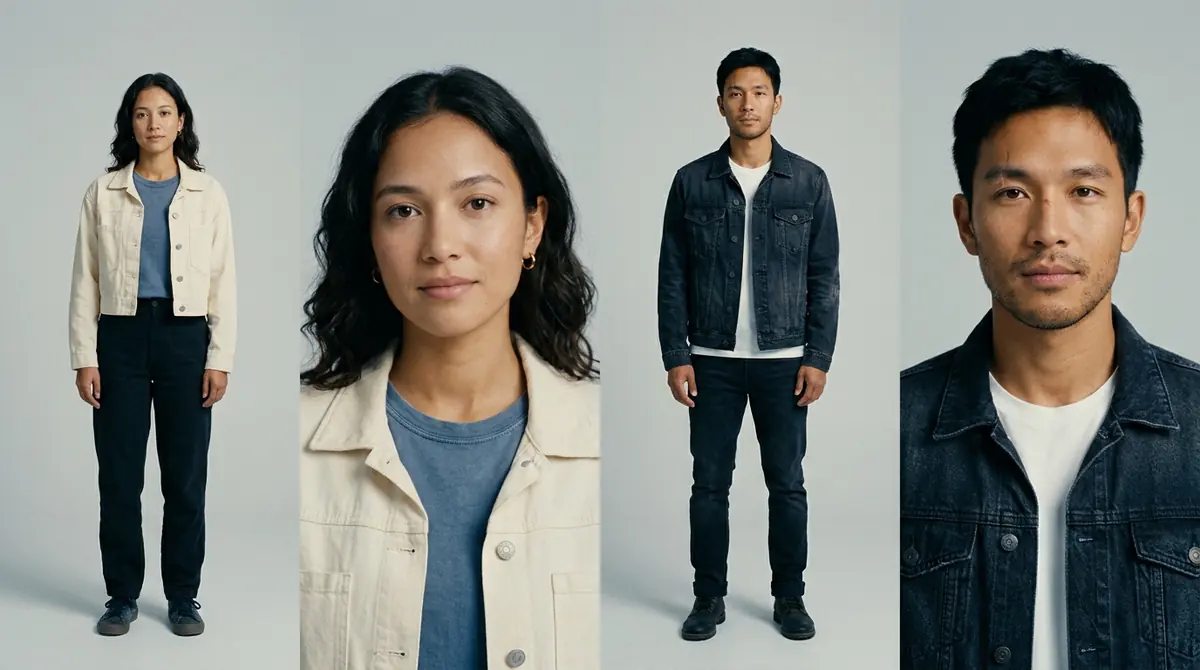
- Character sheet
- A reference image of a character, full length and close up, that every shot showing them is drawn from. See the storyboard example.
- Consistency check
- A comparison of each new keyframe with the character sheet to catch a face, outfit or prop that drifted. Muvora redraws a keyframe that fails it.
- Re-roll
- Generating a single shot again, with a new seed or a revised prompt, instead of remaking the whole video. Muvora includes free re-rolls up to 10% of a video's length.
- Seed
- A number that sets the random starting point of a generation. The same prompt with a new seed gives a different take.
- Multi-shot generation
- One video generation that contains several consecutive shots with cuts between them, each timed to its own segment.
- Lip sync
- Mouth movement matched to the vocals. AI lip sync animates a singer's face from a photo and the isolated vocal. See the AI lip sync guide.
- Upscaling
- Enlarging a video to a higher resolution than it was generated at, for example from 720p to 1080p, by interpolating pixels.
- AI music generator
- A tool that makes a song, or part of one, from a text prompt and sometimes your lyrics; its terms decide who owns the result and how it may be used. See the best AI music generators.
Rights, royalties and money
- Composition
- The song itself: its melody and lyrics, owned by the songwriters and their publishers. One of the two copyrights in every recorded song; see how music royalties work.
- Master
- One particular recording of a song, owned by whoever owns the recording: often the artist, or a label.
- Sync license
- Permission from a song's publishers to put the composition to pictures. Using someone else's song in a video also takes a master use license. See what a sync license is.
- Master use license
- Permission from the owner of a recording to use that recording in a film, an ad, a game or a video.
- Performance royalties
- Money for playing a song in public, on the radio or on a stream, collected for songwriters and publishers by a performing rights organization.
- Mechanical royalties
- Money for reproducing a composition, which includes streams and downloads. In the US, The MLC collects them for streaming services.
- PRO
- A performing rights organization: ASCAP, BMI and SESAC in the US, PRS in the UK and SOCAN in Canada, among others. Songwriters join one to collect performance royalties.
- ISRC
- The International Standard Recording Code, a 12-character ID for one recording, usually assigned by the distributor. See what an ISRC code is.
- Split sheet
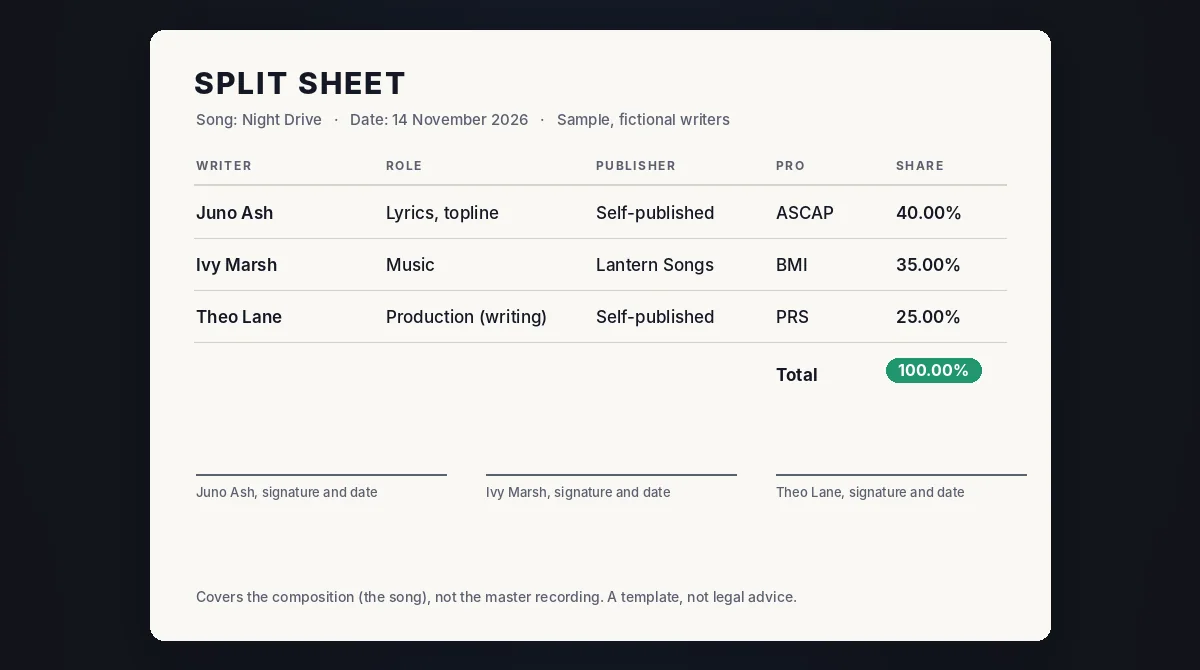
- A signed record of who wrote a song and each writer's share. The split sheet generator makes one whose shares add up to 100%.
- Cover song
- Your own recording of a song someone else wrote. Releasing the audio and setting it to pictures need different permissions; cover song music videos explains both.
- Beat lease
- A non-exclusive license to record over a producer's beat on terms the producer sets, often with caps on streams or sales; other artists can lease the same beat. See how to sell beats online.
- Distributor
- A service that delivers your releases to Spotify, Apple Music and the other stores and passes the master royalties back to you. See how to choose a music distributor.
- A&R
- Artists and repertoire: the people at a label who find and sign artists and guide their releases. See how to get signed to a record label.
- Advance
- Money a label pays an artist up front, usually recouped from the artist's royalties before any more royalties are paid.
- 360 deal
- A record deal in which the label also shares the artist's income beyond recordings, such as shows and merch.
- Music manager
- The person who plans an artist's career and runs their team, usually for a share of income. See how to get a music manager.
- Content ID
- YouTube's system that matches uploads against reference files from rights holders, who can then track, monetize or block the matching videos.
- Monthly listeners
- Spotify's count of the different people who played an artist in the last 28 days. See how to get more monthly listeners.
Release formats and platforms
- Official music video
- The main video for a song, usually 16:9, released on YouTube and the artist's channels.
- Lyric video
- A video whose main feature is the song's words on screen, timed to the vocal. See how to make a lyric video.
- Visualizer
- A video of moving visuals (abstract shapes, cover art, light) that follows the music without a story. See the music visualizer.
- Spotify Canvas
- A short looping vertical video, 3 to 8 seconds, that plays behind a track in the Spotify app. See the Spotify Canvas guide.
- YouTube Shorts
- YouTube's vertical or square short videos. Since October 2024 they can run up to three minutes.
- Instagram Reels
- Instagram's vertical video format. Length limits change and vary by account, so check the app before you cut.
- TikTok video
- A vertical video on TikTok, where songs often spread through short clips of their hook. Check the app for the current length limits.
- Cover art
- The square image shown with a release in every store, usually delivered at 3000 × 3000 pixels in RGB. The album cover checker tests a file against the stores' rules.
- Thumbnail
- The still picture a video platform shows before a video plays, usually 16:9 and seen very small. The music video thumbnail maker makes one from a frame of your video.
- ID3 tag
- The block of information at the start of an MP3: title, artist, album, track number, cover art and more. The MP3 tag editor edits it without touching the audio.
- Embedded cover art
- A picture saved inside an audio file's tags, which music players show. Stores and streaming services take the artwork separately, through the distributor. See how to add album art to an MP3.
- Stage name
- The name an artist releases under. Search the streaming services, the social handles and the trademark register before settling on one; see how to choose an artist name.
- EPK
- An electronic press kit: one page with an artist's bio, photos, music, videos, press and contact for bookers and journalists. The EPK generator builds one from your own words.
- Pre-save
- A link that adds an upcoming release to a listener's library on release day; Apple Music calls it a pre-add. See getting your music on Apple Music.
- Premiere
- A scheduled first showing of a video, which YouTube runs with a countdown and a live chat. See how to premiere a music video on YouTube.
- QR code
- A square barcode a phone camera opens as a link; on a poster or merch it can point to a song or a pre-save. The music QR code generator makes one.
- Setlist
- The songs a band plays at a show, in order; the setlist maker prints one with keys, tempos and the total time.
- Gig poster
- A poster for a show that puts the act, the date and the venue first, sized for print and for social feeds. See how to make a gig poster, or make one with the gig poster maker.
- YouTube chapters
- Timestamps in a video's description that split it into named parts; the first must be at 0:00. Song sections make natural chapters.
- Karaoke captions
- Lyrics on screen where each word changes colour as it is sung.
- LRC file
- A plain-text lyric file with a time stamp before each line, used by music players to scroll lyrics. The lyric file converter turns it into SRT or WebVTT.
- SRT file
- The most common subtitle format: numbered cues, each with a start and end time and its text.
- WebVTT
- The web's subtitle format (.vtt), similar to SRT, used by browsers and many video players.
Put the vocabulary to work
Upload a song and Muvora's storyboard uses every term on this page for you: shots timed to the downbeats, framings and camera moves chosen by section, a character sheet and exports in every shape.
Written by the Muvora team. Last updated November 18, 2026. Spotted something out of date? Tell us at [email protected].